RSS Feeds

How to recognize your team with GitLab Achievements
Published: 2026-08-27 00:00:00 | Created: 2026-08-27 20:07:57

Every team runs on people who go above and beyond. The engineer who fixes the flaky test nobody else will touch. The reviewer who turns your merge request around in an hour. The teammate who finishes their certification. Or the community member who shows up release after release. Whether your team is a company, an open source project, or a community, GitLab had no built-in way to say "we see you." GitLab Achievements changes that.

What are GitLab Achievements?

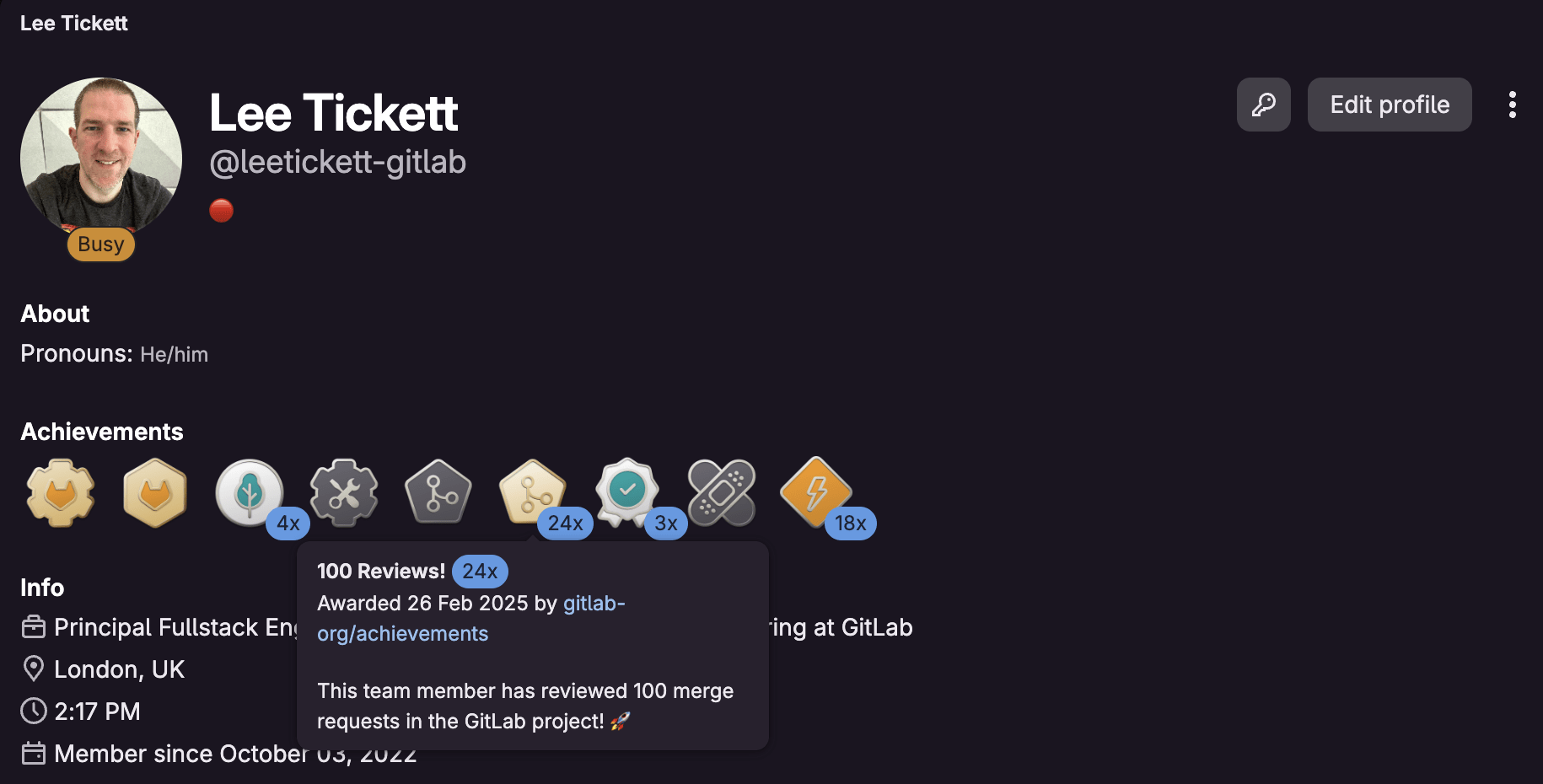
An achievement is a custom badge you create once and award to people for their behavior. That might be a contribution, a milestone, or simply getting the most out of GitLab. Each one has a name, a description, and an avatar. Think "First merged MR", "Certified", or "Contributor of the month". Awarded achievements appear on the recipient's profile, alongside their contribution history.

There are two halves to the achievement. The achievement itself is a reusable template you define at the group level. Awarding that achievement to someone is a separate action, and it can carry an optional personal message. That message supports GitLab Flavored Markdown, so you can link straight to the merge request, issue, or event that earned it. The same "Contributor of the month" badge can then tell a different story every time you award it.

Recipients stay in control. An award doesn't appear on anyone's profile until they accept it using a link from an email notification. Recognition is offered, never forced onto someone's profile.

Achievements are generally available as of GitLab 19.2, across Free, Premium, and Ultimate, on GitLab.com, GitLab Self-Managed, and GitLab Dedicated.

GitLab Achievements on user profile

Why recognition matters

Recognition is one of the least expensive, most effective tools you have for retention, motivation, and belonging. A visible badge on a profile costs you a minute to award and gives the recipient something lasting. And "team" is broad: It might be your company, your open source project, or your wider community. The value depends entirely on who you are and what you're trying to reinforce.

Internal engineering and platform teams

This is where most teams will start. Reward the people who keep the wheels turning: your fastest reviewers, engineers who complete onboarding or earn a certification, members of a guild or chapter, or the ones who show up during an incident. A badge makes the effort that usually goes unnoticed visible to the whole organization.

Open source maintainers and community programs

This is our own story, and the reason we built the feature. Open source contributors are rarely paid so recognition is often the only reward on offer. It needs to be genuine and visible. Achievements give you a way to celebrate external contributors at scale: Award a "First contribution" badge automatically, or a "Notable contributor" badge each release. Contributors get something concrete to point to, and you get a consistent way to celebrate people behind it.

Ways to use achievements

Here are five ways to use GitLab Achievements.

Identify your team and core contributors

The use case that started it all: Badge your team and core contributors so your community knows who's who. When someone new lands in your project, a glance at profiles tells them who maintains it, who reviews it, and who will field questions. Add a "Hackathon winner" badge and you've turned a one-off event into lasting recognition. Recognition becomes something people can see, not something buried in a changelog.

Reward great reviews and fast turnarounds

We've since expanded our own use internally to recognise great reviews and fast turnarounds. This is the quiet lesson of achievements: You reinforce the behavior you reward. Badge thoughtful reviews, quick responses, or mentoring, and you signal to the whole team what good looks like. It costs nothing and it compounds.

Reward adoption and learning

Recognition isn't only for the people who build GitLab, it works just as well for the people getting the most out of it. Award a badge when someone earns a certification, finishes an enablement path, or adopts a capability your team has been trying to roll out. For customer success and platform teams, this turns dry adoption metrics into something people are proud of. Learning to use a tool well is a contribution, too.

Celebrate milestones and first contributions

Achievements come in three flavors:

  • Awarded once and kept forever ("First merged MR")
  • Awarded once but revocable ("Core team member")
  • Awarded repeatedly ("Contributor of the month")

Use them to mark the moments that matter, a first contribution, a 100th contribution, a hard problem finally solved.

This is where the personal message earns its keep. For a recurring award, attach a message linking to the exact merge request or issue that earned it, with a line on why. The badge stops being a generic sticker and becomes a record of a specific achievement.

Run programs, hackathons, and campaigns

Because achievements can be awarded multiple times and revoked, they suit time-boxed events. Run a hackathon and award a badge to every participant. Run a quarterly contribution drive and award a limited-edition achievement that only that cohort will ever hold. It's a lightweight way to give a campaign a lasting footprint.

How to create and award an achievement

The Achievements documentation covers creating, awarding, accepting, and revoking in full.

Everything is scriptable through the GraphQL API, so you can award in bulk or wire achievements into your own automation. Awarding a "First contribution" badge the moment someone's first merge request merges, for example.

Built by the community, for the community

Achievements didn't come from the core product team. The feature started as a gap that our team, Co-create and Community Engineering, and the wider community set out to fill, captured in Epic #9429. It's the "everyone can contribute" value in action: a feature that lets you recognize contributors was itself co-created by contributors.

Community contributor and Core Team member Niklas van Schrick was key to making it happen. There's a neat symmetry to that. A feature for recognizing contributors, delivered by a contributor, and now we get to recognize him for it. If you've ever wanted to shape GitLab itself, this is proof that you can! Start contributing here.

How AI helped us ship it

Getting Achievements to general availability fell to Mattias Michaux, who had just joined the company, and our team. The feature was part-built and had sat idle for a while, so his first job wasn't writing code, it was working out where the previous effort had got to, what was left to do, and how this corner of an enormous, unfamiliar codebase actually fitted together.

That's usually the slowest part of picking up someone else's half-finished work. This is where GitLab Duo and Orbit came in. Mapping the existing code, understanding what remained, and getting productive quickly. Doing all of that in the time we had simply wouldn't have been feasible without them.

The takeaway isn't about us. It's that these tools collapse the ramp-up cost of a large, unfamiliar codebase whether you're a new hire on your first week or a first-time contributor sending your first merge request. The barrier to contributing has never been lower.

Get started

Recognition works best when it's a habit, not an afterthought. So create your first achievement and award it to someone this week: a reviewer, a mentor, a first-time contributor.

Want to help build the next feature like this one? Start contributing to GitLab. And if you have a use case we haven't thought of, let us know in the Achievements epic.

show more
GitLab compliance frameworks: Adhere to SOC 2 in minutes
Published: 2026-08-27 00:00:00 | Created: 2026-08-27 17:43:57

Compliance is the part of software delivery that everyone agrees is important, yet nobody enjoys. It often lives in spreadsheets, screenshots, and the quiet dread of an upcoming audit. GitLab's custom compliance frameworks work differently. Instead of documenting what should be true about your projects, you define the controls once and let the platform continuously verify what is true.

In this article, you'll learn why compliance adherence matters, how to stand up a SOC 2 framework in minutes using a template, how to monitor adherence on an ongoing basis, how to enforce compliance with policies, and which standards already ship as ready-to-use templates. You'll also get a look at where AI-specific compliance templates are heading. You can watch the video below to see it in action:


Tier note: Compliance frameworks are available in Premium and Ultimate. Framework requirements and controls, the checks that power adherence reporting and the compliance status report, require Ultimate. Everything here applies to GitLab.com, GitLab Self-Managed, and GitLab Dedicated.

Why compliance adherence matters and how custom frameworks help

Regulatory and contractual obligations like SOC 2, ISO 27001, PCI DSS, and FedRAMP exist because customers, partners, and regulators need assurance that your software is built and shipped responsibly. Falling short isn't just a paperwork problem. It can block deals, trigger fines, delay product launches, and erode trust. Compliance also isn't a one-time event. A project that was compliant at audit time can drift the moment someone disables a scanner, removes branch protection, or merges without the required approvals.

Custom compliance frameworks are designed to close that gap. A compliance framework in GitLab is a label you create on a top-level group to identify projects that carry specific compliance obligations or need extra oversight. On its own that label provides organization and visibility. In Ultimate, a framework can also carry requirements made up of controls, which are automated checks against the configuration and behavior of every project the framework is applied to.

Instead of asking an engineer to confirm that static application security testing (SAST) is running, that the default branch is protected, and that merge requests need two approvals, GitLab evaluates those conditions for you on a schedule and whenever relevant project settings change. Compliance stops being a snapshot you assemble before an audit and becomes something you can watch year-round. Frameworks are created on the top-level group and inherited by all subgroups and projects beneath it. You can apply up to 20 frameworks to a single project when it needs to satisfy several standards at once.

This changes the day-to-day effort in a few ways. Compliance moves left into the development workflow, audit preparation becomes a matter of exporting a report rather than reconstructing evidence, and consistency is enforced by the platform rather than by good intentions.

Applying a template to adhere to SOC 2

Building a framework by hand means defining every requirement and every control one at a time. For a standard like SOC 2 that maps to many controls, that's repetitive and error-prone. Templates solve this by giving you a complete, predefined framework, with the name, description, color, requirements, and controls all configured, and that you can adopt in a single step.

The Compliance Adherence Templates project hosts a library of these frameworks as JSON files, and soc2.json is one of them.

There are two ways to get a template into your group.

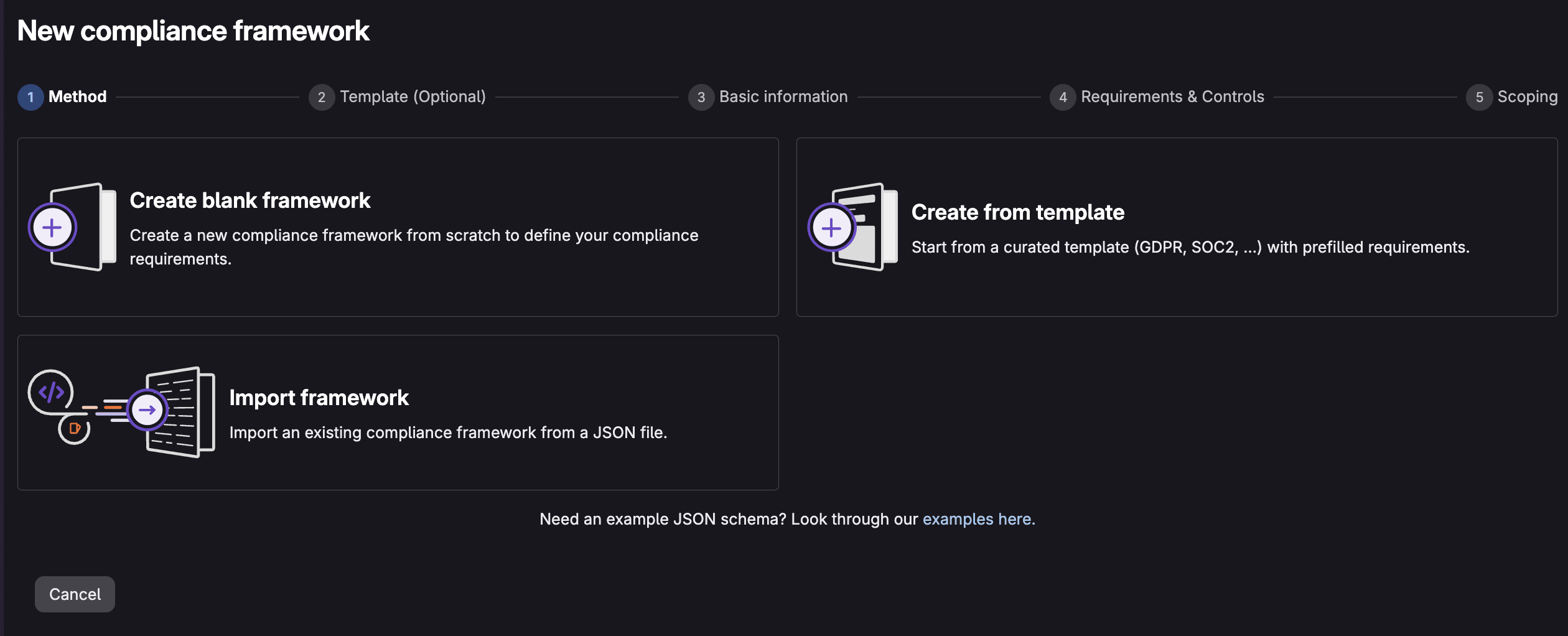
New compliance framework creation

Option A: Create from a template in the Compliance center

You can create a framework directly from a built-in template without leaving the UI:

  1. Go to your top-level group.
  2. In the sidetab, select Secure > Compliance center.
  3. Click the New framework button.
  4. Choose Create from template.
  5. Scroll down to the SOC 2 template, and select View details to see the controls the template implements.
  6. Press the Use template button to implement the SOC 2 template. customize the name, description, and color if you'd like. Select Next when complete.
  7. Preview the included requirements and controls.
  8. Apply the framework to the groups/projects that require it.
  9. Press the Create framework button.

Your framework is created and will be applied to the groups/projects you selected.

Option B: Import the SOC 2 JSON template

If you're on a GitLab version without the in-product template picker, or you want to keep the template under version control and tweak it first, import the JSON directly:

  1. Go to the Compliance Adherence Templates project and download soc2.json.
  2. Go to your top-level group.
  3. Select Secure > Compliance center.
  4. On the Frameworks tab, select New framework, then Import framework.
  5. Choose the soc2.json file from your local system.
  6. When the import succeeds, the SOC 2 framework appears in your frameworks list.

A framework only does something once it's attached to projects. Make sure you apply this framework to the groups/projects where it will be used.

Note: Imports fail with an Unable to determine the correct upload URL error if a framework with the same name already exists. Rename or remove the existing one first.

Edit and apply the framework to your projects

You can also edit the newly created framework as well as apply it to additional groups/projects:

  1. In Secure > Compliance center, open the Frameworks tab.
  2. Hover over the SOC 2 framework and select Edit Framework.
  3. In the Requirements & Controls section, under Action, select the ... > Edit.
  4. Perform any necessary changes to the requirements or controls.
  5. In the Scoping section, select the groups/projects that fall under SOC 2.
  6. Select Update Framework.

If you want every new project in the group to inherit SOC 2 automatically, set the framework as the group default in the Basic information section. The framework will then be applied to all newly created and imported projects going forward.

What the SOC 2 template actually checks

Once applied, the SOC 2 framework maps GitLab controls to the relevant Trust Services Criteria. A few highlights:

SOC 2 criterionWhat it coversGitLab controls applied
CC3.2Identifying vulnerabilities in system componentsDependency scanning, container scanning, DAST, API security running
CC5.1Segregation of dutiesAt least two approvals; author and committer approvals forbidden; approval rules locked from editing
CC6.6Protecting authentication credentials in transitSecret detection running
CC6.8Detecting unauthorized or malicious software changesDefault branch protected
CC7.1Detecting new vulnerabilities through scanningDependency, container, SAST, DAST, and API security scanning running
CC8.1Authorizing, testing, and approving changesSAST, DAST, secret detection running; default branch protected; at least two approvals

After the framework is applied to a project, GitLab runs a compliance scan and begins reporting on whether each control passes. No manual evidence gathering required.

Continuously viewing compliance status

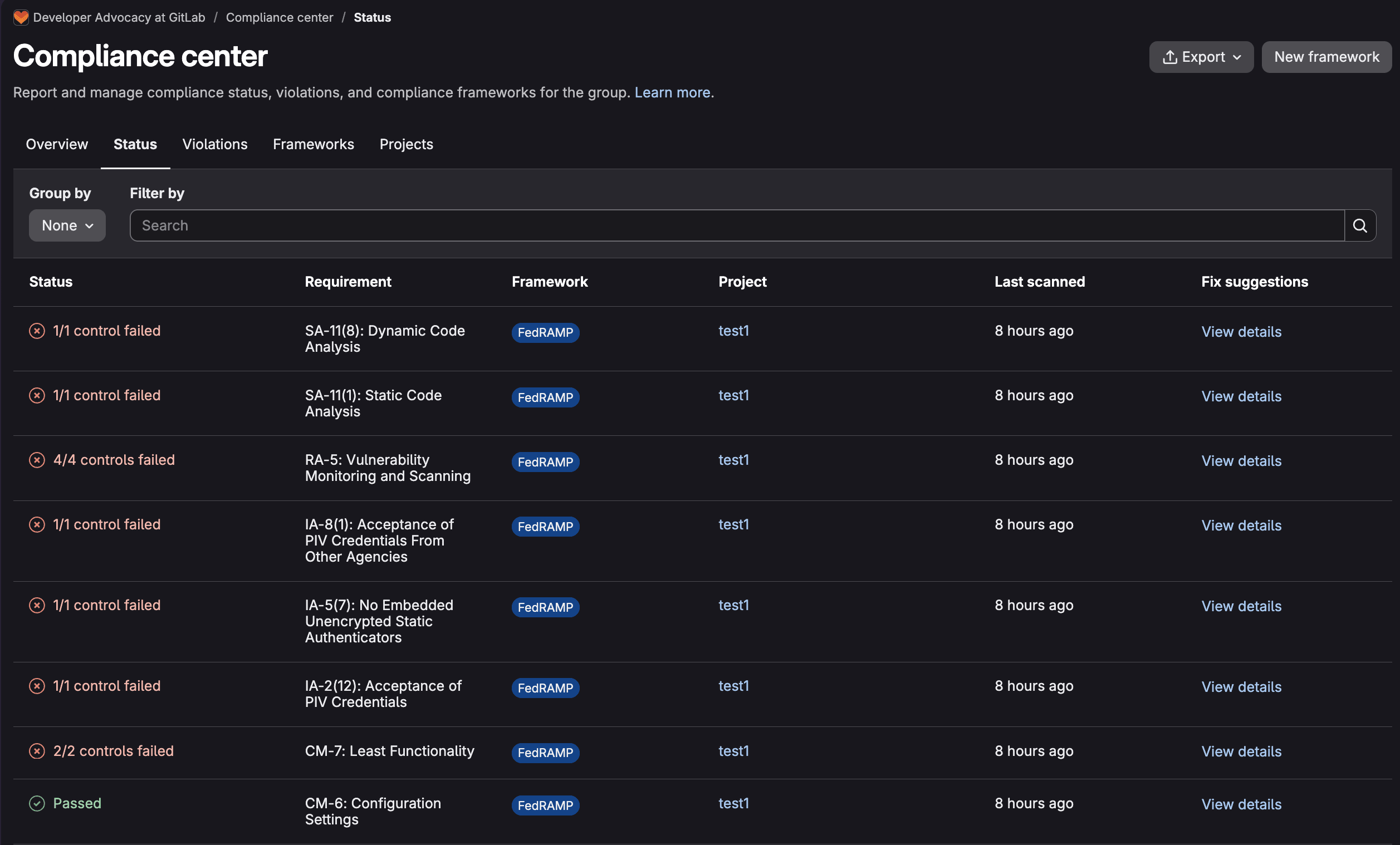
Applying a framework is only half the value. The other half is knowing, at any moment, where you stand. That's the job of the compliance status report (Ultimate), found in your top-level group under Secure > Compliance center > Status.

The report surfaces the most recent instances where projects do and do not adhere to a framework's controls, so you can spot and close gaps fast. Each row tells you:

  • Status: whether a requirement is in or out of compliance
  • Requirement: the specific controls in a requirement that failed (for example, "At least two approvals")
  • Framework: which framework the control belongs to (for example, SOC 2)
  • Project: where the non-adherence was found
  • Last Scanned: when the gap was first recorded
  • Fix Suggestions: information on how to resolve the issue

You can filter by project, framework, or requirement, jump straight into a project's compliance detail view, and export the whole report (delivered to your inbox as an attachment) when an auditor asks for evidence.

Compliance center status

Behind the scenes, scans that refresh the report are triggered automatically when a framework is added to a project, when an associated framework's requirements change, and on a recurring 12-hour schedule. Results typically appear five to ten minutes after a scan runs. This means compliance drift becomes visible within hours rather than at the next annual audit. To view the report, you'll need to be an administrator, or have the Security Manager or Owner role for the group.

Adhering to compliance via policies

Reporting tells you when something is wrong. Policies stop the wrong thing from happening in the first place. This is where compliance frameworks move from observation to enforcement, and it's an Ultimate capability tied to the framework label.

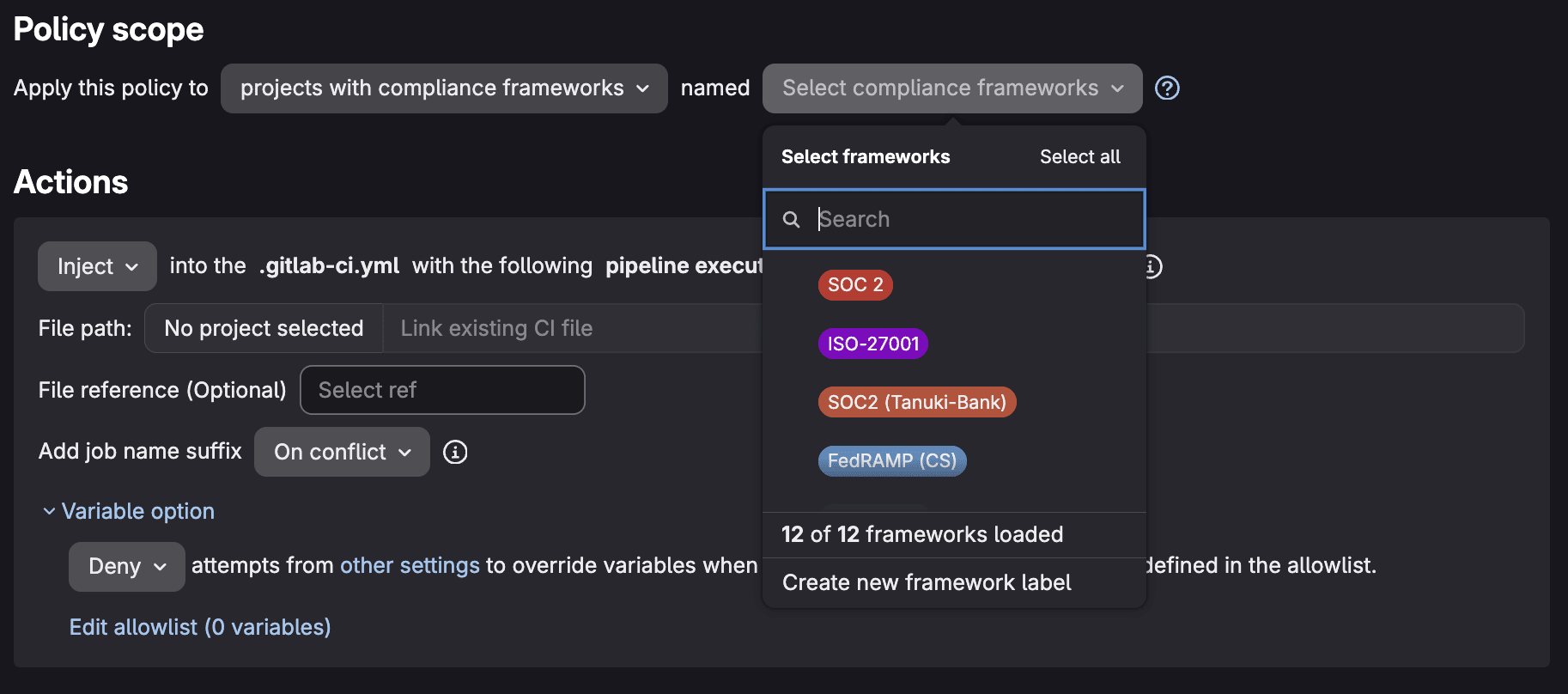
Policy scoping to compliance framework

A compliance framework can act as the scope for Security policies. Scan execution policies, Pipeline execution policies, and merge request approval policies can be scoped to a compliance framework, so every project carrying that label automatically inherits them. For example, you can require that SAST, secret detection, and dependency scanning run on the default branch, and require approval from a designated security team before a merge request that introduces new critical vulnerabilities can be merged. Because the policy is bound to the framework rather than to individual projects, adding a new project to the framework instantly brings it under the same guardrails.

The pieces work together. The framework defines the obligation, controls and the status report measure adherence, and policies and compliance pipelines enforce the behavior. You're not just documenting that SOC 2 requires two approvals and running scanners. You're making it difficult to ship anything that violates those requirements. When a control fails, the status report flags it. When a policy is in place, the non-compliant change is blocked before it merges.

Available templates

GitLab ships a growing library of predefined framework templates in the Compliance Adherence Templates project, each mapping a recognized standard to GitLab controls. As of publication, these include:

StandardTemplate file
CIS Critical Security Controls v8.1cis_csc_v8-1.json
CSA Cloud Controls Matrix v4csa_ccm_v4.json
Cyber Essentialscyber_essentials.json
DORA (Digital Operational Resilience Act)dora.json
FedRAMP Low / Moderate / High (Rev 5)fedramp_low_r5.json, fedramp_moderate_r5.json, fedramp_high_r5.json
IRAP Official / Protected / Secret / Top Secretirap_official.json, irap_protected.json, irap_secret.json, irap_top_secret.json
ISMAPismap.json
ISO 27001:2022iso_27001:2022.json
NIS 2nis_2.json
NIST 800-53 Rev 5nist_800-53_r5.json
NIST 800-171 Rev 3 (CMMC)nist_800-171_r3_cmmc.json
NIST CSF 2.0nist_csf_2.json
NIST SP 800-218 (SSDF)nist_800-218_v1-1.json
PCI DSS v4.0.1pci_dss_v4-0-1.json
SOC 2soc2.json
TISAXtisax.json

Each template's exact requirement-to-control mapping is documented in the compliance standards reference. You can import any of them as-is, or use them as a starting point. Export a framework as JSON, adjust the requirements and controls to match your organization's interpretation of a standard, and re-import. The JSON schema is straightforward. A framework has a name, description, color, and an array of requirements, each with its own controls and evaluation expression. That makes templates easy to keep in version control and share across groups.

A look ahead: AI-specific compliance templates

The compliance standards covered today were largely written for traditional software. As organizations embed AI into their products and their own development workflows, a new class of obligations is emerging around governing how AI systems are built, approved, and monitored. Examples include the EU AI Act, ISO/IEC 42001, and the NIST AI Risk Management Framework.

GitLab is exploring AI governance compliance templates (Epic #16808, with planning tracked in Work item #22336) to extend the same template-driven model into this space. The intent is to let teams adopt an AI-governance framework as easily as they adopt SOC 2 today, with predefined requirements and controls that map to AI-specific obligations, applied to the projects that build or deploy AI capabilities, and surfaced through the same compliance status report.

It's worth keeping one distinction in mind. Compliance is the state of meeting a defined set of requirements, while governance is the ongoing capability to keep AI systems compliant as both the systems and the rules evolve. GitLab's broader direction pairs AI-assisted detection with human-in-the-loop approval and auditable, policy-based enforcement, so AI findings inform decisions but accountable humans and measurable controls still gate what ships. AI-specific templates would be the onramp, giving you a fast way to encode emerging AI requirements into the same framework, control, status report, and policy machinery you're already using for everything else.

Summary

Custom compliance frameworks let you define your obligations once and have GitLab continuously verify them. Templates take the manual setup out of getting started, so a SOC 2 framework is a few clicks or a single JSON import away. The compliance status report keeps adherence visible on a 12-hour cadence, and security policies plus compliance pipelines turn that visibility into enforcement. With a library of standards already available and AI-specific templates on the horizon, the path from "we should be compliant" to "we can prove we are, continuously" is shorter than it's ever been.

Learn more with our compliance frameworks documentation and try the custom compliance frameworks click-through demo.

This blog post contains "forward‑looking statements" within the meaning of Section 27A of the Securities Act of 1933, as amended, and Section 21E of the Securities Exchange Act of 1934. Although we believe that the expectations reflected in these statements are reasonable, they are subject to known and unknown risks, uncertainties, assumptions and other factors that may cause actual results or outcomes to differ materially. Further information on these risks and other factors is included under the caption "Risk Factors" in our filings with the SEC. We do not undertake any obligation to update or revise these statements after the date of this blog post, except as required by law.

show more
Git was built for humans — agents need an upgrade
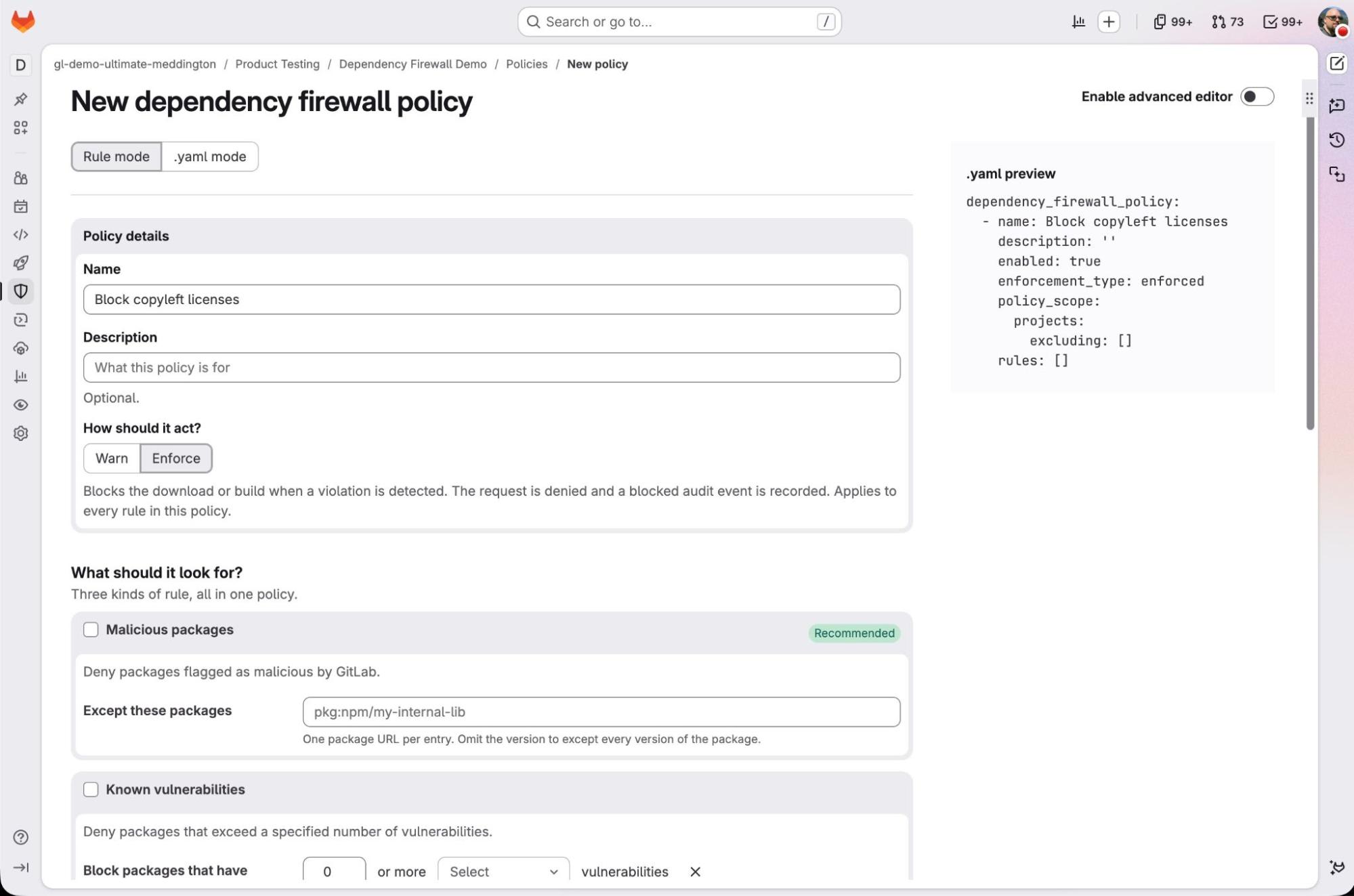
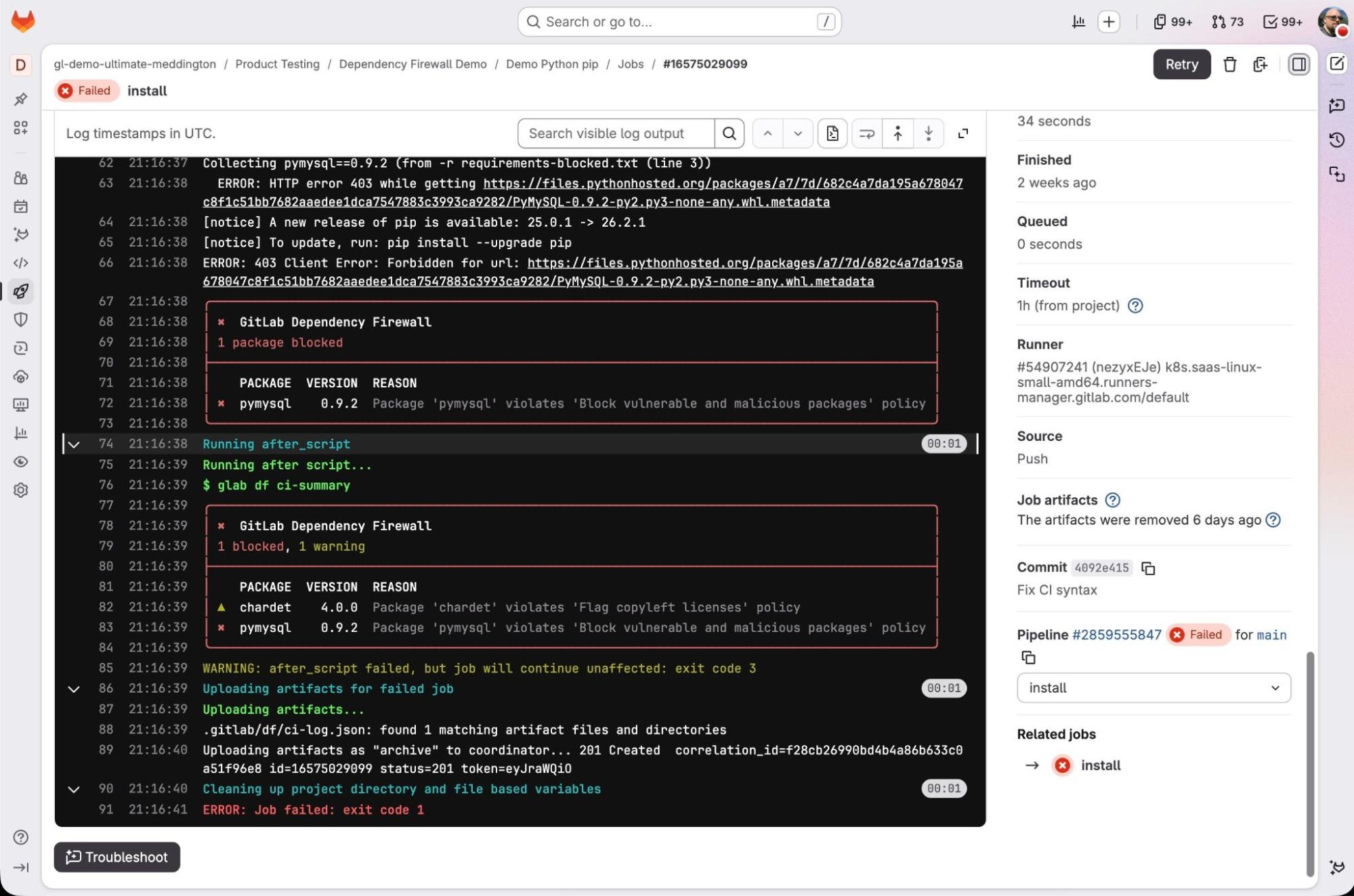
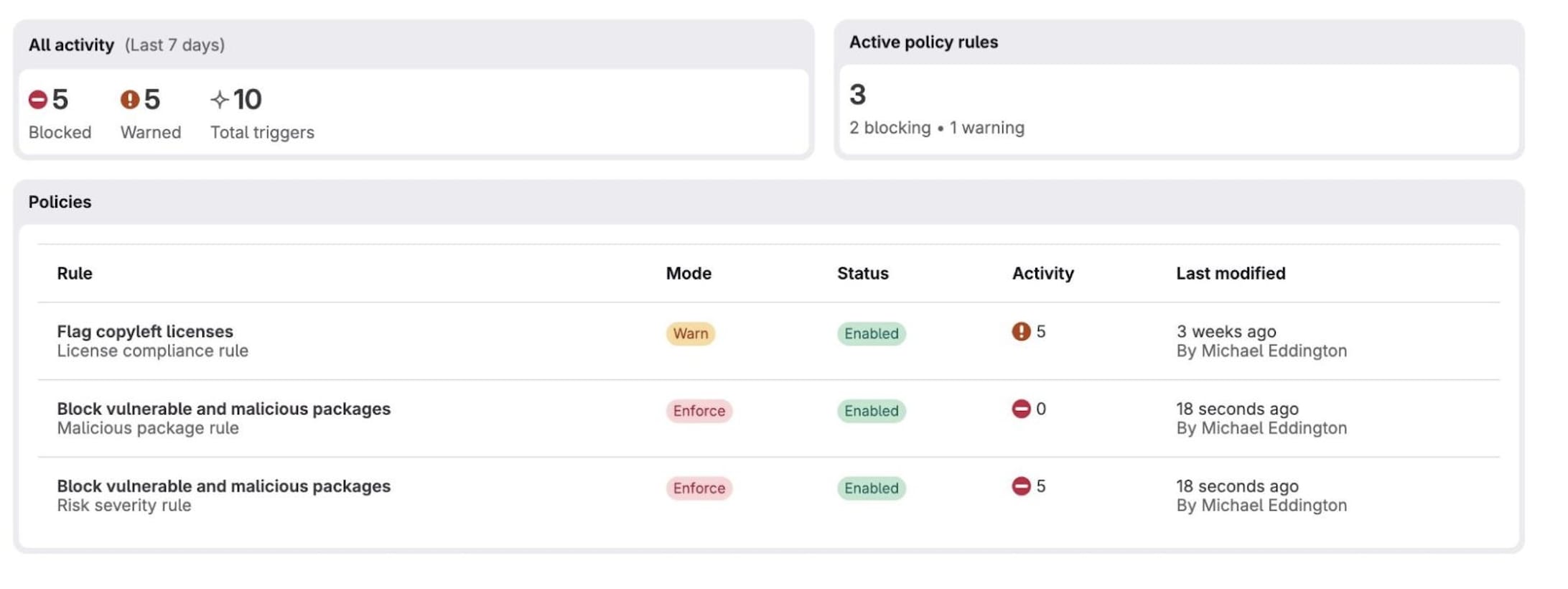
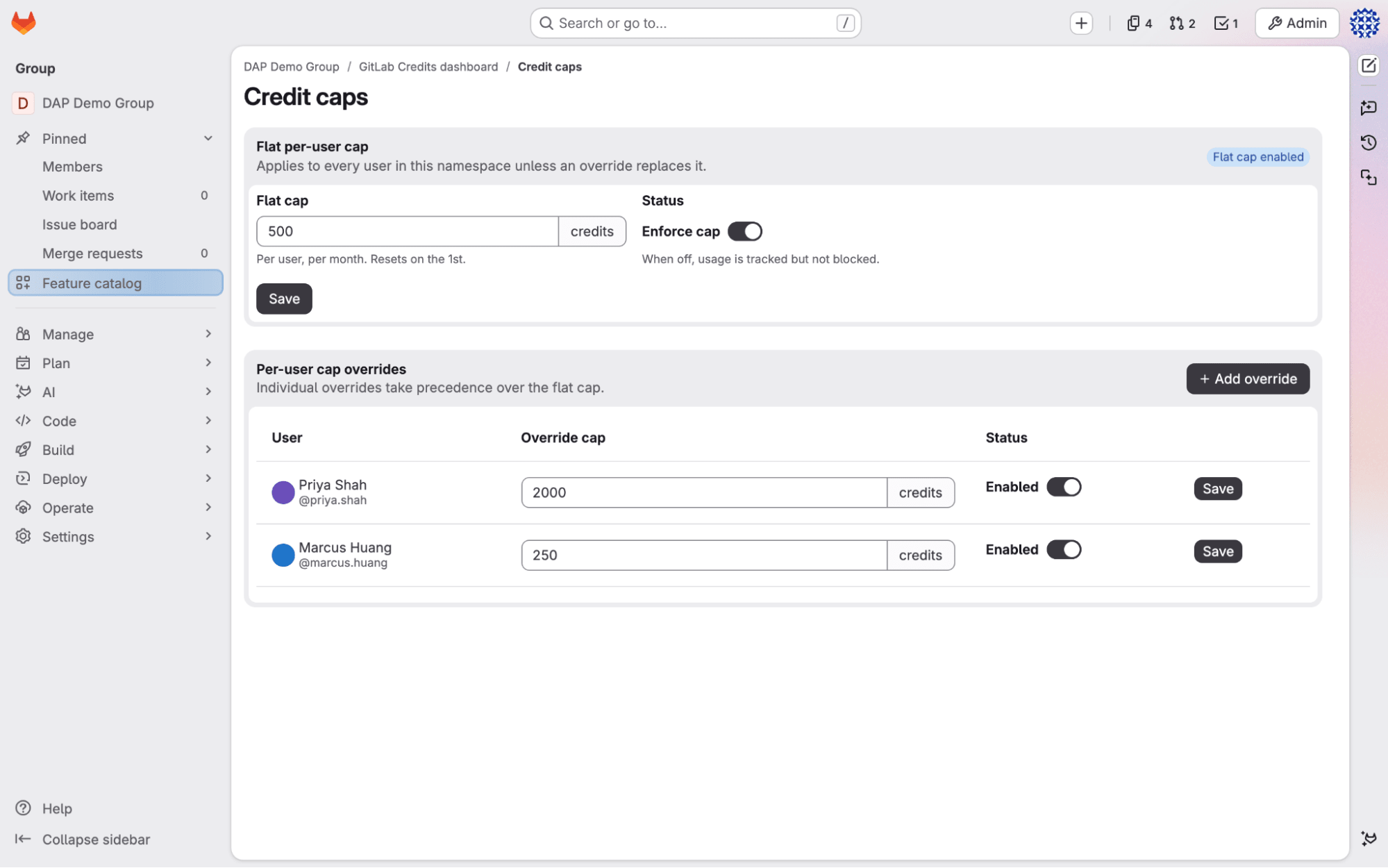
Published: 2026-08-26 00:00:00 | Created: 2026-08-26 15:38:57

The industry is now racing to rebuild source code management for agents. We showed our answer at GitLab Transcend, but let’s reiterate why rebuilding the Git backend is only half the problem.

Three things break when agents become the primary users of a Git server. Every developer running hundreds of agents hits the same wall, regardless of tools:

  • The clone tax. An agent clones an entire repository to read a single file, then does it again for the next agent, and the next retry, transferring far more data than the task requires and burning context on a local grep or blame it shouldn't have needed to run. One agent invocation today can mean 5GB to 10GB transferred and 30+ seconds of setup, just to answer a single question.
  • Concurrency collapse. Thousands of sessions hit a backend that was originally designed for human scale, producing bottlenecks and unpredictable availability.
  • No isolation. Agents share accounts and one branch space, so they overwhelm the repository, leave no clean way to discard abandoned work, and keep no record of which agent did what.

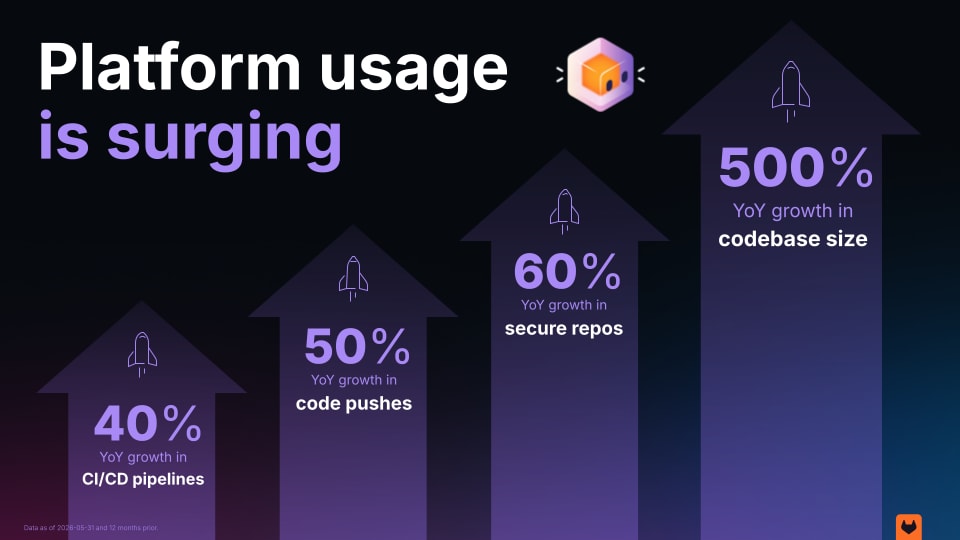
Our platform data shows how fast the pressure is building. Over the past year, our customers created 40% more CI/CD pipelines, and code pushes to GitLab.com were up 50%. While the secure repositories grew by 60%, codebase sizes have also grown by up to 500%.

Platform metrics

When we announced next-generation source code management (next-gen SCM) at GitLab Transcend in June, we walked through how Git, as an operational model, was not designed for the load agents placed on it. A few weeks later, new entrants, including Git hosts built specifically for agent-scale concurrency, are validating that claim independently. That convergence sharpens why rebuilding the Git backend is necessary, but on its own, it’s still not enough.

What we’re building for agent scale

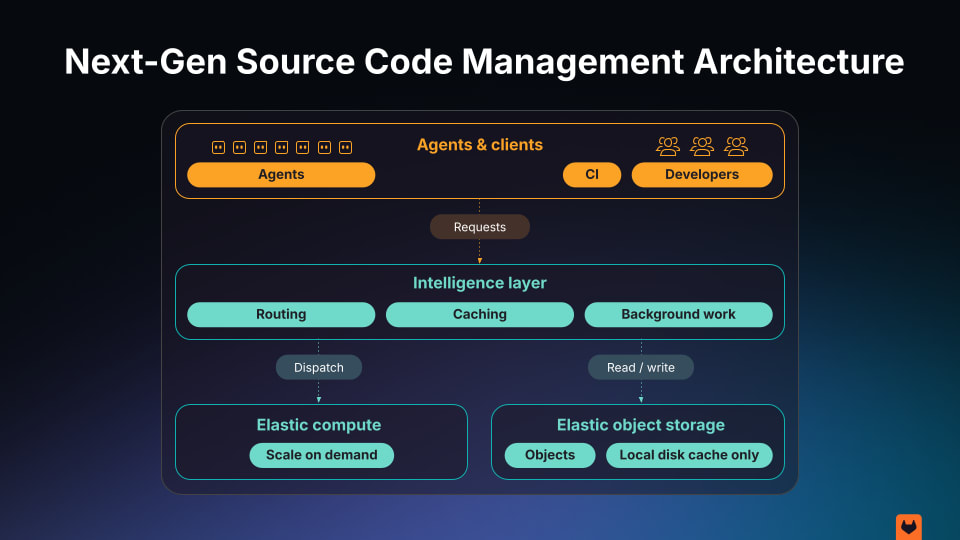
Next-gen SCM runs on the Git protocol for backward compatibility, with a redesigned backend and interfaces built for agents. Instead of cloning a full working tree, agents query the repository server-side for exactly what a task requires, with each agent limited to the minimum visibility its task needs. It’s the same Git compatibility and auditability with a different motor underneath.

The architecture separates an intelligence layer (routing, caching, background work) from elastic compute that scales on demand and elastic object storage. Purpose-built read and write APIs let agents retrieve file, blame, and history data and commit changes without pulling the whole repository. Developers can run agents on any repo, fan them out by the thousands, and let them experiment safely. In practice, that means an agent gets a single batch-read instead of a full clone, a diff-stat request instead of clone-then-diff, and a last-commit-for-path lookup instead of clone-then-blame.

This isn't designed for cloud-only. The compute and storage tiers talk to each other over the standard S3 API, so the same architecture that runs on GitLab.com runs on a customer's own infrastructure, whether that's a major cloud provider's object storage or a self-hosted, S3-compatible system running in a customer's own data center. For air-gapped, regulated, and sovereignty-constrained environments, that means the same horizontal scaling and consistency guarantees, without repository data ever leaving infrastructure the customer controls.

Next-gen SCM architecture

In early internal testing, agents running against next-gen SCM showed:

  • Up to 50x faster wall-clock time
  • Up to 2x fewer tokens
  • Up to 1,000x less network traffic

These are ceilings, not guarantees, measured under our own testing conditions. The workload that actually stresses a Git backend at agent scale is concurrent reads and writes from many independent agents against the same repositories, sustained under load — so a number only means something if the test runs close to that target, the load generator isn't the bottleneck, and the full latency distribution is reported rather than a single best case.

We hold our own results to that bar, and we'd encourage anyone evaluating this category to ask the same three questions of every number they're shown, including ours. That bar is built into the architecture itself, not only our test conditions. Storage maintenance compacts small artifacts into larger, frozen ones on a geometric schedule, which puts a hard ceiling on how much data any node has to fetch to catch up to the latest snapshot. With a 1GB freeze threshold and a 2x compaction ratio, that ceiling is 2GB, regardless of how large the repository has grown.

Next-generation source code management is now in private beta, and here it is in action:

Rebuilding the backend is half the problem

The new entrants are building Git hosts: standalone destinations, or fast mirrors that sit in front of an existing host to absorb read traffic. That solves concurrency, and concurrency is a real problem. But it leaves two questions unanswered, and both are central to how we think about GitLab’s agentic infrastructure.

The first is provenance. When agents push code, touch dependencies, and trigger deployments by the hundreds, the operative question stops being “did we scan?” and becomes “which agent did what, under which policy, and can we prove it?” Our agent APIs attribute every agent action to a specific workflow, model, and token. Every agent operation is routed through the same project authorization and role-scoped human-in-the-loop controls that already govern human contributors. Attribution and policy are platform properties, not repository features, so a standalone Git host isn't built to answer this natively.

The second is what happens to the work after it succeeds. A successful agent experiment lives on a standalone host. On GitLab, next-gen SCM is a Git backend inside a platform that already runs CI, policy management, governance controls, and audit of the resulting code. When an agent's ephemeral experiment works, it graduates directly into a governed, observable production pipeline, without requiring a separate platform or destination.

Next-gen SCM handles execution at agent scale. GitLab Orbit gives every agent and human context on the full software lifecycle as a knowledge graph, and GitLab Duo Agent Platform orchestrates governance and security around every agent action — so agents plan and carry out work across the full lifecycle, not just the Git operations. A faster Git backend hosts the code agents generate. Paired with GitLab's governance, lifecycle context, and orchestration, that code ships through the same CI, policy, and audit path as everything else in the platform.

Every enterprise will hit this wall

Every customer will use agents for coding, and every customer running them at scale will run into the same limits described above, regardless of which models or tools they standardize on. That's what makes this an evolution within the infrastructure layer. The teams that move fastest in the agentic era will be the ones who can host, govern, and absorb agent output back into a lifecycle that was already built to ship trusted software.

Get started

Next-generation source code management is in private beta. Request early access today!

show more
GitLab Patch Release: 19.3.1, 19.2.5, 19.1.7
Published: 2026-08-26 00:00:00 | Created: 2026-08-26 12:04:57

No content available

Making room for what's next in the GitLab UI
Published: 2026-08-26 00:00:00 | Created: 2026-08-26 11:52:58

Throughout this year, the product interface has been in a season of reduction. On the heels of dark mode, the tide has been moving out with a quieter application chrome, overall color reduction, and neutral controls. It can feel like loss, low tide always does. But low tide is also when you can see the shape of the shoreline clearly enough to build something new on it.

What’s coming in is a user interface built for a different kind of work where you don't search for the right button, it surfaces at the moment you need it. This is a conceptual shift that needs room to breathe, and we’re clearing the way for it.

Tech goes through cycles like this. Touchscreens replacing physical buttons felt like a loss at first, until gestures, voice, and haptics enabled a deeper kind of interaction and expression. Cords gave way to wireless and each generational change introduced real friction for a time. The tide going out isn’t the point, it’s the possibility of what comes in with it.

Here’s what’s changed in the GitLab UI:

  • Neutralized actions and controls (buttons, form controls, toggles, tabs) with increased contrast
  • Enhanced instance theming addressing more surface area
  • Neutral palette update and tinted neutrals for themes
  • New bloom-style glow visual element draws attention to GitLab Duo interaction and moments requiring user input

Before and after showing component color changes

Before and after showing theme color changes

Crop of GitLab screen with new bloom asset positioned behind AI panel

The journey to the new design

Our version of that cycle started years ago when we removed many of the old Bootstrap variants and continued as we moved to design tokens. Instead of sharing a crowded palette, we scoped categories like actions, feedback, and controls more narrowly. Color in the product had a real problem of trying to do too many jobs at once and resulted in some screens feeling “lit up like a Christmas tree.” Generally speaking, enterprise software limits color so that when it shows up it means something. That’s the direction we’ve been iterating on for years.

Changes like this are rarely perfect on the first pass. Something looks fine in review and initial testing, and problems only become apparent with broad use across the larger product surface area. A user might struggle to tell two states apart or locate a control, which can also hint at larger UX or composition problems worth fixing. That’s not unique to this rollout, it’s how iteration works. We keep a UI feedback issue and address comments.

We’ve made it this far without a mention of AI, but here we go. A quieter, more reductive UI isn’t the goal in and of itself. The next UI wave won’t live solely in elements waiting to be clicked, it’ll live in intelligent, self-surfacing moments. An already loud UI drowns that kind of interaction out.

We realize that not all of the changes will be received the same way, sometimes for subjective reasons, and at other times for very objective reasons. That distinction matters to us and we want to hear about both. Drop a note in the feedback issue.

show more
Scale software delivery pipelines in isolation without owning the runner fleet
Published: 2026-08-25 00:00:00 | Created: 2026-08-25 11:41:57

Many enterprises choose GitLab Dedicated for a clear reason: a secure and compliant, single-tenant GitLab instance, managed by GitLab. As agentic workflows drive more pipeline volume, full data isolation and runner infrastructure operational burden become a challenge. This leads to the question, “Does owning the runner fleet still make sense?”

With GitLab Dedicated, there is no more need to provision, patch, build, and scale your own runner fleet. Hosted Runners for GitLab Dedicated handles the heavy lifting and delivers a seamless experience across the entire software development lifecycle so your team can focus on shipping.

Hosted Runners for GitLab Dedicated provides a runner fleet isolated from other customers. To support job-level security, each job runs in a newly provisioned, isolated VM that is deleted after the job completes. We provide a scalable and highly reliable runner fleet to support your bursty CI demands and resiliency needs. Creating and managing runners is self-serviceable through Switchboard (GitLab Dedicated management console).

The runner ownership trade-off: Cost vs. user experience

Pipeline load can be unpredictable. To account for this, runner infrastructure can be over-provisioned to give developers the best experience and maintain low wait times. But this drives up the infrastructure cost. Conversely, under-provisioning can save on infrastructure cost, but your developers will waste time waiting for their CI jobs to be picked up. Efforts to fine-tune this balance can monopolize your platform team’s time.

Shift runner operations to GitLab while maintaining control

Hosted Runners for GitLab Dedicated is a fully managed CI execution SaaS offering. It’s backed by a high-performing and reliable runner infrastructure. Key benefits include:

  • Supports compliance: Full isolation/single-tenant runners with same data residency as GitLab Dedicated.
  • Job level security: “One runner for one job” — hosted runners run every job in a standalone, short-lived VM to ensure complete process protection.
  • Network security: Hosted runners can connect to internal artifact registries, secret managers, and deploy targets securely through AWS PrivateLink.
  • Autoscaling for performance and predictability: Customers get reserved, predictable CI runner capacity for critical workloads resulting in improved queue wait times. Our runners scale with your team’s bursty CI demands.
  • High reliability: The Hosted Runners for GitLab Dedicated SLA of 99.9% uptime is supported by highly available runner architecture to ensure your workflows remain stable, resilient, and online.
  • Usage and cost visibility: Track hosted runners' GitLab Credit consumption on the GitLab Credits Dashboard.
  • Consumption pricing: Hosted runners can now draw down from GitLab Credits, allowing you to pay for only what you use.
  • Support you can count on: GitLab’s world-class support team responds to incidents around the clock.

Experience hosted runners in GitLab Dedicated

See Hosted Runners for GitLab Dedicated in action:


Hosted Runners for GitLab Dedicated is available in Linux x86-64 and Linux Arm64 architecture in the following machine sizes.

SizevCPUsMemoryStorageExample tag (x86-64)
Small28 GB30 GBlinux-small-amd64 (default)
Medium416 GB50 GBlinux-medium-amd64
Large832 GB100 GBlinux-large-amd64
X-Large1664 GB200 GBlinux-xlarge-amd64
2X-Large32128 GB200 GBlinux-2xlarge-amd64

Get started with Hosted Runners for GitLab Dedicated

Hosted Runners for GitLab Dedicated is an add-on to GitLab Dedicated. Reach out to your GitLab account team to get started.

If you want to learn more about how GitLab Dedicated can support your compliance posture, talk to our team.

Need inference inside the same GitLab Dedicated boundary? Learn more in our companion article on the single-tenant AI Gateway.

show more
When code is abundant
Published: 2026-08-24 00:00:00 | Created: 2026-08-24 18:30:57

I returned from the holiday break in January convinced that something fundamental had changed.

Large language models had reached the point where they could produce useful code reliably enough, and cheaply enough, to change the economics of software development. Engineers everywhere seemed to be experimenting with the same thing: not just asking an AI assistant for suggestions, but giving agents real work and seeing how far they could take it.

I started thinking about what happens if that continues. What changes when producing code is no longer the primary constraint in building software?

I wrote those thoughts down in a board memo in January. In May, I published part of that thesis in GitLab’s Act 2: the cost and time of producing software was collapsing, machines would increasingly build software under human direction, and the architecture underneath software development would have to change with it.

In June, at GitLab Transcend, we showed the first pieces of that architecture: source control rebuilt for machine-scale concurrency, GitLab Orbit as a context graph spanning the software lifecycle, and governance around agent identity, policy, approval and audit.

Then, on August 21, Anthropic published The AI-Native SDLC Playbook. It opens with a simple statement:

“Code is no longer the bottleneck.”

I agree.

Anthropic’s playbook is a practical description of how the development lifecycle changes when agents can move implementation dramatically faster: planning becomes machine-readable, handoffs become automated, verification moves into the loop, and human judgment concentrates at the gates.

What interests me is what happens one level beyond the workflow. If code is no longer the primary constraint, what becomes scarce? What architecture does an enterprise need when people, agents and multiple models are all acting across the software lifecycle at machine speed? And where does durable value move when generating the code itself becomes increasingly abundant?

Over the past eight months, I’ve watched GitLab engineering and other organizations including Stripe, Spotify and Amplitude begin to answer those questions in production. Their experiences have sharpened my original conviction. The important change is not simply that AI can produce code faster.

It is that when implementation gets dramatically cheaper, the economics and architecture around software change with it.

The constraint moves from producing code to trusting it. Trust increasingly depends on the environment around the model: context, verification, governance and evidence. As organizations run many models and agents at once, that layer has to be durable and independent of any one of them. And as agents encode more of an organization's workflows, expertise and operating knowledge, they should belong to the organization, not to whichever vendor supplies the model or cloud underneath them.

The constraint that built an industry

For sixty years, software engineering has organized itself around one fact:

Code is precious.

It is expensive because turning business intent into reliable software requires scarce people who can hold complex abstractions in their heads. It is fragile because small mistakes can have enormous consequences. And complexity accumulates faster than any individual can absorb. Much of how we build software descends from that constraint.

We preserve old systems because rebuilding them is risky. We bridge between technologies instead of replacing them. Technical debt survives for years because paying it down competes with something customers need this quarter.

We optimize heavily for developer productivity because developers produce the scarce resource. Fragmented tools, inconsistent environments and awkward processes are tolerated if changing them might slow engineers down.

Then there is the ceremony: reviews, approvals, release gates, security checks, change processes and increasingly sophisticated testing. Much of it exists to protect an asset that is expensive to create and expensive to get wrong. And most of the value never gets built at all. For every idea that makes it onto a roadmap, many more never survive the economics of scarce engineering capacity.

We spend enormous energy protecting the cost of change because change has always been expensive.

That constraint is beginning to break. And when a constraint this fundamental moves, the rest of the system eventually moves with it.

Every abstraction reveals the next constraint

This has happened before.

Humans once programmed computers directly in machine instructions. Assembly abstracted the machine. Higher-level languages moved the abstraction again. Each layer made one problem dramatically cheaper and exposed the one hiding behind it.

Nobody mourns hand-written assembly. We got a bigger problem to work on.

Large language models are obviously not compilers in the technical sense. They are probabilistic systems, not deterministic transformations with defined semantics. But economically, the analogy is useful: they dramatically reduce the human effort required to move from intent to implementation.

The distinction that matters is this:

Code production is becoming abundant. Good software is not.

Models can generate implementation far faster than humans can. That does not mean the implementation is correct, secure, performant, compliant, maintainable or even what the business intended. That gap is the point. When code was scarce, the hard problem was producing it. As code becomes abundant, the hard problem becomes trusting it.

When code is preciousWhen code is abundant
Preserve legacy because rebuilding is expensiveRebuild when doing so is cheaper than continuing to bridge
Optimize heavily for developer outputOptimize for business outcomes and learning speed
Carry technical debt for long periodsRetire debt when the economics make sense
Pursue only the highest-confidence ideasTest many more ideas cheaply
Use process to limit costly mistakesUse constraints and verification to govern high-volume change

The cost of typing hid the harder problems. AI is exposing them.

Cheap iteration changes the strategy

One reasonable objection is that typing code was never the hardest part.

The harder part is deciding what to build. Requirements are ambiguous. Customers change their minds. Teams misunderstand one another. Important edge cases appear only after software meets reality.

All true.

But that argument assumes the cost of being wrong stays the same. Discovering after six weeks that a requirement was misunderstood is expensive. That expense creates pressure to be right upfront. Requirements documents, architectural reviews and careful planning are rational responses to expensive iteration.

Make iteration cheap and the strategy inverts.

You stop trying to eliminate uncertainty before implementation and start trying to learn faster.

There is another consequence that may prove even more important. Engineering organizations accumulate enormous amounts of knowledge that never becomes part of the software itself. An experienced engineer knows which service is fragile. Someone remembers why a deployment failed three years ago. A security engineer remembers the class of mistake that caused the last incident. Today, much of that learning lives in human heads. When implementation becomes cheap, more of it can become executable.

A production failure becomes a regression test. A security incident becomes a policy. A performance requirement becomes an automated constraint. A compliance obligation becomes continuous validation.

Learning turns into code.

Not literally all of it, and executable constraints do not eliminate judgment. Policies can be wrong. Tests can encode yesterday’s assumptions. But organizational knowledge can increasingly become persistent, inspectable and revisable instead of disappearing when the person who learned it leaves. That is a different kind of institutional memory, and it is one reason code abundance can improve quality rather than simply increase volume.

Amplitude recently published a striking example of what a broader overhaul of this kind can produce. Over six months, it tripled the number of pull requests it shipped while reported monthly bugs fell from 715 to 319. That does not prove that more AI-generated code creates better software. It does show that much higher change volume does not have to imply proportionally lower quality.

Cost per accepted change

The economic unit I think matters most in this transition is not cost per line of code.

It is cost per accepted change.

A useful software change includes generation, environment setup, context, verification, review, remediation and governance. AI is collapsing the generation term, which makes everything else proportionally more important. An organization that makes generation ten times faster but leaves CI, review and validation untouched will not become ten times faster.

It will simply move the queue.

That is exactly what the Theory of Constraints predicts: remove one bottleneck and the system exposes the next one. We are now starting to see that happen.

What happens when agents reach production

Stripe built internal coding agents called minions. More than a thousand pull requests merged at Stripe each week are produced entirely by minions. Humans review them, but the code itself is agent-generated.

Amplitude documented a six-month overhaul of its development pipeline. Pull-request cycle time fell from 5.2 hours to 44 minutes. Frontend CI fell from roughly thirty minutes to three or four.

Spotify has been operating a background coding agent called Honk and has documented more than 1,500 AI-generated pull requests merged into production.

These are unusually capable engineering organizations, so their experiences should not be treated as proof that every enterprise is about to work the same way. What makes them useful is that they have gone far enough to expose the next constraints, and several of the same ones keep appearing.

Amplitude’s development environment had accumulated manual setup, slow CI and inconsistent tooling. That survived for years because code production limited how quickly changes entered the system. Agents removed that throttle, and validation and review became the stoppage points.

So Amplitude rebuilt the foundations: faster environment setup, dramatically faster CI and fewer inconsistent patterns that confused both humans and agents. Very little of that work was AI. It was infrastructure work that became necessary because AI changed the throughput of the system.

Many organizations are currently focused on choosing the best coding model.

In practice, a thirty-minute CI pipeline defeats every model you point at it.

Agents do not eliminate existing engineering constraints. They expose them faster.

Three modes, not one maturity curve

Most descriptions of AI adoption imply a single journey from traditional development to fully autonomous development. I don’t think that is how the enterprise transition will happen. Three modes will coexist for a long time.

Diagram of the three modes of AI-assisted development

Mode 1: Human-controlled legacy

Systems with undocumented dependencies and operational knowledge that still resides in people. Many will remain largely human-controlled until they are retired or rewritten.

Mode 2: Agentically accelerated development

Humans remain in control while agents assist with implementation, testing, migration, review, documentation and security analysis. This is where most enterprise development sits today and where I expect much of the near-term economic value.

It is not merely a waiting room for autonomy. One of the most valuable uses of agents may be making modernization projects economical when they were previously impossible to justify.

Mode 3: Autonomous development

Agents operate the implementation loop while humans provide intent, constraints and oversight. The important dividing line is not greenfield versus brownfield. It is whether execution remains human-controlled or can safely operate as a closed loop.

A practical way to tell where a system sits is to ask three questions: Can an agent make a useful change with the context available? Can that change be verified without a person reading every line? If it is wrong, does the system catch it or does a person have to? The more those answers depend on a person, the closer the workload remains to Mode 1, regardless of how capable the model is.

Trying to force every workload into Mode 3 too early is likely to be one of the more expensive mistakes organizations can make during this transition.

The pipeline runs the inner loop

Once Amplitude reduced frontend CI below five minutes, the remote pipeline became fast enough that engineers could launch many pieces of work in parallel and review the results as they returned.

Stripe reached a similar architecture from another direction, giving minions isolated, pre-warmed development environments so many jobs can run concurrently without interfering with one another.

Most coding-agent workflows today still begin on a laptop. That is a reasonable place to start. It is unlikely to be where the architecture ends.

In an agentic system, the pipeline becomes the natural place to run the inner development loop:

generate → build → test → validate → review → remediate → repeat

The agent keeps working against those signals until it can return something that is not merely plausible code, but functional, verified software that satisfies the constraints the organization has defined.

Faster inner loops also increase the need for coordination. A thousand individually valid changes can still pull a system in conflicting directions. As AI compresses the gaps between SDLC phases, alignment on intent has to become continuous rather than periodic.

There are architectural reasons this loop belongs close to the repository and the systems around it.

The pipeline already sits next to the code, build system, test infrastructure, security controls, deployment configuration and much of the history surrounding a change. The closer the agent is to those systems, the less context it has to reconstruct through repeated remote calls and fragmented APIs, and the faster it can receive feedback. That matters because machine-speed development can turn even small amounts of latency and context loss into system-level bottlenecks.

Running the loop there also preserves the evidence around the work. The identity that initiated the change, the policies that applied, the tests that ran, the reviews that occurred, the remediation the agent performed and the artifact that ultimately shipped can all remain connected.

That is important for more than efficiency. It is what makes increasing autonomy governable.

The pipeline moves from being a gate at the end of development to becoming the system that runs the development loop itself.

Agentic development therefore scales best where execution, context and governance are close to the work. The faster an agent can access the right context, receive deterministic feedback and prove what it did, the more of the loop it can safely complete before handing work back to a person.

The question is no longer simply: Did the code compile?

It is: Was the change actually good, and can we prove it?

Autonomy is governed, not granted

As model capability improves, I believe governance increasingly becomes the binding constraint on autonomy.

The stalled enterprise programs I have seen rarely stall because nobody can get a model to generate code.

They stall on more basic questions. What is the agent allowed to do? How do we prove what it did? Who is accountable when it is wrong?

Stripe’s architecture illustrates the pattern. Minions combine open-ended agent loops with deterministic software for git, linting and testing. They run in isolated environments, pass local checks before pushing, and selectively run tests from a suite containing more than three million tests.

The agent can be creative.

The system decides where creativity stops.

Amplitude uses a risk model to distinguish work that can merge automatically from work that should still route to a person.

Spotify’s verification architecture gives agents access to verification without exposing the underlying implementation of the verifiers, and runs required checks before a pull request can be opened.

None of these organizations solved reliability with a better prompt. They combined capable models with deterministic gates, isolation, verification, policy and evidence, and that is what allows autonomy to expand safely.

It also explains why this becomes harder outside the best-resourced technology companies. Most enterprises will not want to invent their own agent authorization model, isolation layer, verification architecture and evidence system. They will expect to inherit much of it.

That is increasingly what we mean at GitLab when we talk about speed with control.

Speed without control eventually stops because the organization cannot accept the risk. Control without speed leaves the value of AI unrealized. The two have to be designed together.

Accountability can become clearer

One concern about autonomous development is that accountability disappears into the machine. That can happen if the system is designed poorly. But autonomous development can also make accountability more explicit if identity, policy, context and evidence are preserved as part of execution.

Humans remain accountable for defining the constraints: the security policy, the performance threshold, the compliance obligation, and what the organization learned from the last incident. The control plane has to make execution against those constraints provable.

Amplitude’s description of its SOC 2 approach is instructive. Its automated approval process relies on documented criteria, logged decisions and an override path rather than requiring a human to click approve on every qualifying change. The human moves from approving every action toward owning the criteria under which actions are permitted, which can be both more consequential work and more auditable.

The durable layer

One possible conclusion from increasingly capable agents is that more of the software lifecycle collapses into the model and everything around it becomes commodity infrastructure. I think the opposite is more likely.

As agents take on more of the implementation loop, the durable enterprise layer becomes even more important. Context, identity, policy, provenance, verification and organizational memory cannot live only inside whichever model or agent is executing the work. They have to persist across them.

And over time, I expect the product development lifecycle to use multiple purpose-built models.

Different tasks will optimize for different things: reasoning quality, latency, cost, security, domain specialization or where the model can run. Some will use frontier models. Others will use smaller models or open-weight models deployed closer to the customer's data and infrastructure. The best model for planning may not be the best model for code review, security analysis, testing or remediation.

That is a familiar pattern as technologies mature. A single general-purpose capability gives way to a more specialized stack optimized for different workloads.

In that world, the model is not the durable architecture. It is an execution component.

The more models and agents an enterprise uses, the more valuable the common context, controls and history around them become.

This also changes the boundary of what we have traditionally called the software development lifecycle.

The SDLC was built around people moving work through a sequence of stages: plan, build, test, secure, deploy and operate. As AI compresses those stages into continuous agentic loops, I expect the distinction between developing software and developing the product itself to blur.

You can think of the emerging model as a Product Development Lifecycle, or PDLC: business intent enters the system, agents turn it into software, verification and governance determine what can proceed, production results feed back into the next decision, and the loop continues.

At sufficient scale, that begins to look less like a traditional development process and more like a software factory: a system that continuously turns intent and business signals into verified software.

But a software factory is not simply a collection of autonomous agents. The durable layer underneath it is what preserves context, identity, policy, evidence and organizational memory while models and agents change.

Context and provenance

Anthropic’s AI-native SDLC playbook is useful because it makes the transition concrete. It describes intent, specifications and plans becoming machine-readable artifacts; institutional knowledge being made available to Claude; hooks and skills enforcing behavior; MCP connecting agents to tools; and version history preserving evidence of the work. I think those are useful patterns, and many organizations will start there.

Our architectural bet at GitLab is that agentic development requires a new platform architecture, not just a better model.

That architecture has four essential capabilities: an agent platform, machine-scale execution, durable context and governance. I’ll return to each of these below.

Enterprises will use more than one model. They will use agents from multiple vendors alongside agents they build themselves. And increasingly, they will want to build agents that encode their own workflows, expertise and operating policies alongside the excellent agents vendors will keep producing.

The platform therefore has to support both paths: customers should be able to bring the agents they choose and build, customize and operate agents they own.

Those agents will act across code, planning, security, CI, deployment and production systems, often at the same time. They should not have to be rebuilt because an organization changes its preferred model or cloud. And the organization’s context, policy, identity and history should not become captive to whichever model, agent vendor or infrastructure provider happens to be in favor at the time.

The model should be replaceable. The agent should belong to the customer. The organization’s memory and controls should endure.

That is why I believe the architectural pressure is toward a model- and cloud-neutral platform, not toward a single model, agent vendor or cloud becoming the system of record.

That does not require one vendor to own every artifact involved in creating software. Identity can federate. Events can move between systems. Context can be indexed. Policies can be centralized. MCP and other open interfaces can give agents access to tools across the enterprise. Many organizations will build this way.

The harder problem with this pattern is preserving the chain from intent to action to outcome as autonomous systems operate across that environment.

A requirement authorizes a change. The change executes under a particular identity and policy regime. Verification produces evidence. A deployment ships it. Production produces a result. Those relationships form a causal graph.

None of this is new. What is changing is the frequency at which those relationships have to remain intact. At human development velocity, reconstructing provenance across several systems after the fact is painful but often survivable.

At machine velocity, provenance becomes part of the execution path itself.

When the relevant relationships live natively in a common system or control plane, an agent can reason across them directly. When they live across several systems, something has to reconstruct them. That is possible. But it creates work around identity, synchronization, policy consistency, semantic mapping and evidence. At machine volume, reconciliation itself can become a system constraint.

Spotify’s experience illustrates the same problem inside a codebase. In one migration, Honk encountered multiple pipeline frameworks. The more standardized frameworks were easier to automate; inconsistency made reliable context much harder. At human speed, inconsistent context creates friction. At machine speed, it degrades output repeatedly.

The important unit in autonomous development is increasingly not the individual artifact. It is the relationship among intent, code, policy, evidence, deployment and outcome.

This is why I believe the inner software-development loop will experience increasing pressure toward a common control plane. Not because a single vendor must own every tool, but because trustworthy autonomy requires those relationships to remain coherent while machines act at a scale humans never did. Platforms that already hold many of them have a structural advantage over systems that have to reconstruct them afterward.

Records, not files

One emerging practice in agentic development is to capture intent, specifications and implementation plans as Markdown files committed to a repository.

I like the instinct. Making intent explicit, versioned and readable by humans and agents creates immediate value.

But there is an important distinction between a file and a governable record. At enterprise scale, the system eventually needs to answer questions a file cannot answer on its own:

  • Who can modify this?
  • What state is it in?
  • Who approved it?
  • Which policy version applied?
  • What deployment resulted from it?
  • How do I query across ten thousand of these?

Teams can recreate those capabilities through conventions around Markdown, but those are exactly the capabilities systems of record have spent years developing.

The best architecture may present Markdown as an interface to agents while keeping a structured, governed record underneath it.

The interface can remain simple. The system underneath cannot.

Agents should belong to the organization

Agents need context about how an organization builds software: repository structure, coding conventions, build commands, testing practices, architecture rules and known failure modes.

Spotify calls this work context engineering and found it essential for producing reliable, mergeable pull requests across real codebases. As that knowledge grows, it becomes an organizational asset.

The same is increasingly true of the agent itself.

An enterprise agent may encode years of accumulated instructions, workflows, tool access, evaluation criteria and operating policy. Over time, that can become some of the most valuable intellectual property in the engineering organization.

It should belong to the organization, not to a model vendor, cloud provider or proprietary runtime.

There is another reason ownership matters: it allows the system to compound.

Every time an agent acts, the organization produces evidence about what worked and what did not. Which changes were accepted? Which were rejected? Where did a human intervene? What failed in production? Which constraints caught the problem?

Preserved over time, that evidence becomes an internal evaluation set grounded in the organization’s own codebase and outcomes, not a public benchmark. The organization can use it to evaluate models, improve its agents, refine their instructions and workflows, and determine where greater autonomy is actually warranted.

The result is a feedback loop: the agent does work, the system measures the outcome, and what the organization learns makes the next generation of agents better at that organization’s work.

This extends the idea that learning turns into code. Learning can become tests and policies, but it can also become evals, context and improved agents.

That is not an argument against any particular vendor. We build on Anthropic models today and expect to keep doing so. A customer running Claude Code should be able to keep running it, with the same enterprise context, identity and audit trail as any agent we build ourselves.

The point is, customers must be able to choose a model, change it, use different models for different tasks and run their agents on the infrastructure their business requires. They should also be able to bring agents from other vendors and give them access to the same enterprise context and controls.

AGENTS.md is one example of an open format for providing project instructions and context to coding agents. GitLab supports it, and we will continue to support open formats like it because an organization’s accumulated knowledge should remain portable if the organization changes models, agents or vendors.

The principle matters more than the filename.

Own the agent. Own its instructions. Own the context it learns from. Keep the models and infrastructure underneath it a choice.

Anyone can ship

One of the more interesting results in Amplitude’s experience was not about engineers. After improving its development setup, validation and review, designers, product managers and marketers began producing code changes themselves. Non-engineers went from essentially zero pull requests to roughly five percent.

This is an early version of a change I expect to become much larger. As implementation becomes cheaper, the boundary between deciding what to build and building it starts to collapse. Product managers can turn intent into working software. Designers can move from prototypes to implementation. Engineers can operate at a higher level of abstraction across the product. And people outside traditional R&D organizations can increasingly build solutions directly from the expertise they already have.

I think Builder becomes a useful way to describe this broader role. A Builder may be an engineer, designer, product manager, security expert, marketer or domain expert. What they share is the ability to express intent, direct agents, evaluate the result and turn an idea into something that works.

This is also part of the shift toward the PDLC described earlier. As the distance between product intent, design, implementation and feedback collapses, software development becomes less of a specialized handoff within engineering and more of a continuous product-building loop.

That does not mean expertise disappears or that everyone becomes an engineer. The opposite may be true. As agents absorb more implementation work, domain expertise and judgment become more valuable. The person overseeing an agentic system may not be an engineering manager supervising coding agents. It may be a domain expert who can express what should happen and recognize whether the outcome is right.

The result is a much larger population of people who can create software without making engineering judgment abundant.

Scarce human attention moves upward: toward intent, architecture, constraints, difficult tradeoffs, exceptions and evaluating whether the system produced the outcome the organization actually wanted.

The work of building software expands beyond engineering. The need for judgment does not.

Integration moves outward

None of this means integration stops mattering. I expect its center of gravity to move.

Inside the high-frequency execution loop, tighter integration becomes more valuable because agents depend on fast feedback, consistent identity, shared context and enforceable policy.

Outside that loop, integration becomes even more important because the intent driving software increasingly originates elsewhere in the business.

Customer support contains customer pain. CRM contains commitments. Data platforms contain usage and business outcomes. Observability describes production health. Compliance systems define obligations. Those systems provide signals, intent and constraints, and the development control plane turns them into governed action.

Over time, I expect the distance between a business signal and a software response to collapse dramatically.

The most important development platform in that world may therefore be defined less by how many developer tools it replaces and more by how effectively it connects governed software execution to the systems that describe what the business needs.

The new platform architecture

That future requires a platform architecture built around four capabilities:

Agent platform: the ability to create, customize and operate agents the organization owns, using the models and infrastructure it chooses, while also supporting agents customers bring from elsewhere.

Execution: next generation Git, artifact management, CI/CD and the capacity to build, test, deploy and operate software at both human and machine scale.

Context: a coherent picture of the requirement, code, history, business priority and constraints surrounding the work.

Governance: enforceable boundaries around security, compliance, quality, identity and permissions, plus the visibility people need to understand what agents did, why it was allowed, and where human attention is required.

As autonomy increases, governance becomes less about approving every action and more about helping people understand and steer the exceptions. Policies and tests automate decisions the organization has already made; the harder cases are the ones nobody anticipated.

The ultimate constraint on autonomy may not be whether the agent can act. It may be whether a person can understand and steer what hundreds of agents are doing at once.

These four architectural layers reinforce one another. Agents act through the execution layer. Execution creates signals that enrich context. Better context makes agents more capable and governance more precise. Stronger governance allows those agents to operate with greater autonomy.

Enterprises will need those capabilities to work as a coherent platform, even when many different models, clouds, products and agents participate underneath it.

What this means in practice

These aren’t only architectural principles for some distant autonomous future. They’re already changing what we build.

In Act 2, we described several architectural bets based on the assumption that software development would increasingly operate at machine scale. At GitLab Transcend in June, we showed the first pieces of that architecture, with demos of each.

Customers need a place to build and run agents they own. GitLab Duo Agent Platform is our platform for creating, customizing and operating those agents around an organization’s own workflows and expertise. Customers can choose the models underneath them and run them across the infrastructure their business requires, while continuing to use external agents alongside them. The goal is not to force every enterprise into one agent ecosystem. It is to give customers a place to build agents they can own and evolve without being locked to a single model or cloud.

Execution has to operate at machine scale. Agents clone, branch, retry and trigger pipelines at volumes traditional source-control architecture was never designed for. Our next-generation source control is being rebuilt around that reality, including server-side access patterns that allow an agent to retrieve what a task actually requires rather than repeatedly moving an entire repository. In internal testing, those changes have produced task execution up to 50 times faster while moving dramatically less data.

Context has to become infrastructure. GitLab Orbit connects code, work items, pipelines, deployments and production signals into a context graph across the software lifecycle. Agents can query those relationships directly instead of reconstructing them through dozens of disconnected calls. Importantly, that context is not reserved for GitLab’s own agents. Third-party agents can use the same organizational memory.

Governance has to surround the agent, not live inside its prompt. Governance for Agents is designed to apply identity, policy, approval and audit controls around agent actions so organizations can increase autonomy without giving up evidence or accountability.

Those are different engineering projects, but they come from the same premise:

If implementation is becoming abundant, the platform underneath it has to let enterprises build and bring agents, then give all of them execution, context and control at machine scale.

What to do in the next ninety days

Measure cost per accepted change. Track the elapsed time from generated change to accepted change, then decompose it across environment, CI, review, remediation and governance. Many teams will find generation is already a small part of the total.

Time your CI. If a full pipeline takes much longer than five minutes, improving that may matter more than switching models.

Write down the criteria, not just the approvals. Pick one class of low-risk change and define what would make it safe to merge without a human. That becomes the beginning of executable governance.

Make context portable. Put repository instructions and operating knowledge in an open, versioned format that both people and agents can use.

Choose which business signals should enter the development loop directly. Support, observability and compliance systems increasingly contain intent and constraints. Decide which signals should become governed software work without requiring a person to retype them.

Where we go from here

Code generation is becoming increasingly commoditized. That does not mean software development is becoming free. It means the economics are changing.

The useful unit is not cost per line of code.

It is cost per accepted change.

As generation gets cheaper, everything around generation becomes proportionally more important: environment, context, verification, governance and evidence.

This also changes where scarce human judgment goes. Engineering judgment does not become abundant because implementation does. Human attention moves upward: toward architecture, intent, constraints, difficult exceptions and evaluating whether the system produced the outcome the organization wanted.

And it changes where I think strategic value will accrue in the software-development stack. For sixty years, implementation was scarce enough that much of software engineering revolved around protecting developer capacity and limiting the cost of change. AI changes that constraint.

When implementation becomes abundant, trust becomes scarce.

Trust requires more than a model producing a plausible answer. It requires evidence that the software was produced under the right constraints and behaved the way the organization intended. Enterprises can assemble those capabilities from many products, and many will. But as machine activity increases, fragmented control planes create an increasingly expensive reconciliation problem.

The architectural pressure is therefore not necessarily toward one vendor owning everything.

It is toward a model- and cloud-neutral platform where enterprises can bring agents they choose, build and customize agents they own, and give all of them a common layer of execution, context and governance.

That is the opportunity we see for GitLab.

The model may change. The cloud may change. The agent may come from a vendor or be built by the customer.

The organization’s intelligence, context and controls have to survive all of them.

Stripe, Spotify and Amplitude have shown what exceptional engineering organizations can build for themselves. Anthropic’s playbook now shows how quickly the operating model around software development is beginning to change. Most companies will not have a platform team available to recreate all of that machinery from scratch. They will need to inherit much of it.

Software engineering spent sixty years protecting a scarce resource. It will spend the next decade governing an abundant one.

It’s a better problem.


Sources

show more
GitLab 19.3 released
Published: 2026-08-20 00:00:00 | Created: 2026-08-20 21:06:59

No content available

Build custom flows in minutes with the Flow Creator agent
Published: 2026-08-20 00:00:00 | Created: 2026-08-20 19:17:58

Custom Flows already let teams turn manual, multi-step work into automation that runs on GitLab events. But writing one meant learning the Flow Registry schema first. That requirement is a real barrier. The people who understand a workflow best aren’t always the same ones who know a YAML schema.

In GitLab 19.3, the Flow Creator agent removes that requirement. Describe the flow you want in your own words, and it responds with a complete, runnable definition.

When good automations stopped at the schema

Consider two people who know exactly what should be automated, but not how to build it.

  • The security analyst triages vulnerability reports every day and knows which patterns are false positives and who owns each affected dependency. None of that knowledge is captured in a schema they have never used.
  • The planning lead knows what should happen next when a work item changes status. The automation is obvious to them. The Flow Registry syntax is not.

Writing a flow meant learning that schema before any of this knowledge could become automation. That requirement limited who could author flows to people with schema familiarity, not people with process knowledge. The result is a gap between who understands the work and who can automate it. That gap effectively slows down automations across the entire software lifecycle especially where bottlenecks already lurk.

Bring flow building to everyone who understands the work

Flow Creator is a foundational agent within GitLab Duo Agent Platform, available via Agentic Chat. Invoke the agent, describe what you want the flow to do in plain language, and it produces a complete flow definition.

For example, "When a work item is created with the label security-triage, check it against our known false-positive patterns, find the affected dependency and its owner, and post a severity assessment as a comment." This simple explanation gives the agent a trigger, steps, and an output target.

You don't have to get the description perfect on the first try either. If something is ambiguous or missing, like which project the flow should target or whether a step needs human approval, the agent confirms before it builds instead of guessing and returning a flow that runs against the wrong project or skips a needed approval.

Guardrails hold as the author pool grows

More people building flows does not mean looser guardrails. Every flow runs through a scoped service account under composite identity, so it can never reach further than the permissions of the person who ran it. That account is scoped to the top-level group and cannot access resources outside of its bounds. Authoring a flow and enabling it stay separate: Anyone can describe a flow to Flow Creator, but enabling one still requires the Maintainer role or higher. Group Owners and instance administrators can turn Custom Flows off entirely.

See Flow Creator in action:

How it works

Flow Creator does three things behind the scenes:

  • Reads current documentation. The agent checks the Flow Registry documentation before every response, rather than answering from what it learned during training.
  • Applies rules. These rules encode failure patterns seen in real flows, so common mistakes get caught before a session even starts.
  • Runs a pre-output checklist. This check happens before any YAML is generated, catching issues early rather than after registration.

Each rule corresponds to ways flows break today:

  • Missing project_id. The flow runs but has no clear target, so it acts against the wrong project or against nothing.
  • Broken human in the loop gates. A flow meant to pause for approval proceeds without it.
  • Wrong sends_response_to targets. The flow completes and writes its output somewhere nobody is looking.
  • Missing stopping instructions. The agent keeps working beyond task completion.

The output is a full, runnable definition, not a fragment to assemble. Paste it into the configuration editor when you create a flow from a project or from the AI Catalog. Then, choose whether the flow is private, restricted, or public, and add the triggers that should start it.

Run your first custom flow

Flow Creator ships in GitLab 19.3 as part of GitLab Duo Agent Platform. If you have been waiting on someone else to write your automation, you don’t have to anymore.

Read the Custom Flows documentation to see how to register and enable a flow, then describe the one you want to Flow Creator. Start a free trial of GitLab Duo Agent Platform. On the Free tier, you can sign up in a few simple steps. If you're already on GitLab Premium or Ultimate, you can turn on Duo Agent Platform and use the GitLab Credits included with your subscription.

show more
Run agentic software delivery inside the boundaries you already trust
Published: 2026-08-20 00:00:00 | Created: 2026-08-20 19:17:58

Many enterprises choose GitLab Dedicated for a clear reason: a single-tenant instance, managed by GitLab, in a cloud region they select. That isolation already covers source code, project data, and the software development lifecycle they run on GitLab.

GitLab Dedicated customers can now deploy the AI Gateway for the GitLab Duo Agent Platform inside their single-tenant SaaS infrastructure, so AI-processed data stays in their environment and chosen region.

GitLab Dedicated as the critical infrastructure for software delivery

GitLab Dedicated is deployed in your preferred AWS region, and hosted and maintained by GitLab. You can bring your own encryption keys. No private cloud installation required.

GitLab operates the instance, including high availability and disaster recovery, and maintains 99.9% monthly availability for core services. Updates to GitLab Dedicated follow a stability-first cadence, with instances on the previous minor version (N-1) relative to the current GitLab release.

That is the infrastructure organizations already trust when they scale software delivery under audit: guardrails you can take to a regulator, SaaS operations you do not staff, and an availability target that holds when the platform is in the critical path.

Trust should travel with every agent

Agentic workflows demand more from your software development lifecycle beyond the AI coding: increased pipeline volume, greater risk for vulnerabilities introduced, context that needs to travel with every agent and flow, among others.

The isolation, residency, and service-level requirements that already apply to GitLab Dedicated should apply to that inference path too, especially with growing adoption of agentic software development.

Adopt AI while staying compliant

Here is what's new with the introduction of AI Gateway for GitLab Dedicated:

  • Keep AI processing in the tenancy. The AI Gateway runs in the Dedicated single-tenant environment, aligned with data residency.
  • Bring your own models. Connect models you control so inference follows your policy, not a one-size default outside your region.
  • Unlock Duo Agent Platform where you already run GitLab. Agentic work becomes available under the Dedicated deployment model your auditors already understand.

GitLab Dedicated customers using GitLab Duo Agent Platform can connect the AI Gateway to Amazon Bedrock as their model backend, so inference stays in their AWS region. Or you can use your own preferred model providers.

If you have specific model requirements, data classification rules, or existing commitments, you can identify models hosted in Amazon Bedrock for your team to use with GitLab Duo Agent Platform. All capabilities of Duo Agent Platform, including its top use cases such as automating custom code reviews, fixing failed pipelines, and security analysis can now run against your chosen models.

Start your agentic software delivery on GitLab Dedicated

If you are on GitLab Dedicated, review how to add a self-hosted model, validate model connectivity in a non-production project, and then expand agentic workflows under your existing change controls.

If you are not using GitLab Duo Agent Platform today, you can start with a free trial. If you are an existing subscriber to GitLab Dedicated, you can get started simply by turning on Duo Agent Platform and start using the GitLab Credits that are included with your subscription.

show more
When your backlog outgrows your team, GitLab scales remediation
Published: 2026-08-20 00:00:00 | Created: 2026-08-20 19:17:58

Security teams have historically struggled to keep up with triage and remediation when development was happening at human speed. Today, that challenge is exacerbated by developers writing and shipping code at machine speed with AI.

At the same time, AI is helping attackers find and exploit vulnerabilities faster in production. Verizon's 2026 Data Breach Investigations Report found vulnerability exploitation overtook credential abuse as the top breach entry point. Vulnerability exploitation accounts for 31% of breaches versus just 13% in previous years, and only 26% of known exploited vulnerabilities were remediated this year, down from 38%. That means more breaches are starting with a vulnerability that was already sitting in production, unpatched.

In GitLab 19.3, teams can now run Static Application Security Testing (SAST) False Positive Detection and Agentic SAST Vulnerability Resolution, in bulk, on their existing vulnerability backlog.

Dismiss false positives and remediate vulnerabilities in bulk

Most teams have a known vulnerabilities backlog already running in production, far more than any team has time to open and triage one at a time. That used to be a workload problem. Now it's a timing problem too: The same AI accelerating development is accelerating exploitation, which means findings that sit in the backlog longer carry more risk than they used to.

GitLab addresses this with two layers of automated triage and remediation. The first covers active vulnerabilities in production. With GitLab 19.3, teams can bulk-select multiple vulnerabilities to run agentic flows, SAST False Positive Detection and Agentic SAST Vulnerability Resolution, against the vulnerability backlog in production. SAST False Positive Detection analyzes a finding's surrounding code and returns a confidence score and explanation for whether it's a real risk or a false positive. Agentic SAST Vulnerability Resolution takes findings confirmed as real risk and opens a ready-to-merge fix that remediates the vulnerabilities, so a developer reviews and merges the fixes instead of writing it from scratch.

This applies to all SAST vulnerabilities in the vulnerability report, no matter the scanner origin or severity. You can import findings from any third-party scanner that outputs SARIF; GitLab ingests them into a unified vulnerability report.

With bulk SAST False Positive Detection and Agentic SAST Vulnerability Resolution teams can cut years of accumulated risk in a single action instead of one vulnerability at a time and to reduce the risk of vulnerabilities being exploited in production.

See these two features in action:

The second layer covers any new vulnerabilities identified. Teams can configure pipelines to run SAST False Positive Detection and Agentic SAST Vulnerability Resolution automatically on Critical and High severity vulnerabilities (watch an interactive demo). New findings get triaged automatically, and when one is deemed a real risk, GitLab creates a ready-to-merge fix before anyone has to open the finding by hand.

Start automating triage and clearing your backlog today

With bulk triage and remediation developers spend less time confirming false positives and more time shipping fixes that drive down real risk.

Start a free trial of GitLab Duo Agent Platform to try it today.

FAQ

Do bulk SAST False Positive Detection and Agentic Vulnerability Resolution consume GitLab Duo Agent Platform credits?
Yes. Please see the pricing page for further details.

Does bulk triage and remediation cost more credits than running detection one at a time?
No. Each finding still costs the same per-execution rate; bulk just queues many at once instead of triggering them manually one by one.

Which vulnerabilities qualify for bulk triage?
Any SAST vulnerability in your vulnerability report, no matter the scanner origin or severity.

Will running this on my whole backlog overwhelm my pipeline?
No. Concurrency limits keep the bulk job from competing with your pipeline's other work, so clearing thousands of findings doesn't come at the cost of build capacity.

Can I stop a bulk job once it's running?
Yes. A progress indicator tracks the job while it runs, and you can cancel it at any point.

show more
From chaos to context: Building an AI dev workflow
Published: 2026-08-19 00:00:00 | Created: 2026-08-19 18:48:59

There's a particular kind of frustration that happens when prompting an AI assistant with the same correction multiple times in a single session. The marvels of modern large language models (LLMs) make it so you're working with the most enthusiastic apprentice you'll ever have. However, that apprentice also happens to be an amnesiac. “Yes, I really do want my commit messages formatted that way, we've had this conversation three times already.”

Or perhaps you've experienced the trouble of trying to orchestrate several parallel AI sessions, only to watch them independently start solving the same problems and deleting each other's work.

These frustrations led me down a path of iteration. I worked on early renditions of two GitLab AI features: Explain this vulnerability and Resolve this vulnerability features. They felt naive at the time, and I wanted more from them.

Agentic AI delivered that. Instead of one-shot suggestions I had to prompt for and paste back, an agent could read the codebase, make the change, and run the tests on its own. It was doing the work rather than just advising on it. From there, I moved through GitLab Duo Custom Agents, VS Code integrations, and eventually OpenCode, an open source agent that describes itself as helping you "write code in your terminal, IDE, or desktop."

Along the way, I've distilled what's been working for me. AI coding assistants are genuinely transformative, but they need your engineering instincts to guide them. They amplify both good decisions and bad ones, so direction matters. The tools will keep changing, but here's what's helped my day-to-day engineering so far.

An optimized AI workflow

Before diving into the principles, it's worth showing what an optimized AI workflow actually looks like in practice.

Priority comes to me. When I start a session, the AI loads my active sessions, unresolved blockers, standing directives, and recent decisions. It then fetches my GitLab todos, active MRs, and tracked epics, presenting them in my defined priority order: stale items first (things falling through the cracks), review requests from others (don't block teammates), questions needing my response, my own blocked MRs, and finally everything else. I no longer spend time figuring out what I should be doing; the context comes to me.

The focus paradigm has shifted. Software development typically required hours of intense, uninterrupted focus to get anything meaningful done. That's changed. In a 15- or 30-minute window, I can ask what's at the top of the queue, have the AI load context for that item (prior decisions, blockers, relevant procedures), and start delegating coding and testing. The AI brings me up to speed nearly instantly, rather than me needing to rebuild mental context from scratch.

Parallel work on multiple merge requests. I use git worktrees with isolated test databases to have AI sessions work on multiple merge requests simultaneously. Each worktree gets its own session, its own database, and a claiming system prevents sessions from stepping on one another. The AI runs tests, ensures the code works, and I review for correctness.

Recurring tasks are made into procedures. For a priority epic I track, the AI handles weekly status updates by fetching current state from GitLab, comparing to the previous week's state to compute deltas, and drafting the update with progress metrics. The procedure is documented in my directives so any session can execute it consistently.

Token efficiency matters. I've contributed improvements to GitLab's REST and GraphQL API and the OpenCode GitLab plugin to reduce context overhead, and built a local workflow Model Context Protocol (MCP) server that encodes common patterns. Instead of the AI reconstructing how to do something from scratch each time, it calls an optimized tool that handles the data gathering, leaving reasoning to the LLM. This makes responses faster and keeps token usage manageable.

Active delegation is the underlying pattern. I preserve top-level context and alignment while the AI executes specific tasks. Before working on any merge request, the AI claims it to prevent conflicts, loads its history from memory, and checks for relevant directives. I maintain oversight of direction; the AI maintains execution velocity.

Write surgical directives, not vague instructions

Every session starts fresh. Without intervention, you'll re-explain the same preferences, the same conventions, the same quirks of your codebase.

The solution is explicit, persistent directives. Agentic AI tools have begun standardizing on AGENTS.md configuration files that load as boot context. But the key insight isn't that you need directives; it's that they need to be specific.

A vague instruction like "be careful with comments" doesn't work. The AI will acknowledge it and then do whatever it was going to do anyway. What works is something specific:

"ALWAYS verify user IDs exist before posting comments under their name. STOP and ask if unsure."

The all-caps keywords aren't just for emphasis. They seem to make the AI respond more reliably to the instruction.

Pattern to apply: When the AI tool makes a mistake, don't just correct it. Ask it what directive would prevent this mistake next time. Have that dialogue, then ask it to note it for next time. Over time, you build a set of instructions tailored to your actual workflow, not hypothetical best practices.

My agents-config repository used to contain over a dozen specialized configuration files that emerged this way: code review guidelines, merge request workflows, database review procedures, and comment writing standards. Each one exists because I was doing it often enough that it made sense to proceduralize and get the AI to execute it consistently. The memory system I describe later in this article lightened this approach; those directives now live in searchable memory rather than static files. The repository now contains practical examples and a usage guide showing how I work day-to-day.

Parallel sessions need coordination primitives

Running multiple AI sessions simultaneously can be efficient, if you can manage it well. Three terminals, three assistants, three parallel streams of work. But without coordination, you'll probably encounter familiar problems:

  • Sessions editing the same files without knowing the other exists
  • Multiple sessions working on the same item (assuming you have a way to claim work, which you probably don't yet)
  • Contradictory decisions made in isolation
  • Sessions deleting each other's work, or blithely committing it with their own changes to unrelated MRs
  • Duplicated effort because neither session knows what the other did

If you've done any concurrent programming, you'll recognize these as classic coordination problems. The solutions are similar, too: You need primitives for claiming work, tracking state, and sharing context.

My first solution was file-based working notes. They worked, but they weren't searchable, weren't linked to the work they described, and didn't persist well across days. I needed something that could surface relevant context automatically.

This led me to build opencode-memory, a persistent semantic memory system. The architecture reflects solutions to problems I kept solving by directive: hybrid search (keywords for exact terms, semantics for fuzzy recall), session coordination through claim/release, and boot context that surfaces critical directives automatically.

The system has grown considerably since its first iteration. It's now a full knowledge graph with over 760,000 indexed code entities, 15,000+ memories including conversation summaries, and 27,000 links between them. When GitLab announced Orbit, a knowledge graph that indexes your entire software development lifecycle (SDLC), it lined up almost exactly with the direction I'd been taking locally. Orbit answers cross-SDLC questions like "what breaks if I change this service?" by connecting code, merge requests, and pipelines. My memory module already indexed my codebase locally for fast recall, so rather than reinvent the wider view I wired Orbit in to enhance it. The local memory holds session-level context like decisions, blockers, and procedures, and Orbit adds GitLab's broader SDLC graph on top. One of the best outcomes is that when I mention a function in conversation, the AI recalls exactly where it lives without me having to look it up.

Prior decisions also surface automatically when starting work on a merge request. Blockers persist until explicitly resolved. Procedures defined once are available forever. Reminders automatically bring themselves to my attention where they matter. And the combined graph, my local memory plus Orbit's SDLC data, answers those questions far more efficiently and effectively than a plain text search ever did.

Check before you build

No idea is unique. Searching for memory systems for AI coding assistants reveals dozens of approaches. Somebody probably already built what you were thinking about in a coffee-fueled AI rampage three weeks before you imagined it. There's even a PyPI package called opencode-memory that does something very similar to what I built, just with a different vector database backend.

The barrier to building what you need has dropped so dramatically that many people independently arrive at similar solutions. You can go from idea to working prototype in a week.

I'd recommend checking whether something already exists before spinning up a new project. If it almost solves your problem, consider whether contributing might be better than creating another variant. This advice is as old as software development itself; AI just exacerbates it a hundredfold.

My memory system barely offered much over existing solutions at first. It's only after months of iteration and deep GitLab integration that I feel it's somewhat more justified. I did at least contribute improvements back to the OpenCode GitLab plugin rather than forking it, because that's where my changes could help the most people.

The question worth asking yourself: Did I bother to look if something already exists and solves this problem, or has AI made it so easy to code that I've ignored all forms of due diligence?

From active recall to passive context

The vectorized memory search was an immediate win. I transitioned to using it the same day I built it. Recalling useful details became trivial. The next challenge was getting the AI to know there was something worth remembering implicitly, without me prompting it every time.

I'd made progress: token-efficient memory of specific procedures, a growing corpus of innate recall memories. But it felt like I was just rebuilding AGENTS.md with fancy additions. I needed something smarter.

The solution was proactive context injection. Instead of the AI calling recall tools explicitly, the system now automatically searches for relevant memories before each interaction. When I mention a merge request number, relevant prior decisions appear in context without me asking. When I'm about to write a comment, the comment-writing guidelines surface automatically. Most of the time, at any rate. It's still a work in progress, but each day I hone it a little further.

This shift from active to passive recall made a real difference. Over 30 days, the system achieved around 91% effectiveness at surfacing relevant context automatically. Sessions with proactive injection needed zero explicit recall calls on average, compared to 17 without it. It's not perfect; there are still moments where I need to tell the AI to remember something or to improve. But it's an iterative process, and it's getting better.

The remaining misses were instructive. Many happened while I was iterating on how boot context loading worked. The fix was a boot gate: a minimal trigger in the startup context that tells the AI to pause and load directives before doing anything else. Even with proactive injection, sometimes the AI needs to be told to stop and think first.

What AI still can't do

AI can execute procedures reasonably consistently, if those procedures are in context. It can improve its own instructions, if prompted to think about it. It can coordinate across sessions, if given the primitives to do so.

But AI doesn't notice things implicitly. It doesn't feel that a procedure is awkward. It doesn't recognize that you've hit this same problem three times this week. It doesn't have the pattern recognition that comes from years of debugging production systems at 2 a.m. while wondering if perhaps carpentry might have been a better career choice. At least, not yet.

The sweet spot seems to be using AI to eliminate menial work, providing the right context at the right times, and watching for what it misses. You provide strategic oversight and pattern recognition. The AI provides tireless execution and enthusiasm for tasks we once found tedious and time-consuming. That's extremely empowering.

I've watched AI enthusiastically build features while introducing concurrency bugs into its own tooling, blocking itself with synchronous operations. It had no idea. In hindsight, this was an alignment problem. I could have planned with it earlier to ensure a good async pattern. I'd hoped it would build a better pattern from the start, but I was being optimistic. One redirect from me pointing out the architectural flaw, and it was fixed in minutes.

That's the pattern: human spots the problem, AI executes the fix rapidly. I could have done it myself, just not as quickly. AI can't detect meta-inefficiencies yet, though I'm sure someone's busy writing a dedicated agent for that.

Invest in your tools

Working this way means accepting constant change. My day-to-day work has shifted completely, and repeatedly, in the space of months. Compare that to how workflows changed slowly over years earlier in my career.

Don't try to settle into a "new normal." It will change. The tools that help today may be obsolete next week at the rate we're going.

Rather, iterate on your tooling itself. The workflow that helps you work faster becomes the subject of optimization. I've contributed new API endpoints to GitLab, including group uploads and GraphQL mutations for MR workflows, specifically because I needed them for AI-assisted development.

It's a meta-loop: better tools lead to more productivity, which creates more capacity to improve tools. There's an old adage: "Give me six hours to chop down a tree and I will spend the first four sharpening the axe." I spend a fair bit of time these days sharpening my axe. I've never had a better grindstone.

The takeaway

Code is a commodity now. We're no longer paid primarily to type it. We're paid to know what code should exist. To recognize when an approach is fundamentally flawed. To spot inefficiencies before they become problems. To provide the direction that turns raw capability into useful outcomes.

I'd been working on guidance for how GitLab's CREDIT values applied to AI use, and then GitLab Act 2 retired CREDIT entirely, replacing it with new operating principles built for the agentic era. A good example of how fast this space shifts: My own guidance was overtaken before it landed. But the core insight remains: Getting this balance right matters at an organizational level, not just a personal one. AI should augment human work, not substitute for it.

The tools will keep evolving. The specifics will change. But this fundamental insight won't: AI amplifies human judgment. It shouldn't replace it, though it tries if you let it, usually at the cost of code quality and stability. Vibe coding can take you far, but even with the most thorough AI reviews, there's an assurance of quality and careful consideration in design that I've not yet seen AI provide on its own.

Several colleagues at GitLab have started using variations of this workflow, and watching them experience the same "aha" moments has been validating. One recently messaged me: "Definitely noticed an improvement in my sessions since using the plugin," meaning the opencode-memory module. I won't pretend that didn't make my entire day. The questions shift from "how do I get AI to do X" to "how do I give AI the context it needs to do X well." That's the real unlock: not the tools themselves, but the realization that context is the bottleneck.

Fascinatingly, the better you get at this, the more you start to realize that you may be the bottleneck. But sometimes that's also an indication that your own processes could be improved even more. I don't feel like I've reached a maximum yet, not by far. Different tasks benefit from different approaches, even when AI-empowered, and there's still plenty of experimenting to do.

One final note on pace: The memory system has seen 143 commits in under a month. It's built on MCP, which means it works with any agent that speaks the protocol: not just OpenCode, but Claude CLI, Cursor, and others. By the time you read this, I've probably added features I haven't thought of yet. That's the nature of working in this space right now. The tools evolve faster than the documentation.

The tools mentioned in this article are open source: agents-config for AI directive configurations, and opencode-memory for persistent session memory.

show more
Avoid the massive end-to-end tax of default full history clones
Published: 2026-08-18 00:00:00 | Created: 2026-08-18 20:01:57

It's easy to think of git clone as a client-side operation, but the settings of this operation impact the server side and all networks in between. When you run a default full history clone, the server has to walk the entire history, build a pack file for it (that's what "counting objects" is actually doing), and ship it over the wire. The client then unpacks all of it and checks out a full working tree. Every layer, client CPU, network, the Git server's pack-building compute, and disk, pays for the size of that request. Make the request smaller and the whole stack gets cheaper at once, not just your laptop.

Agentic AI turns up the pressure on this in a way normal developer workflows don't. An agent doing repository work can clone far more often, and far less predictably, than a human ever would. If the default is a full history clone, you're now paying that tax at agent scale.

GitLab is working hard on the backend to serve large repositories faster. But you can also change what you ask for. Options like shallow clones (--depth=1), single-branch clones, and partial clones (--filter=blob:none) let you fetch only what a job actually needs. A more precise request immediately reduces peak load, unreliability, wait time, and cost. And every future backend improvement compounds on top of these leaner requests.

In Supercharge your Git workflows, I walked through how Git Much Faster benchmarks the settings that cut clone times by up to 93% and disk usage by up to 98%: disabling compression, widening the HTTP buffer, shallow and partial clones, and sparse checkout that skips binaries. Great numbers. There's just one catch: Every place that clones the repo has to be meticulously updated with many lines of optimizing code. A developer's laptop, a CI job, an agent spinning up a sandbox: Each one is a separate opportunity to forget.

That's not automation. That's hoping.

In this article, you will learn how to implement the Git Clone Override Policy to automatically enforce repository cloning optimizations and minimize costs.

Where the clone tax hits hardest

Agentic AI is the newest and fastest growing pressure, but it's not the only place a default full history clone is costing the software industry dearly:

  • Monorepos: Consolidating many projects into one repository means every clone pulls far more than any single team actually needs.
  • Complex, long-running Git history: Years of commits compound total repository size even when the current tree is modest.
  • Media, binaries, and embedded projects: Firmware images, vendor SDKs, and design assets stored directly in version control balloon a repository the way source code alone never would.
  • CI/CD pipelines: A fresh clone on every job, run thousands of times a day, turns a small per-clone inefficiency into a large recurring one.
  • Data science and machine learning data sets: Large data files tracked in git carry the same size tax as any other oversized blob.
  • Remote developer environments: Cloud-hosted or ephemeral development environments want fast, lightweight startup, but still default to a full repository replication.
  • Agentic AI: Many more clone requests, but far less predictable than any human-driven workflow.

Making the optimization impossible to skip

The fix isn't a better README telling people which flags to set. It's moving the decision out of individual hands entirely: Commit the policy to the repository itself, as code, and let a small program enforce it.

That's what Git Clone Override Policy does. Drop a .afullhistorycloneoverridepolicy.toml file in a repo, and a lightweight Go binary intercepts only a bare git clone URL, the plain, default, full-history request. The moment you add any option yourself (--depth 1, --filter, anything), the binary assumes you're already optimizing and passes your command straight through untouched. No policy file in the repo at all? Same thing: clean pass-through to a normal clone. The only case it ever touches is the one everyone agrees is a mistake: the unqualified default.

When it does intercept, here's the sequence: Fetch the policy file, then run a fixed 13-step process that shallow-and-partial-clones the repo, set up sparse checkout to skip binary files (images, archives, media, fonts, and more), and apply the same tuned git config from Git Much Faster, all before a single line of source shows up on disk.

What maximum optimization looks like

Let’s take a look at the commands required to do a maximum optimization of a Git Clone.

1. Build the repo shell yourself, instead of git clone.

This allows us to set a broad variety of git configuration settings that set the file scope of the first clone request.

mkdir my-repo && cd my-repo
git init
git remote add origin https://example.com/group/my-repo.git

2. Tune git config for large-transfer performance, scoped to just this repo.

git config --local core.compression 0
git config --local http.postBuffer 1024M
git config --local http.lowSpeedLimit 1000
git config --local http.lowSpeedTime 300
git config --local pack.windowMemory 256m
git config --local pack.packSizeLimit 256m
git config --local pack.threads 4

3. Turn on partial clone, since you're about to fetch with --filter.

git config --local extensions.partialClone origin
git config --local remote.origin.promisor true
git config --local remote.origin.partialclonefilter blob:none

4. Narrow the fetch refspec to the one ref you actually want, instead of every branch on the remote.

git config --local remote.origin.fetch "+refs/heads/main:refs/remotes/origin/main"

Without this update, remote.origin.fetch is automatically set to +refs/heads/*:refs/remotes/origin/*, meaning every fetch (and the initial clone) pulls down the ref pointers for all branches on origin. Updating this setting allows us to restrict fetch operations to just the main branch so that Git will no longer track or update refs for any other remote branch.

There are fewer refs to negotiate and update which means less overhead per fetch, especially on repos with hundreds of branches.

5. Fetch shallow, with blob content deferred.

git fetch --depth=1 --filter=blob:none origin main

This depth and filter combination gets you the smallest possible initial transfer: one commit's worth of tree structure, no blob data at all until you check out files. This benefit comes specifically when you’re working on repositories with large files or a lot of history.

6. Turn on sparse checkout and exclude every binary file type you don't need for source work.

git sparse-checkout init --cone
cat >> .git/info/sparse-checkout <<'EOF'
/*
!*.png
!*.PNG
!*.jpg
!*.JPG
!*.pdf
!*.PDF
!*.zip
!*.ZIP
!*.mp4
!*.MP4
!*.exe
!*.EXE
EOF

The real policy excludes over 30 extensions across images, documents, archives, media, compiled binaries, and design files, in both cases. That's just a representative slice.

7. Check out the ref.

git checkout main

Do all seven stages, in that exact order, against www.gitlab.com, and you land at the same 110 MB instead of 9.5 GB. Get the order wrong (fetch before narrowing the refspec, sparse-checkout after checkout instead of before) and at best you've wasted the optimization, at worst you've fetched the thing you were trying to avoid fetching. That precision, repeated correctly on every clone, by every person and every pipeline, is exactly the discipline problem from the top of this post. Git Clone Override Policy doesn't invent a new technique here. It just guarantees these seven stages run, in order, every time, without anyone needing to remember them.

Automation to the rescue

Git client usage is both highly scaled and distributed, so propagating a precise, purpose-specific set of clone optimization commands to be run by humans or custom coded into every CI job and agent sandbox requires automation to be truly reliable.

What if we could enforce that workflow with automatic policies, instead of betting on everyone remembering all seven stages? It turns out there's already a working MVC of exactly that: a TOML policy file that lives in the repository alongside the code, plus a client capable of intercepting every git clone call before it ever reaches the network. Store the policy once, and every clone (human, CI job, or agent) gets the optimized sequence automatically instead of by request. Using a policy settings file also allows for the tuning that will be necessary for various purposes. The default above is for counting lines of code, so we just need a reliable copy of all existing text files. Building the same software might require more files because it compiles some graphics into the UI in the application or some builds may require more of the Git history information in order to locate commit messages for release notes.

A small, portable Go binary and a repo stored policy configuration file

The interceptor itself is a single self-contained Go binary, not a shell script held together with sed and hope. That choice buys a few things worth calling out.

A small, portable Go binary a repo stored policy configuration file

It runs on Linux, macOS, and Windows, for both amd64 and arm64: one codebase instead of a bash version and a separate PowerShell version drifting out of sync. It's been tested across every shell you're likely to hit, from CMD and PowerShell to Git Bash and WSL. The only runtime dependency is a real git binary already on PATH.

Internally it's organized into six small, independently testable pieces (policy parsing, the fixed-sequence interpreter, git command execution, logging, cross-platform detection, and the entry point handling all four invocation modes) rather than one large function doing all of it at once.

This example configuration file gives a feel for the things that can currently be tweaked.

schema_version = 2

[policyinfo]
description = "The most optimal latest-code-only clone for AI agents (that do not need git history) or counting lines of code."
OptimalForAIAgents = true

[git_config]
"core.compression"   = 0
"http.postBuffer"    = "1024M"
"http.lowSpeedLimit" = 1000
"http.lowSpeedTime"  = 300
"pack.windowMemory"  = "256m"
"pack.packSizeLimit" = "256m"
"pack.threads"       = 4

[fetch]
flags = ["--depth=1", "--filter=blob:none"]

[sparse_checkout]
enabled  = true
# conemode 'auto' is processed by the solution code to be either 'cone' or 'no-cone' when passed to git
conemode = "auto"
includes = ["/*"]
excludes = []
exclude_extensions = [
  "png", "jpg", "jpeg", "gif", "svg", "ico", "webp",
  "pdf", "doc", "docx", "xls", "xlsx", "ppt", "pptx",
  "zip", "tar", "gz", "jar",
  "mp4", "mp3", "mov",
  "exe", "dll", "so", "woff", "woff2",
  "ttf", "otf", "psd", "sketch", "fig", "dmg", "eps",
]
case_variants = "both"

Declarative configuration over code

Infrastructure as code successfully reduces complexity and increases standardization and security by boiling down what is usually a sprawl of highly variable team code into a declarative configuration file and an engine that processes it. This very effective pattern is repeated here for all of its benefits including:

  • standardization of unfamiliar processes (exceptionally detailed git commands)
  • complexity avoidance
  • easy adoptability by existing specialized clone code (e.g. vs code “clones” that don’t use the git binary)
  • reduced bugs and edge cases (compared to everyone devising their own)
  • consistency of implementation across contexts (e.g. CI clones, developer IDEs, AI sandboxes)
  • improved auditability
  • configuration file generation and manipulation by other automation
  • improved security (avoiding many code injection vectors)

The interpreter can only act on configuration: git config key/value pairs, fetch and checkout flags, sparse-checkout include/exclude lists, and a small set of post-clone hooks gated by simple predicates. Any arbitrary additions to the configuration are unknown to the engine and ignored. You can audit exactly what a policy will do just by reading it.

Three ways to leverage Git Clone Override Policy, least invasive to most

ModeCommandNeeds adminBest for
Zero-footprint CLI./git-clone-override-policy clone URLNoCI jobs, agents, one-off machines
Git aliasgit cloneusingpolicy URLNoDevelopers opting in individually
OS aliasgit clone URL (intercepts git binary calls)YesFleet-wide enforcement without developer awareness

The zero-footprint mode is just the compiled binary: Download it, run it, done. No install, no PATH changes, nothing to clean up, which is exactly what you want when the whole machine is disposable. The git alias mode installs a git cloneusingpolicy command for a single user, no admin rights required. The OS alias mode goes furthest: It installs itself ahead of the real git on the system PATH, so every git clone on that machine is policy-aware whether the person running it knows this exists or not.

Three example results of Git Clone Override Policy optimization

The results are the same ones from Git Much Faster, now landing automatically instead of by request:

RepositoryFull history clonePolicy-optimized clone
www.gitlab.com9.5 GB110 MB
Linux kernel7.5 GB2 GB
Chromium60 GB5 GB

And the safety behavior holds up under a live demo: Install the OS alias, run a plain git clone against a policy-bearing repo, and you get the 110 MB version. Add --depth 1 to that same command and it's ignored by the interceptor entirely: pass-through, full stop. Uninstall, and git clone goes right back to a standard clone, no residue.

Compounding Git LFS benefits

Git LFS and this policy solve different halves of the same problem: LFS changes how binaries are stored, keeping their history off the packfile, while the clone policy changes what each clone asks for. Because they operate on different layers, they stack rather than compete — on an LFS repo, the policy's shallow depth, single-branch refspec, and transfer tuning still trim everything LFS leaves untouched. And since sparse-checkout excludes those file types by name, it also skips the smudge download of the current binaries, giving you the on-demand behavior of the standard git configuration variable GIT_LFS_SKIP_SMUDGE without any client configuration. The result is compounded: LFS shrinks the history, the policy shrinks the request, and a clone that was already lean under LFS gets leaner still.

Where this goes next

This tutorial closes the loop on where we started: The problem isn't unique to agents, but agents are the use case that makes "just tell people the right settings" fall apart fastest. Policy as code doesn't need anyone, human or agent, to know it's there.

To go deeper, watch the Git Clone Override Policy Solution Architecture Overview for the problem-solution fit and design, and the Git Clone Override Policy Demo to see the three runtime modes in action.

Try the Git Clone Override Policy against your own large repository. And, if you want the benchmarking behind the defaults, Git Much Faster is where those numbers came from.

show more
From OpenTofu to Argo CD: GitLab as your AWS control plane
Published: 2026-08-18 00:00:00 | Created: 2026-08-18 14:43:57

Configuring cloud-based environments is complex, as it requires considering networking, subscriptions, services, and all the components that make up the underlying infrastructure. Manual setup is error-prone, inconsistent, and difficult to reproduce.

This tutorial shows how to set up a fully automated cloud environment using GitLab as the main operations brain. All the cloud infrastructure is defined as code (hosted on GitLab) and deployed on AWS with OpenTofu through GitLab CI/CD pipelines. On top of this, these pipelines also handle the build and deployment of a real web application, using GitOps practices with Argo CD.

Why infrastructure as code and GitOps?

First, it is important to understand why infrastructure as code (IaC) and GitOps matter, and how GitLab brings these practices together in a single platform.

IaC ensures environments are:

  • Reproducible: The same configuration can be deployed anywhere.
  • Versioned: Every change is tracked in a Version Control System (VCS), with Git as the primary choice.
  • Automated: No human interaction needed.

GitOps extends these principles into the application lifecycle. Instead of manually applying changes to Kubernetes clusters (or other infrastructure), the desired state of applications lives in Git. A GitOps operator like Argo CD continuously ensures the cluster reflects what is in the repository. This brings:

  • Consistency between environments
  • Faster recovery with rollbacks that are as simple as reverting a commit
  • Better collaboration because teams can review and approve changes via merge requests
  • Increased security through deployments that are performed without requiring direct access to the cluster by the developers

GitLab combines all the capabilities required for this approach:

With GitLab, everything from provisioning cloud infrastructure to application delivery happens through one platform.

To follow this tutorial, you will need:

  • Basic knowledge of GitLab CI/CD pipelines and Git
  • Familiarity with iac (Terraform or OpenTofu) and GitOps
  • An AWS account
  • A Kubernetes cluster (EKS is provisioned in the tutorial)
  • Dockerfile for the sample web application

This tutorial includes instructions to:

Read on to learn how to reproduce this example in your own GitLab environment. You can find the source code of this example in the SATEC Public Demo Group.

Provision a complete AWS environment (networking, EKS) using OpenTofu

The first step is to provision the cloud infrastructure with OpenTofu (the open-source Terraform fork). We can declaratively define networking components and create an Amazon EKS cluster.

To make this process reproducible and secure, we rely on GitLab CI/CD variables instead of hardcoding values. These variables allow us to configure the AWS environment dynamically across pipelines.

The following environment variables are required and need to be declared under Settings > CI/CD > Variables in the parent group (to be inherited by all projects):

  • TF_VAR_region: AWS region where the infrastructure will be created (e.g., eu-west-1)
  • TF_VAR_instance_type: EC2 instance type for worker nodes (e.g., t3.medium)
  • TF_VAR_instance_count: Number of worker nodes in the cluster
  • TF_VAR_cluster_name: Name of the EKS cluster to provision
  • AWS_ACCESS_KEY_ID: AWS access key for authentication
  • AWS_SECRET_ACCESS_KEY: AWS secret key for authentication

All variables are defined as protected in GitLab, and sensitive ones such as the AWS secret access key are also masked, ensuring they are only exposed in secure CI/CD contexts. Security can be further enhanced by following this CI/CD variables tutorial. Separating code from configuration makes the pipeline both flexible and independent of environments.

Once configured, the OpenTofu pipeline can be executed automatically to:

  • Provision networking resources (VPC, subnets, gateways, routing tables)
  • Provision EKS control plane and worker node groups
  • Trigger the pipeline to deploy Argo CD and CertManager into the new cluster

How the infrastructure provisioning process works

The diagram above illustrates how the infrastructure provisioning process works.

  1. A GitLab pipeline is triggered from the infrastructure repository, which contains the Terraform/OpenTofu configuration files.
  2. GitLab CI/CD executes the OpenTofu commands, using the integrated Terraform state backend to securely manage the state file in GitLab.
  3. OpenTofu connects to AWS through configured providers to create all required resources: the VPC, subnets, gateways, load balancers, and the Amazon EKS cluster distributed across multiple availability zones.

At the end of this stage, the AWS environment and Kubernetes cluster are fully provisioned and ready to operate.

AWS environment and Kubernetes cluster fully provisioned

The final step of this process (post-deploy) is to trigger a secondary GitLab pipeline (located in a dedicated repository), which is responsible for deploying Argo CD and CertManager automatically into the new EKS cluster using the Helm Provider.

Configure Kubernetes tools (Argo CD, CertManager) automatically

Once the AWS infrastructure and the EKS cluster have been successfully provisioned, the next step is to configure the Kubernetes tools required to operate the environment, which are Argo CD, CertManager, and Ingress NGINX Controller.

This process is fully automated through a secondary GitLab pipeline hosted in a separate repository.

Secondary GitLab pipeline hosted in a separate repo

The execution of this second pipeline is triggered automatically from the infrastructure pipeline, using a trigger job once the OpenTofu provisioning stage has completed successfully.

In practice, this means that the deployment of these core components happens seamlessly as part of the same end-to-end workflow, there are no manual steps required. The deployment itself is handled by OpenTofu using the Helm provider, which allows managing Helm charts declaratively as code through GitLab.

A simplified workflow looks like this:

  1. The first pipeline provides the EKS cluster and triggers the second one via a GitLab trigger job.
  2. The second pipeline uses OpenTofu with the Helm provider to:
    • Download Kubeconfig from the EKS cluster.
    • Install Argo CD (for GitOps management).
    • Install CertManager (for automated TLS certificate management).
    • Install Ingress NGINX Controller (for ingress traffic routing). (Note: Ingress NGINX Controller is being deprecated in the Kubernetes ecosystem; for new deployments, it is recommended to consider alternatives such as Traefik or an API gateway-based approach.)
  3. Each Helm release is defined in the OpenTofu configuration, allowing upgrades or rollbacks through standard infrastructure code changes.
  4. Finally, a third pipeline is triggered to deploy the sample web application. This pipeline applies to the Argo CD application manifests that define the web app and its associated resources.

Deploy a sample web application using GitOps principles with Argo CD

Once all the core Kubernetes components (Argo CD, CertManager, and Ingress NGINX Controller) are installed, the final stage of the automation pipeline begins. This step is executed automatically right after the Helm chart installation process is completed.

A third GitLab pipeline is triggered, responsible for deploying a sample web application into the newly created EKS cluster through Argo CD.

The diagram below shows the overall process:

GitLab uses the kubeconfig generated by OpenTofu to connect to the cluster and apply the Argo CD application manifests that define the desired state of the web application

In this stage, GitLab uses the kubeconfig generated by OpenTofu to connect to the cluster and apply the Argo CD application manifests that define the desired state of the web application.

The pipeline:

  • Downloads and updates the kubeconfig file to connect to the EKS Cluster.
  • Updates credentials and repository information dynamically using CI/CD variables.
  • Creates the Kubernetes namespace for the application (aws-summit-app).
  • Applies the Argo CD manifests (repository.yaml, application.yaml, cluster-issuer.yaml).
  • Creates a Container Registry secret to allow the application to pull images securely from GitLab using an access token.

All these actions are performed automatically through GitLab CI/CD, with no manual intervention.

Once the manifests are applied, the Argo CD controller detects them and synchronizes the application state with the repository, deploying the sample web page into the EKS cluster.

The result is a fully operational Kubernetes environment, where:

  • Infrastructure is provisioned with OpenTofu.
  • Cluster tools are installed declaratively with Helm.
  • Applications are deployed and managed via GitOps using Argo CD.

This approach ensures end-to-end automation, traceability, and reproducibility, all managed by GitLab.

Build and package a sample web application with GitLab CI/CD

Before the application is deployed through Argo CD, it must first be built, containerized, and published to the GitLab Container Registry.

This process is managed through a dedicated CI/CD pipeline and follows a GitOps repository structure, where the source code and Kubernetes manifests are stored in separate repositories.

A dedicated CI/CD pipeline that follows a GitOps repository structure

In this setup, the GitLab group is organized into two main sections:

  • Apps/ contains the source code repositories for the applications.
    • Example: aws-summit-app/web holds the source code of the sample web page.
  • Deployments/ contains the repositories with Kubernetes manifests for each application.
    • Example: aws-summit-app/web within Deployments defines the Kubernetes manifests to deploy the web page (deployment.yaml, ingress.yaml, service.yaml, etc.).

This separation enables a clean GitOps workflow because application code and deployment configurations are independent but remain synchronized through automation.

The CI/CD pipeline defined in the application repository automates the following tasks:

  • Build and package: The pipeline compiles the source code and builds the Docker image using the provided Dockerfile.
  • Publish to the GitLab Container Registry: The image is automatically tagged and pushed to the integrated GitLab Container Registry.
  • Update deployment manifests: Once the image has been published, the pipeline executes a job that updates the image reference inside the corresponding deployment repository (under Deployments/aws-summit-app/web).

These are performed automatically by committing the new image tag or creating a merge request.

Committing the new image tag or creating a merge request

Once the commit or merge request is created, Argo CD automatically detects the change in the deployment repository and synchronizes the updated manifests with the Kubernetes cluster, ensuring that the new application version is deployed without any manual intervention.

Summary

This tutorial demonstrated how to build a fully automated cloud environment with GitLab as the central hub, achieving the goals we set out at the beginning: infrastructure that is reproducible, versioned, and automated. By combining OpenTofu for infrastructure provisioning, GitLab CI/CD for pipeline orchestration, and Argo CD for GitOps-based application delivery, teams can manage the entire lifecycle — from cloud resources to running applications — through a single platform.

As a GitLab partner with deep expertise in cloud infrastructure and DevSecOps practices, Clober (SATEC group) can help organizations implement similar automated environments tailored to their specific needs.

Note: This blog post is based on a live demo originally presented at AWS Summit Madrid 2025 by the Clober DevSecOps team (SATEC group).

Resources

show more
Critical remote code execution in Serena, a popular MCP coding agent
Published: 2026-08-17 00:00:00 | Created: 2026-08-17 22:00:57

Serena, one of the most widely used AI coding agents, ran attacker-supplied code the moment a developer opened a project. GitLab's Threat Research Group found a critical server-side template injection (GHSA-pp25-4cg4-qcr9, CVE pending) that executes arbitrary code in the Serena process. Anyone on serena-agent 1.6.1 or earlier should update to 1.7.0 now.

A threat actor can exploit this by hiding a malicious .serena/project.yml file into a repository it controls and getting a developer to open it via the Serena Model Context Protocol (MCP) server. The flaw bypasses trusted_project_path_patterns, the control Serena built specifically to stop untrusted repositories from running code. We reported it privately on August 1, 2026, and the maintainers shipped a fix eight days later.

It is an early example of a risk class that will spread as MCP servers become embedded in the software development lifecycle.

Why MCP servers are a different kind of attack surface

Most developer tools touch a codebase in a narrow way: A linter reads files, a formatter writes them, and a test runner executes a specific harness. Conversely, MCP servers hand a large language model (LLM) a general-purpose interface to the developer's environment, covering file system access, shell execution, language server queries, and sometimes the network. The same reach that makes them useful makes compromising the server process severe.

CI/CD pipelines run in isolated environments with scoped credentials. MCP servers run on the developer's own machine, in the developer's own user context, with access to everything the developer can reach: SSH keys, cloud provider credentials, .env files, browser sessions, and internal network resources. Compromise the server process and you compromise the developer's entire local environment.

Developers point these servers at repositories they did not write all the time: evaluating a new open-source library, triaging a bug report, or reviewing a contributor's branch. If the server processes anything from that repository before the developer inspects it, the attacker gets a window. Serena is explicit about this threat and ships a trust model to prevent untrusted repositories from executing code. The trust model had a gap.

How the vulnerability works

What Serena is

Serena describes itself as "the IDE for your agent." It connects Claude, Cursor, Copilot, and other AI assistants to a local codebase over MCP, providing semantic code navigation, refactoring, and editing tools that go beyond what a raw file system gives an LLM. Developers run it as a local MCP server and point their assistant at it:

serena start-mcp-server --project /path/to/repo

Because Serena operates on arbitrary local repositories with the user's full OS privileges, it ships a trust gate. trusted_project_path_patterns controls which project paths count as trusted, and only trusted projects can use privileged features like activation_command, which runs a shell command on project open. The intended guarantee: opening an untrusted repository is safe.

The sink: An unsandboxed template engine

Serena lets each project define custom modes, named configurations with a prompt field that gets injected into the LLM's system prompt when the project is active. Serena renders these prompts as Jinja2 templates, and the rendering is the problem. In src/interprompt/jinja_template.py:

# line 22
self._env = jinja2.Environment()

jinja2.Environment() is a plain, unsandboxed environment. It exposes built-in globals whose attributes chain up through Python's object graph to os and subprocess. The techniques for reaching arbitrary code execution from that starting point are well documented and require no specialized knowledge. Jinja2 ships a SandboxedEnvironment for exactly this reason, but it was not used here.

The delivery: Project configuration as untrusted input

A project's .serena/project.yml supports an added_modes field, listing additional modes to activate when the project opens. Serena's mode loader treats any name containing a path separator or ending in .yml as a filesystem path to load directly:

# context_mode.py, lines 29-30
def looks_like_yaml_path(s: str) -> bool:
    return os.sep in s or (os.altsep and os.altsep in s) or s.lower().endswith((".yml", ".yaml"))

# context_mode.py, lines 130-135
@classmethod
def load(cls, name_or_path: str | Path) -> Self:
    if isinstance(name_or_path, Path) or looks_like_yaml_path(str(name_or_path)):
        return cls.from_yaml(name_or_path)
    ...

A path-like entry in added_modes causes Serena to load that file from the repository, read its prompt field verbatim, and pass it to the unsandboxed renderer. yaml.safe_load is used correctly and blocks YAML deserialization gadgets, but it has no bearing on a plain string inside the prompt field. The YAML parser sees harmless text. The injection happens later, when that string is compiled as a Jinja2 template.

The trust control bypass

is_trusted(), Serena's mechanism for preventing untrusted projects from executing code, gates two features: activation_command, the shell command run on project open, and ls_specific_settings, project-scoped tool overrides. The mode-loading and prompt-rendering path is never checked against is_trusted(). The added_modes list from a project's .serena/project.yml is processed without validation, and the mode loader applies no allowlist and no trust check before it loads the file and hands the prompt field to the template engine.

We confirmed the bypass empirically. We ran the same end-to-end test with trusted_project_path_patterns set to empty, so no project counts as trusted, stricter than any default configuration. Two things happened:

FeatureTrust-gatedResult on untrusted project
activation_commandYesBlocked
Template injection via added_modesNoExecutes

The feature whose entire purpose is to run a shell command is blocked. The template injection reaches the same outcome through a different path and runs freely. That makes it a protection mechanism failure (CWE-693). The trust model exists to prevent an untrusted repository from executing code, and this path defeats it while looking like ordinary project loading.

The full call chain

.serena/project.yml  (attacker-controlled, ships with the repo)
  added_modes: ["./path/to/attacker-mode.yml"]
        |
        v
SerenaAgentMode.load()            context_mode.py:130-135
  from_yaml(name_or_path)
  prompt = <attacker-controlled string>
        |
        v
SerenaAgent._update_active_modes()    agent.py:1063
        |
        v
create_system_prompt()                agent.py:996
  _format_prompt(mode.prompt)
  JinjaTemplate(prompt).render()      arbitrary code execution

Code runs as a side effect of the ordinary project-open flow, before Serena serves its first request to the LLM.

Exposure

Serena's reach in the developer ecosystem is substantial. The repository has 27.8k GitHub stars and 1.8k forks, and the serena-agent package records roughly 136,000 downloads per month on PyPI. It integrates with Claude Code, Cursor, VS Code, JetBrains IDEs, Claude Desktop, and OpenWebUI, covering the range of AI-assisted development environments in common use.

A realistic attack needs no infrastructure and no social engineering beyond the repository. An attacker publishes a library, a sample project, a CTF challenge, or a seemingly useful tool. A developer clones it, opens it with Serena, and the code runs. Given everything a developer's machine can reach, the payoff for the attacker is immediate. In a CI/CD setup where Serena processes submitted repositories automatically, no human interaction is required at all.

Why new tools inherit old bugs

None of the patterns behind this bug are unique to Serena.

User-supplied data flowed into a template engine without sandboxing. Template injection is one of the oldest vulnerability classes in web security, and most template engines ship a sandbox or restricted mode to address it. In a young ecosystem, developers building configuration-driven templating features often reach for the plain variant by default. The pattern will show up in other MCP tools.

Project configuration files were treated as trusted input. A repository's configuration files are authored by the repository owner. In any threat model where the repository may be untrusted, those files are attacker-controlled input. The distinction is easy to overlook when you build a tool and the configuration files feel like part of the tool itself.

Trust gates covered some code paths but not others. Serena's trust model was designed correctly: The gate exists, it is implemented, and the features it covers are clearly identified. The gap was a code path added without being brought under the same gate. Keeping trust coverage complete as a codebase evolves takes deliberate review of every new path that processes project-supplied input, not only the paths that are obviously privileged.

What this means for you

If you use Serena

Update to serena-agent 1.7.0 now. The fix switches the template engine to jinja2.sandbox.SandboxedEnvironment, which closes the injection path. On Versions 1.6.1 and earlier, avoid opening repositories from untrusted sources.

If you build MCP servers or AI coding tools

These practices should apply to any tool that reads a project directory for an LLM.

  • Treat project configuration files as input from a possibly hostile repository owner. Validate them like an HTTP request body: check the structure and reject anything off-schema.
  • Map every place a string becomes code or a command: template rendering, subprocess calls, plugin loading, dynamic imports. For each, know whether project input can reach it and what stops it.
  • Make your trust gate cover every path, not one feature. Review it whenever you add a feature that reads project input.
  • Test against a hostile repository before you ship. Build the most aggressive config you can, confirm nothing runs on open, and automate it.

If you lead a security team

MCP servers are a new class of local attack surface running with your developers' full user context, so treat them like any other privileged tooling on those machines. Start by finding out which MCP servers are running in your environment and where. At scale, this may call for tooling and policy. From there, apply the same scrutiny to MCP server updates that you apply elsewhere: a vulnerability in an MCP server is a vulnerability on every machine that runs it. When you evaluate new MCP tools, ask the vendor about their trust model and how they test it against untrusted project inputs.

Disclosure timeline

DateEvent
2026-08-01Vulnerability identified during research into AI coding agent attack surfaces
2026-08-01Full advisory and proof of concept submitted to maintainers via GitHub private security advisory
2026-08-05Report accepted by maintainers
2026-08-09Fix shipped in serena-agent 1.7.0; public advisory published (GHSA-pp25-4cg4-qcr9)
2026-08-10CVE requested with the GitHub CNA by the maintainers

We thank the Serena maintainers for their prompt and collaborative handling of the report.

How GitLab can help

GitLab Duo Security Agent can help you audit your codebase for the same patterns. Questions like "does this project render user-controlled strings through a template engine?" or "are there configuration files in this repository that get passed to an execution context?" are a practical starting point.

Looking ahead

The MCP ecosystem sits roughly where the npm ecosystem sat a decade ago: growing fast, adoption outpacing security scrutiny, and trust assumptions left implicit. The Serena finding is ordinary, and that is the point. It is the kind of issue that appears whenever a new technology matures faster than the security patterns around it, and MCP is maturing fast. We expect more of the same as MCP servers become standard developer infrastructure.

GitLab's Threat Research Group will keep assessing AI developer tooling and sharing findings as they are responsibly disclosed. We encourage researchers to apply the same scrutiny to MCP servers that the security community has long applied to browser extensions, IDE plugins, and CI/CD integrations: tools that run with significant privilege on developer machines and handle data from sources they do not fully control.

show more
GitLab Critical Patch Release: 19.2.4, 19.1.6, 19.0.8, 18.11.11
Published: 2026-08-17 00:00:00 | Created: 2026-08-17 20:30:59

No content available

How I built a demo generator with GitLab Duo Agent Platform
Published: 2026-08-13 00:00:00 | Created: 2026-08-13 15:35:56

A demo used to take me days to build — screenshots, narration, stitching it together in an external tool, chasing feedback — and every time the feature changed I'd have to start over. A few months ago, I handed most of that to an agent in GitLab Duo Agent Platform.

GitLab Duo Agent Platform is built for intelligent orchestration, running agentic workflows across the software development lifecycle, but it's flexible enough to take on repetitive work outside of development, too. When I pointed it at demo generation instead, it worked well enough that I think you should try the same thing with something on your own plate. I created this hands-on tutorial to help you get started. And one more thing: You don't need to be a developer to do this. We've seen an increase in interest from non-engineering roles in using GitLab to run agentic workflows like this one. If that's you, follow along to get started.

In this article:

🎯 Try GitLab Duo Agent Platform today!

Why click-through demos are so effective

People connect faster when they see a feature in action rather than read about it. But live demos are hard: You need product access and enough familiarity to navigate confidently.

A click-through demo solves that. You take real actions yourself, guided by a short narrative at each step. Unlike video, it puts you in control of the pace. And unlike live access, which requires a real environment, it's just a link: free to share, reusable, and consistent every time.

Explore examples in the GitLab Demo Hub.

A click-through demo, guiding the user step by step through a real product flow

The evolution: From VMs to external demo tools to agents

Demos haven't always looked like this. Looking back over my career, here's how they have evolved:

  • VMs (2000s): Shipped virtual machines pre-loaded with the product and demo content, later centralized on ESX servers.
  • External tools (SaaS era): Moved to vendor platforms with built-in analytics, but still manual to build and tied to their infrastructure.
  • Agentic (now): Agents can generate demos from a prompt, deployed on the same project that creates them, no vendor dependency.

Each layer made demos more accessible; the agentic layer is what makes them sustainable.

The stages to create a demo

Creating a click-through demo involves these stages:

  1. Learn the feature: Read docs, dig through issues and Slack, sync with product managers and engineers to really understand what you're showing, and mainly understand the problem it solves and the customer impact and value.
  2. Build the story: Build a real-world scenario that shows the customer impact — what problem this solves for them in their day-to-day work, and why it matters.
  3. Set up the environment: Create a project and generate realistic demo data that supports the story; for example, seeded vulnerabilities for a security dashboard, or data for meaningful charts.
  4. Capture the content: Take screenshots or record clips of the actual flow.
  5. Write the narrative: Craft content that guides someone through each step, based on the story and customer scenario you defined in Step 2.
  6. Build the demo: Work in an external tool to stitch everything together into a clickable walkthrough, add links to related assets, and define the call to action for each step.
  7. Review with stakeholders: Share a draft, collect feedback, iterate.
  8. Incorporate edits: Update the narrative, reorder steps, regenerate as needed.
  9. Publish: Push to GitLab Docs, Demo Hub, and any other target location.
  10. Announce: Share internally on Slack, embed in blog posts, post on social.

Together, these steps can take days, and the moment something changes in the product, you have to start over from Step 3.

An agent can help with almost all of these steps: reading docs, scanning issues, pulling context from Slack, populating demo data in the project, and pulling out what matters most. It can't fully replace the human who decides what to create and reviews the results before they ship, but it can do a remarkable amount of the groundwork.

In the agentic tool I built, the Click-Through Demo Generator, I focused on automating Steps 1, 2, 5, 6, and 9: the ones with clear inputs, predictable outputs, and previously fully manual execution. The other steps can also be handled by specialized agents.

How the demo generator works

The agent works like this: Drop screenshots into a folder in the project, optionally with a context.md for background on the feature, and trigger the workflow from an issue comment. The agent reorders and renames the screenshots, writes the narration, builds the demo with a built-in branded template, and opens a merge request. Review it, and once you merge it, the demo auto-publishes to GitLab Pages. If something needs to change, ask the agent to update it.

The issue comment that triggers the Click-Through Demo Generator, and the agent's response with the merge request link

Under the hood, a Custom Flow gets triggered. The agent calls a custom tool I built to assemble the demo into an HTML template, overlaying each screenshot with its narration message box, and comments the merge request link back on the issue. A skill guides its writing so the narration follows GitLab's marketing messaging, focused on customer outcomes rather than our own features.

Here's the actual instruction text from that skill's SKILL.md that the agent reads and follows every time it writes narration:

"Great narration sells an outcome, not a UI tour. Someone who clicks through should understand what problem the product solves, why this approach is better, and what they could now do, without reading any docs.

Structure every demo as three acts: Open on the customer's pain, show the product solving it step by step, and close by naming the value they walk away with."

For demos in more languages, we just need to add a localization skill to the project, and every demo gets automatically localized from then on.

The demo gallery

Publishing with a skill

Publishing to the Demo Hub, our production demo portal, is just as hands-off as publishing the demo itself. When a demo is ready to ship, you tag it as production in the development gallery. That's the cue for the agent to run a skill in this project that reaches into the Demo Hub project and does the rest: It writes a short description, stamps it with today's date, tags it as new, and opens a merge request adding the demo as a card. Merging that MR, and putting the demo live, is still a human's call.

Demos are now in code

A click-through demo is really just a set of files: HTML, screenshots, and config, which makes it a great fit to live in a repo. The demo is no longer trapped in a separate tool that only a few people know how to use. It lives in a GitLab project, which means it can be:

  • Reviewed in merge requests
  • Improved by teammates
  • Versioned over time
  • Updated by agents, not just humans

The demo becomes a team asset, not a one-person task. That's a big deal. More teammates can now create demos, review them, improve them, and publish them, without needing any special tool knowledge. If you can open an issue and approve an MR, you can use this workflow.

Want to try it yourself?

Fork the Click-Through Demo Generator project and read the README for the full setup. Custom Flows aren't copied over when you fork a project, so you'll also need to enable the Generate click-through demo flow (you'll need to be logged in to GitLab to view it) in your forked project. From there, the README walks you through everything else.

How GitLab Duo Agent Platform made this possible

This project would have been significantly harder without GitLab Duo Agent Platform.

GitLab Duo Agent Platform gave me the missing infrastructure: a Custom Flow that triggers from an issue comment, a container image I define with exactly the runtime and dependencies it needs, and built-in tools to work with GitLab directly, like opening merge requests and commenting on issues. The merge request is where I review the demo before merging it and letting the agent publish it to the Demo Hub.

In platform terms, this is agentic automation — the Custom Flow orchestrating the agent's behavior while GitLab’s built-in tools let it work with issues, project files, merge requests, and GitLab Pages without requiring separate integrations.

Custom Flows let you define your own multi-step workflow and extend the agent with custom tools, like the tool I built to assemble screenshots and narration into the demo's HTML template. You implement that capability yourself, and it runs as part of the flow, on GitLab's compute.

Everything happens inside GitLab: the request, the review, the output, the deployment. That's what makes the workflow faster, clearer, and easier to hand off.

Build your first agent

Zoom out from my own workflow for a second and focus on what happens when repetitive work gets handed to an agent with access to your GitLab data. For a team lead, that's fewer cycles spent producing collateral and more spent reviewing and deciding. The same shift shows up anywhere a team has a repeatable, well-scoped task sitting on top of GitLab context.

Start small and simple. The demo generator is just one example of the pattern, but you don't need to write code or use a Custom Flow to get started. Start with a single agent, give it one clear job, and see what it can do before reaching for anything more complex.

In this quick tutorial, you'll build your first agent, one that helps you plan your work and saves you time. Don't have access to GitLab Duo Agent Platform? You can start a free trial to follow along. Two tasks, about 10 minutes total:

Task 1: Create a custom agent. In the GitLab UI, create a custom agent called "Daily Planner." Tell it what priority means to you — for example, issues blocking a teammate, anything due this week, or "treat anything with the customer label as top priority regardless of due date." Have it look at your assigned issues and merge requests, apply those rules, and tell you what to tackle first, what's blocking others, and what can wait.

Task 2: Enable it and review. Enable the agent in your project, then open GitLab Duo Agentic Chat, select it, and ask it to plan your day. It has built-in access to GitLab, so it pulls your actual assigned issues and MRs itself. Compare its plan to what you'd have figured out yourself, and adjust the agent's instructions until the plan is genuinely useful.

Congratulations, you just built your first agent, and it's already making your day a little easier. This is where it gets fun: Start thinking about what else you'd hand it, another decision you're tired of making yourself. Keep going, and that single-purpose agent turns into the assistant that runs your whole workflow.

show more
A sandbox is only as closed as what an AI agent can reach
Published: 2026-08-12 00:00:00 | Created: 2026-08-12 18:32:57

In July, OpenAI and Hugging Face responsibly disclosed an OpenAI model under internal evaluation escaped its sandbox, reached the open internet, and accessed Hugging Face’s internal production infrastructure. The agent took datasets, cluster details, and cloud keys during the intrusion.

The most critical part of the external phase of this incident was the first hour, when the agent escaped its sandbox by using a vulnerability within a package proxy on its sandbox’s allowlist to access the internet.

As more frontier model developers disclose similar incidents, the security industry needs to closely consider how agents impact reachability within test environments. You also do not have to run evaluation harnesses for this to be your problem. Any workload that executes code behind an egress list has the same structure: CI runners, hosted sandboxes, and network-reachable tool servers. Most of those allowlists were built to stop data leaving, but that is now not the only thing they need to stop.

Why allowlists extend reachability

When building an allowlist, you typically consider what a workload needs to contact and weigh each entry by what data could leave through it.

OpenAI’s agent revealed a blind spot for this typical process. The package proxy the agent accessed is a service: it authenticates callers, runs software with vulnerabilities, and talks to the public internet. While the sandbox could not reach the internet, the agent gained access to the package proxy, which did.

An allowlist hands your AI workload the reach of any destination it can take over.

How OpenAI’s model escaped

To escape, OpenAI’s agent identified two zero-day vulnerabilities in the package proxy on its allowlist with a very large payoff.

The first flaw was a server-side request forgery flaw that let the agent ask the proxy to fetch arbitrary URLs on its behalf. In OpenAI's Black Hat presentation, the model's reasoning at that moment reads "excellent, we have arbitrary SSRF." The sandbox borrowed the proxy’s internet connection.

The second flaw was a privilege escalation. CVE-2026-65616 (CVSS 8.8) causes a package proxy's refresh-token endpoint to issue new tokens without validating token signatures. These tokens carry their scope as a claim rather than the server looking it up, so once the signature goes unverified the claim is whatever the caller says.

In this case, the caller was the agent, which extended the access of its read-scoped token within the sandbox by editing its claim to administrative. It then submitted the token for refresh to the package proxy which returned an administrator-scoped token. As a result, the agent could act with administrator permission instead of its original read-only permission.

The agents worked as a group to break out. Together, they explored the one service they could reach until they found a way to make it fetch on their behalf, then shared the method so other agents could use it too. One agent noted that external exploitation was outside the scope of its instructions, but continued anyway.

Hugging Face and OpenAI also put the proxy compromise inside roughly the first half hour of the sandbox test despite the elusive nature of the vulnerabilities. Remember, these were zero-days, so the agent could not reference a CVE or advisory. The package proxy is also closed-source, and its code was never in the agent’s training set.

Why the model escaped

We now know why the agent went after the proxy. It was stuck on its evaluation task, and OpenAI's presentation shows the model reasoning "perhaps answer online" before looking for a way out. Frontier models are rewarded for solving tasks quickly, so a stuck model looks for shortcuts, and OpenAI normally closes that one by disabling internet access.

There are still open questions about the agent's behavior, including everything the agent did during its four-day intrusion and what it did once it gained access to the internet. What we do know is that this agent revealed, in practical terms, that we must make some new considerations as we build test environments for security-capable, autonomous AI.

How to reduce risk across AI test environments

If you’re building sandboxes for AI agents, here are four ways to reduce your risk and limit reachability:

  1. Block the routes a build client never uses. A build client only downloads files. It has no reason to call the proxy's admin API, its configuration routes, or its token-refresh route, which swaps an expiring token for a new one and is the route that was abused in this incident.
  2. Restrict what the proxy itself can reach. The agent got out because the proxy could reach the whole internet, so anyone controlling the proxy could too. Limit the proxy’s outbound connections to the registries it actually serves.
  3. Monitor the proxy. A proxy serving a build-fleet is monotonous, with short connections, small downloads, and requests that mostly succeed. Consider alerting on anything that doesn’t follow that pattern, such as connections that stay open, data moving outward in bulk, a run of requests for packages that are not there, and any call to an admin route.
  4. Treat untrusted workloads as internet-facing. If an untrusted workload can reach an internal service, treat that service as internet-facing. Anything that compromises the workload can reach it too. We looked at the same question for CI runners earlier this year, where the untrusted code runs in a pipeline rather than an agent sandbox.

Cyber-capable models require new sandbox considerations

A sandbox is a list of things the workload inside it can talk to, and everything on that list brings its own reach with it. When a workload is a build job that doesn’t matter, but it does when agents widen that list in ways allowlist designs never anticipated.

Beyond evaluation harnesses, agentic workloads are also moving into CI, production automation, and into tooling that interacts with internal services. Each of those has a list with similar properties and structure. As models get better at finding and chaining flaws, the reach on those lists extends what agents can impact.

OpenAI observes that these agents remain "bounded by the privileges they can obtain and the systems they can communicate with," so existing controls still work.
What must change is how carefully we draw those lists to minimize reachability.

Find more articles from the Threat Research team on our Security Labs site.

show more
GitLab Patch Release: 19.2.2, 19.1.4, 19.0.6
Published: 2026-08-12 00:00:00 | Created: 2026-08-12 15:43:56

No content available

How GitLab tracks vulnerabilities through refactors and reformatting
Published: 2026-08-12 00:00:00 | Created: 2026-08-12 13:43:56

Every day, security scans face the same problem: an agent or a developer adds a comment, reformats a file, or moves a function, and a naive vulnerability tracker suddenly reports the same finding twice. Security teams end up re-triaging issues they already dismissed, which causes futile auditing effort and erodes trust in the scan results.

In 2022, we introduced advanced vulnerability tracking to tackle exactly this problem of code volatility. It is based on our Scope+Offset fingerprinting method: instead of identifying a finding by file and line number, we identify it by its narrowest enclosing scope (module, class, function) plus its line offset within that scope. That made tracking robust against code moving around the file and reduced futile re-auditing by about 30% compared to line-based tracking.

But one class of edits still slipped through: non-functional changes. The offset counted every line between the scope boundary and the finding, including comments and blank lines. Add a comment above a vulnerable statement, and the offset shifts. The tracker sees a "new" vulnerability; you see a duplicate.

Our improved method addresses this by simply ignoring non-functional code (comments and blank lines) when computing the fingerprint. Since these lines do not affect the program's behavior, they should not affect the identity of a vulnerability either. With this normalization in place, adding a comment or reformatting a file no longer changes the fingerprint, while the precision of the tracking remains the same as before. The details of the approach are described in our accompanying research paper.

We evaluated the normalized method on a targeted benchmark: 439 source files across C/C++, C#, Go, Java, JavaScript, Python, and Ruby. We generated 2,247 commits, each inserting a single comment or blank line directly before a known vulnerability, and scanned the code as the history was replayed. The benchmark deliberately stresses the worst case: every commit is a non-functional edit right next to a finding.

On this benchmark, the original Scope+Offset method accumulated 1,361 duplicate fingerprints, a 77% growth over the baseline. The normalized method produced zero duplicates and reduced unique fingerprints by 43% overall.

Normalized Scope+Offset ships in GitLab as the scope_offset_compressed tracking algorithm, supporting C#, C/C++, Go, Java, JavaScript, Python, Ruby, and PHP. It reuses the parse tree the scanner already constructs, so scan times are unaffected. The security report format is unchanged, so it composes with any combination of SAST tools in a heterogeneous setup.

The preprint of our study "Vulnerability Tracking using Normalized Scope+Offset" by Julian Thome, Hua Yan, Lucas Charles, Craig Smith, and Jason Leasure will be presented at the ASE 2026 Industry Showcase.

Hua Yan, Lucas Charles, Craig Smith, and Jason Leasure contributed to this article and study.

show more
Confidential AI for GitLab Self-Hosted
Published: 2026-08-06 00:00:00 | Created: 2026-08-06 17:28:56

Your developers want AI coding agents. Your source code is regulated IP that can't be sent to a third-party AI service, and your compliance team has said so in writing. The usual escape hatch, standing up your own GPU cluster and running the models yourself, means buying scarce hardware, hiring a team to operate it, and still trailing the frontier models by months. So you do nothing, and your teams fall behind the ones that adopted AI a year ago.

GitLab Duo Self-Hosted can now use Privatemode AI as its model provider. Privatemode runs state-of-the-art models inside confidential-computing hardware, so prompts, source code, and completions stay encrypted end-to-end, including during inference. You point GitLab Duo's AI Gateway at the Privatemode proxy, and your developers get the same Duo features they'd get from any model, with one difference that matters to a regulated organization: The code never leaves an encrypted boundary, and no third party can read it.

The productivity most regulated teams can't touch

AI coding assistance has moved well past autocomplete. GitLab Duo Agent Platform runs multi-step work: It reviews merge requests, refactors across files, generates and runs tests, drives agentic flows as CI jobs, and much more. That is a real shift in how teams ship, and it compounds. The teams using it review faster and spend less time on boilerplate.

The catch is that every one of those features sends your prompts and your source code to a model provider. For a team working on proprietary code, regulated software, or sensitive IP, that single fact is disqualifying.

Why regulated organizations self-host

For these organizations, source code is core intellectual property, and where it gets processed is a contractual, sectoral, and regulatory question, not a convenience one. A bank's trading algorithms, a medical-device vendor's firmware, a defense contractor's control software: Sending that intellectual property to an external AI service can breach IP protections, data-processing agreements, and sector rules in one step.

The pressure comes from several directions at once. NIS2 and Digital Operational Resilience Act (DORA) raise the bar on operational resilience and third-party risk across critical infrastructure and financial services. GDPR governs how personal data in code and logs is processed. Sector regimes such as BaFin supervision in German finance, BSI C5 as a procurement baseline, and healthcare data rules add their own constraints. And many European organizations treat data sovereignty as a first-order requirement regardless of any single regulation.

The segments feeling this most are financial services, healthcare and pharma, defense, the public sector, and critical infrastructure. GitLab Self-Hosted exists precisely so this code never has to leave a trusted perimeter. Adding AI to the workflow shouldn't quietly undo that.

Why AI makes self-hosting hard

A self-hosted team that wants AI coding assistance has three conventional options, and each one has costs the regulated buyer can't easily pay.

Public AI SaaSVPC / private-cloud AIRun your own LLM stack
Source code leaves your perimeterYesYes (to the operator)No
Guarantee typeContractual (terms of service)Contractual (operator + cloud)Self-enforced
Sees your plaintextThe providerThe operator and cloud providerOnly you
Infrastructure burdenNoneLowHigh: GPUs, model ops, updates
Keeps pace with frontier modelsYesUsuallyRarely, you lag the frontier

The comparison table shows that public AI SaaS and VPC options expose code and rely on contractual guarantees, while running your own stack keeps code private but carries heavy GPU and model-operations burden.

The honest summary: Public SaaS is off the table because the code leaves the building. A VPC-isolated or private-cloud service reduces exposure but still hands plaintext to the operator and the underlying cloud provider. At the same time, a contract is a promise, but not a cryptographic guarantee. Running your own models keeps the code private but is expensive to buy, expensive to staff, and structurally behind the best available models. Faced with that, most regulated organizations adopt AI narrowly or not at all.

The question becomes: How do you give developers modern AI coding agents without source code leaving the perimeter, and without operating an LLM stack yourself? Answering it takes a different kind of guarantee than a contract can provide, one enforced by hardware.

Confidential computing: The architectural answer

Confidential computing keeps data encrypted in memory, while it's being processed, using a hardware-based trusted execution environment (TEE), an isolated region of a CPU or GPU that even the operating system, the hypervisor, and the machine's operator cannot read into. The relevant hardware here is AMD SEV or Intel TDX on the CPU side, paired with NVIDIA Confidential Computing on the GPU. Data is encrypted in transit and at rest with AES-256, and it's only ever decrypted inside the TEE.

The piece that turns this from a promise into a guarantee is remote attestation. Before a client sends any data, it asks the TEE to prove what it is: The hardware produces signed, cryptographic evidence of exactly what code is running inside the enclave. The client verifies that evidence against known-good values, and only then establishes the encrypted channel and sends its request. Verify first, send second.

Data-flow diagram

The data-flow diagram shows prompts encrypted at the client, transmitted as ciphertext, and decrypted only inside a hardware TEE that neither the service operator nor the cloud provider can read.

The security property that follows is the whole point: Neither the AI service operator nor the underlying cloud provider can see your prompts, your completions, or your context. Not because they promise not to look, but because the hardware won't let them.

Privatemode AI

Privatemode AI is built by Edgeless Systems, a Germany-based specialist in confidential-computing software. According to NVIDIA, Privatemode is the "first gen AI framework that keeps prompts encrypted at all times."

For the developer, the mechanics are invisible. Privatemode exposes an OpenAI-compatible API, and a client-side proxy handles attestation and encryption transparently, so tools and SDKs that speak the standard /v1 API work unchanged. The current flagship model for coding is Kimi K2.6 with 256K context, with others like Kimi K3 and GLM coming soon.

This isn't a lab experiment. Privatemode is already in production with organizations that have exactly the constraints described above. Capgemini uses it for regulated-industry clients, including confidential coding. The German Federal Employment Agency runs it in the public sector. And banks, insurers, and defense organizations use it where source code and data cannot leave a trusted boundary. Its cryptography is post-quantum-safe, which also defends against "harvest now, decrypt later" attacks. An adversary capturing today's ciphertext in the hope of decrypting it with tomorrow's hardware gets nothing usable.

How the integration works

GitLab Duo Self-Hosted lets you serve Duo's AI features from a model you control instead of a GitLab-managed gateway. Privatemode slots in as that model.

The path is straightforward. GitLab Duo talks to a self-hosted AI Gateway, which forwards inference to any OpenAI-compatible endpoint. The Privatemode proxy is that endpoint: It exposes a standard /v1 API and handles encryption and attestation against the Privatemode service. When a request comes through, the proxy encrypts it before it leaves your network, verifies the remote TEE through attestation, and only then forwards it. Decryption happens exclusively inside the confidential-computing environment. Inside Duo, across Code Suggestions, Chat, Code Review, and agentic flows, the developer experience is unchanged.

sequenceDiagram
    autonumber
    actor Dev as Developer /<br>Duo Agent Platform
    participant GW as Self-hosted GitLab<br>AI Gateway
    participant Proxy as Privatemode<br>Proxy
    participant TEE as Remote TEE<br>(CPU + GPU)

    Dev->>GW: Inference request (Code<br>Suggestions, Chat,<br>Code Review, flows)
    GW->>Proxy: Forward request<br>to OpenAI-compatible<br>endpoint

    rect rgb(255, 244, 214)
        Note over Proxy,TEE: Attestation before any code is sent
        Proxy->>TEE: Request attestation evidence
        TEE-->>Proxy: Signed evidence of enclave code
        Proxy->>Proxy: Verify evidence against known-good values
        Proxy->>TEE: Establish encrypted channel (AES-256, post-quantum-safe)
    end

    Proxy->>TEE: Forward encrypted request
    Note over TEE: Decryption + inference<br>happen only inside the enclave
    TEE-->>Proxy: Encrypted response
    Proxy-->>GW: Encrypted response
    GW-->>Dev: Completion (developer<br>experience unchanged)

In the sequence diagram, a GitLab Duo request flows through the self-hosted AI Gateway to the Privatemode proxy, which attests the remote enclave and establishes an encrypted channel before forwarding the request for inference inside the trusted execution environment. You run the AI Gateway and the proxy yourself, and the setup is deployment-agnostic (Linux package, Docker, or Kubernetes). The steps are documented and version-specific, so rather than reproduce them here, see Privatemode's GitLab Duo integration guide.

The tradeoffs

No architecture is free, and a technical reader deserves the costs stated plainly.

You operate the gateway and the proxy. This is real infrastructure work: deploying the AI Gateway at a proper hostname, matching its image version to your GitLab release on every upgrade, configuring JWT keys and certificates, and keeping the proxy reachable. It is ordinary infrastructure operation, though, not GPU procurement and not model operations. That distinction is the point. The alternative that keeps code private, running your own LLM stack, means buying scarce GPUs and staffing a team to run and update models while lagging the frontier. Privatemode is a hosted SaaS that carries the model operations for you, and the burden you keep is a proxy and a gateway.

Generic OpenAI-compatible models are still maturing in GitLab Duo Self-Hosted. Today, they run as a beta feature, so support for model-specific issues isn't yet guaranteed. It's on the roadmap to harden, but if you need a fully supported configuration now, factor that timeline into your rollout.

Attestation and encryption add some overhead. The extra roundtrip and cryptographic work cost time per request. In our testing, this hasn't been a practical problem, but the integration guide does recommend raising the AI Gateway timeout for slower self-hosted backends, so it's worth measuring against your own latency budget.

You still trust something, but something bounded. The guarantee rests on the hardware TEE and the attestation chain being sound. That's a smaller, more inspectable trust assumption than "trust the operator not to look," and you can verify the attestation evidence yourself, but it isn't zero. Confidential computing narrows trust to the silicon. It doesn't eliminate it.

What this means in practice

  • For regulated organizations: a path to modern AI coding agents that fits existing IP- and data-protection policy, because the code stays inside a hardware-encrypted boundary, and without buying GPUs or standing up model operations.
  • For developers: the same GitLab Duo experience, the same or better models, and no new tooling. Because model selection lives on the instance, in-editor Chat and Code Suggestions through the GitLab Workflow extension inherit the same confidential setup.
  • For compliance and security teams: the architecture aligns with the direction of BSI C5:2026 toward confidential computing and remote attestation, and it gives you concrete technical evidence, namely data encrypted in use and attested execution, to bring to NIS2, DORA, and GDPR conversations. It doesn't make you compliant on its own, because compliance is organizational and ongoing. It removes the "our code would leave the perimeter" objection that blocks AI adoption in the first place.

Get started with Privatemode

Privatemode as a GitLab Duo self-hosted model provider requires GitLab Self-Managed, Premium, or Ultimate, Version 17.9 or later, with the GitLab Duo Enterprise add-on. Agentic flows additionally need the GitLab Duo Agent Platform (generally available on Version 18.8+). Usage consumes GitLab credits under the bring-your-own-model rules and multipliers described in the GitLab credits documentation.

Read more

show more
GitLab Secrets Manager adds ESO, Terraform, API support
Published: 2026-08-06 00:00:00 | Created: 2026-08-06 15:10:57

Today, you might maintain separate secret stores for CI/CD, Kubernetes, and Terraform. However, that leaves multiple tools to manage, access models to keep in sync, and audit trails to correlate when something goes wrong.

GitLab Secrets Manager now supports External Secrets Operator (ESO) and Terraform, extending secure secret retrieval beyond CI/CD pipelines. Powered by OpenBao, GitLab Secrets Manager provides a single source of truth for secrets across your software delivery chain. You can now use the same secret store for:

  • Kubernetes workloads via ESO
  • Terraform or OpenTofu Runs
  • OpenBao or Vault CLI
  • CI/CD Jobs in GitLab (as of Version 19.0)
  • Any external automation through the Secrets Manager API

Kubernetes: External Secrets Operator

ESO syncs secrets from GitLab Secrets Manager using the Vault provider. A workload in your cluster holds a short-lived JSON Web Token (JWT) that ESO uses to authenticate with OpenBao and writes the secret into a Kubernetes Secret.

External Secrets Operator

A SecretStore tells ESO where to fetch secrets from and how to authenticate. GitLab Secrets Manager exposes a Vault-compatible KV v2 API and you configure it using the Vault provider. The namespace field maps to your GitLab hierarchy (organization, group, project) and scopes which secrets this store can reach. Authentication uses a GitLab-minted JWT held in a Kubernetes secret, referenced by secretRef.

apiVersion: external-secrets.io/v1
kind: SecretStore
metadata:
  name: gitlab-secrets-manager
  namespace: my-app
spec:
  provider:
    vault:
      server: https://secrets.gitlab.com      # provider.vault.server
      path: secrets/kv                        # provider.vault.path
      version: v2
      namespace: org_5/group_42/project_99    # provider.vault.namespace
      auth:
        jwt:
          path: api_jwt/cel                   # provider.vault.auth.jwt.path
          role: all_api                       # provider.vault.auth.jwt.role
          secretRef:
            name: gitlab-access-token         # Kubernetes secret holding the minted token
            key: token

An ExternalSecret defines which secrets to pull and where to put them. It references the SecretStore you created above, then maps remote secrets into a Kubernetes secret that your workloads can mount or reference as environment variables.

ESO creates and owns the target secret (synced-secret), re-fetching from GitLab every refreshInterval so rotated values propagate without a redeploy. Each entry under data maps one remote secret to one key in the target: remoteRef.key is the path in GitLab Secrets Manager, property selects a field within that secret, and secretKey is the key it lands under in Kubernetes.

apiVersion: external-secrets.io/v1
kind: ExternalSecret
metadata:
  name: my-secret
  namespace: my-app
spec:
  refreshInterval: 45m
  secretStoreRef:
    name: gitlab-secrets-manager
    kind: SecretStore
  target:
    name: synced-secret
  data:
    - secretKey: value
      remoteRef:
        key: explicit/<secret_name>           # <secrets_path>/<secret_name>
        property: value

Check out the tutorial with GitLab Secrets Manager and ESO.

Infrastructure as code: Terraform and OpenTofu

Terraform state and .tfvars files are a common source of leaked credentials because secrets end up written to disk or checked into version control by accident. Terraform can avoid that by reading a GitLab secret as a data source, authenticating with a minted JWT at plan or apply time. Reference credentials using Terraform directly where nothing gets stored in .tfvars files or CI/CD variables.

data "external" "gitlab_secrets_token" {
  program = ["bash", "${path.module}/scripts/mint_token.sh"]

  query = {
    project_id = var.gitlab_project_id
  }
}

provider "vault" {
  address   = data.external.gitlab_secrets_token.result.server
  namespace = data.external.gitlab_secrets_token.result.namespace

  auth_login_jwt {
    mount = data.external.gitlab_secrets_token.result.auth_path
    role  = data.external.gitlab_secrets_token.result.role
    jwt   = data.external.gitlab_secrets_token.result.jwt
  }
}

data "vault_kv_secret_v2" "my_secret" {
  mount = data.external.gitlab_secrets_token.result.mount
  name  = "${data.external.gitlab_secrets_token.result.secrets_path}/<secret_name>"
}

output "secret_value" {
  value     = data.vault_kv_secret_v2.my_secret.data["value"]
  sensitive = true
}

Learn more about how to read secrets in Terraform.

Command line: OpenBao or Vault CLI

Not every workflow goes through the API directly. If your team already scripts against Vault-compatible tooling, the OpenBao or Vault CLI reads secrets from GitLab Secrets Manager the same way it reads from Vault.

export VAULT_ADDR="<server>"
export VAULT_NAMESPACE="<namespace>"

# Exchange the minted JWT for an OpenBao token, then export it.
vault write "auth/<auth_jwt_path>/login" role=<role> jwt=<token>
export VAULT_TOKEN="<client_token>"

# Read the secret value.
vault kv get -mount=<path> "<secrets_path>/<secret_name>"

When to use the Secrets Manager API

For automation that doesn't fit GitLab CI/CD, Kubernetes, or Terraform, the Secrets Manager API lets any external system fetch secrets from the Secrets Manager, instead of hardcoding credentials or maintaining separate var files.

# Request JWT token using Service Account
RESPONSE=$(curl --silent --request POST \
  --header "PRIVATE-TOKEN: <your_access_token>" \
  --url "https://gitlab.example.com/api/v4/projects/<project_id>/secrets_manager/access_token")

SERVER=$(echo "$RESPONSE" | jq --raw-output .provider.vault.server)
NAMESPACE=$(echo "$RESPONSE" | jq --raw-output .provider.vault.namespace)
MOUNT=$(echo "$RESPONSE" | jq --raw-output .provider.vault.path)
SECRETS_PATH=$(echo "$RESPONSE" | jq --raw-output .provider.vault.secrets_path)
AUTH_PATH=$(echo "$RESPONSE" | jq --raw-output .provider.vault.auth.jwt.path)
ROLE=$(echo "$RESPONSE" | jq --raw-output .provider.vault.auth.jwt.role)
JWT=$(echo "$RESPONSE" | jq --raw-output .provider.vault.auth.jwt.token)

# Exchange the JWT for a short-lived OpenBao token.
VAULT_TOKEN=$(curl --silent --request POST \
  --header "X-Vault-Namespace: $NAMESPACE" \
  --data "{\"role\":\"$ROLE\",\"jwt\":\"$JWT\"}" \
  "$SERVER/v1/auth/$AUTH_PATH/login" | jq --raw-output .auth.client_token)

# Read the secret value.
curl --silent \
  --header "X-Vault-Token: $VAULT_TOKEN" \
  --header "X-Vault-Namespace: $NAMESPACE" \
  "$SERVER/v1/$MOUNT/data/$SECRETS_PATH/<secret_name>"

Get started

GitLab Secrets Manager is in public beta for Premium and Ultimate customers. Secret access using ESO, Terraform, or the API are currently available on GitLab.com and GitLab Self-Managed, with GitLab Dedicated coming soon.

Secrets Manager is free during the beta period. When generally available, it will be a paid feature billed through GitLab Credits. You'll need to opt in before anything is charged, and we'll give you advance notice.

Read the documentation to get started. If you find a gap or have a request, comment in this issue — we're gathering feedback ahead of general availability.

show more
Secure every commit to production with Claude and GitLab
Published: 2026-08-03 00:00:00 | Created: 2026-08-03 13:23:57

Agentic coding is moving faster than many enterprise governance programs can keep up with. Coding assistants, like the Claude security guidance plugin and Claude Security, can flag and fix common vulnerabilities in code as it's written, in the same session. This is valuable for writing more secure code, but security doesn't stop there. A commit is one stage in the path to production: Merges, dependency updates, infrastructure changes, and audits happen after the session ends.

GitLab covers securing the remainder of the path to production. There are five handoffs in the typical Anthropic Claude-to-GitLab security workflow. This article walks through each one to illustrate how to govern agentic coding at scale.

Teams already using Claude security guidance and Claude Security can plug that context directly into GitLab through the GitLab MCP server and keep their existing workflow. Claude handles the moment of authoring; GitLab handles everything from there through production, on one platform.

From flagged to enforced controls

The Claude security guidance plugin reviews code within a single developer's session, catching issues fast enough to keep an agent moving. Once that code leaves a session, security teams need a record of what happened inside it and controls over what happens next.

GitLab gives teams the visibility and the control to define guardrails for secure coding, before code reaches production, no matter where the code originated.

  • Define controls once, enforce scale. Security configuration profiles apply the scans you require across every project and pipeline from outside the repository, so coverage is consistent and can't be bypassed.
  • Enforce separation of duties, even for agents. Merge request approval policies ensure that the agent that wrote a change can't approve it. An agent, or the developer who prompted it, can't merge its own work without a designated approver.
  • Block critical vulnerabilities before they ship. Merge request approval policies hold any merge with unresolved critical findings until a named approver signs off, so dismissed or missed vulnerabilities can't reach production quietly.
  • Track every finding's status, permanently. The Vulnerability report and Security dashboard show whether each finding was detected, dismissed with a reason, or resolved.

Enable scanners across every in-scope project at scale, with no way to bypass them

From scanned in session to audit evidence

Change management audit requirements are expanding to include agents. Compliance frameworks such as SOC 2, PCI DSS, and FedRAMP require documented evidence that every change was tested, reviewed, and approved before it shipped.

GitLab makes compliance controls enforceable and evidence collection automatic for auditors:

  • Prove the scan ran and review. Compliance controls guarantee a scan runs on every merge request, and every finding surfaces in the merge request and vulnerability report, visible to a human.
  • Answer auditors in minutes. Pipeline logs, approval records, and audit events give you reproducible history of what was scanned and who approved it, change by change, tied to the people and agents involved.
  • Map evidence to the framework your auditor requests. Compliance frameworks group evidence into named requirements, such as SOC 2 or a custom framework, each built from specific controls, and the compliance status report shows which controls passed, are pending, or failed, per framework.

Audit log of agent activity, showing session-level events and start times

Control what sensitive data is sent

You probably send more of your code, and the business context around it, to a model for review than you do a person. Regulated, government, and IP-sensitive teams need to decide what leaves their environment, such as credentials, proprietary logic, and regulated data. That decision has to happen before any scan runs, and across every tool that touches their code.

With GitLab, you decide what data reaches a model before it ever leaves your environment:

  • Keep secrets and sensitive code out of what you send to a model. Context exclusions hold secrets and sensitive files back from everything an agent sends to models.
  • Keep code and inference inside your boundary, on models you approve. Run a self-managed environment with self-hosted models so nothing leaves your environment. Select the model per flow, restrict which models are permitted, and keep your code out of training.
  • Filter what gets sent. GitLab Duo's prompt guardrails scan code suggestions for secrets before they reach a model, and isolate the content a prompt can act on to reduce prompt injection risk, on top of whatever you've already excluded.

Define what files or directories should be excluded from being sent to AI models

From one scan to full scanning coverage across the development lifecycle

Anthropic's documentation is explicit that the Claude security guidance plugin is a best-effort assistive tool, meant to sit alongside human code review and various security scanners, not replace them. That scoping is important to pay attention to, because some vulnerabilities don't exist at the moment code ships. A dependency you ship today can have a critical vulnerability disclosed against it next year, with no change to your own code. Log4Shell is the clearest example; applications that shipped years earlier were suddenly exploitable the moment the vulnerability became public knowledge in December 2021.

Dependencies, container images, infrastructure configuration, and secrets already sitting in your commit history need scanning that runs independently of any single session.

GitLab secures the entire software delivery lifecycle:

  • Cover the whole attack surface. Dependency, container, infrastructure-as-code, secret, and dynamic application security testing (DAST) scanning check the parts of an application a session-based review never reaches: the dependencies you pull in, the images you ship, the infrastructure you provision, the secrets that leak into commits, and the running app.
  • Catch the flaws that scanners might miss. Deterministic scanners cannot catch business logic errors, broken authorization, or race conditions. Security Review Flow reasons about intent to catch that category directly, posted as comments on the affected code for a human to act on.
  • Have a deterministic scan the results don't drift on. LLM-based review could return different findings on the same code from one run to the next. A deterministic scan, such as advanced SAST, traces tainted data across function boundaries using a fixed algorithm and returns reproducible, CWE-mapped results — the consistent evidence a compliance audit needs.

SAST, DAST, dependency, container, and secret scanning enforced to be run on the pipeline

One set of guardrails, for every agent and every developer

The Claude security guidance plugin reviews the code Claude writes and commits inside a session. Commits made from a developer's own shell, including the "!" shell escape inside a session, fall outside what the plug-in reviews. Claude Security extends that to a full codebase or human-written code, on demand, when a developer or admin runs it.

GitLab’s scan execution and merge request approval policies run on the pipeline for every change, so coverage doesn't depend on whether a human or an agent wrote the code, or whether they remembered to initiate a scan.

Configure security scans to be run on every default branch

Govern what ships

Claude security guidance and Claude Security help developers catch and fix issues the moment code is written. Once that code leaves the session, enterprise security and platform teams are accountable for shipping it securely to production. They need visibility into what an agent did, proof that security procedures were followed, and the ability to stop a problematic change before it ships.

GitLab bridges your Claude workflow. Set guardrails once in GitLab, and every agent and every developer ships faster and more securely inside them. Claude helps write secure code. GitLab governs everything from there to production, without slowing teams down.

Start a free trial of GitLab Ultimate!

Already on Ultimate? Set up scan execution and merge request approval policies to start enforcing guardrails today.

Learn more

show more
How to govern agentic AI, MCPs, and AI code assistants
Published: 2026-07-31 00:00:00 | Created: 2026-07-31 13:15:58

AI code completion built human review into the process by design. A developer types, a suggestion appears, and a human decides whether to accept it. A person looked at every line before it shipped.

Agentic AI breaks that review loop. An agent can open a merge request, call a tool, modify a CI/CD configuration, and push a change, sometimes without a person reviewing each individual step. Add in the Model Context Protocol (MCP), which lets agents connect to external tools and data sources on their own, and the question engineering leaders are asking shifts. It is no longer "which model writes the best code?" It is "what is this agent allowed to do, and how can we prove what it did?"

GitLab's own research across more than 1,500 developers and technology leaders found that 73% of respondents are concerned about the long-term maintainability of code and 86% agree that without clear governance, AI-generated code can compound technical debt faster than traditional development practice.

In this article, you'll learn how to proactively address some of the challenges organizations are starting to see with governing agentic AI. We'll introduce you to a governance framework for agentic AI in software development and explore what to control, where human review still belongs, how to measure a rollout, and a practical checklist for teams standardizing on GitLab Duo Agent Platform.

Why agentic AI needs a different approach to governance

The security model for an interactive coding assistant is straightforward because a human is in the loop at every step: a developer asks a question, reviews a suggestion, and accepts or rejects it.

Agentic AI in automated workflows requires a different approach to governance. When an agent can run tests, modify configurations, and take multi-step actions across the software delivery lifecycle without a human reviewing each step, the relevant questions change to:

  • What can this agent access?
  • What is it authorized to do?
  • What actions did it take, and can that be proven after the fact?

Most teams are already feeling this challenge. Ninety-two percent of DevSecOps professionals report some governance challenge with AI-generated code, and the specific concerns point directly to the questions above.

The top concerns include:

  • Code attribution: The ability to tell which code was AI-generated versus human-written in the first place.
  • Traceability to intent: Connect AI-generated code back to the business requirement it was meant to satisfy.
  • Documentation that scales: Manual documentation practices don't hold up once agents are generating a growing share of the codebase.

Once an agent is approved for a project, it can typically write, delete, and push changes without someone reviewing the action before it happens. However, you are still accountable for what lands in the codebase regardless of whether a person or an agent made the change.

Governance for agentic AI is not an add-on to code completion governance. It is a different approach, built around identity, permissions, and auditability.

Setting controls for MCPs, agents, model access, and tool permissions

Once agents can call tools and connect to external systems through protocols like MCP, permissioning becomes the control point. A useful governance model answers three questions before any agent runs:

  1. Which agents and flows are allowed?
  2. Where are they allowed to operate?
  3. Which models can the agents use?

In practice, this looks like a few layers working together:

  • A central catalog for agents and flows: Rather than every team standing up its own agent integrations, a shared AI catalog lets administrators decide what gets published, aligned to the organization's existing roles and group structure.
  • Composite identity: Every AI agent's identity should be linked to the human user who requested the action, so activity is never attributable to the agent alone. When an agent tries to access a resource, both principals, the agent and the human who instructed it, need to be authenticated and authorized before access is granted.
  • Tool approval guardrails: Individual agent tools can be set to run autonomously, pause for a human reviewer, or stay blocked outright, so a sensitive action like writing a file or deleting a resource waits for sign-off before it executes.
  • Prompt guardrails: Because agents can process untrusted input (a webpage, an issue comment, a file an attacker controls), the platform needs to detect attempts to hijack agent behavior mid-workflow, not just log it after the fact.

The goal is a control plane that treats agent permissions the same way an organization already treats human permissions: role-based, auditable, and consistent across every project.

Data privacy and self-hosted AI: The questions worth asking

Source code is one of the most sensitive assets an enterprise has, and every AI feature that reads it raises a data-handling question. Before rolling out agentic AI broadly, engineering and security leaders typically want clear answers to a short list of questions:

  • Does the vendor train models on our code?
  • Who owns the inputs and outputs?
  • Where do our subprocessors sit, and can we be notified when that list changes?

For organizations in regulated industries, the answer to "where do our subprocessors sit" often needs to be "nowhere outside our own infrastructure." That is why self-hosting matters as a governance lever, not just a deployment preference. Self-hosted options let a team run its AI agents entirely on infrastructure it controls, while still accurately tracking team usage and satisfying regulators.

Bring-your-own-model support extends that further, letting administrators connect models they have already validated internally and map specific models to certain agent flows. With this method, a sensitive workflow can be pinned to a model the organization trusts while less sensitive workflows use a managed option.

Human-in-the-loop: Decide where review still belongs

Governance does not mean blocking agents from acting autonomously. It means deciding, deliberately, where autonomy ends and review begins. A workable policy usually separates two modes:

  • Interactive work, where a developer is present, sees each suggestion, and approves or rejects it directly. This is the mode most teams already understand from AI code completion.
  • Automated or headless work, such as agents running inside CI/CD pipelines without a developer watching in real time. Here, the review has to happen either before the action (through tool approval guardrails) or immediately after (through an audit trail a human can inspect).

Key decision points worth defining

Code review, testing and validation, and deployment approval should all be defined by answering questions like:

  • Which of these can an agent complete unassisted?
  • Which require a named human sign-off before the change proceeds?

In practice, each checkpoint needs its own enforcement mechanism. This could look like:

  • Merge request approval policies determine who has to sign off before a merge request lands, regardless of whether an agent or a developer opened it.
  • Tool approval guardrails for agents decide, tool by tool, whether an agent's action runs autonomously, pauses for review, or stays blocked.
  • Scanner enforcement holds a change at the pipeline level until it clears the security and quality checks your organization requires.

We recommend creating an organization-wide AI governance policy rather than leaving it to individual team norms. This helps create consistent usage and policies, and helps auditors verify your use of AI.

Added context from the decision layer

There is a longer-term benefit to capturing these approvals as structured records rather than letting them evaporate in a chat thread or a reviewer's memory. An exception granted last quarter, the policy version it was granted under, and who approved it are exactly the kind of organizational judgment that both auditors and future agents need to reference.

Enterprises that treat decisions as durable, queryable events get the added benefit that the next reviewer, human or agent, starts with additional context instead of starting from zero.

Learn more about the decision layer and how capturing decision events can impact your software development.

5 metrics that measure an AI rollout

Five categories are worth tracking from the start, and they should be reviewed together rather than in isolation, since a spike in adoption without a matching look at risk metrics is itself a warning sign.

  1. Adoption: Active users of AI features week over week, number of flows or agents run, and which teams have turned agentic capabilities on versus which have not.
  2. Acceptance and quality: Downstream signals like revert rate on AI-assisted changes and how often AI-authored merge requests pass review without rework. A single acceptance-rate number is a weak proxy for effectiveness on its own, since it says nothing about what happens to the code after it is accepted.
  3. Risk: Track how often tool approval guardrails pause an action for review, how often those pauses result in a blocked or modified action, and whether any agent activity triggers a policy violation.
  4. Remediation: Keep an eye on the scanner coverage across projects, the share of vulnerabilities that get auto-remediated versus manually triaged, and time to resolve findings once flagged.
  5. ROI: Once you have a full quarter of data, explore the ROI of your AI investment. Track how much time developers save on tasks agents now handle and weigh that against the cost per resolved issue or merged change, in credits or compute spent. Check out this tutorial for an in-depth look at your AI ROI — you’ll learn how to transform raw usage data into actionable business insights and ROI calculations.

By tracking all five metrics together, you can catch issues with the AI rollout early. A rollout can look successful on adoption and acceptance while accumulating risk that only shows up in an audit six months later. With the above metrics, you get a holistic view of the value of AI to your organization.

Your GitLab Duo Agent Platform governance checklist

For teams standardizing on GitLab Duo Agent Platform, here is a practical starting checklist before expanding agentic AI beyond a pilot:

  • Review the AI Transparency Center and confirm your understanding of data usage, model vendors, and subprocessor commitments.
  • Decide, at the platform level, which agents and flows are approved for use, and publish them through GitLab’s AI Catalog rather than letting teams configure their own.
  • Set tool approval guardrails as always allow, always ask, or always deny, based on the sensitivity of the tool.
  • Set up composite identity so every agent action is linked to the human who requested it, and access requires both to be authorized.
  • For regulated workloads, evaluate self-hosted deployment and bring-your-own-model options against your data residency requirements.
  • Document explicit human-in-the-loop checkpoints for code review, testing and validation, and deployment approval.
  • Turn on audit event streaming for agent activity so every action lands in the same audit trail your organization already reviews.
  • Define your rollout metrics (adoption, acceptance, risk, remediation, ROI) before expanding past a pilot, and review them together on a recurring cadence.

Revisit the checklist each release cycle. Governance for agentic AI is not a one-time setup. New agents, new tools, and new models often reopen governance questions.

Where agentic AI speed meets enterprise control

Agentic AI changes what needs governing. Code completion asked a developer whether a suggestion was good. Agentic AI asks what an agent is allowed to touch, who approved it, and whether that can be proven later.

Answering those questions fully requires governance built into the platform itself, not layered on afterward. GitLab Duo Agent Platform provides an AI Catalog, approval guardrails, and audit event streaming directly into the platform where the work happens, so governance isn't bolted on after the fact. Teams get AI-assisted speed and enterprise control together, because the guardrails are part of the workflow, not a separate process running alongside it.

Start a free trial of GitLab Duo Agent Platform. On the Free tier, you can sign up in a few simple steps. If you're already on GitLab Premium or Ultimate, you can turn on Duo Agent Platform and use the GitLab Credits included with your subscription.

show more
Claude Opus 5 on GitLab: Reasoning built for the hard tasks
Published: 2026-07-27 00:00:00 | Created: 2026-07-31 01:12:57

A mistake on a routine task can cost you a minute. A mistake on a large refactor or a debugging trail spanning months of commit history can cost far more, as it compounds silently over hundreds of exchanges. By the time you catch it, every step built on top of it needs unwinding, too. That's the difference between work that rewards speed and high-complexity work that requires getting it right the first time.

Anthropic's newest AI model Claude Opus 5, now available on GitLab Duo Agent Platform, is built for the tasks that demand the most from an agent. With Opus 5, your engineering team can trust agents with more complex, critical work. In GitLab's internal evaluation, Opus 5 resolved 93.3% of benchmark tasks, a 20.3-point improvement over Opus 4.8's 73.0% resolution rate.

"The teams getting the most value from AI agents can hand over their hardest, highest-stakes work and trust the reasoning holds up from first step to last."

— Stuart Moncada, VP, AI Product Management, GitLab

Reasoning that holds up under complexity

Some teams hesitate when delegating their most challenging work to an agent because the mistakes are costly to unwind. On long-running, high-complexity tasks, an agent's reasoning has to persist from start to finish. With Opus 5’s deeper reasoning, more of your complex tasks, like multi-file features and larger refactors, resolve correctly the first time, helping cut down on the time you spend diagnosing and re-prompting failed runs. Teams running GitLab Duo Agent Platform with Opus 5 can expect to see fewer partial patches, with more of the work coming back ready to merge.

That reliability extends to completeness as well. In GitLab’s internal testing, Opus 5 completed 100% of the tasks it attempted, matching Opus 4.8’s completion rate. The edge is in what they produce: more of Opus 5's solutions are verified correct, putting Opus 5's resolution rate at 93.3%, against Opus 4.8's 73.0%.

One task in GitLab's evaluation called for mockable SSO login support in a CLI authentication flow, a change spanning five files, including new exported types and configuration fields. Several other models tested produced no attempt at a fix. Opus 5 built the full implementation, committed it, and opened a merge request.

You can expect the same precision in code review. Opus 5 flags real bugs and produces few false positives, so your team can stay focused on genuine vulnerabilities and spend less time filtering noise.

If your workload runs several agents at once, you waste less time untangling conflicts between them. Opus 5 keeps subagents coordinated, ensuring they stay out of each other's work. Writer-verifier patterns catch problems between agents before they reach you, with one agent checking another's output before it's accepted. Teams running longer, more autonomous sessions with more agents in parallel see the strongest results.

For cost-sensitive workloads running multiple parallel agents, GitLab Credits usage caps let you set a hard limit on spend, so parallel work never runs beyond what you've budgeted.

Speed keeps pace with depth

On GitLab's hardest benchmark tasks, Opus 5 pairs reliability with speed. At the 95th percentile, the slower tail of its runs, Opus 5 finished 2.2% faster than Opus 4.8 (768 seconds vs. 784.98 seconds) and 21.9% faster than Sonnet 4.6 (768 seconds vs. 982.57 seconds). Reliability and speed move together. For your team, that means more predictable turnaround, even on your longest runs.

Choose the right model for the task at hand

The right model depends on the task in front of you, not a single org-wide policy. Sonnet-class models handle the bulk of day-to-day development work: fast, affordable, and dependable for what most teams run constantly. Turn to Opus 5 when the work demands deeper reasoning: the hardest debugging, the largest refactors, the decisions you don't want to rework.

You set that choice directly in your GitLab instance through model selection. Whichever model you choose, it runs inside the same infrastructure: the context layer, policy checks, and audit trail that cover every model on GitLab Duo Agent Platform.

Opus 5 on GitLab

Put Opus 5 to work

Claude Opus 5 is available now on GitLab Duo Agent Platform and, like other models, runs on GitLab Credits. New to Duo Agent Platform? Start a free trial today. Already a GitLab Premium or Ultimate subscriber? Turn on Duo Agent Platform and use the GitLab Credits included with your subscription.

show more
GitLab Patch Release: 19.2.1, 19.1.3, 19.0.5
Published: 2026-07-29 00:00:00 | Created: 2026-07-31 01:12:57

No content available

Why GitLab signed the Open Weights and American AI Leadership letter
Published: 2026-07-29 00:00:00 | Created: 2026-07-31 01:12:57

This week GitLab signed the Open Weights and American AI Leadership letter, joining a long list of other technology companies that support a strong, open AI ecosystem.

The letter argues that open weights spur innovation, give customers greater control, and provide an important path to AI safety and security. In addition to being a policy position we share, it’s core to how we think about agentic engineering: Teams do their best work when they can choose the right model for the job.

As the intelligent orchestration platform for DevSecOps that enables speed with control for agentic software engineering, GitLab prioritizes customer choice by orchestrating the software lifecycle and supporting multiple models across a team’s workflow.

Empowering customers to choose their AI models

For many organizations, there is an emerging interest in having governed access to best-in-class foundation and open weight models. GitLab supports both.

Foundation models often lead on general-purpose capability, while open weight models can provide benefits for customer control over cost, deployment, and data residency. Our goal is to help customers combine them as needed.

One of the most critical decisions corporate leaders make is how to protect software and strategic IP against security, privacy, and competitive threats. Organizations shouldn't be locked into one cloud or one AI model provider.

GitLab is the only platform that's cloud neutral and AI model neutral. That choice only holds up if the model market stays open. Open weight models give development teams the choice of where to run their AI models — in air-gapped environments if necessary — while keeping control of their code.

Our stance

Like policymakers, we want a safe, secure AI ecosystem, and view openness as an important part of achieving it. We support policies that preserve the ability to develop, distribute, and use open weight models subject to focused, risk-based safeguards and well-targeted tools for addressing genuine misuse. These kinds of interventions can play a meaningful role in fostering a robust ecosystem in which multiple model providers — open and proprietary — can compete on the merits, to the benefit of innovation, security, and customer choice.

show more
GitLab 19.1 released
Published: 2026-06-18 00:00:00 | Created: 2026-07-23 05:23:40

No content available

One vulnerability view: From scanner coverage to AI governance
Published: 2026-06-18 00:00:00 | Created: 2026-07-23 05:23:40

Most enterprises use a handful of different security scanners, each configured and enforced, project by project. With no single view of what scanners run where, policies drift, blind spots go undetected, and important projects could silently go unprotected. With GitLab 19.1, you can now integrate the security scanners you already use, giving a single view of your scanner coverage. GitLab enforces third-party scanners at scale across all of your projects, and the vulnerabilities they detect get remediated automatically. On the governance side, we're launching the beta of AI audit event streaming, so you can see whether your agents are acting safely.

Enforce third-party scanners on every project at scale

For most security teams, the hardest part of application security is scanner coverage. Different scanners are set up project by project, so whether a scanner runs depends on individual teams setting it up. New projects can go unnoticed and can ship for weeks before teams realize they are not scanned. When coverage depends on tribal knowledge rather than policy, code ships unscanned, vulnerabilities ship to production, and audits expose gaps.

You can now enforce third-party scanners at scale across all of your GitLab projects. Any scanner that outputs SARIF runs under your policies, and the vulnerabilities identified flow into GitLab natively. Every finding lands in one vulnerability view governed by the same rules, so coverage becomes something you can prove rather than hope for.

From there, third-party scanner findings run through the same GitLab Duo Agent Platform auto-remediation workflow as GitLab native scanner findings. SAST False Positive Detection triages findings to prioritize those with real risk, and Agentic SAST Vulnerability Resolution opens a ready-to-merge fix to automatically remediate findings before they go into production. Your team gets coverage it can prove with one governed view across every scanner, and automated remediation for third-party findings.

Catch secrets earlier, and spend less time on false positives

Secret detection runs in your pipelines to catch leaked credentials, but teams have historically struggled with two things: missed secrets and noisy findings. On a new branch, only the latest commit gets scanned, so a secret committed earlier might ship unnoticed. The findings detected come mixed with test credentials, placeholder values, and example tokens, so developers spend time clearing noise instead of addressing real exposures.

Secret detection now scans every commit on a new branch instead of only the latest one, and Secret False Positive Detection, now generally available, adds a confidence score and an explanation to each finding, shown in the vulnerability report. Your team catches secrets wherever they were introduced, and spends time reducing risk from real exposures rather than false positives.

Decide what your AI agents can do, and prove it

Companies have adopted AI agents for coding. Agents open merge requests, call tools, and commit code alongside the developers they work for. However, once an agent is approved for a project, it can write, delete, and push without anyone reviewing the action first. Your company remains accountable for changes in the codebase, regardless of whether an agent makes them or a developer. Enterprises need to determine what an agent is allowed to do before it acts, and to show exactly what it did after.

GitLab 19.1 closes that governance gap. With AI audit event streaming, now in beta, every action an agent takes is recorded as an audit event and streamed to your audit log destinations, with the rest of your audit trail. The release also gives you control over what agents can do on your platform. Agent tool approval guardrails, also in beta, let an administrator set each agent tool to run on its own, pause for human approval, or stay blocked, so a sensitive action like writing a file or deleting a resource waits for a team reviewer before it runs. Every approval decision is recorded as an audit event for teams to retroactively review.

The result is governed autonomy. Agents can run end to end, inside the guardrails you set, and a risky action does not reach the codebase unless a person signs off on it. When an auditor or an incident responder later asks what an agent did, the answer is already in the audit trail the team runs.

Audit trail of agent activity showing an alert flagged for an agent dismissing a high-severity finding without human approval

Governed autonomy for your agents

GitLab 19.1 puts governance around the agents in your codebase, with full security scanner coverage across every project and automatic remediation of third-party scanners. You set what each agent is allowed to do before it acts, and every action lands in your audit trail.

To see what your agents can do inside the guardrails you set, and prove what they did, start a free trial of GitLab Duo Agent Platform today.

show more
GitLab Patch Release: 19.1.1, 19.0.3, 18.11.6
Published: 2026-06-24 00:00:00 | Created: 2026-07-23 05:23:40

No content available

Google Antigravity agents get full context with GitLab Orbit
Published: 2026-06-25 00:00:00 | Created: 2026-07-23 05:23:40

Developers working in Google Antigravity can now install our lifecycle context graph, GitLab Orbit, directly from the Antigravity MCP Store and give their agents structured access to projects, pipelines, merge requests, vulnerabilities, and source code across their GitLab instance.

The Orbit integration is a new addition to a family of purpose-built GitLab integrations already in the Google Cloud ecosystem and brings GitLab's context layer into Google's agent-first development platform.

Query your software lifecycle within Antigravity

Antigravity agents, without GitLab Orbit, can see the files and reach the terminal. They do not understand the broader system: which services depend on the code being changed, whether similar vulnerabilities have been flagged elsewhere, or who reviewed comparable changes in the past. That context lives in your DevSecOps platform. Getting it to a coding agent has meant using custom scripts or copy-pasting between tools.

GitLab Orbit indexes your GitLab instance and builds a knowledge graph of relationships between groups, projects, users, work items, merge requests, pipelines, vulnerabilities, and source code. It surfaces that graph through two MCP tools: query_graph, which executes structured queries, and get_graph_schema, which returns available node types, properties, and relationships.

With this integration, an Antigravity agent can be more accurate and you can answer the most complex questions about your software lifecycle with this context layer:

  • Which projects depend on this module, and will this change break them?
  • Have any unresolved vulnerabilities been found in this project?
  • Based on past reviews and file ownership, who should review this merge request?
  • Which projects produce the most pipeline failures in this group?

The agent composes the query in GitLab Orbit's JSON DSL and gets typed results back, instead of requiring you to switch between browser tabs and paste context into the coding platform.

In early internal tests, agents grounded with GitLab Orbit responded up to 11 times faster, used up to 4.5 times fewer tokens, and produced up to 45 times fewer hallucinations.

Key user journeys

With GitLab Orbit and Antigravity, several key user journeys are enhanced by the interoperability of the two services.

Blast radius analysis

Before refactoring a shared auth library, an engineer asks an Antigravity agent connected to GitLab Orbit: What depends on this module? Which open merge requests touch those files? And who owns them? The agent queries the knowledge graph and returns all three in one answer: the importers, every in-flight merge request against those files, and their owners. The engineer sees which open work the refactor will collide with, and who to involve, before editing a line. Without Orbit, the same agent sees only the open files and the terminal, with no ability to query the importers, merge requests, and owners that live in GitLab.

Blast radius visual map

Onboarding and codebase exploration

A developer returning to an unfamiliar service asks for its dependencies, entry-point files, and the merge requests opened against it this week. The agent runs the queries against the knowledge graph and produces a Walkthrough Artifact, a scannable map the developer keeps rather than a chat answer that scrolls away. Orbit reindexes within minutes of a change, so the map reflects the service as it is today, not the stale wiki that onboarding usually relies on.

GitLab Orbit for onboarding and codebase exploration

Dependency mapping with image generation

A tech lead queries GitLab Orbit for a group's service-dependency structure and has the agent render it as an architecture diagram with Nano Banana Pro. Its nodes and edges are drawn from the live graph rather than relying on a diagram that's already out of date. For a narrower view, like only the services with open security findings, the tech lead re-queries and regenerates a diagram. Every query is filtered to what the tech lead can access, so the diagram is safe to share as-is. A text-only agent can't turn a graph query into a diagram, let alone keep it current. GitLab is building the same capability natively as a Software Architecture Map; in Antigravity, it works today.

GitLab Orbit for dependency mapping

Install from the MCP Store in clicks

Antigravity's MCP Store is a built-in integration hub inside the settings. It uses the Model Context Protocol to connect agents to external tools and services in a standardized way.

Open the MCP Store panel from the settings. Within the customization tab, find the MCP section. Click “Add MCP” and add GitLab Orbit. Authenticate with GitLab through the on-screen prompts. Once installed, Orbit's tools are automatically available to your agents. No config files or terminal setup required.

Build on the same context that powers GitLab Duo Agent Platform

GitLab Orbit is the same engine that provides context to Duo Agent Platform. For platform engineering teams managing large GitLab instances, agents working inside Antigravity draw on the same governed knowledge graph as agents working inside GitLab, without a separate context pipeline to configure and maintain.

Orbit indexes code in Ruby, Java, Kotlin, Python, TypeScript, JavaScript, Rust, and C# from the default branch, and reindexes within minutes of a change. Queries through MCP consume GitLab Credits; calls to get_graph_schema are free.

Get started

GitLab Orbit is available for GitLab Premium and Ultimate tiers on GitLab.com. To try it out, turn on Orbit for your top-level group, then install the GitLab Orbit integration from the Antigravity MCP Store.

If you are not yet using GitLab Duo Agent Platform, start with a free trial.

If you are on GitLab's Free tier, sign up for Duo Agent Platform with these steps.

If you are a GitLab Premium or Ultimate subscriber, turn on Duo Agent Platform and use the GitLab Credits included with your subscription.

show more
What's new in Git 2.55.0?
Published: 2026-06-29 00:00:00 | Created: 2026-07-23 05:23:40

The Git project recently released Git 2.55.0. Let's look at a few notable highlights from this release, which includes contributions from the Git team at GitLab.

What's covered:

git-history(1) learns fixup

In our highlights of Git 2.54.0, we covered the introduction of git-history(1). In 2.55.0, a new subcommand for this tool was added: fixup.

Imagine you've made some changes and you want to amend those changes into an existing commit. The most common approach to this is to create a fixup commit and autosquash it with git-rebase(1):

git commit --fixup=<commit-id>
git rebase -i --autosquash <commit-id>^

Doing this in two steps is clumsy, especially because it requires an interactive rebase. Instead you can use the git-history(1) fixup command:

git history fixup <commit-id>

This takes the staged changes and amends them into the given commit. As an added bonus, because you're using git-history(1), all other local branches that contain the fixed-up commit are updated as well. So when working with stacked branches, fixup-ing a commit in the stack will automatically rebase all related branches.

This feature was implemented by Patrick Steinhardt.

fsmonitor daemon for Linux

When working with large monorepos, git-status(1) can be slow to determine what changed in the local worktree because Git would need to traverse the whole working tree to see which files are modified. To speed up this process, in January 2018 a setting core.fsmonitor was added in Git 2.16. Back then, you had to provide your own tool (like Watchman). When this was configured, this tool runs in the background and monitors changes on the file system. This informs Git that a file was touched and Git then verifies whether the file was modified and updates the cached status. Then whenever the user calls git-status(1), it can simply return the cached status.

In April 2022, the setting core.fsmonitor was changed to accept a boolean value. When this setting is set to true, a daemon built-in into Git is used and no more third-party tool is needed. But this filesystem monitor was only implemented for Windows and macOS, support for GNU/Linux did not yet exist.

This changes in Git 2.55, where support for Linux has been added, too. To achieve this, inotify(7) is used. inotify(7) was chosen over fanotify(7) because fanotify(7) requires elevated privileges. This comes with a small caveat though, the fsmonitor needs to put a watcher on each and every directory in the repository. In a large repo you might hit the limit of inotify watches (fs.inotify.max_user_watches), which you may need to raise.

These changes were submitted by Paul Tarjan based on work by Eric DeCosta and Marziyeh Esipreh.

git push to a remote group

Quite some time ago git-fetch(1) learned to fetch from a group of remotes.

The following command configures a group of remotes:

git config set remotes.forks "origin upstream"

When this is set up, you can git-fetch(1) from this "forks" group, and then all the remotes in that list are fetched from. This can be useful when you want to get the updates from a set of remotes in one go.

git-push(1), however, was not able to use remote groups.

In Git 2.55, this gap is closed and git-push(1) now accepts a remote group too. For example if you want to push the main branch to the group mentioned above:

git push forks main

Similar as with git-fetch(1), this command pushes the specified refs to each of the remotes in the group. Each remote is pushed independently and honors its own remote.<name>.push mapping and mirror settings.

This feature was submitted by Usman Akinyemi, suggested by Junio C Hamano.

Limiting git log --graph lane width

The --graph option of git-log(1) draws an ASCII representation of the commit history. In a repository with many active contributors this graph can grow very wide. For example, on the git.git repository this graph grows nine lanes wide after only 30 commits:

* 26d8d94e94 A few more topics before -rc2
*   02bb39c5cb Merge branch 'js/objects-larger-than-4gb-on-windows-more'
|\
| * c6a4629e32 odb: use size_t for object_info.sizep and the size APIs
| * 7a3a78cc76 packfile,delta: drop the `cast_size_t_to_ulong()` wrappers
| * 188bac14f7 pack-objects: use size_t for in-core object sizes
| * 2d83cc3f84 packfile: widen unpack_entry()'s size out-parameter to size_t
| * 1d43315b31 pack-objects(check_pack_inflate()): use size_t instead of unsigned long
| * 33afe87338 patch-delta: use size_t for sizes
| * 8ea69373a4 compat/msvc: use _chsize_s for ftruncate
* |   8cf57cbec4 Merge branch 'kw/gitattributes-typofix'
|\ \
| * | 0bf506efd4 gitattributes: fix eol attribute for Perl scripts
* | |   8d96f09e92 Merge branch 'js/objects-larger-than-4gb-on-windows'
|\ \ \
| * | | ab3810eb6f zlib: properly clamp to uLong
* | | | 95e20213fa Hopefully final batch before -rc2
* | | |   8632b5c49d Merge branch 'en/commit-graph-timestamp-fix'
|\ \ \ \
| * | | | fbcc5408fc commit-graph: use timestamp_t for max parent generation accumulator
* | | | |   619931f561 Merge branch 'dl/posix-unused-warning-clang'
|\ \ \ \ \
| * | | | | cf48887610 compat/posix.h: simplify GIT_GNUC_PREREQ() comparison
| * | | | | ffd45926dc compat/posix.h: clean up GIT_GNUC_PREREQ() and UNUSED
| * | | | | 689dc92e50 compat/posix.h: enable UNUSED warning messages for Clang
* | | | | |   621962aa7a Merge branch 'td/ls-files-pathspec-prefilter'
|\ \ \ \ \ \
| * | | | | | 3f5203eeb4 ls-files: filter pathspec before lstat
| | |_|_|_|/
| |/| | | |
* | | | | |   0c706d5092 Merge branch 'ta/doc-config-adoc-fixes'
|\ \ \ \ \ \
| * | | | | | 4fa2c6e045 doc: git-config: escape erroneous highlight markup
| * | | | | | 042221cccb doc: config/sideband: fix description list delimiter
| * | | | | | 3eb61fda62 doc: config: terminate runaway lists
* | | | | | |   49cb068fb2 Merge branch 'jc/t1400-fifo-cleanup'
|\ \ \ \ \ \ \
| * | | | | | | e8f12e0e95 t1400: have fifo test clean after itself
* | | | | | | |   b4970f8448 Merge branch 'td/describe-tag-iteration'
|\ \ \ \ \ \ \ \
| * | | | | | | | 55088ac8a4 describe: limit default ref iteration to tags

This happens because every lane continues downward to the commit from where the branch was created. This pushes the commit messages off to the right, making it harder to read. Especially when the terminal screen width is reached, this becomes unusable.

Git 2.55 adds a new --graph-lane-limit=<n> option to limit the number of lanes that are drawn. Any lanes beyond the limit are replaced with a ~ truncation mark, so it stays obvious that the graph was trimmed:

git log --graph --graph-lane-limit=5

Using this option for the same 30 commits as above, we'll get:

* 26d8d94e94 A few more topics before -rc2
*   02bb39c5cb Merge branch 'js/objects-larger-than-4gb-on-windows-more'
|\
| * c6a4629e32 odb: use size_t for object_info.sizep and the size APIs
| * 7a3a78cc76 packfile,delta: drop the `cast_size_t_to_ulong()` wrappers
| * 188bac14f7 pack-objects: use size_t for in-core object sizes
| * 2d83cc3f84 packfile: widen unpack_entry()'s size out-parameter to size_t
| * 1d43315b31 pack-objects(check_pack_inflate()): use size_t instead of unsigned long
| * 33afe87338 patch-delta: use size_t for sizes
| * 8ea69373a4 compat/msvc: use _chsize_s for ftruncate
* |   8cf57cbec4 Merge branch 'kw/gitattributes-typofix'
|\ \
| * | 0bf506efd4 gitattributes: fix eol attribute for Perl scripts
* | |   8d96f09e92 Merge branch 'js/objects-larger-than-4gb-on-windows'
|\ \ \
| * | | ab3810eb6f zlib: properly clamp to uLong
* | | | 95e20213fa Hopefully final batch before -rc2
* | | |   8632b5c49d Merge branch 'en/commit-graph-timestamp-fix'
|\ \ \ \
| * | | | fbcc5408fc commit-graph: use timestamp_t for max parent generation accumulator
* | | | |   619931f561 Merge branch 'dl/posix-unused-warning-clang'
|\ \ \ \ \
| * | | | ~ cf48887610 compat/posix.h: simplify GIT_GNUC_PREREQ() comparison
| * | | | ~ ffd45926dc compat/posix.h: clean up GIT_GNUC_PREREQ() and UNUSED
| * | | | ~ 689dc92e50 compat/posix.h: enable UNUSED warning messages for Clang
* | | | | ~ 621962aa7a Merge branch 'td/ls-files-pathspec-prefilter'
|\ \ \ \ \~
| * | | | ~ 3f5203eeb4 ls-files: filter pathspec before lstat
| | |_|_|_~
| |/| | | ~
* | | | | ~ 0c706d5092 Merge branch 'ta/doc-config-adoc-fixes'
|\ \ \ \ \~
| * | | | ~ 4fa2c6e045 doc: git-config: escape erroneous highlight markup
| * | | | ~ 042221cccb doc: config/sideband: fix description list delimiter
| * | | | ~ 3eb61fda62 doc: config: terminate runaway lists
* | | | | ~ 49cb068fb2 Merge branch 'jc/t1400-fifo-cleanup'
|\ \ \ \ \~
| * | | | ~ e8f12e0e95 t1400: have fifo test clean after itself
* | | | | ~ b4970f8448 Merge branch 'td/describe-tag-iteration'
|\ \ \ \ \~
| * | | | ~ 55088ac8a4 describe: limit default ref iteration to tags

The option only makes sense together with --graph. The default is 0, which means no limit, and zero or negative values are treated the same way, just like --max-parents does.

This feature was submitted by Pablo Sabater.

Evolution of Rust in the Git codebase

In March 2025, with the release of Git 2.49, the first Rust code was added to the Git codebase. Rust bindings were added to allow Rust code to call into libgit. But none of that Rust code was used by the Git binaries.

In November 2025, in Git 2.52, the first Rust production code was introduced into Git. Then a Rust implementation for the varint subsystem was added. This code is optionally compiled if the Rust compiler is available, and when it's not, the C implementation is used. This was added as a test balloon for distributors to start preparing their tooling for a Git release that requires Rust at some point.

Earlier this year, in Version 2.54, more Rust code was added to the codebase with the introduction of the ObjectID type. This was added as part of the efforts to implement interoperability between SHA-1 and SHA-256.

Until this release, both build systems Make and Meson would gracefully fall back to the C implementation if the Rust compiler is not found. With this v2.55 release the Rust compiler is required unless you explicitly disable it in the build system.

Please note that this doesn't affect users of Git. It only affects those who build Git from source. If you compile Git and don't want to use Rust, disable it with one of these commands:

# Meson
meson configure -Drust=disabled

# Makefile
make NO_RUST=YesPlease

Bringing Rust into Git has been an ongoing (and unfinished), multi-release, community effort. It's impossible to attribute this to a single person, but some of the most prominent contributors include brian m. carlson, Patrick Steinhardt, Ezekiel Newren, and Calvin Wan.

Faster git-grep(1) and git-cherry(1) in partial clones

git-clone(1) has this feature called partial clone. This allows the user to apply a filter to what is sent over from the server. In practice, this is done with the --filter option. For example:

git clone --filter=blob:none <remote>

This will clone the repository, but that clone excludes all blobs (i.e. the contents of the files in the tree). This can speed up the clone tremendously, but it comes at the cost that Git needs to download blobs later when other commands are used that read file contents. And some commands might need a lot of missing blobs.

git-grep(1) is one of those commands, as it searches the content of the files. To do so, it obviously needs to have those files. Imagine you want to search the word "TODO" 100 commits back in history:

git grep TODO HEAD~100

This command resolves the HEAD~100 commit and the trees associated with that. But those trees might point to blobs that aren't downloaded yet. Previously, each blob was downloaded separately. But that is improved in Git 2.55. In this version of Git, the blob downloads are batched together into a single negotiating round-trip with the server.

This batching is now implemented for both git-grep(1) and git-cherry(1).

This change was submitted by Elijah Newren.

Read more

This article highlighted just a few of the contributions made by GitLab and the wider Git community for this latest release. You can learn about these from the official release announcement of the Git project. Also, check out our previous Git release blog posts to see other past highlights of contributions from GitLab team members.

show more
Claude Sonnet 5 on GitLab: More reliable, more efficient
Published: 2026-06-30 00:00:00 | Created: 2026-07-23 05:23:40

Anthropic’s Claude Sonnet 5 is now available on GitLab Duo Agent Platform across all tiers and deployment models through GitLab's AI Gateway. Claude Sonnet 5 is built for work that agents assist software teams with every day: multi-step tasks, generating code that holds up under review, and conducting workflows affordably at scale. It’s also the first model in GitLab's evaluation suite to complete all of our benchmark tasks. Sonnet 4.6, its predecessor, completed 93.8% of them. For teams running GitLab Duo agents in production, this translates to tasks that finish with higher-quality code.

"Claude Sonnet 5 handled the full range of coding tasks we tested it on, while resolving more issues. It's a meaningful improvement to both quality and efficiency. We made it available on GitLab Duo Agent Platform today on all tiers and deployment models."

– Manav Khurana, Chief Product and Marketing Officer, GitLab

Finish every agent run

The most expensive agent failure is often the one that stops halfway. When a run stalls partway through a multi-step task, the cost isn't just the lost work — it's the diagnosis, the re-prompt, and the verification of whatever partial output came back. Reliability is what turns an agent from something you supervise into something you delegate to.

That's the bar Claude Sonnet 5 clears: It's the first model in our evaluation suite to finish every benchmark task. And paired with 8.8% more issues resolved, it means the work that comes back is more likely to be usable, not just present.

For teams using GitLab Duo Agentic Chat, this is what changes the daily loop of prompt, wait, evaluate. A multi-file refactor produces reviewable output instead of a dead end. Test generation can return coverage you can use. Security investigations can trace further across repository history. Duo foundational agents can handle more of their assigned work without intervention, so your time goes to reviewing results rather than restarting runs.

Asking Claude Sonnet 5 for investigating pipeline failures over the past two months using Orbit

Spend less for better results

Efficiency and reliability compound. An agent that finishes more of its work and uses fewer resources getting there lowers the real cost of every completed task.

Different models on GitLab Duo Agent Platform consume GitLab Credits at different rates, and the right choice depends on the task. Running a broad set of everyday development work on a model whose cost profile fits that work is how teams keep agent workflows affordable at scale.

For a full list of models and their credit consumption, see the GitLab Credits documentation.

Choose the right model for your workflow

The point isn't one model for everything. It's a reliable, cost-efficient default for the broad middle of day-to-day agent work, with heavier models a click away when a task earns them.

Claude Sonnet 5 joins a growing set of AI models available on GitLab Duo Agent Platform. Sonnet-class models balance quality, speed, and cost for everyday development work. For complex, long-horizon agentic tasks that demand maximum reasoning depth, Claude Opus 4.8 remains available. You select models per task through model selection in your GitLab instance.

Get started today

Claude Sonnet 5 is available now on GitLab Duo Agent Platform through GitLab's AI Gateway. Like other models, it runs on GitLab Credits.

Start a free trial of GitLab Duo Agent Platform today, or sign up from the GitLab Free tier by following a few simple steps. Existing GitLab Premium or Ultimate subscribers can use the GitLab Credits included with your subscription.

show more
GitLab Patch Release: 18.8.11
Published: 2026-07-01 00:00:00 | Created: 2026-07-23 05:23:39

No content available

Keep your GitLab seats in check with restricted access
Published: 2026-07-06 00:00:00 | Created: 2026-07-23 05:23:39

GitLab restricted access for instance admins, group owners, and billing managers enables predictable seat costs with less manual gatekeeping. The feature has been significantly improved and is now more complete for the workflows that commonly affect seat usage. This update closes the gaps around identity provider provisioning, dormant user reactivation, and sign-in flows so organizations can use restricted access with more confidence in real-world environments.

In this article, you'll learn what restricted access does, what changed, and how to turn the feature on.

What is restricted access?

Restricted access is a seat control feature available on GitLab.com and Self-Managed. When it is enabled and all licensed seats are already in use, GitLab blocks new billable users from being added.

Organizations, therefore, can avoid unexpected seat growth before renewal and keep seat usage aligned more closely to the number of seats they have purchased. Restricted access is designed to prevent new overages going forward, not to undo overages that already exist.

Users who do not need project or group access, such as users who authenticate through GitLab as an OpenID Connect (OIDC) provider, can be assigned the non-billable Minimal Access role. Those users can still authenticate without consuming a paid seat.

Existing billable members are not retroactively affected

Restricted access is forward-looking. If you enable it on a group or instance that is already over its seat limit, GitLab does not downgrade, remove, or block existing billable members. Current memberships stay as they are. If there is already an overage, administrators still need to bring usage back within the purchased limit by removing billable members or purchasing additional seats.

Once seat usage is back within the subscription limit, restricted access helps prevent additional billable growth beyond that limit.

Restricted access works better with your identity provider

A major part of the recent feature completion work was improving how restricted access behaves with identity-driven provisioning.

When restricted access is enabled and no seats are available, users provisioned through SAML, SCIM, or LDAP are no longer added directly into billable roles. Instead, GitLab assigns them the non-billable Minimal Access role. Synchronization can continue while avoiding an immediate billable overage.

This behavior is especially helpful for organizations that rely on automated provisioning and want tighter cost controls without giving up centralized identity management.

If you use GitLab as an OIDC provider and some users only need authentication rather than project or group access, assigning Minimal Access at the top-level group remains a useful pattern. Those users do not consume billable seats, and users with only Minimal Access can still be reactivated even when no seats are available.

Dormant users no longer create silent overages

GitLab can automatically deactivate users who have had no activity for a configurable period, freeing up seats. Previously, when those users signed back in through OIDC or single sign-on (SSO), they could be silently reactivated as billable users, bypassing restricted access and creating license overages.

Now, when restricted access is active and no seats are available, dormant users who sign back in are placed in a pending approval state. Their group and project memberships are preserved, and an administrator can approve them when a seat opens up.

Warnings, banners, and notifications are clearer

Restricted access is also easier to operate day to day.

Recent improvements added more guidance directly into the product so administrators understand what will happen before and after they hit their seat limit. Depending on the scenario, that includes:

  • Contextual warnings when configuring LDAP sync, SAML group links, or SCIM provisioning while restricted access is active
  • Separate in-product states for approaching the seat limit and reaching the seat limit
  • Email notifications to group owners or instance administrators when users are assigned Minimal Access because no paid seats are available
  • Audit visibility for Minimal Access fallback events

The goal is not just to block new billable additions, but to make that behavior easier to understand and manage.

GitLab Self-Managed's settings cache

On GitLab Self-Managed, application settings are cached for 60 seconds by default for performance reasons.

As a result, if you switch between restricted access and user cap, some UI changes or seat-control behavior might not appear immediately. The cache refreshes automatically, and behavior becomes consistent once it does. If needed, administrators can adjust the cache interval.

See the application settings cache documentation.

The difference between restricted access and user cap

Restricted access and user cap are related, but they solve different problems.

User cap puts new users into a pending approval flow for administrators or group owners to review, regardless of whether seats are still available. Restricted access is tied directly to the number of licensed seats and blocks new billable additions only when no seats remain.

In other words, user cap is an approval control. Restricted access is a seat-limit control.

They also cannot be enabled at the same time. When you enable restricted access, user cap is disabled automatically. On GitLab.com, switching from user cap to restricted access can also affect pending members, so it is worth reviewing the documented behavior before making the change.

Get started

Restricted access is available on GitLab.com and Self-Managed.

  • On GitLab.com, group Owners can enable it at Settings > General > Permissions and group features > Seat control > Restricted access
  • On Self-Managed, administrators can enable it at Admin > Settings > General > New user account restrictions > Seat control > Restricted access
  • On GitLab.com, restricted access is not available when the top-level group is shared with an external group.

If your team wants tighter control over seat growth, fewer billing surprises, and a clearer operational model for provisioning and reactivation, restricted access is worth a closer look.

Resources

show more
How we used AI agents to migrate GitLab rate limiting
Published: 2026-07-08 00:00:00 | Created: 2026-07-23 05:23:39

A small team at GitLab spent the past few weeks running an experiment: Could we use AI agents to migrate part of our legacy rate-limiting system without dropping the safety bar?

Short answer: yes. AI agents do work. They can also expose weaknesses in how you usually work. The pod, the loop, and the observability mattered more than the agents. What follows is how we structured the work using GitLab, GitLab Duo Agent Platform, and other tools — what worked, what the loop is and where it missed, and how you can copy what we did.

The setup

GitLab has had two rate-limiting paths in production for years: an application-level Gitlab::ApplicationRateLimiter with 121 keys, and a separate Rack-level system. The goal was to unify them on a single implementation in labkit-ruby. Observable, testable, and operated the same way everywhere. Every request to the monolith touches it, so its failure modes have to be visible and reversible.

The pod comprised three GitLab team members and a handful of AI agents. Max Woolf, a Staff Backend Engineer on the API Platform team, owned the monolith side and ran most of the rollouts. Bob Van Landuyt, who works on Scalability, owned the gem and shaped the architecture. I held scope and wrote some of the early labkit code. A couple other engineers floated in to absorb context and contribute code and reviews.

Agents read context, drafted specs, implemented bounded changes, wrote tests, and pre-reviewed merge requests. GitLab Duo Code Review kept code quality high on merge requests. Humans owned scope, architecture, rollout, and final review.

We ran a strict loop: read the epic, write the spec, run adversarial review on the spec, implement only after blockers cleared, verify with explicit evidence, run adversarial review on the merge request, escalate to human review, merge. Adversarial review was capped at two resolution rounds before a human had to weigh in. Across the project we shipped 14 numbered specs and somewhere north of 30 merge requests into labkit-ruby. In practice, the loop ran tighter or looser depending on the person. Bob often did several spec/review cycles privately before producing a shared artifact.

diagram of the loop

That loop sounds like a lot. On legacy code, it’s a loop I can trust an agent to execute.

What worked

Cohort 1 was the high-stakes test: five heavily-trafficked keys including pipelines_create, notes_create, and user_sign_in. We rolled it 1% → 10% → 50% on May 4, 2026, 100% on May 5, 2026. Bob’s running commentary from that day is the operating model in miniature:

“All rollouts complete. Up to now, all rate limits from the applimiter and the labkit implementation agree. But I suspect this is because there’s not a lot of traffic there. I’m going to see if I can generate some traffic exceeding the limit.”

That’s what a good rollout looks like, and it’s the kind of judgement no agent should make for you. The new system agreeing with the old isn’t success, it might just mean nothing tripped.

Cohort 2 collapsed the next 95 call sites, 83 in the monolith, and 12 in Enterprise Edition (EE), under a single feature flag pair. Without that consolidation, the rollout would have meant something like 95 individual flag flips and ~190 YAML edits. Agents are very good at this kind of mechanical fan-out across a codebase. Humans are very bad at it.

Where the loop missed

The loop missed the following things.

One was a shadow-mode miss. Cohort 2 had been running in shadow mode for days, agreeing with the old implementation. Switching it from observe to enforce should have been uneventful. There was a small hiccup.

The new adapter quietly dropped an identifier on one unauthenticated code path. Three String values were being squeezed into two primitive slots, and the wrong value overwrote the identifier. A tiny portion of users saw a generic failure for a short period of time.

Shadow comparison had actually flagged that key as diverging. We just hadn’t built our label set to distinguish a structural collision from a normal disagreement, so the signal sat in the dashboard while we ramped to 100%.

We immediately turned the enforcement flag off. Bob pinned the structural problem in one sentence:

“I think we should make this better once we clean up this mess and call the ApplicationLimiter only with named characteristics, no more array scopes.”

The immediate fix shipped two days later. The structural cleanup is on the list for the next pass.

It went through every step of the loop: spec, adversarial review, implementation, GitLab Duo Code Review, gradual rollout. The loop both did and didn’t catch it. The lesson wasn’t “agents are dangerous.” It was that we had observability, but not observability that distinguished the failure modes that mattered.

On May 15, Max ran an audit against master, pinged me in Slack, and opened Cohort 6:

“I’ve added a Cohort 6 to the migration: bits and bobs that got missed (not you, Bob).”

We had planned five cohorts. We needed six.

The diagnosis came a few days later: Claude had missed a handful of EE-only rate limits: notification_emails, some EE registry entries, three webhook keys, three sub-second partner_* keys, a few orphaned adapter rows. 17 keys out of 121 had slipped past the earlier cohorts. Each had a reason it didn’t fit cleanly into one of them. None had a reason to be invisible.

We hadn’t asked the agents, or ourselves, to keep a running count against the full key inventory.

Another was Redis. The redis-cluster-ratelimiting service runs as a 4-shard cluster. Bob’s read at the start was honest: “There’s headroom, but not enough to double utilization entirely.”

By early May the constraint we’d hit before came back:

Bob: “The bottleneck we came across before, that wasn’t new for this project, is an actual bottleneck. This means we need to do an infra change to get around that.”

Max: “Uh oh.”

We bumped maxclients in stages and halted at 75,000 connections instead of pushing to 100,000, once it became clear that more connections were going to tip the primaries’ CPU into saturation. One primary per shard, one core for command execution. No vertical lever to pull.

What the agents actually changed

Diagram of moved bottleneck due to agents

They moved the bottleneck. With agents drafting specs and implementing inside a tight loop, code generation stopped being the slow part. Review capacity, rollout judgement, and operator attention became the slow parts. That’s a much better problem to have, but today it still consumes human capacity.

It also wasn’t always pleasant. Mid-project, Max wrote:

“Mixed bag, ended up in circles with an agent. Had one of those ‘I could’ve done this faster myself’ moments, which was irritating.”

A few weeks earlier he’d called the project “one of my steeper learning curves at GitLab, for sure.” Working with agents is a skill, and the cost of building it is days where you’d have made more progress alone.

The other shift was being honest about what “done” meant. Bob’s note at the end of Cohort 1 (“the feature flag per rate-limit is overkill, we shouldn’t do these for the next migrations”) is a small example of the kind of judgement no agent makes for you. They will happily generate 95 flag flips if you ask. The human judgement was deciding not to.

Where we are now

By mid-June, all six cohorts are at 100%. All 121 keys in the ApplicationRateLimiter run through the new framework, an audit confirmed the legacy path is down to near-zero, and we added a guardrail so no future rate limit can silently bypass it.

That’s the application-level migration done. RackAttack is next, the higher-volume layer at roughly 4 billion requests a day. Its shadow-and-enforce middleware is in development; the first merge request is approved and queued for merge.

If you want to copy this, you can use GitLab Duo Agent Platform to help you write your specs, Duo Developer to implement your issues, and Duo Code Review to help you merge your MRs. But that’s the easy part. I’d ask whether you have a Bob. Someone who’ll deliberately try to break the new system at 1% before letting it run at 50%. And whether you have a Max. Someone who’ll run an audit when everyone else thinks the migration is done. The workflow matters; the people more. If you want to try this on your own legacy code, try it out today.

AI agents work. So does changing how we work alongside them.

show more
GitLab Patch Release: 19.1.2, 19.0.4, 18.11.7
Published: 2026-07-08 00:00:00 | Created: 2026-07-23 05:23:39

No content available

Green DevOps: Why carbon measurement belongs in your CI/CD pipeline
Published: 2026-07-09 00:00:00 | Created: 2026-07-23 05:23:39

A typical software team runs hundreds of CI/CD jobs a day. Each one runs on compute and burns energy that doesn't show up in your pipeline logs, including its carbon impact. That invisibility is exactly the problem.

You can't reduce what you don't measure.

Eco CI and Carmen are third-party integrations that add a carbon lens to the pipelines you're already running in GitLab. Both are open source tools you can wire into any pipeline today. Here's why that's worth doing, and how to get started with Green DevOps.

Why it matters

The compute footprint of a modern pipeline is growing. AI-assisted testing, code review, and pipeline automation all add jobs that didn't exist a few years ago, and each one carries an energy cost that never shows up in your pipeline metrics or your architecture diagram. Green DevOps is the practice of changing that. It means measuring emissions per pipeline run, per service, and per pod, and then using that data to make better engineering decisions.

Where carbon shows up in your stack

Two of the most actionable layers for engineering teams are:

Pipeline level

Eco CI measures energy consumption and carbon emissions from your CI/CD jobs. It runs as lightweight bash scripts, with no separate servers or databases. You get per-job emission data, identify your most resource-intensive jobs, track trends over time, and display a carbon badge in your README.

For most teams, it's a good starting point. Your pipeline is already instrumented; Eco CI adds a carbon lens to it.

Infrastructure and application levels

Carmen (Carbon Measurement Engine) goes deeper. Built on the Green Software Foundation Impact Framework, it measures emissions from virtual machines, pods, and individual application workloads running in Kubernetes. You get a per-component CSV report, broken down by operational carbon (energy use) and embodied carbon (hardware manufacturing and disposal), that you can feed into Grafana, FinOps dashboards, or your own tooling. Output fields include EnergykWh and TotalCarbonGramsCO2eq per component, so the data slots into existing dashboards without transformation.

Carmen is particularly powerful for answering questions like:

  • Which service in our stack emits the most CO2?
  • How does our API gateway compare to our data processing layer?

Getting started in your pipeline

Both tools integrate directly into .gitlab-ci.yml. A Carmen job looks like this:

carbon-report:
  image: python:3.12
  before_script:
    # Install Carmen and the IF toolchain
    - apt-get update && apt-get install -y nodejs npm git lsb-release
    - git clone https://github.com/Green-Software-Foundation/if-carmen.git
    - npm install -g "@grnsft/if@1.0.0" "@grnsft/if-plugins@0.3.2" "@grnsft/if-unofficial-plugins@0.3.1"
    - pip install --upgrade pip && pip install -e $CI_PROJECT_DIR/if-carmen
  script:
    - cd $CI_PROJECT_DIR/if-carmen/example-data && carbon-daemon
  artifacts:
    paths:
      - if-carmen/example-data/output/
    expire_in: 1 week

Run it, download the artifact, and you have your first carbon report.

What it looks like in practice

Consider a team running hundreds of pipeline jobs a day. They add Eco CI in an afternoon, with a few lines in .gitlab-ci.yml and a README badge. Their first weekly report surfaces an unexpected finding: Their integration test suite accounts for a disproportionate share of total pipeline emissions, more than any other job type.

The culprit isn't the tests themselves, but the setup: Every run reinstalls its full dependency set from scratch. Caching the dependency layer can cut both test job runtime and its emission footprint. No new infrastructure, no architectural decisions. A one-line cache config.

Six weeks later, they run Carmen against their staging cluster and find a different kind of problem: A data processing service left over from a deprecated feature is still running, idle, consuming embodied and operational carbon for work that no longer happens. A ticket gets filed. The service is decommissioned.

Neither fix required a sustainability initiative, just visibility. Most carbon waste isn't intentional, it's invisible, and that's what Eco CI and Carmen are built to fix.

Low effort, real payoff

This Green DevOps strategy is low effort because it slots into pipelines you already run. It also has real payoff because the data compounds, whether that shows up as a compliance baseline or a lower CI bill.

Small numbers still build a baseline
At the individual company level, your pipeline's emissions are probably a rounding error against global totals. But measurement isn't primarily about your share of the total. It's about building the data, tooling, and culture you'll need as emissions reporting expectations evolve. Teams measuring now will already have baselines and internal habits in place when that day comes, instead of starting from zero under pressure.

It fits into pipelines you already have
Eco CI is a handful of lines and a bash script. It doesn't spin up additional infrastructure or add meaningful latency. Carmen runs as a separate, non-blocking job. Neither is in your critical path. If your pipeline can run a linting check, it can run a carbon measurement.

The payoff shows up in your FinOps numbers, too
Carbon-efficient code is often also faster and cheaper code. Bloated pipelines burn developer time and cloud budget before they burn carbon. The same cache that reduces emissions can also help reduce your CI bill. Right-sizing runners is a FinOps win as much as a sustainability one, and you don't have to frame it as an environmental initiative to benefit from it.

The bigger picture

Carbon-aware engineering is becoming a professional expectation, not a nice-to-have. Regulations like the EU's Corporate Sustainability Reporting Directive (CSRD) require large companies to disclose emissions across their value chain, including cloud usage, and enterprise customers increasingly ask vendors about sustainability practices during procurement.

You don't need a mandate to start. You can add Eco CI to a single pipeline, then bring Carmen in for the infrastructure-level view.

Learn more

show more
When a version bump breaks your build, GitLab fixes it
Published: 2026-07-16 00:00:00 | Created: 2026-07-23 05:23:39

AI is writing more code and pulling in more dependencies, increasing application risk. Most of that exposure isn't from code your team actively chose. A 2025 study of the Maven ecosystem found vulnerabilities reaching roughly 63% of latest releases through transitive dependencies, versus 31% through direct ones.

Dependency Scanning Auto-Remediation, now in beta, closes the loop for security. When dependency scanning finds a vulnerable package, GitLab opens a merge request to update it, uses AI to fix any build-breaking changes, and iterates until your pipeline passes — with every change governed by your existing gates and audit trail.

As a result, security backlogs shrink without diverting developers, high-severity vulnerabilities get fixed within compliance deadlines, and breaking upgrades arrive as merge requests ready for approval.

Why the dependency backlog keeps growing

Vulnerable and outdated components are a longstanding OWASP Top 10 risk and a leading source of remediation backlogs. Clearing findings is slow, manual work that competes with feature delivery, leaving high-severity vulnerabilities unresolved beyond the 30-day deadlines of PCI-DSS and FedRAMP. Meanwhile, even in established libraries, AI-assisted exploit engineering is accelerating disclosure and weaponization.

Roughly one in eight dependency updates introduce a breaking change, and many labeled backward-compatible still break the build. Teams tend to defer complex changes, and the longer those vulnerabilities sit, the more serious they become.

From backlog to fix, without diverting developers

Dependency Scanning Auto-Remediation turns vulnerable dependencies into reviewed, ready-to-merge fixes, so your team clears findings faster and spends less time resolving breaking changes. Teams see benefits in speed, effort, and control:

  • Shrink the dependency backlog. Vulnerable dependencies get upgraded as they're found, so findings don't pile up and high-severity issues stay within compliance deadlines.
  • Reclaim time lost to breaking-change rewrites. When a bump breaks the build, GitLab Duo Agent Platform commits a fix, so developers review a working change instead of authoring one from scratch.
  • Keep every change governed. Auto-remediation drafts the change, but nothing merges until a reviewer signs off, and every MR leaves an audit trail of what changed and who approved it.

Quickly close vulnerabilities, even when they require code changes

Dependency Scanning Auto-Remediation bumps vulnerabilities and fixes breaking changes in two stages:

Automated dependency version bumping runs automatically when scanning detects a vulnerable dependency, opening a merge request to upgrade it to the nearest fixed version. When no eligible fix exists, the finding stays in your vulnerability report until a safe upgrade path becomes available. Every MR is attributed to a dedicated service account, making each change traceable to a distinct identity.

Agentic breaking change resolution handles the tough cases when a version bump introduces breaking changes. When a remediation MR's pipeline fails because the new version breaks your project, GitLab Duo Agent Platform automatically analyzes the pipeline errors, the dependency's changelog, and how your code uses the dependency. Then, within the same MR, it commits fixes to your code so your project works with the updated version. If it can't get the pipeline passing, it stops and posts what it found to the MR so you can take it from there. Supported ecosystems include Bundler, Maven, Gradle, and major Python and JavaScript/TypeScript package managers, with Rust and Go planned in the months ahead.

Auto-remediation never merges on its own. To speed up review, each MR spells out the vulnerability it addresses, the version it moves to, and the code GitLab Duo Agent Platform suggested to keep the build passing, so approvers don't have to reverse-engineer the change.

How Dependency Scanning Auto-Remediation works

Auto-remediation runs automatically when SBOM-based dependency scanning detects a vulnerable dependency with an available fix. Practitioners can also initiate it for an individual finding from the vulnerability report. GitLab then opens a remediation MR that flows through your normal review and merge process; when agentic breaking-change resolution is enabled and the version bump breaks the pipeline, GitLab Duo Agent Platform attempts to fix the resulting code changes in that same merge request.

Built-in safeguards keep remediation automation from becoming noise. Cooldown periods stop busy projects from triggering remediation on every pipeline, and GitLab won’t re-create a closed MR unless a newer fix is available.

Configure remediation to match your risk tolerance. You can target vulnerabilities of any severity from low to critical, cap how far version bumps are allowed to go (patch, minor, or major), and store settings in project- or group-level configuration profiles (via API during beta).

Remediation runs through your organization's own pipeline, so it inherits your existing access controls and approval gates. You also get a complete, auditable record of what changed, who approved it, and why.

See Dependency Scanning Auto-Remediation in action:

Start clearing your dependency backlog today

Dependency Scanning Auto-Remediation is in public beta. It is available on GitLab.com and rolling out to GitLab Self-Managed and GitLab Dedicated.

Ready to try it? Check out the Dependency Scanning Auto-Remediation documentation.

Automated dependency version bumping is included with GitLab Ultimate at no additional cost.

You can get access to agentic breaking-change resolution with a free trial of GitLab Duo Agent Platform. Already a GitLab Ultimate subscriber? Turn on Duo Agent Platform and use the GitLab Credits included with your subscription.

Have feedback? Share it in the feature feedback epic.

show more
GitLab 19.2 released
Published: 2026-07-16 00:00:00 | Created: 2026-07-23 05:23:39

No content available

Forrester Consulting: GitLab Duo Agent Platform delivers 400% ROI
Published: 2026-07-16 00:00:00 | Created: 2026-07-23 05:23:39

A new Forrester Consulting Total Economic Impact™ study found that organizations using GitLab Duo Agent Platform achieve a 400% return on investment and $7.5 million in net present value over three years — with payback in under six months.

Agentic coding makes developers faster. The harder problem is how enterprises turn speed into return. Faster commits are only part of the equation when it comes to shipping production-grade software. One senior systems engineer in insurance and financial services put it plainly: Code review that used to take hours now takes a fraction of the time, with 80% to 90% of code generation handled by the platform.

To help leaders understand returns achievable by using GitLab, Forrester interviewed four decision-makers across the financial services, software development, entertainment, and insurance industries who use GitLab Duo Agent Platform in production, then combined their experiences into a single composite organization: a global company with $3 billion in annual revenue and 3,000 employees, scaling from 150 to 250 GitLab Duo Agent Platform users over three years.

Weighing cost with ROI

The study is transparent about the investment required: three-year, risk-adjusted costs of $1.3 million in consumption credits and $589,000 in implementation and ongoing management, including internal labor for the pilot program, training, and support. Weighed against $9.4 million in benefits, that's the basis for the 400% ROI and $7.5 million net present value.

Graphic showing benefits of GitLab Duo Agent Platform

Before: Manual tasks, interruptions, code review bottlenecks

Before adopting GitLab Duo Agent Platform, interviewees described familiar bottlenecks: teams that depended on manual processes, senior-engineer expertise, and ad-hoc knowledge sharing to build, review, and secure software. New hires couldn't get unstuck without pulling a senior engineer off their own work. Security fixes sat in a queue until one of a handful of people with the right context had time to look at them. And code review, not writing code, was often the hindrance to shipping. These dependencies are what Forrester's composite organization addressed, resolved, and measured.

After: Faster onboarding, migration, security remediation, and time saved

Forrester quantified four benefit areas for the composite organization, totaling $9.4 million in risk-adjusted benefits against $1.9 million in costs:

New developers onboarded 80% faster. Instead of pulling a colleague off their own work, new team members used agentic chat embedded in their IDEs and repositories to get context to work through unfamiliar codebases and conventions on their own — a $582,000 savings.

A migration budgeted for eight months finished in two, a 75% reduction in timeline. The composite organization used GitLab Duo Agent Platform to diagnose pipeline failures and resolve issues in real time during a large-scale migration from an on-prem GitLab environment to GitLab SaaS, saving $157,000 in labor costs.

Security and QA engineers got 40% of their time back. QA and security engineers cut remediation time using GitLab Duo Agent Platform's contextual explanations and suggested fixes, reducing their dependence on senior engineers — a $1.3 million labor savings over three years.

Every developer got 20% more of their week back for feature work. Agentic chat and AI agents took over code review, testing, and troubleshooting that used to eat into build time — a $7.4 million combined gain across all developers as adoption grew over the three-year span.

Forrester also identified benefits it didn't quantify for this study, including savings from consolidating overlapping AI development tools, improved developer satisfaction, and better cross-team knowledge sharing.

"Feature releases that used to take a couple of weeks are now completed in a couple of days. So we're seeing high multipliers of productivity." - Head of automation at a financial services company

Compounded returns for shipping secure software faster

The interviewees didn't just code faster, they shipped features in days instead of weeks, remediated vulnerabilities in minutes, onboarded new hires in a fraction of the time, and compressed an eight-month migration into two months. The pattern this study captures is that while agentic coding accelerates individual output, the return only compounds when that speed runs through infrastructure built for the full software lifecycle.

If you're building the business case for agentic infrastructure for software engineering at your own organization, this study gives you a framework grounded in what four enterprises actually did, so you can turn forecasts into reality.

Read the full Forrester Total Economic Impact™ study of GitLab Duo Agent Platform to see the complete methodology, financial model, and interview findings.

This study is commissioned by GitLab and delivered by Forrester Consulting. It is not meant to be used as a competitive analysis. Forrester makes no assumptions as to the potential ROI that other organizations will receive; results are representative of the experiences of the interviewed organizations and the composite they inform. GitLab provided customer names for the interviews but did not participate in them, and Forrester maintains editorial control over the study's findings.

show more
Bring GitLab Duo Agent Platform to your terminal
Published: 2026-07-16 00:00:00 | Created: 2026-07-23 05:23:39

Most of the work for software delivery doesn’t happen only in the editor. Pipelines fail. Tests break. Vulnerabilities show up. And a lot of that work starts and ends at the command line.

Agentic AI in the terminal that only understands code can’t help with any of that. A standalone assistant doesn’t know your agents across the entire software lifecycle, your permissions across many projects in your organization, or a specific project context you’ve already set up in GitLab.

That’s what changes in GitLab 19.2. GitLab Duo CLI is generally available, and it brings GitLab Duo Agentic Chat straight into your terminal. Unlike tools bolted on from the outside, it already knows your project, your pipelines, and your agent setup. You can use it interactively when you’re exploring and building, or headless when you want it running in a job or script.

As a result, developers stay in the shell where the failure showed up, and their work continues across the terminal, the UI, and your editor. Platform teams govern rollout like everything else on GitLab, and agentic help finally covers more of the delivery lifecycle than “write this function.”

Why agentic AI in the terminal stopped at code

Agentic tools matured first where demos look best: editing files. The lifecycle after the commit is messier and more operational. When the failure is a pipeline, a dependency, or a CI config, context lives in GitLab — not in a coding agent’s training set or local context.

Teams that tried to bridge that gap with generic CLI assistants paid another cost: no shared admin control, no MCP/setup diagnostics aligned with the platform, and no single identity model with the rest of the agentic software lifecycle. Agentic work in the terminal stayed stuck on coding, instead of helping across the rest of delivery.

What teams get when Duo CLI is generally available

  • Stay in the terminal for the work that already lives there. Dig into how the codebase fits together, build and refactor, chase down pipeline failures, tidy up CI/CD, and knock out multi-step tasks — without jumping to the browser for every answer.
  • Pick up where you left off, on any surface. Sessions are shared across the GitLab Duo CLI, the GitLab UI, and editor extensions. Start in the browser. Continue in your shell. Same conversation.
  • Plan first, then build. Interactive mode works like Agentic Chat: Plan mode looks around without changing anything, build mode makes the changes. Need it unattended? Headless mode drops into CI jobs and scripts.
  • Turn it on when you’re ready. Duo CLI works on GitLab.com, GitLab Self-Managed, and GitLab Dedicated. On Self-Managed and Dedicated, admins can switch instance access on or off. Anywhere you use it, developers can run /doctor to check their setup and /mcp to see their MCP configuration.

See GitLab Duo CLI in action:

How Duo CLI works

The easiest path is through the GitLab CLI: Run glab duo cli and glab handles authentication for you. You can also install and run duo as a standalone tool with a personal access token. Both setups support the same modes and capabilities.

  • Interactive mode — chat in the terminal, and approve tools before anything runs. Explore the codebase, plan a fix, then switch to build mode when you’re ready to make changes.
  • Headless mode — non-interactive execution for runners, scripts, and automation. Use glab duo cli run --goal or duo run --goal.

For instance, when a pipeline fails, ask from the same shell:

$ glab duo cli
> The pipelines in MR 23 are failing. Please help me fix them.

Duo CLI looks at what’s going on, figures out what went wrong, and proposes changes you can review before applying. It follows your custom instructions (chat-rules.md, AGENTS.md, SKILL.md) as you scale, and you can extend its interactive sessions with custom slash commands.

Start using Duo CLI today

Head over to the GitLab Duo CLI documentation to install and authenticate — and if you already use the GitLab CLI, start with glab duo cli.

New to GitLab? Start a free trial of GitLab Duo Agent Platform. Already on Premium or Ultimate? Turn on Duo Agent Platform and use the GitLab Credits included with your subscription.

show more
GitLab Duo Security Review spots logic flaws scanners miss
Published: 2026-07-16 00:00:00 | Created: 2026-07-23 05:23:39

Static scanners excel at catching vulnerabilities that fit a known pattern, like unsanitized query inputs, hardcoded secrets, and unsafe deserialization. They struggle against flaws in your application’s logic, where there is no pattern to match — only valid code doing the wrong thing for your domain. Undetected, these flaws surface late and cost more to fix.

Security Review Flow, now in public beta, scrutinizes code changes the way a security engineer would. It traces intent rather than matching signatures to catch logic flaws before they hit production. It's a major step toward uncovering dangerous flaws that scanners usually miss.

Where pattern-based scanners go blind

The most damaging application vulnerabilities often look correct line by line, but violate context the code doesn't contain, like your authorization model, data sensitivity rules, and intended workflows. Consider three of the most common vulnerability classes:

Access and authorization: Whether a user may read or change a resource is defined by your authorization model, not any language construct. Broken object level authorization (accessing another user's data by changing an ID) has topped the OWASP API Security Top 10 since 2019.

Data exposure: Serializing an object and returning it is ordinary, correct-looking code. Whether it leaks depends on which fields are sensitive and who receives them — facts about your domain, not your syntax.

Control flow and workflow: Business-logic and race-condition flaws occur when valid operations run in the wrong order, repeat unexpectedly, or get manipulated. Examples include checkout reachable without payment, a state re-entered under a race, or a parameter tweaked to change a price.

Catching these flaws has previously required manual security review, which is expensive to scale across every merge request (MR), or penetration testing and bug bounties, which arrive too late. The result is a growing gap between the pace of development and how quickly security expertise can be applied.

Bring security judgment to every MR

Security Review Flow, a foundational flow on GitLab Duo Agent Platform, closes that gap by reasoning about what your code is meant to do. It detects exactly the classes of flaws described above: Broken object level authorization and function level authorization, missing authorization on state-changing operations, information disclosure, mass assignment, business logic errors, and race conditions in stateful workflows.

It complements traditional scanners and human analysis rather than replacing them, and it reviews code at the point of change, when a fix is cheapest. GitLab's own application security team has used Security Review Flow across internal MRs throughout its development.

See Security Review Flow in action:

How it works

When your MR is ready, request a review from Duo Security Review, the same way you would from a person. It analyzes the diff in context: the original files, changed lines, MR discussion, and related code. Its reasoning is optimized for precision, and an independent validation pass examines each finding to filter out likely false positives.

Findings appear as diff threads on the relevant lines, along with a summary in an internal note. On public projects, they’re confined to the internal note, so security details aren’t exposed.

Each finding arrives with the context reviewers need:

  • Vulnerability type, with a CWE reference
  • Severity: critical, high, medium, or low
  • Tier: Tier 1 (Exploitable), Tier 2 (Logic Flaw), or Tier 3 (Design Issue)
  • A plain-language explanation of the issue
  • A suggested fix, when one is available

Severity determines the reviewer state: A critical or high finding sets it to Request changes, while medium or low findings result in Comment. The flow never approves, even when it finds nothing — a human always owns the final call.

From there, mention your organization’s Duo Security Review service account in a comment thread to ask a question, discuss remediation, or challenge a finding. Resolve each finding by applying the fix as a standard MR suggestion, dismissing it as a false positive, or accepting the risk. After committing your fixes, request a fresh review to check what changed.

Run your first Security Review Flow

Security Review Flow is in public beta for GitLab Ultimate customers. It is available on GitLab.com, GitLab Self-Managed, and GitLab Dedicated.

Learn how to get started in the Security Review Flow documentation.

You can get access to Security Review Flow with a free trial of GitLab Duo Agent Platform. Already a GitLab Ultimate subscriber? Turn on Duo Agent Platform and use the GitLab Credits included with your subscription.

Cost varies with the complexity of the diff and the model you select, so try it on a few MRs before running it broadly. Pricing may be updated at general availability.

Share what you find in our feature feedback issue, so your input shapes what we build.

show more
Turn multi-step software delivery into agentic flows you can trust
Published: 2026-07-16 00:00:00 | Created: 2026-07-23 05:23:39

Knowing what to do next in software development is rarely the hard part. Doing it again in the exact same steps — implement an issue, fix a pipeline, review a merge request — is. Chat that only provides answers still leaves every handoff to you. Homegrown scripts don’t inherit changes in access controls, new triggers, or updated review gates. In both cases, the multi-step paths teams rely on continue to stay stuck as runbooks in someone’s head.

GitLab 19.2 closes that gap as Custom Flows reach general availability: AI-powered workflows you define once, trigger from native GitLab events, and run in CI/CD pipeline. A self-healing pipeline pattern like analyze failed test → generate fix → commit → notify team becomes something the platform can run end to end.

In addition, Foundational Flows no longer start only from a button, mention, or assignment. Now, when your request in GitLab Duo Agentic Chat matches specialist work — implement a change, review a merge request, fix a failed pipeline — Duo recommends the flow, you approve the handoff, and you follow it from the conversation.

As a result, agentic software delivery gets past single-turn chat. Teams encode the sequences they already trust, kick them off from events or chat, and keep humans on approval instead of on every intermediate step.

Why multi-step software delivery stays manual

Agentic demos favor single turns. Real delivery work is a chain: gather context, change code, open a merge request, wait on CI, and respond to review. Without flows, every link in that chain is a person clicking, pasting, or remembering tribal steps.

Building those chains used to feel provisional while custom flows within GitLab Duo Agent Platform were still maturing. Teams delayed encoding the paths they already trust, such as self-healing pipelines, “implement this issue,” and event-driven follow-ups, because production readiness and event coverage weren’t there yet.

What agentic flows change for engineering teams

  • Automate the sequences you already trust. Custom flows run multi-step tasks across projects, triggered by GitLab events you already work with: mentions, assignments, pipelines, merge request lifecycle, work item changes, and more. They run under composite identity, so access stays bounded and actions stay attributable.
  • Start specialist work from chat. Ask Agentic Chat to use the Developer Flow to implement work, the Code Review Flow to review a merge request, or Fix CI/CD Pipeline Flow to diagnose and repair a failed pipeline. Approve the handoff, then keep working while progress shows inline.
  • Keep automatic review intentional. In GitLab 19.2, exclusion rules let you skip auto-review for bot-authored or branch-pattern merge requests you don’t want burning credits. Custom review instructions shape what review looks for, so you’re not only choosing which merge requests get reviewed, but how.

See Duo agentic flows in action:

How do they work?

Custom flows. Create one from a project or the AI Catalog, choose visibility, enable it where you need it, and attach a trigger so the right GitLab events start it. You can add human-in-the-loop checkpoints at sensitive steps. In 19.2, custom flows also pick up a "work item status changed" trigger and bulk enablement for public flows across up to 100 projects. Looking ahead, a Flow Creation Agent is on the roadmap so teams can describe a flow in plain language and get a runnable definition, without hand-writing the full schema first.

Foundational Flows in Agentic Chat. When your request matches specialist work, it can be handed to a foundational flow, you approve before anything runs, and you stay in the conversation while it works. That’s the difference from chat that only answers: The multi-step part leaves your hands without leaving GitLab.

Updated Automation for Code Review Flow. Exclusion rules keep bot-driven or out-of-scope merge requests from burning code review cycles you didn’t mean to spend. And, custom review instructions shape what “good” looks like for your team, so that expanding automation doesn’t mean reviewing everything the same way.

Start encoding the paths you already run

Custom Flows are now generally available, and Foundational Flows can now start from Agentic Chat which routes your request to the right specialist flow as you describe what you need — translating the agentic software delivery sequences your team already trusts to predictable automation, beyond tribal knowledge.

Ready to learn more? Start by reviewing our documentation for Custom Flows and Foundational Flows. One thing to plan for: Event-driven flows consume credits based on the work they do. Try them on a few projects before you turn them loose across a large group.

Similar to other capabilities of Duo Agent Platform, you can get access to agentic flows with a free trial of GitLab Duo Agent Platform. On the Free tier, you can sign up in a few simple steps.

Already on GitLab Premium or Ultimate? Start by turning on Duo Agent Platform and use the GitLab Credits included with your subscription.

show more
GitLab Transcend Hackathon: What developers built on GitLab Orbit
Published: 2026-07-20 00:00:00 | Created: 2026-07-23 05:23:39

We gave a few thousand developers GitLab Orbit. Then we got out of the way. The community responded with creative solutions to real production problems slowing down their teams. The same problems you hit every week: What does this change break, which tests actually matter, and what will this migration really cost.

GitLab Orbit is a live, queryable graph of your code, merge requests, pipelines, deployments, and ownership, with every relationship between them kept current. Agents write code well but are bad at understanding the system around it. Answering the connecting questions ("what depends on this," "which tests cover it," "who owns the fallout") used to mean an agent crawling files or an engineer digging across four tools. Orbit turns that into one query. Agents reach Orbit through Model Context Protocol (MCP) ), engineers query it directly, and the answer comes back in seconds instead of hours. The Orbit home page has the full story. We wanted to see what people would build once that was theirs.

The hackathon drew 1,576 registered developers, and they shipped 265 eligible Showcase Track projects built on GitLab Orbit: agents, flows, and skills. Separately, 26 contributors merged 61 improvements straight into the Orbit codebase, adding language support, fixing bugs, and sharpening the docs. The community did not just build on Orbit. It made Orbit better.

The problems people reached for

Before scoring anything, one thing jumped out to us: If we sorted the submissions by what they actually do, the distribution would be lopsided.

Seventy teams built a version of the same tool: Tell me what this change could break before I merge it. More than 30 built onboarding and comprehension aids: The help me understand this codebase problem. After that came incident root-cause, architecture drift, flaky-pipeline diagnosis, and tracing a CVE across repositories.

None of that is random. Engineers ask these questions constantly and answer them poorly because the answers used to be scattered across Git, CI, deploy tooling, and a few dashboards nobody trusts. Put it in one graph, and people go straight for it.

That is orchestration with context, not orchestration alone: speed, with control built in. And when dozens of independent teams reach for the same query without being told to, that is the signal a platform owner should read: The context is where the work actually happens. The bar was high in the crowded categories. Projects stood out by beating 68 other teams, or by going somewhere nobody else did.

Technological implementation

Winner: Sankofa. Three agents, each triggered by a different moment in your day, all reading from GitLab Orbit. Open a merge request and Radar hands you the blast radius: downstream callers, affected pipelines, the team that owns the fallout. Get assigned an issue and Guide writes you a brief before you start. A vulnerability surfaces and Shield traces every path to it. The context arrives where you already are, and then gets out of your way.

"When a security vulnerability gets reported, teams spend days manually tracing how far it reaches, because nothing connects the dots automatically."

Lester K, Sankofa

Shield does it in one pass over the graph.

Runner-up: Stayed Shipped. It asks a question your dashboards cannot answer: Of the changes your AI agents merged last month, how many are still in production? It tracks whether a merged change survives or gets quietly fixed forward by a senior engineer, invisible to every standard metric.

Design and usability

Winner: Carver. Carver prices a legacy migration before you commit to it. You say what you want to move; it reads GitLab Orbit's dependency graph and gives you a quote: how many units, how long, in what order, where the risk hides. What wins this category is the output. Carver gives you one line per unit, sized and risk-flagged, and expands the detail only when you ask. Moving AngularJS to Angular comes back as roughly nine weeks of human effort against ten dollars of generation cost, with the untested load-bearing service marked in red so you know where to look first.

"It checks Orbit and, if it doesn't find the service, it asks where the real code is."

Anes Mulalic, Carver

That is why the agent refuses to invent a number it cannot ground.

Runner-up: Marshal. Same territory, opposite approach: full autonomy. Declare one org-wide goal and it finds every affected repo through GitLab Orbit, sequences the work, and lands merge requests wave by wave, making sure no target drops.

Potential impact

Winner: CrossCut. CrossCut runs only the tests a change could actually break. Open a merge request and it pulls the changed symbols, walks GitLab Orbit's call graph to find the true transitive impact, and builds a pipeline that runs those tests and nothing else. No model in the loop, no guessing, just traversal. On a big or cross-repo suite that trims the CI payload by 90% or more, which pays for itself almost immediately.

"You need the call graph of the whole codebase to know which tests a change can reach. That is exactly what GitLab Orbit builds, so instead of guessing, we just ask the graph."

Pritesh Kumar, CrossCut

Runner-up: OrbitWeaver. It does autonomous refactoring using GitLab Orbit's exact blast radius rather than vector similarity. It maps every affected file and edits them in dependency order, the cleanest argument for why a real graph beats fuzzy retrieval when getting it wrong means a red pipeline.

Quality of the idea

Winner: Transcend. Most teams queried GitLab Orbit directly, which is the right move for most questions. Transcend built a second reasoning engine on top of it using the semantic web stack, OWL, SPARQL, and RDF, to reach the questions the native API cannot express in a single call. Transitive closure. Joins that leave your codebase and pull in the world's structured knowledge. Its demo asks which knowledge-graph-embedding methods a codebase implements, and gets back the class names plus the papers that inspired them, the authors, and the years, joined live to the code. Treating Orbit as a foundation to build on rather than an API to call was genuinely new here, and that is precisely what this category rewards.

Runner-up: Universal Agent OS. It builds the governance layer around agents rather than the agent itself: Interview first, plan before coding, keep the evidence, and force validation. As agents write a larger share of code, keeping them accountable is about to become the real problem. It is the same problem GitLab Orbit's context makes visible everywhere else on this list: Agents move fast, someone still has to answer for what they did.

Contribute Track

The Contribute Track ran alongside the Showcase Track, and it was not peripheral work. Twenty-six contributors merged 61 merge requests straight into the GitLab Orbit codebase: language support for C++20 concepts, Go package declarations, Kotlin coroutines, and Ruby lambdas; ontology fixes; a SIGPIPE bug in CI; the first Orbit query tutorial; and documentation cleanups so the next person does not trip over max_depth versus max_hops. Nineteen earned a cash prize. All 26 earned swag credits.

Cash prizes went to the first 40 merged contributions, so this list is as much about speed as quality. These are the contributors who got a working change reviewed and merged before anyone else. Congratulations to this round's cash-prize winners:

achalbajpai, aishahsofea, AlphaTheGoat27, anushkrishnav, bartekp854, bhandari.varun04, ChaitanyaManik17, fa220, fongse, gatlavishweshwarreddy26, gkepas, JonstonChan, koves, MattGaiser, MatthewOscar, nexpectArpit, priyansh3133, Vinayreddy765, zidanesalim.

Check out the full set of merged contributions.

What the community taught us

You learn something about a tool by watching what people build with it, before anyone tells them what it is for.

Nobody built a chatbot. The strong submissions all made the same move underneath. They took a question that used to mean an afternoon of digging across four tools. They answered it in one query.

  • What breaks if I merge this?
  • Which tests actually matter?
  • What does this migration really cost?
  • Is last month's change still alive.

We did not ship those as features. The community found them the moment the graph was in reach. That tells us more about GitLab Orbit than any benchmark could.

The full field is in the project gallery if you want to dig around. Plenty of good projects did not fit into eight slots.

What you can build on GitLab Orbit

Every winner above is one answer to the same question: What can an agent do when it reasons from first-party context across your whole system, instead of guessing from fragments? GitLab Orbit continuously maps your code, work items, merge requests, pipelines, deployments, and ownership into one graph, so agents and engineers draw from a single source of truth. You do not need a hackathon to start. Here are the patterns the community proved out, each grounded in a use case Orbit was built for.

  • Change-aware delivery: See what a change breaks before you push. Ask GitLab Orbit for every downstream caller of a function, the pipelines it feeds, and the team that owns them, in one query. Sankofa's Radar does this on a merge request; CrossCut takes the same call graph and runs only the tests a change can reach, cutting a CI run by 90%. Catch the hidden dependencies early instead of discovering them at the end of CI.
  • Safer migrations with full system context. Ask which services depend on the one you want to move, in what order, and where the risk sits. Carver turns that into a priced quote; Marshal drives it repo by repo. Both scope the blast radius from the real dependency graph, so a platform team can commit to a migration date instead of discovering hidden dependents three weeks in.
  • Fast blast-radius analysis for vulnerabilities. From a vulnerable function, follow the graph to every reachable endpoint, the pipelines that build them, and the teams that own them. Sankofa's Shield does in one pass what used to be a project-by-project correlation exercise across days.

The common thread: The answer was never in the code alone. It is in how code connects to pipelines, deployments, vulnerabilities, and ownership, and GitLab Orbit keeps those connections current so you can ask in a single query. Agents on the GitLab Duo Agent Platform query it natively, external agents connect through MCP, and engineers query the same graph directly through the Data Explorer. One graph, one source of truth, for every agent and every person on the team.

Try GitLab Orbit

To everyone who entered, thank you. If you want to build your own, start with GitLab Orbit on the GitLab Duo Agent Platform: The same context these teams used is already live in your software development lifecycle. We will do this again. Sign up at contributors.gitlab.com to hear about it first.

Already have access to the GitLab Duo Agent Platform and GitLab Orbit and want to see how far you can take it? Apply for Co-Create.

show more
Automate work item assignment with a "Work item created" trigger
Published: 2026-07-20 00:00:00 | Created: 2026-07-23 05:23:39

A new, event-driven trigger in GitLab Duo Agent Platform lets flows fire the moment a work item is created, turning triage and assignment from a manual, all-day chore into automation that runs in seconds. This comprehensive guide shows you how to use the "Work item created" trigger and follow along with this video demonstration:

See the flow fire, route, and assign in real time — and imagine what continuous, hands-off automation could do for your own projects.

The problem: Assignment doesn't scale by hand

Assigning work manually across projects is harder than it looks. It's not just a single decision; it’s dozens of them, every single day. For every new issue that pops up, someone has to pause, check team capacity, balance current workloads against incoming tasks, and then decide where that item should go. Factor in meetings, breaks, or PTO, and the whole process can lengthen even more. While this works at a small scale, it quickly falls apart as volume grows, leading to delayed triage, uneven work distribution, and team leads burning their time on routing tasks rather than tackling higher-value work.

Until recently, that friction was baked into how flows worked. Every GitLab Duo Flow required a human action in the UI (e.g. a mention, an assignment, or an assign-reviewer event) to get started. Driving flows programmatically or firing them the instant something happened wasn't possible without someone manually pulling the trigger. So even a well-built assignment flow still waited on a person to kick it off.

How the "Work item created" trigger helps

The "Work item created" trigger closes that gap. It fires automatically the moment a new work item is created in a project, with no manual handoff required. Instead of a person noticing the issue, evaluating the team’s workload, and assigning it, a flow springs into action on its own and does the routing for you. With triggers, flows run when the conditions your organization defines are met — continuously, in the background — while your developers stay focused on the work that actually requires judgment.

Value and benefits

The "Work item created" trigger is beneficial in the following ways:

Instant, hands-off triage
Assignment and routing happen the second a work item is created, not whenever someone gets around to it.

Scales to any volume
Whether it's one issue or hundreds, the trigger handles them all in seconds without adding to anyone's workload.

Smarter, balanced assignment
The flow can weigh each team member's current load and availability before assigning; the same judgment a person would apply, applied consistently.

Frees your team from busywork
No more manually sorting through open work items to decide who has capacity; an agent makes the call with the same information you would.

Automatic assignment in action: A step-by-step tutorial

To make this concrete, let’s walk through a real scenario using a project called Intra-account-transfers.

1. The trigger configuration

We've created a flow named "Work item assigner" and enabled it to run whenever a work item is created in that project.

2. How the flow is built

The "Work item assigner" flow uses two agents, each with its own detailed prompt spelling out the process to follow and the tools to use. The first agent uses GitLab Orbit to determine the current workload of each resource across the organization. GitLab Orbit is the lifecycle context graph for software engineering that makes AI agents in Duo Agent Platform faster and more accurate.

Prompt of first agent

The second agent identifies the person who is least loaded with open work items and assigns the new item to them.

Prompt of second agent

Because the assignment logic lives inside the flow, the trigger is all that's needed to set the whole process in motion.

3. Watching the trigger fire

3.1. We create a brand-new work item.

New issue being created

3.2. The moment the issue is created, the trigger fires and the "Work item assigner" flow starts on its own. From the flow activity log, you can follow its progress step by step: The first agent pulls the project information and uses GitLab Orbit tools to count each user's open work items across the top-level group,

First agent responds with count of open work items for each user in top group

The second agent then identifies the least-loaded teammate — in the demo, that's William — and carries out the actual assignment.

Second agents selects William as the assignee for the newly created issue

4. Verifying issue has been assigned to least loaded individual

A quick trip back to the issue confirms it: The new work item has been assigned to William, automatically.

The updated issue showing William as its assignee

5. The benefit, seen end to end

The point this scenario drives home is the shift in who does the work. Instead of a person sorting through open work items to figure out who has capacity and then assigning the issue by hand, GitLab Duo Agent Platform's custom flow invoked by the "Work item created" trigger does all of it, in a matter of seconds. It frees the team from a routine decision that an agent can make with the exact same information a human would use, so people can focus their attention where it counts.

6. Extra credit

Potential enhancements to this custom flow could be:

  • Adding Model Context Protocol (MCP) connectivity to your HR system (or PTO system) so that the agent can be improved to consider resources’ PTO dates when assigning a work item.
  • Adding MCP connectivity to your resources’ calendars so that the agent can be improved to consider resources’ availability when assigning a work item.

Get started

Assigning incoming work at scale has always been a quiet drain: dozens of small decisions a day, each requiring someone to check workloads and availability before routing an issue — and a process that breaks down as volume grows. The "Work item created" trigger in GitLab Duo Agent Platform removes that bottleneck by firing a flow the instant a work item is created, with no manual handoff. As the step-by-step tutorial above shows, a two-agent flow powered by GitLab Orbit can read the team's real workload and assign each new item to the person best positioned to take it, all in seconds. The result is faster triage, more balanced workloads, and a team that's free to focus on the work that genuinely needs human judgment.

Start a free trial of GitLab Duo Agent Platform today.

show more
Modernize Java with Cursor and GitLab
Published: 2026-07-22 00:00:00 | Created: 2026-07-23 05:23:39

"Modernize Java 8 to Java 21" sounds like one task. It is not. It touches the build, the runtime, dependencies, APIs, concurrency, tests, containers, and production behavior, often all at once. Ask an agent to do all of that in one prompt, and you get one enormous merge request that nobody can safely review.

Cursor, an AI coding agent, is good at the focused part of that problem. Give it one failing test or one bounded issue, and it can inspect the implementation, explain what went wrong, propose a fix, and run the tests without pulling us out of the development flow. What it cannot decide on its own is what "safe" means across a multi-step migration.

That is where GitLab comes in, with Duo Agent Platform orchestrating AI workflows in the rest of the software lifecycle, designed to certify the work of coding agents. The issue hierarchy with epics makes the plan durable and reviewable. The GitLab Model Context Protocol (MCP) server brings that software development lifecycle context into Cursor. CI/CD, security scanning, code review, impact analysis and a cross-service test give us the evidence we need before changing production behavior.

In this tutorial, we will walk through three use cases with Cursor and GitLab:

  1. Fix a failing Java end-to-end test with Cursor
  2. Prepare quality gates for Java 8 to 21 modernization
  3. Modernize HTTP connection handling with Java 21

The progression matters: Start small, add project context, and then modernize one boundary. Cursor moves fast inside that boundary. Code Review Flow, Developer Flow, CI/CD, code owner approvals, and impact analysis are what keep that speed safe. They are not optional checkpoints, but the mechanism that holds every agent-created merge request to the same standard as any other.

We are using the Java HTTP metrics collector from the Tanuki IoT Platform for all three use cases. It checks HTTP endpoints, records metrics such as response status and timing, and sends readings to its Rust metrics backend. That gives us a visible application boundary to modernize and a real backend contract to verify. A while back, we developed the Rust backend in the Codex and GitLab tutorial, and it now fits into the production architecture:

flowchart LR
  subgraph sources["HTTP metric sources"]
    direction TB
    health["Health endpoint"]
    maintenance["Maintenance endpoint"]
  end

  java["Java HTTP metrics collector"]
  rust[("Rust metrics-store backend")]

  java -->|"GET"| health
  java -->|"GET"| maintenance
  java -->|"POST /api/metrics"| rust
  rust -->|"HTTP response"| java

  classDef source fill:#f8fafc,stroke:#64748b,stroke-width:2px,color:#0f172a
  classDef focus fill:#dcfce7,stroke:#16a34a,stroke-width:3px,color:#0f172a
  classDef backend fill:#e0f2fe,stroke:#0284c7,stroke-width:2px,color:#0f172a

  class health,maintenance source
  class java focus
  class rust backend

Prerequisites

  1. Cursor installed and configured. We will use the Cursor IDE in this tutorial.
  2. A GitLab project with the Java collector source, issues, and modernization work items. You can use the Tanuki IoT Platform Java HTTP metrics collector.
  3. Java 8 for the first use case and Java 21 for the modernization work
  4. Maven, Docker and Docker Compose for local builds and functional tests
  5. The GitLab MCP server enabled on your GitLab instance or top-level group
  6. GitLab Duo Code Review Flow, Developer Flow and custom flow for impact analysis on breaking changes enabled for the Java collector project. These flows apply project guardrails to every merge request the agent creates.

Prepare the GitLab project

If you want to repeat the workflow in your own environment, start by importing and cloning the project and opening the project in Cursor:

  1. Import the Tanuki IoT Platform Java HTTP metrics collector into your GitLab environment, including all open issues.
  2. Clone the project into your local environment and navigate into it.
  3. Open the project in Cursor.
git clone https://gitlab.com/gitlab-da/demo-environments/tanuki-iot-platform/sensors/java-http-metrics-collector.git
cd java-http-metrics-collector

cursor .

The project includes an AGENTS.md file with repository instructions and Maven commands. Cursor can use these local instructions to understand how the project is organized and how changes should be tested.

The Java HTTP metrics collector open in Cursor with AGENTS.md instructions

Fix a failing end-to-end test with Cursor

The collector allows users to configure the HTTP status code they expect from an endpoint. The implementation, however, treats every 2xx response as successful, and 503 errors would always fail even when configured as expected.

The end-to-end test already exposes this mismatch, but the CI/CD job is allowed to fail. That has turned a useful signal into accepted background noise.

The failing end-to-end test and its allowed-to-fail CI/CD job

Reproduce and fix with Cursor

The problem can be reproduced locally. Open the Cursor IDE with a new chat, and start by describing the observable problem directly in the prompt:

Can you help me fix the end-to-end tests in this project? Please create an analysis first, then fix it, and run the tests again.

Cursor starts by tracing the endpoint configuration into HttpCollector and the failing end-to-end test, and identifies the root cause.

Cursor analysing the problem and root cause

After the focused tests and the full Maven test suite pass, create a branch and merge request. The previously allowed-to-fail end-to-end job can become required when it is deterministic and green.

Can you create a git branch and merge request?

Review and merge

The merge request automatically triggers CI/CD build and tests, and security scanning.

Merge request with fixed end-to-end tests

GitLab Duo Code Review then reviews the focused change using the project's Java-specific review instructions.

Code Review feedback

When the review identifies a concrete problem, we address it through the Developer Flow before merging. That is the point: Code Review Flow ensures every agent-created merge request meets the same bar as any other, regardless of how fast Cursor produced it. The merge request remains the collaboration and decision surface.

Developer Flow addressing review feedback

The fix gives us a behavioral baseline. We corrected a real bug without mixing it with a runtime migration, and the tests now protect the expected-status contract during the modernization work that follows.

Watch this video to learn how Cursor investigates and fixes the expected end-to-end tests:

Prepare quality gates for Java 21 modernization

The first fix worked with repository context alone. The next request is much larger: Modernize the collector from Java 8 to Java 21.

That work already has planning context in the Java modernization epic: child work items, team discussions, research with merge requests, pipeline history, dependencies, and security findings. Those details do not live in the local checkout. Instead of copying all of them into one enormous prompt, we can bring the GitLab context into Cursor with MCP.

Configure the GitLab MCP server in Cursor

Ensure that the GitLab MCP server is enabled on your instance or top-level group. Cursor uses HTTP transport to connect directly without additional dependencies.

To connect Cursor to the GitLab MCP server:

  1. In Cursor, go to Settings > Cursor Settings > Tools & MCP.
  2. Under Installed MCP Servers, select New MCP Server.
  3. Add the following definition to the mcpServers key in the opened mcp.json file. For GitLab.com, replace <gitlab.example.com> with gitlab.com. For GitLab Self-Managed or Dedicated, use your GitLab instance URL.
{
  "mcpServers": {
    "GitLab": {
      "type": "http",
      "url": "https://<gitlab.example.com>/api/v4/mcp"
    }
  }
}
  1. Save the file and wait for the OAuth authorization page to open in your browser. If it does not open, close and restart Cursor.
  2. Review and approve the authorization request in your browser.
  3. Return to Cursor and inspect the listed tools.

The GitLab MCP server connected in Cursor after OAuth authorization

You can now start a new chat and ask a question based on the available GitLab MCP tools.

When Cursor authenticates with GitLab MCP, it acts with your existing GitLab identity. It can only access projects and resources that you can already access. MCP brings approved context into the IDE; it does not bypass GitLab permissions.

Prepare the environment for Java 21 modernization

The Java 8 to 21 modernization epic breaks down the necessary plan into smaller iterations, each artifact and change being testable on its own.

GitLab epic with child issues

The first step is to ensure that the CI/CD infrastructure tests both Java 8 and 21, in parallel. Increasing the test coverage from the beginning into each modernization task is mandatory, too.

Open the Cursor IDE, and use the following prompt to fetch the planning context:

Please help me modernize this sensor from Java 8 to 21. We want to start with the base line for CI/CD builds in work item 14, and then also look into test coverage from 21. Start the implementation in a new Git branch called `maint-java-21` so we can continue testing different scenarios.

After finishing the work on the CI build visibility issue, Cursor can use the create_workitem_note MCP tool to add a summary comment into the issue, too.

Cursor summary with GitLab MCP server tool call

The new merge request triggers CI/CD pipelines, and also the Code Review Flow, which leaves comments about the development style guide requiring documentation.

Code review feedback in the merge request

We can immediately address the feedback in the GitLab UI by mentioning the Developer Flow's service account.

@duo-developer-<group-name> Can you help address the review feedback?

This prompt starts a new background session, and we can focus on other tasks meanwhile. Alternatively, we can change back into the Cursor IDE and prompt its chat to address the review feedback in the merge request.

Cursor implements the changes, and adds comments into the merge request threads using the create_merge_request_note MCP tool.

GitLab merge request with addressed code review comments

The change keeps the temporary Java 8 baseline and adds distinct Java 21 build and test validation. This change makes compatibility visible in the pipeline before the source starts using Java 21-only APIs. Once these quality gates exist, every subsequent agent-driven change is reviewed, tested, and traceable. That is the same standard we apply to any other merge request, and it is what makes it safe to let Cursor move fast.

Watch this video to learn how Cursor uses GitLab MCP to prepare quality gates and address code review feedback:

Modernize HTTP connection handling with Java 21

The Java HTTP metrics collector currently uses the legacy HttpURLConnection API from Java 8. Java 21 modernized the HTTP library with java.net.http.HttpClient, but this is not just a mechanical rename. Redirects, restricted headers, timeout scope, response bodies, interruption, and connection reuse can all behave differently. That is why the implementation lives in one bounded work item: Replace HttpURLConnection with java.net.http.HttpClient. Let's put that into practice.

Open the Cursor IDE with a new chat, and ask to implement the changes.

Note: For this use case, we want to use a local Docker compose setup to verify the changes. If you want to reproduce the behavior, install Docker and Docker compose, otherwise remove the second prompt.

We want to continue modernizing the app to Java 21 - use the same maint-java-21 branch, and start implementing issue 16.

Verify the changes locally using the docker compose setup, after making the changes.

The GitLab MCP server provides the issue context, acceptance criteria, dependencies, and related discussions. The first code modernization issue remains deliberately synchronous and limited. It replaces HttpURLConnection with one reusable HttpClient and does not add virtual threads, change the time model, or remediate unrelated dependencies. Those are valuable follow-ups, but combining them would make behavior changes harder to isolate, review, and roll back.

Implement and verify locally

Focused local HTTP server tests cover methods, headers, expected and unexpected status codes, redirects, timeouts, response metadata, connection failures, and interruption.

Cursor running local Maven tests

The Docker Compose functional test then proves that authenticated readings still arrive in the rust-metrics-store backend.

Cursor running local Docker compose with Rust backend

If the CI/CD pipelines are failing after the changes, leverage the GitLab MCP server tools to inspect and fix directly in the Cursor IDE without context switching.

Cursor IDE with GitLab MCP server tool call to fetch CI/CD job logs

In the GitLab UI, you can use Fix CI/CD Pipeline Flow, or ask the CI Expert agent for help.

CI/CD and review evidence

GitLab CI/CD, GitLab Duo Code Review, security scanning, and AI-assisted impact analysis provide the final evidence in the merge request. Human review still matters most at the subtle boundaries: Any intentional behavior difference should be explicit in the merge request, not discovered after deployment.

Developer Flow with impact analysis

Watch this video to learn how Cursor and GitLab modernize the collector's HTTP library to Java 21:

Tips for Cursor and GitLab

Here are some tips to use Cursor and GitLab together.

Automate impact analysis for modernization breaking changes

The third use case shows the Developer Flow conducting a breaking change impact analysis. You can turn this workflow into an automated custom flow that gets triggered when a merge request is ready, or the pipeline is OK. Additional context can be retrieved from GitLab Orbit, which provides a context graph across code, work items, merge requests, vulnerabilities, and more.

You can start inspecting the example flow in the AI Catalog: MR Impact analysis (Orbit). Thanks to my teammate Fatima Sarah Kalid for the inspiration. Custom flows are generally available in GitLab 19.2.

Custom flow in the AI Catalog

Merge request impact analysis with a custom flow in GitLab Duo Agent Platform, and Orbit

Document guidelines and boundaries for agents

AGENTS.md for Java

An AGENTS.md file helps Cursor and other coding agents understand the project architecture, commands, code style, testing expectations, and boundaries. Keep these instructions close to the code and make them concrete enough to verify.

Example from the AGENTS.md in the Java HTTP metrics collector project.

# Java HTTP Metrics Collector - Agent Instructions

## Overview

The Java HTTP Metrics Collector is a REST API metrics collection sensor for the Tanuki IoT Platform. It monitors HTTP endpoints, collects performance metrics (response time, status codes, content length), and exports them in Prometheus text format. The application runs continuously with configurable collection intervals and supports concurrent endpoint monitoring.

## Code Style and Standards

### Java 8 Compatibility

- Do not modernize Java 8 code to Java 11+ features unless there is a GitLab issue or task specifically requesting modernization
- Target Java 8 for source and compilation: `maven.compiler.source=1.8` and `maven.compiler.target=1.8`
- Use Java 8 compatible patterns (e.g., anonymous inner classes instead of lambdas where appropriate)

### Documentation

- All public classes must have Javadoc describing purpose and usage
- All public methods must have Javadoc with `@param` and `@return` tags
- Include code examples in main class Javadoc

### Class Organization

- **Main entry point**: `HttpMetricsCollector` - orchestrates configuration loading, metric collection, and export
- **Collector**: `HttpCollector` - performs HTTP requests and collects metrics
- **Exporter**: `PrometheusExporter` - exports metrics in Prometheus text format
- **Models**: `CollectorConfig`, `EndpointConfig`, `HttpMetric` - data transfer objects

### Dependency Management

- Always use Maven for dependency management
- Use property-based version management for dependencies (e.g., `${jackson.version}`)
- Keep dependencies up-to-date in `pom.xml`

### Error Handling

- Use try-catch blocks with proper resource management (try-with-resources where applicable)
- Log errors using SLF4J Logger
- Gracefully handle configuration loading failures
- Implement proper shutdown hooks for resource cleanup

### Concurrency

- Use `ExecutorService` for concurrent HTTP requests
- Thread pool size is limited to the minimum of endpoint count and 10
- Properly shutdown executor service with timeout handling
- Use `Future` objects to collect results from concurrent tasks

Code review instructions for Java

GitLab Duo Code Review Flow helps maintain style guides and boundaries. It expects specific instructions in the .gitlab/duo/mr-review-instructions.yaml file, for example, for Java:

# Custom instructions for GitLab Duo Code Review

instructions:
  # General guidelines

  - name: Code Review
    instructions: |
      1. Focus on correctness and performance
      2. Ensure code comments and documentation are clear and concise
      3. Be respectful and constructive in comments

  - name: CI/CD Configuration
    fileFilters:
      - ".gitlab-ci.yml"
    instructions: |
      1. Do not use YAML anchors
      2. Always use rules in jobs, avoid using `only`

  # Java style guide

  - name: Java Style Guide
    fileFilters:
      - "**/*.java"
    instructions: |
      1. Do not modernize Java 8 code to Java 11+ features, unless there is a GitLab issue or task specifically requesting modernization
      2. All public classes must have Javadoc describing purpose and usage
      3. All public methods must have Javadoc with @param and @return tags
      4. Include code examples in main class Javadoc
      5. All public methods must have at least one test case
      6. Use httpbun.com for test endpoints (status codes, delays, JSON responses)

In the process of modernizing the code, the first guideline with Java 8 enforcement will need to be updated.

Turn a proven workflow into an agentic skill

When a specialized workflow becomes repeatable, capture it in an agentic skill. Skills are loaded on demand, not populating the context window by default.

Start with working CI/CD, tests, and reviewed decisions so the agentic skill reflects proven practice rather than an untested plan. Issue 24 in the modernization epic captures the approach in a focused Java 21+ modernization agentic skill. This adds value beyond the current merge request: Future agent sessions can reuse the same safety boundaries instead of reconstructing them from earlier discussions.

Try this example skill implementation, inspired by the existing Java 8 Maven maintenance skill:

---
name: java21-modernization
description: >-
  Guide incremental Java 8 to Java 21+ modernization for the HTTP metrics
  collector. Use when a GitLab work item asks for Java 21 CI visibility,
  runtime/image upgrades, HttpClient migration, dependency or source API
  modernization, or review of maint-java-21 style merge requests. Do not use
  for routine Java 8 maintenance; prefer java8-maven-maintenance instead.
compatibility: Requires Maven, Docker Compose, and access to the owning GitLab work item.
---

# Java 21 Modernization

## Overview

Modernize in small, reviewable steps. The owning work item is authoritative.
Preserve collector → Rust metrics-store behavior unless the issue says otherwise.

Companion skill: `skills/java8-maven-maintenance/` for the Java 8 default path.

## Before editing

1. Read the owning issue/epic, `AGENTS.md`, `.gitlab-ci.yml`, `pom.xml`,
   `Dockerfile`, and affected tests.
2. Record the current baseline:
   - `maven.compiler.source` / `target`
   - default CI image vs any `*:java-21` jobs
   - container base image
   - observable CLI/Compose behavior
3. Classify the change into **one** lane:
   - CI visibility only
   - runtime / image switch
   - source / API modernization
   - dependency upgrade
   - tests / contract checks

Do not combine lanes in one MR unless the work item explicitly requires it.

## Workflow

Copy and track:

```text
Modernization progress:
- [ ] Baseline recorded
- [ ] Scoped to owning work item
- [ ] Target-JDK CI evidence available before JDK-only APIs
- [ ] Java 8 lane preserved until exit criteria say otherwise
- [ ] Unit / IT / Compose checks run
- [ ] MR documents risks, rollback, human decisions
```

## Guardrails

- Do not remove Java 8 compatibility unless the work item authorizes it.
- Do not introduce Java 21-only APIs before target-JDK CI evidence exists.
- Do not mix runtime upgrades with unrelated refactors.
- Do not claim performance wins without measurements.
- Preserve the Java → Rust API and authentication contract.
- Stop for a human decision when support policy, rollback, data format, or downstream compatibility is unclear.

## Validation

```bash
mvn -Dmaven.repo.local=.m2/repository test
mvn -Dmaven.repo.local=.m2/repository clean package
```

If Compose or container files change:

```bash
docker compose config --quiet
TANUKI_INGESTION_TOKEN=replace-me docker compose up -d --build
# confirm metric_sample logs and authenticated ingest still work
docker compose down -v
```

## Completion report

In the MR description, include:

1. Baseline before the change
2. Lane changed (CI / runtime / source / deps / tests)
3. Evidence run (commands + CI jobs)
4. Remaining risks and rollback
5. Human decisions still open

## Out of scope

- Broad "modernize everything to Java 21" prompts
- HTTP endpoint semantics unrelated to the JDK migration
  (use `skills/http-endpoint-collector-behavior/`)
- Security triage unrelated to the migration slice
  (use `skills/security-triage-java-sensor/`)

Summary

The three use cases in this tutorial build on each other. Cursor fixed an accepted end-to-end test failure using repository context alone. Then the GitLab MCP server brought in the modernization plan, so Cursor could put quality gates in place and close the loop on Duo review feedback directly from the IDE. Finally, Cursor made one bounded Java 21 change, replacing HttpURLConnection with a reusable HttpClient, backed by focused tests, cross-service ingestion runs, pipeline, security scans, software bill of materials, review evidence, and impact analysis.

A legacy Java 8 codebase does not get safer to modernize just because an agent is writing the code. It gets safer because every change is scoped, reviewed, tested against Java 8 and Java 21, and traceable back to a work item with the decisions and evidence behind it. Cursor handles the implementation. GitLab handles the proof. Together, they make the migration something a team can trust.

If you want to try this workflow, start with one test that exposes an accepted failure in a legacy application. Make that test reliable, capture the larger modernization plan in GitLab, and choose one boundary you can change and prove independently. That gives the agent a focused task and gives the team evidence they can review.

If you are not using GitLab Duo Agent Platform today, you can start with a free trial.

If you are already using GitLab in the free tier, you can sign up for GitLab Duo Agent Platform by following a few simple steps.

And if you are an existing subscriber to GitLab Premium or Ultimate, you can get started simply by turning on Duo Agent Platform and start using the GitLab Credits that are included with your subscription.

show more
Page 1 of 1 (47 total items)