The CloudNativePG Community is excited to announce the immediate availability of CloudNativePG 1.30.0!
This minor release introduces the new DatabaseRole CRD for declarative, GitOps-friendly PostgreSQL role management and a Lease-based primary election primitive for safer failover, alongside notable security and operational improvements, further cementing CloudNativePG as the leading operator for running PostgreSQL workloads on Kubernetes.
We are also pleased to announce the release of maintenance versions 1.29.2 and 1.28.4, the latter of which is the final planned release in the 1.28.x series. We encourage users on 1.28 to plan their upgrade to 1.29 or 1.30.
With the release of CloudNativePG 1.30.0, the CloudNativePG 1.28.x series reaches its End-of-Life (EOL) date of June 30, 2026, and the EOL date for the CloudNativePG 1.29.x series is confirmed as September 29, 2026.
Highlights in 1.30.0
DatabaseRole CRD for declarative role management
The headline addition in 1.30 is the new DatabaseRole custom resource, which manages a PostgreSQL role as a standalone Kubernetes object rather than inline in the Cluster’s .spec.managed.roles stanza. Each role now has its own lifecycle, status and RBAC, which suits GitOps workflows and lets role definitions live next to the applications that own them. Migrating an existing role is a matter of moving its stanza into a dedicated manifest.
A DatabaseRole can also include a clientCertificate block, having the operator automatically generate and renew a TLS client certificate signed by the cluster’s client CA and stored in a <databaserole-name>-client-cert Secret. This enables password-free PostgreSQL cert authentication, with the Secret cleaned up automatically when the feature is disabled or the resource is deleted.
Primary Lease for safe primary election
CloudNativePG 1.30 introduces a Kubernetes Lease object, named after the cluster, that acts as a mutex serializing primary promotion. The instance manager must hold the lease before acting as primary and releases it on clean shutdown, so replicas can promote without waiting for the full TTL. Timings are configurable through the new .spec.primaryLease stanza.
To be precise about the architecture: the lease is a promotion gate, not a fence. Primary isolation remains responsible for fencing — the Lease closes the window for an uncoordinated promotion during transitions.
Enhanced Security and Resilience
This release includes significant improvements focused on stability, security, and supply-chain integrity:
search_path pinning (CVE-2026-55769): Fixed a privilege-escalation vulnerability (CWE-426) where a database owner could plant overloaded operators in the public schema. The operator now pins search_path = pg_catalog, public, pg_temp on its pooled connections.
SCRAM-SHA-256 password encoding (CVE-2026-55765): The operator now SCRAM-SHA-256 encodes cleartext passwords before issuing CREATE/ALTER ROLE commands, so the SCRAM verifier — rather than the cleartext secret — is what could ever appear in logs or extension captures.
Authenticated instance communication (GHSA-7qwx-x8ff-3px9): Operator-to-instance-manager communication is now authenticated via ECDSA certificates. This hardening is new in 1.30.0 and is not backported; on earlier releases continue to restrict the instance status port with a NetworkPolicy.
Other Notable Enhancements
In-place major upgrades with Image Volume extensions — pg_upgrade in-place upgrades are now supported for clusters using Image Volume extensions, mounting the source- and target-version extension images side by side so a failed upgrade reverts cleanly.
PgBouncer image management via Image Catalogs — the Pooler can now reference an ImageCatalog or ClusterImageCatalog entry through spec.pgbouncer.imageCatalogRef, with referencing Poolers automatically reconciled and rolled out when a catalog entry changes.
TLS for the Pooler metrics endpoint via .spec.monitoring.tls.enabled, with hot certificate reloading on every handshake.
Cluster as a VPA/HPA target through a new status.selector on the scale subresource, mapping a Cluster to its instance pods.
Primary status visibility — the operator now emits a PrimaryStatusCheckFailed warning event when a primary pod looks Ready to the kubelet but fails the operator’s /pg/status check, surfacing failover deferrals via kubectl describe cluster.
This release also adds support for Kubernetes 1.36 and updates the default PostgreSQL version to 18.4.
Heads-up on an API change: the cluster reference is now immutable on the Database, Pooler, Publication, Subscription and ScheduledBackup resources. Re-pointing one of these at a different cluster is now rejected by a CEL validation rule at the API server, as it had no well-defined semantics.
In parallel with the 1.30 release, we have also shipped maintenance updates for the previous stable series. Both backport the security fixes above — including search_path pinning and SCRAM-SHA-256 password encoding — along with VPA/HPA support, primary status visibility, automatic CNPG-I plugin reloading, Kubernetes 1.36 support, the updated PostgreSQL 18.4 default, and dozens of bug fixes:
CloudNativePG 1.28.4: the final planned maintenance release for the 1.28.x series — see the release notes for 1.28. We strongly recommend planning an upgrade to a currently supported version.
We encourage all users to upgrade to the latest stable versions to benefit from the latest features, security enhancements, and bug fixes.
Last year, we announced that CLion Nova would become the default C and C++ engine for all users and that all new language improvements would be developed for Nova. With CLion 2026.2, we’re taking the next step in that transition – the legacy Classic engine is moving from the CLion bundle to an optional plugin.
What this means for you
If you already use Nova, no action is required.
If you still need the Classic engine, it’s available as the standalone C/C++ Language Support via Classic Engine plugin. You can install it from Settings | Plugins | Marketplace in CLion or from JetBrains Marketplace. We’d appreciate it if you could also contact the CLion support team and let us know what’s preventing you from adopting Nova.
Transition timeline
If you’re still using the Classic engine, here is the transition timeline:
CLion 2026.2 (now) – The Classic engine moves from CLion to an optional plugin.
CLion 2026.3 (November 2026) – The last stable Classic release compatible with the IDE.
After 2026.3 (December 2026) – Updates end for the Classic engine.
Does your team need help moving to Nova?
If your team depends on Classic-specific behavior or workflows, contact your customer success engineer or account manager. We’ll work with you to understand your roadblocks and plan the transition.
GitLab restricted access for instance admins, group owners, and billing managers enables predictable seat costs with less manual gatekeeping. The feature has been significantly improved and is now more complete for the workflows that commonly affect seat usage. This update closes the gaps around identity provider provisioning, dormant user reactivation, and sign-in flows so organizations can use restricted access with more confidence in real-world environments.
In this article, you'll learn what restricted access does, what changed, and how to turn the feature on.
What is restricted access?
Restricted access is a seat control feature available on GitLab.com and Self-Managed. When it is enabled and all licensed seats are already in use, GitLab blocks new billable users from being added.
Organizations, therefore, can avoid unexpected seat growth before renewal and keep seat usage aligned more closely to the number of seats they have purchased. Restricted access is designed to prevent new overages going forward, not to undo overages that already exist.
Users who do not need project or group access, such as users who authenticate through GitLab as an OpenID Connect (OIDC) provider, can be assigned the non-billable Minimal Access role. Those users can still authenticate without consuming a paid seat.
Existing billable members are not retroactively affected
Restricted access is forward-looking. If you enable it on a group or instance that is already over its seat limit, GitLab does not downgrade, remove, or block existing billable members. Current memberships stay as they are. If there is already an overage, administrators still need to bring usage back within the purchased limit by removing billable members or purchasing additional seats.
Once seat usage is back within the subscription limit, restricted access helps prevent additional billable growth beyond that limit.
Restricted access works better with your identity provider
A major part of the recent feature completion work was improving how restricted access behaves with identity-driven provisioning.
When restricted access is enabled and no seats are available, users provisioned through SAML, SCIM, or LDAP are no longer added directly into billable roles. Instead, GitLab assigns them the non-billable Minimal Access role. Synchronization can continue while avoiding an immediate billable overage.
This behavior is especially helpful for organizations that rely on automated provisioning and want tighter cost controls without giving up centralized identity management.
If you use GitLab as an OIDC provider and some users only need authentication rather than project or group access, assigning Minimal Access at the top-level group remains a useful pattern. Those users do not consume billable seats, and users with only Minimal Access can still be reactivated even when no seats are available.
Dormant users no longer create silent overages
GitLab can automatically deactivate users who have had no activity for a configurable period, freeing up seats. Previously, when those users signed back in through OIDC or single sign-on (SSO), they could be silently reactivated as billable users, bypassing restricted access and creating license overages.
Now, when restricted access is active and no seats are available, dormant users who sign back in are placed in a pending approval state. Their group and project memberships are preserved, and an administrator can approve them when a seat opens up.
Warnings, banners, and notifications are clearer
Restricted access is also easier to operate day to day.
Recent improvements added more guidance directly into the product so administrators understand what will happen before and after they hit their seat limit. Depending on the scenario, that includes:
Contextual warnings when configuring LDAP sync, SAML group links, or SCIM provisioning while restricted access is active
Separate in-product states for approaching the seat limit and reaching the seat limit
Email notifications to group owners or instance administrators when users are assigned Minimal Access because no paid seats are available
Audit visibility for Minimal Access fallback events
The goal is not just to block new billable additions, but to make that behavior easier to understand and manage.
GitLab Self-Managed's settings cache
On GitLab Self-Managed, application settings are cached for 60 seconds by default for performance reasons.
As a result, if you switch between restricted access and user cap, some UI changes or seat-control behavior might not appear immediately. The cache refreshes automatically, and behavior becomes consistent once it does. If needed, administrators can adjust the cache interval.
The difference between restricted access and user cap
Restricted access and user cap are related, but they solve different problems.
User cap puts new users into a pending approval flow for administrators or group owners to review, regardless of whether seats are still available. Restricted access is tied directly to the number of licensed seats and blocks new billable additions only when no seats remain.
In other words, user cap is an approval control. Restricted access is a seat-limit control.
They also cannot be enabled at the same time. When you enable restricted access, user cap is disabled automatically. On GitLab.com, switching from user cap to restricted access can also affect pending members, so it is worth reviewing the documented behavior before making the change.
Get started
Restricted access is available on GitLab.com and Self-Managed.
On GitLab.com, group Owners can enable it at Settings > General > Permissions and group features > Seat control > Restricted access.
On Self-Managed, administrators can enable it at Admin > Settings > General > New user account restrictions > Seat control > Restricted access.
On GitLab.com, restricted access is not available when the top-level group is shared with an external group.
If your team wants tighter control over seat growth, fewer billing surprises, and a clearer operational model for provisioning and reactivation, restricted access is worth a closer look.
POSETTE: An Event for Postgres 2026, took place from 16–18 June 2026 as a free and virtual event, organized by Microsoft in partnership with AMD. Although the event has concluded, all the content remains available online.
All 44 talks are now on YouTube
Whether you missed the conference or want to revisit your favorite sessions, all 44 talks are now available on YouTube, with captions that have been translated into 16 different languages (because accessibility matters). Explore the recordings and resources below:
Replay the full livestreams: watch the livestream playlist if you want to enjoy the talks back-to-back, peppered with host banter
Learn more about the speakers: The Speaker page shines a light on this year’s 50 speakers, featuring biographies and written interviews
If you need help deciding which talks to watch first, this ultimate guide blog post may help. All the talks are categorized into buckets such as Postgres core, Postgres ecosystem, Azure Database for PostgreSQL and Azure HorizonDB—and then we tagged each talk by topic.
Big Gratitude: Thank you!
Big thank you to everyone who participated in the 5th annual POSETTE, whether as a speaker or livestream host or livestream attendee on the virtual hallway track on Discord.
Keep up with the latest news
Good news: Discussions are already underway for POSETTE: An Event for Postgres 2027. We hope to see you there!
Subscribe to the POSETTE newsletter, our team at Microsoft will send you a newsletter when the next POSETTE is announced, when the CFP opens and closes, when we post the schedule, and when there is other important news about the event to share.
We are pleased to announce the release of Barman 3.19.0 and 3.19.1, which shipped in quick succession on May 20 and May 26, 2026. This announcement covers both releases.
Barman (Backup and Recovery Manager) is an open-source administration tool for remote backups and disaster recovery of PostgreSQL servers in business-critical environments. It relies on PostgreSQL's point-in-time recovery technology, allowing DBAs to manage a complete catalog of backups and the recovery phase of multiple remote servers from one location.
Release Highlights (3.19.0)
Cloud Storage Restore Support
Barman can now restore backups taken with backup_method = local-to-cloud or backup_method = postgres directly from cloud object storage, using the standard barman restore command. A new barman cloud-wal-restore command fetches WAL files directly from cloud storage during recovery and supports parallel fetching. This completes the cloud backup lifecycle, enabling backup and recovery workflows entirely in the cloud.
New Backup Export and Import Commands
New barman export-backup and barman import-backup commands let you export a backup to a tarball for sharing or archiving, and re-register a previously exported backup into a Barman catalog.
Improvements
Parallel WAL archiving for barman cloud-wal-archive (--parallel flag), reducing WAL archival backlog during high-WAL periods.
Parallel WAL restore support added to barman-cloud-wal-restore.
Support for alternative GCP universes via the GOOGLE_CLOUD_UNIVERSE_DOMAIN environment variable.
New aws_check_object_lock option checks S3 Object Lock before deleting base backup files.
In-progress cloud backups are now visible in barman-cloud-backup-list rather than only appearing once complete.
New --partial-wal flag for barman restore --no-get-wal, for opt-in inclusion of .partial WAL files.
Setuptools is no longer a runtime dependency.
Bug Fixes (3.19.0)
Fixed backup metadata (backup.info) not being updated in cloud storage for local-to-cloud/postgres backup methods.
Fixed barman restore --no-get-wal copying unusable .partial WAL files that PostgreSQL could never apply.
Fixed --no-get-wal restores not copying WAL files from newer timelines on PostgreSQL 12+, which could cause PITR restores to fail.
Fixed spurious warnings about intermediary files not being removed during batch WAL archiving (introduced in 3.18).
Bug Fixes (3.19.1)
Fix cloud-wal-restore failing to find compressed WAL files
Fixed a bug where barman-cloud-wal-restore and barman cloud-wal-restore would fail to locate a compressed WAL file when a backup file with the same prefix existed in the cloud storage bucket. WAL files are now correctly identified even when backup files share the same prefix.
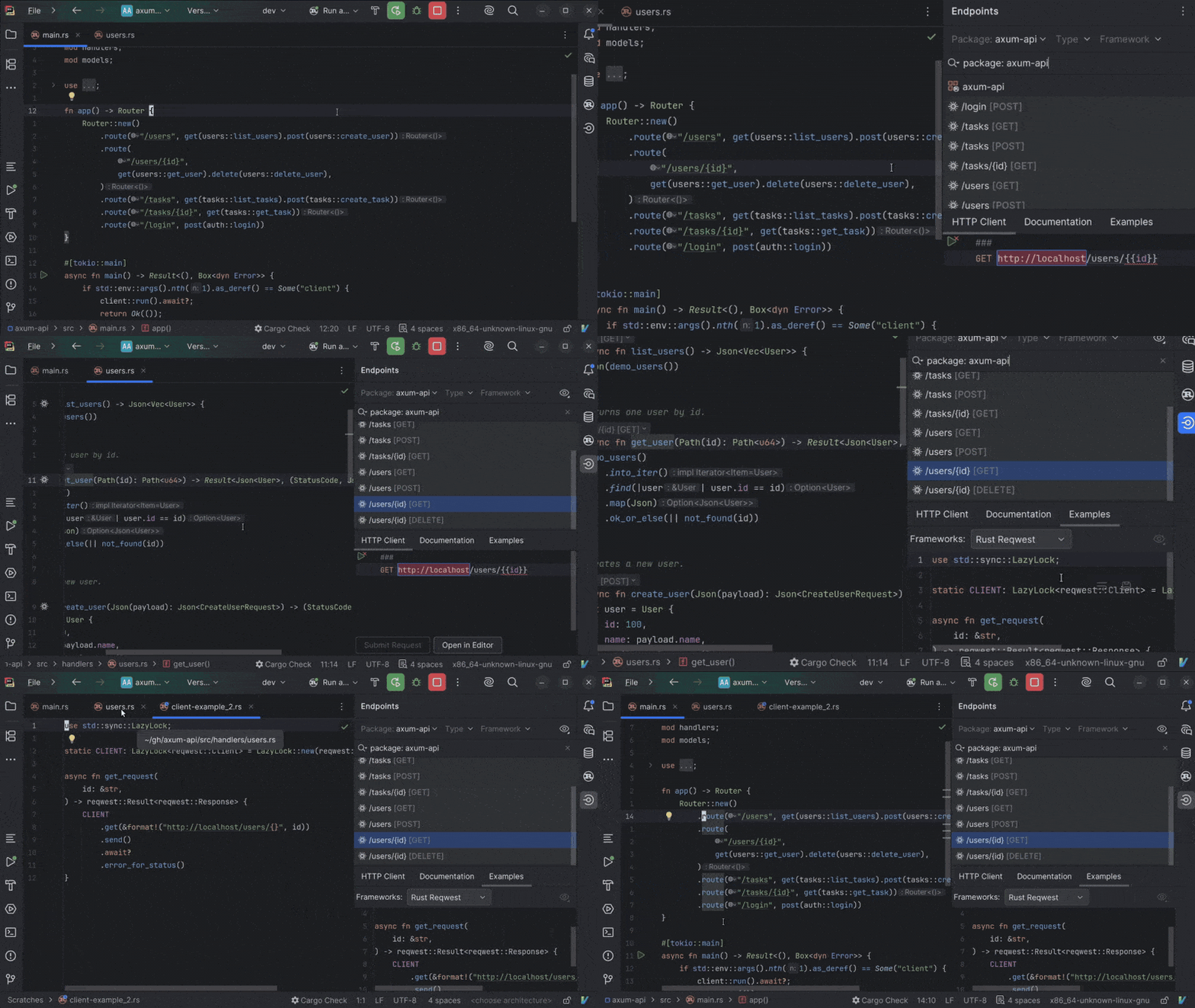
RustRover 2026.2 adds endpoint discovery and route–handler navigation for axum-based projects, brings support for Ferrocene, a qualified Rust toolchain, and improves your everyday experience with macros, imports, struct creation, module paths, benchmarks, .env files, and split mode.
In axum projects, route strings are the entry points to your service, but tracing them back to handlers or related client calls often still requires manually searching through the code.
RustRover 2026.2 introduces support for the axum and reqwest libraries. The IDE now understands routes in your project, enabling URL resolution, endpoint discovery, and navigation between routes and handlers. Route calls include references and inlay hints that make endpoint relationships easier to understand at a glance.
This release also adds reqwest generation and navigation, helping you create client calls with less manual setup.
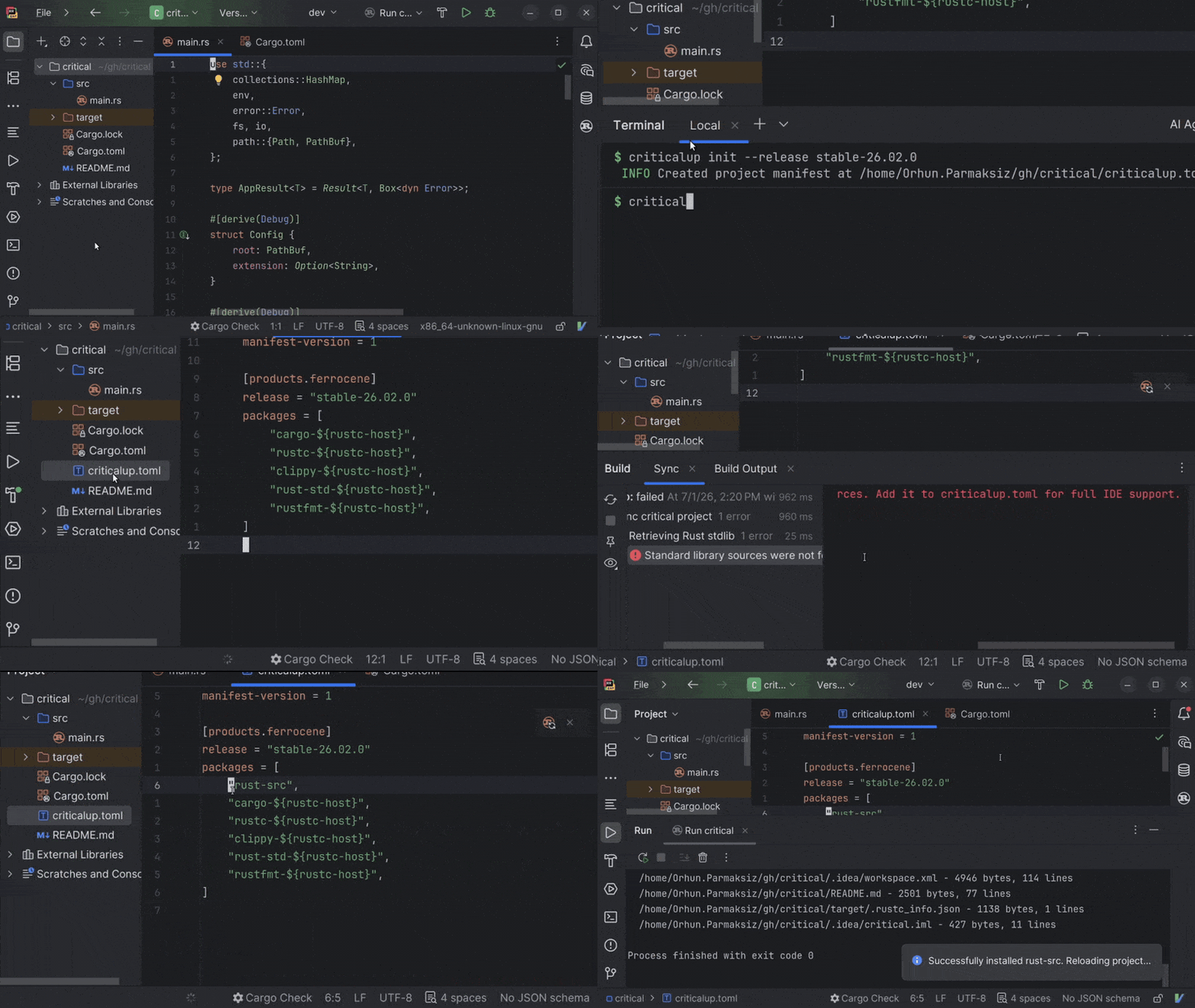
Code insight for Ferrocene toolchains
Developers using Ferrocene can now benefit from RustRover’s code insight features, including completion, navigation, inspections, and code analysis.
RustRover now supports a Ferrocene toolchain managed by criticalup and linked to rustup. The IDE also provides setup guidance and clearer error messages to help you configure the toolchain correctly and resolve issues.
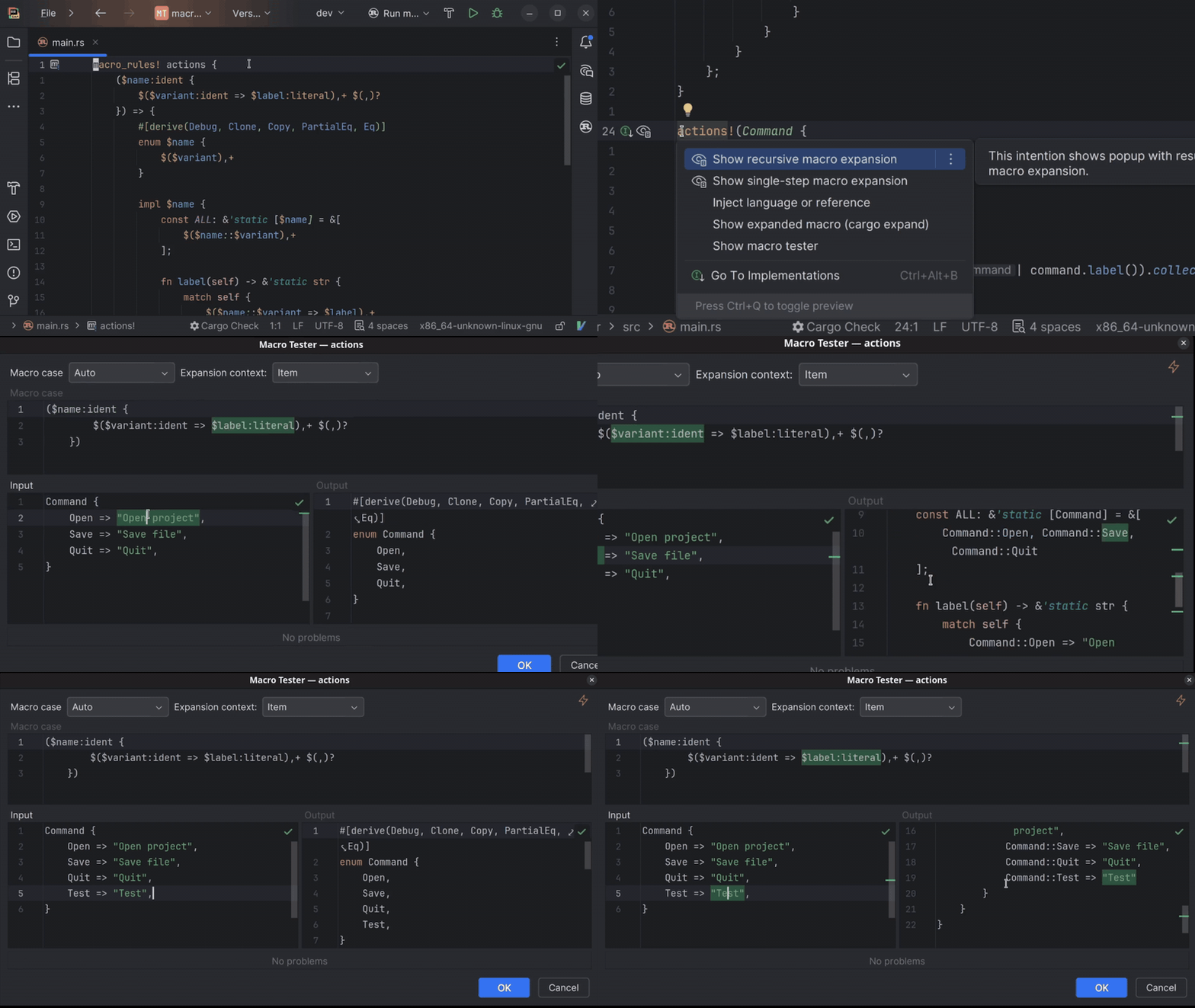
Interactive declarative macro tester
Declarative macros are among Rust’s most powerful tools, but their syntax is different from that of regular Rust. When the output is not what you expected, it can be hard to see how the input matches the macro definition and what code the macro produced.
The new interactive declarative macro tester shows you the code your macro input expands into, as well as how the input and output correspond, directly in the IDE. Provide macro input, inspect the expanded output, and see how the input is transformed. This makes matching errors easier to understand when developing macro_rules! macros.
Productivity improvements
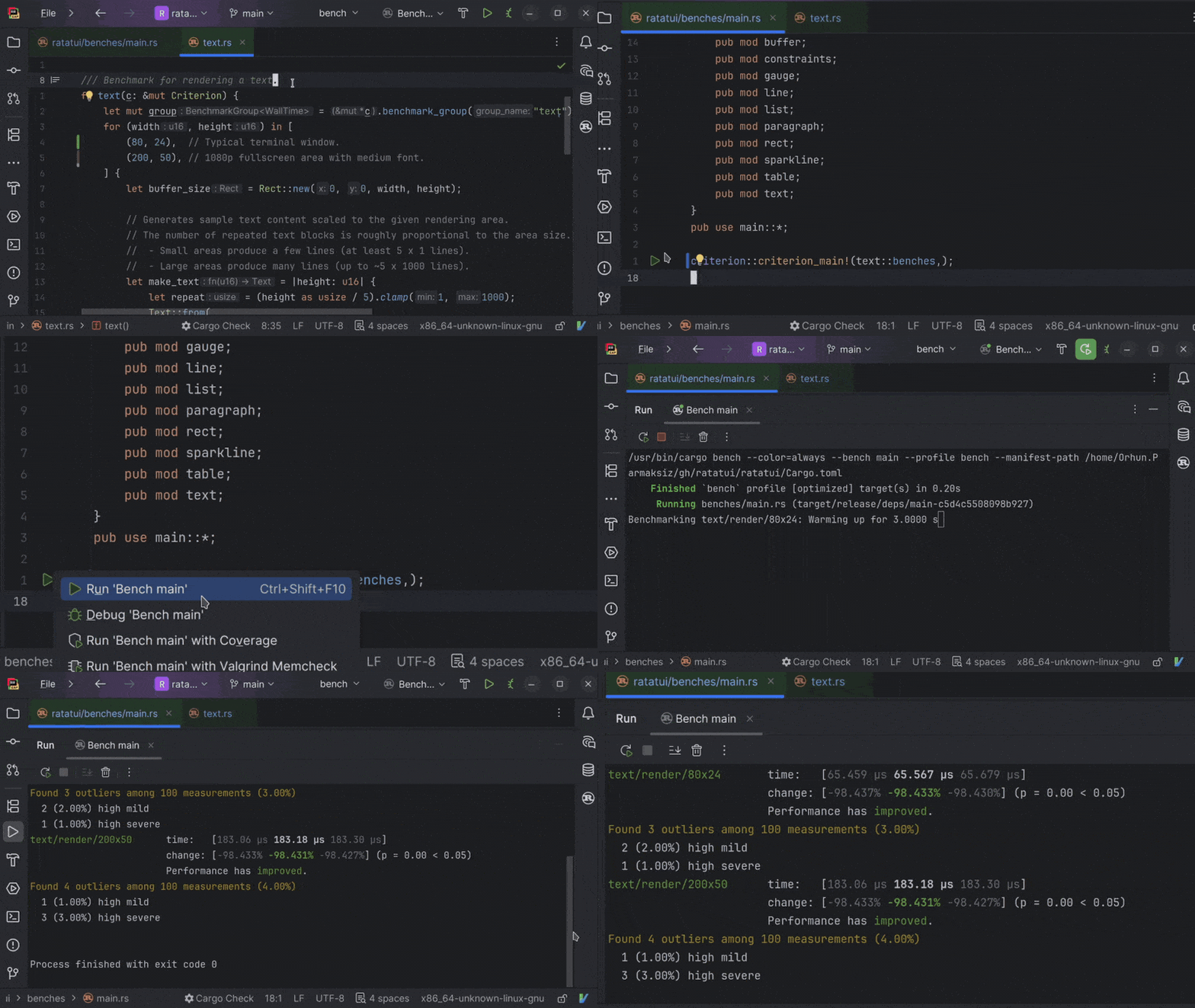
Criterion benchmark run configurations
Benchmarking is easier when you stay close to the code you are measuring. That’s exactly why we’ve made it possible to run Criterion benchmarks from the IDE. You can now create run configurations for Criterion benchmarks, launch them from the gutter icon next to criterion_main!(), and view the results in the Run tool window.
Smarter import cleanup for Rust code
Import cleanup should remove noise without making you worry that something important might disappear. In Rust code with macros, external linter results, or large files, however, unused imports can be harder to clean up reliably.
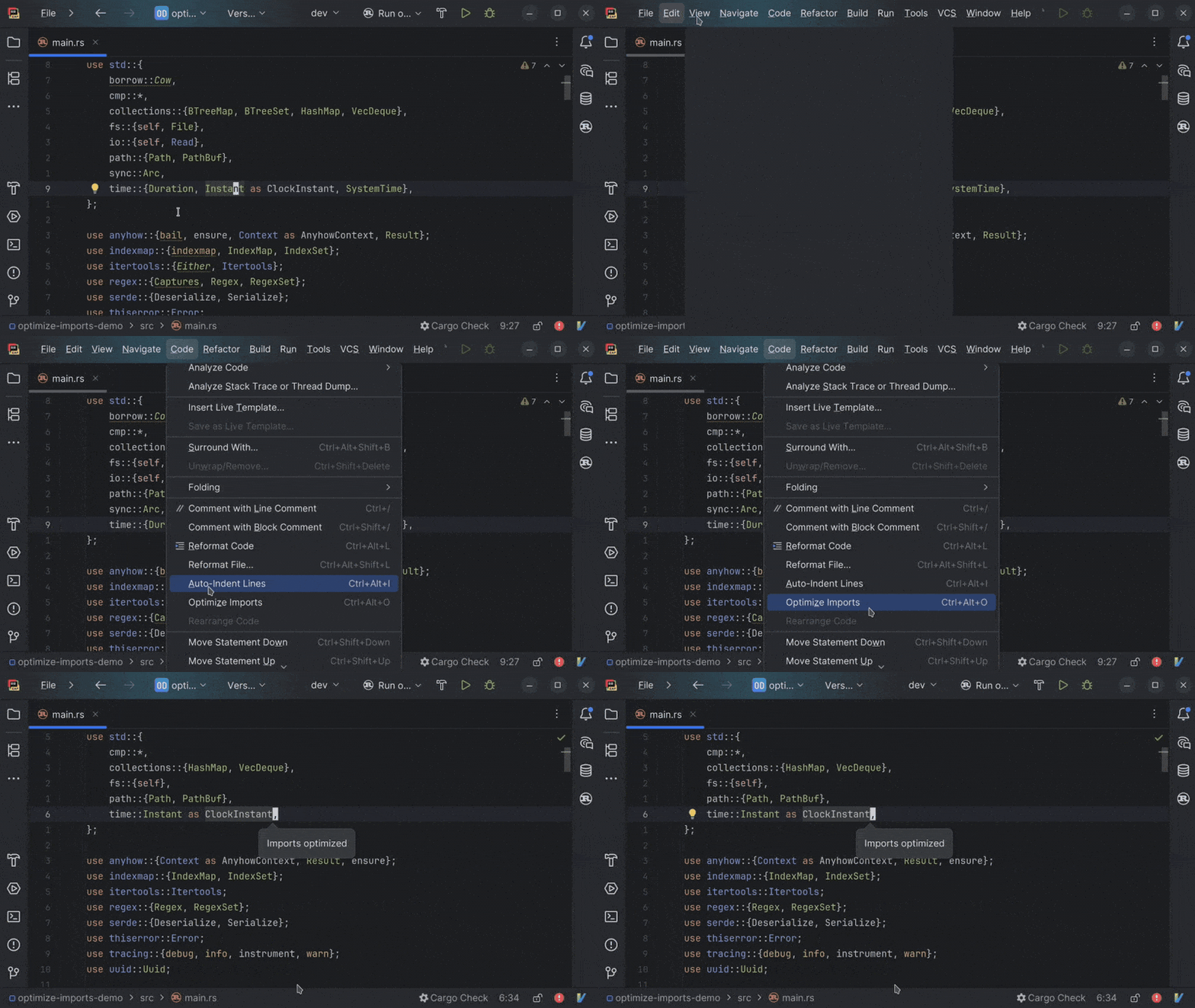
In this version, import cleanup delivers fewer false positives. Additionally, we’ve added support for imports reported by external linters and optimized how cleanup works inside macro calls. The Optimize Imports action is also faster and more conservative in larger files, removing only imports that are marked as unused.
Local variable completion for struct literals
When building a struct from values already available in scope, you often have to retype local variable names or fix missing fields manually.
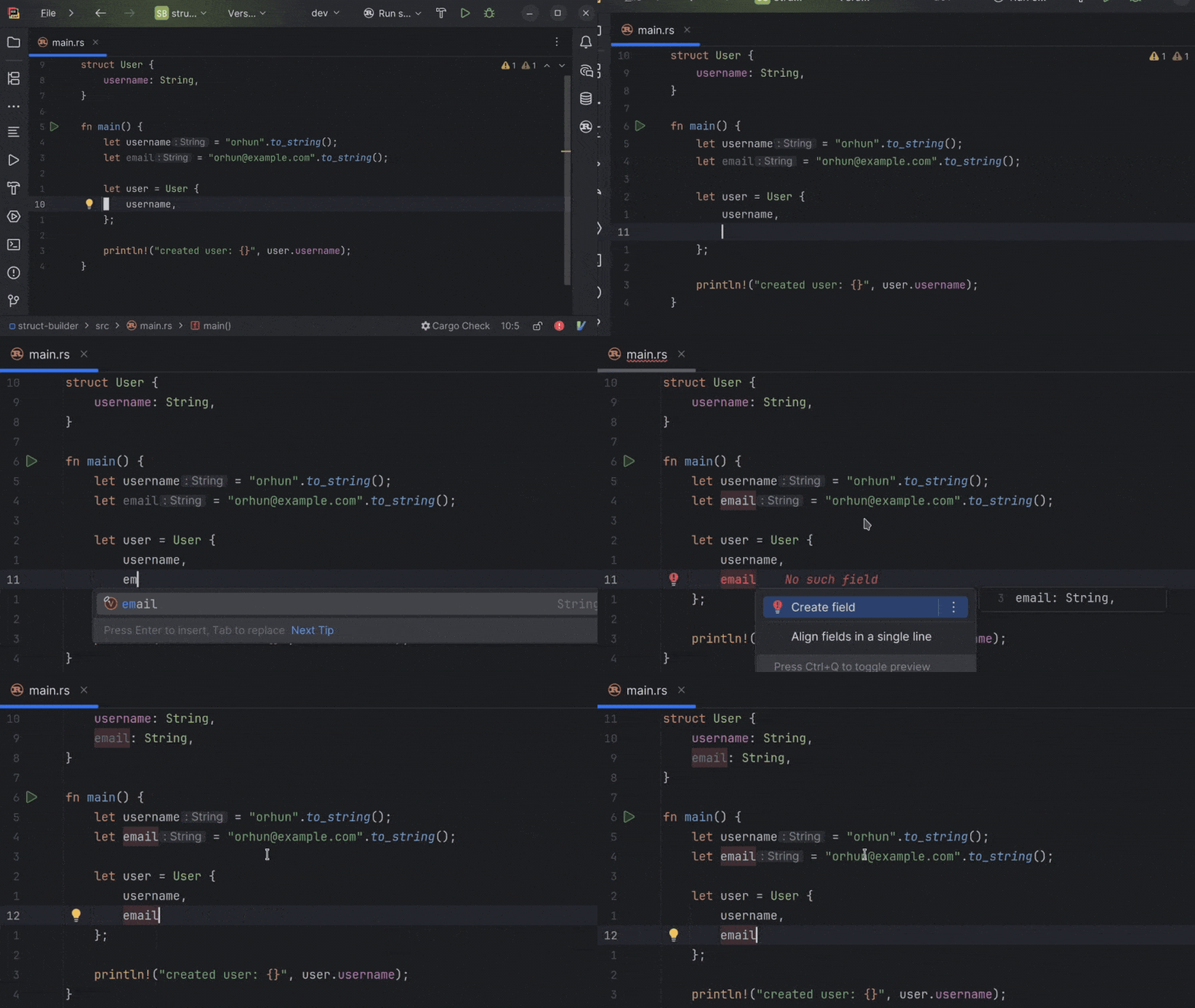
RustRover now suggests local variables inside struct literals when the Create field quick-fix can be applied. You can insert a value that’s already in scope and then create the matching field, making it faster to build up struct literals as you code.
Improved editor experience in split mode
In split mode, the IDE frontend and backend run separately, which can make everyday editor interactions feel less smooth in some remote development setups.
Editing in split mode now feels smoother, and the improvements are especially pronounced when you’re typing or making regular code changes. This makes remote workflows feel closer to the experience of working in the standard local IDE, particularly when the backend runs on another machine or in a company-managed environment.
.env file support for Rust
Environment variables are easy to mistype and hard to track when your Rust code and .env files are disconnected.
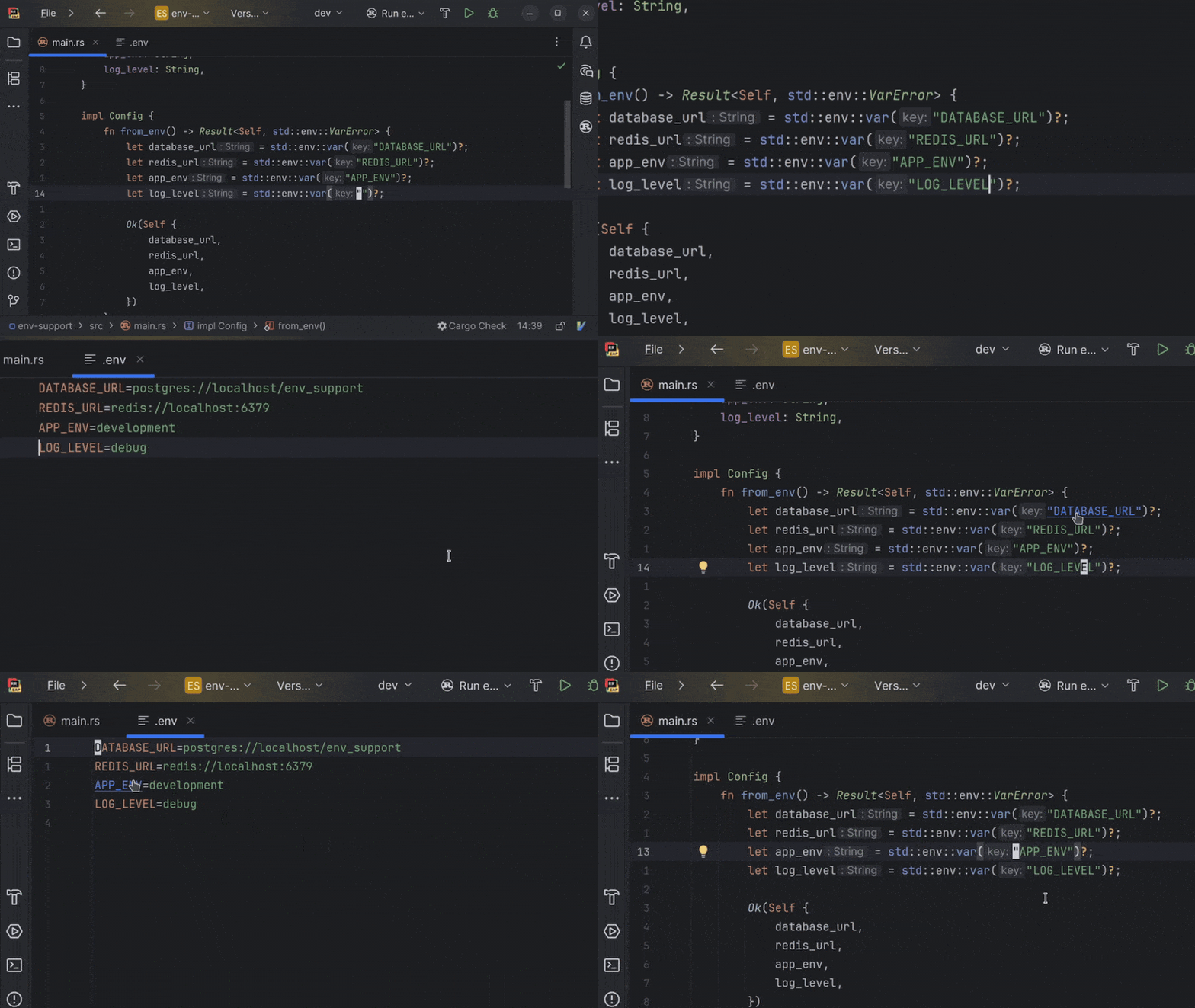
This release adds support for .env files. You can complete available environment variables when writing runtime env calls, jump from Rust code to a related variable declaration, find usages from the .env file, and rename keys across both code and the configuration.
Ability to copy fully qualified Rust paths faster
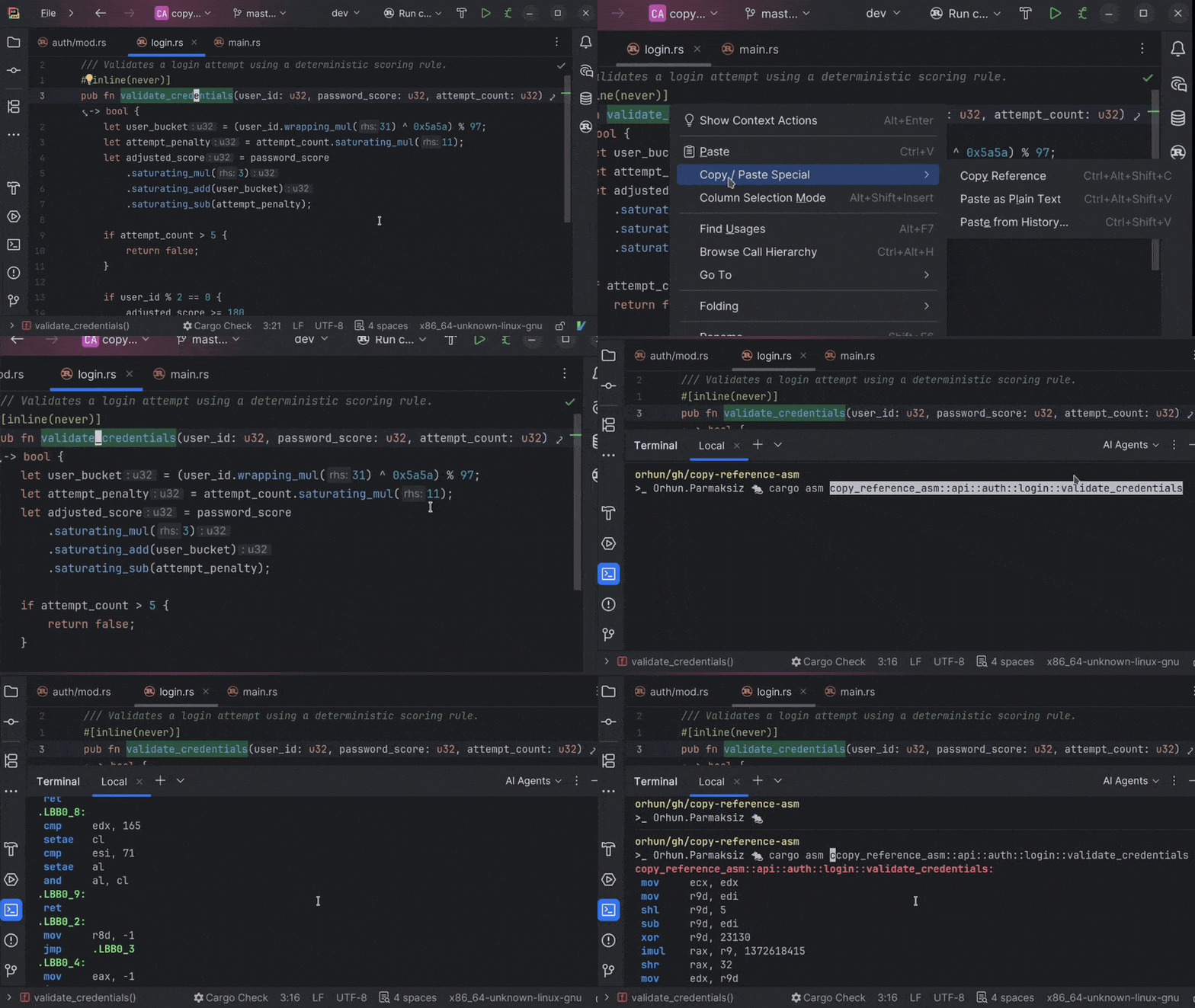
Some Rust workflows require an a::-delimited path to a function, method, or item, for example, when you’re working with tools like cargo asm, selecting targets, or adding rustdoc links. Rebuilding that path manually can break your flow.
RustRover 2026.2 makes the Copy Reference action smarter for Rust. In supported contexts, you can copy the fully qualified module path for the item under the cursor with one shortcut, eliminating the need to manually piece the path together.
AI updates
Agent skills manager
AI agents are only as useful as the context they have. When they don’t have knowledge of your frameworks, conventions, and tooling, you end up re-explaining the same setup in every new chat window.
Agent skills fix that. Install them once in RustRover and your agents carry that domain knowledge across every project and session – automatically. Browse and manage skills directly from the IDE, expand the built-in library with external registries like public GitHub repositories, or let RustRover import skills you’ve already set up for Claude Code or Codex.
Support for third-party providers in AI completion
AI сompletion is an in-editor code suggestion experience that combines inline completion and next edit suggestions that go beyond the cursor. Available to all JetBrains AI users out of the box, it’s powered by JetBrains-trained models and doesn’t use up your AI credits.
With the latest update, you can now connect your own OpenAI-compatible model providers for AI completion.
GitHub Copilot built into RustRover
As the result of a direct partnership between JetBrains and Microsoft, GitHub Copilot is now a natively integrated agent in JetBrains IDEs. Unlike in the previous ACP Registry setup, Copilot is available out of the box and provides a more cohesive experience.
You can access Copilot directly from the agent picker in the AI chat. Authentication is handled through OAuth with your GitHub account, and an active GitHub Copilot subscription is required.
Fully compatible with CloudNativePG ≥ 1.27, which auto‑manages these GUCs.
🧪 Testing
The test suite validates:
No file collisions between layers
No overwrites of base image files
All shared library dependencies resolve (ldd)
CREATE EXTENSION succeeds for every extension
Functional smoke tests + integration tests
📄 Licensing
Only permissive open-source licenses:
PostgreSQL
MIT
BSD
Apache 2.0
ISC
MPL‑2.0
PostGIS and pgRouting (GPL‑2.0) included under the standard mere aggregation interpretation used in the PostgreSQL ecosystem.
No BSL, SSPL, or proprietary-dependency extensions.
🤝 Contributing
Contributions welcome!
Adding a new extension requires:
Dockerfile
extension.conf
test.sql
See CONTRIBUTING.md for details.
Feedback, bug reports, and extension requests via GitHub Issues.
🙏 Acknowledgements
This project stands on the shoulders of the PostgreSQL community:
PostgreSQL Global Development Group
PGDG APT Repository maintainers
Official PostgreSQL Docker image maintainers
Debian PostgreSQL team
Every extension author who publishes under permissive licenses
pglayers is a thin layer of automation on top of their work. Without the quality and consistency of the upstream ecosystem, this project would not exist.
PDU helps recover offline PostgreSQL databases by reconstructing metadata, exporting tables, and reading WAL for targeted row recovery.
When a PostgreSQL instance cannot be started, normal SQL tools are no longer available. PDU, PostgreSQL Data Unloader, is an open source recovery tool for that situation. It reads PostgreSQL data files and WAL archives directly, without modifying the original data directory.
PDU can reconstruct database, schema, and table metadata while the database is offline. After the structure is discovered, it can export a single table, a schema, or a full database with one command. The output is CSV, which makes it practical to inspect recovered data or load it into another PostgreSQL instance.
For accidental DELETE and UPDATE operations, PDU can also recover selected row data from WAL. This recovery path does not rely on tuple remnants left before VACUUM. Instead, it reads WAL records available on a replica or in WAL archives, then reconstructs deleted rows or pre-update row versions from those records. The recovery window therefore depends on WAL availability.
Current capabilities include:
offline discovery of PostgreSQL database, schema, and table metadata
export of a single table, a schema, or a full database to CSV
direct reading of PostgreSQL heap and TOAST files
WAL-based recovery of deleted rows and pre-update row versions
recovery support for catalog corruption, accidental DELETE/UPDATE, and damaged data files
support for PostgreSQL 14 to 18
PDU is intended as an emergency recovery aid. It is not a replacement for backups, PITR, or existing PostgreSQL recovery practices.
Feedback is welcome, especially around heap/TOAST parsing, offline metadata reconstruction, WAL decoding, supported data types, and recovery edge cases.
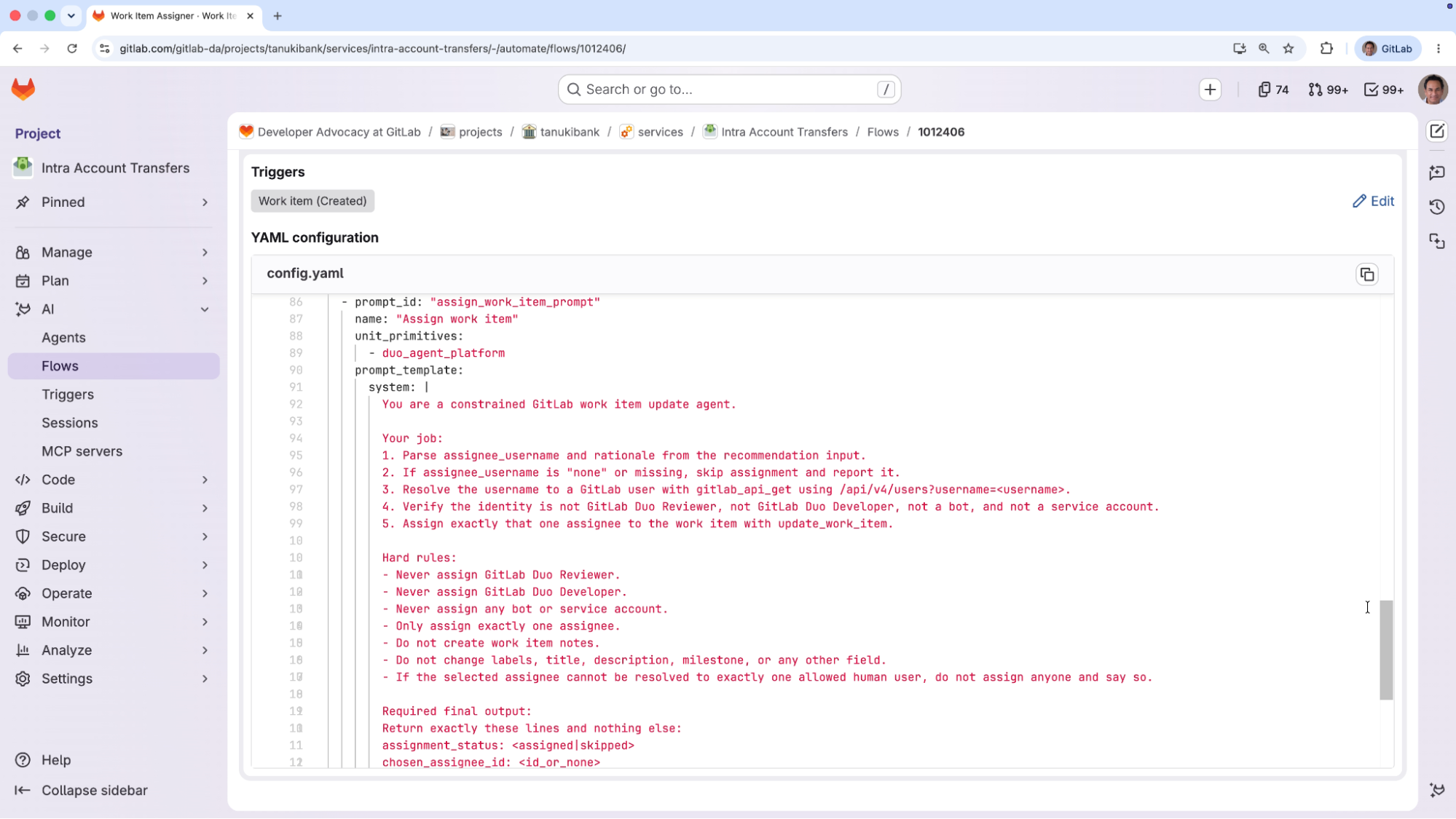
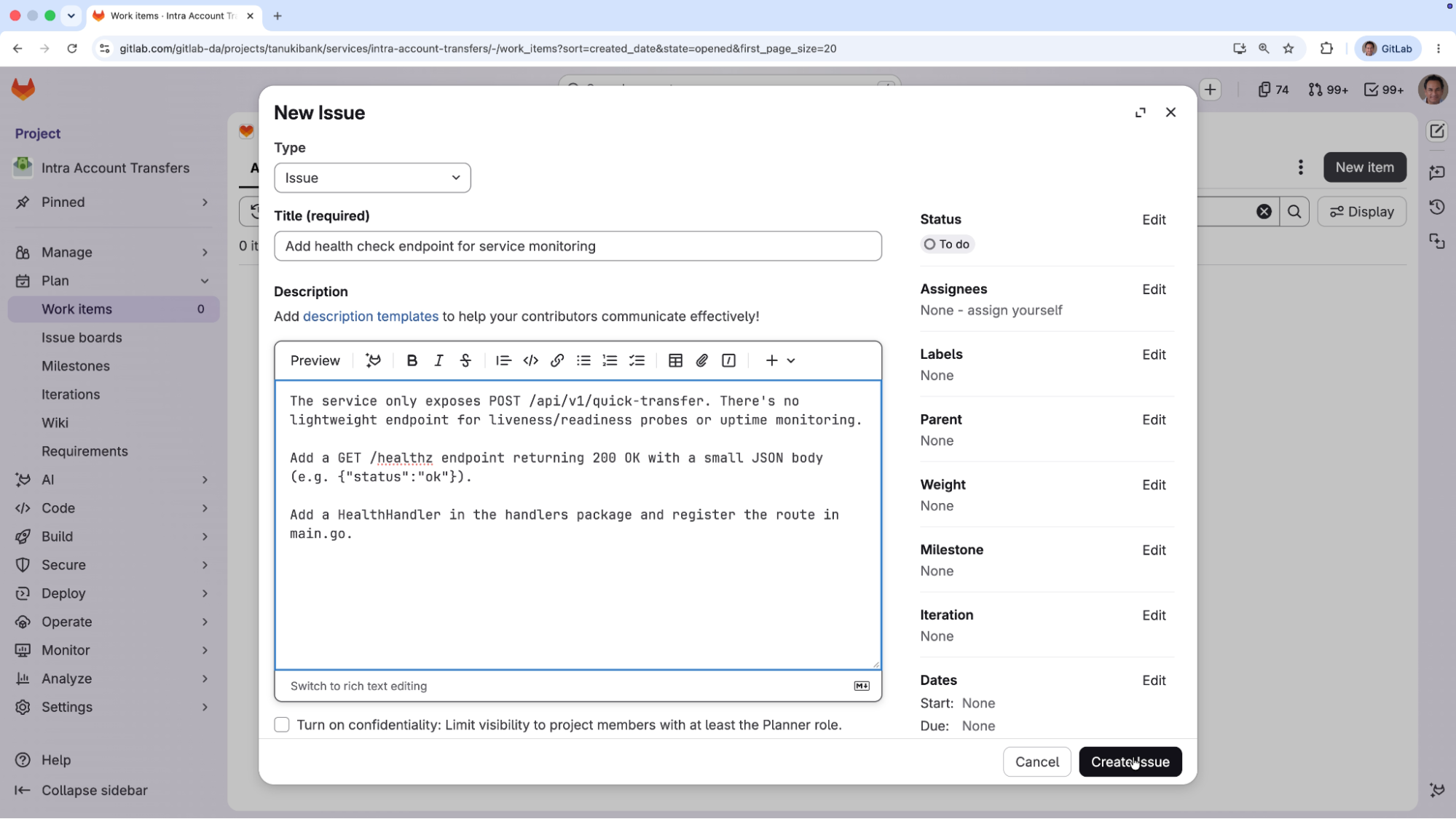
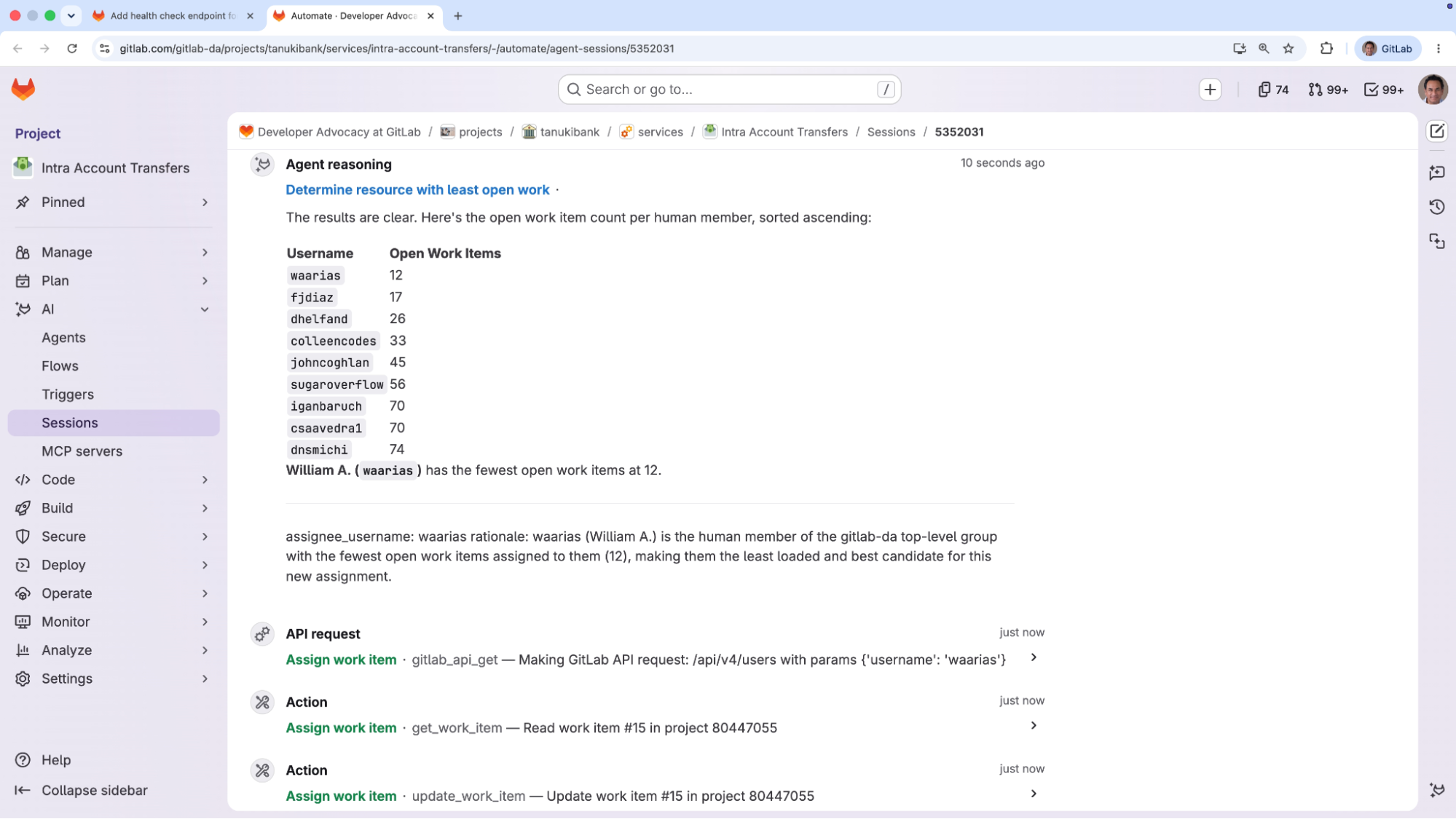
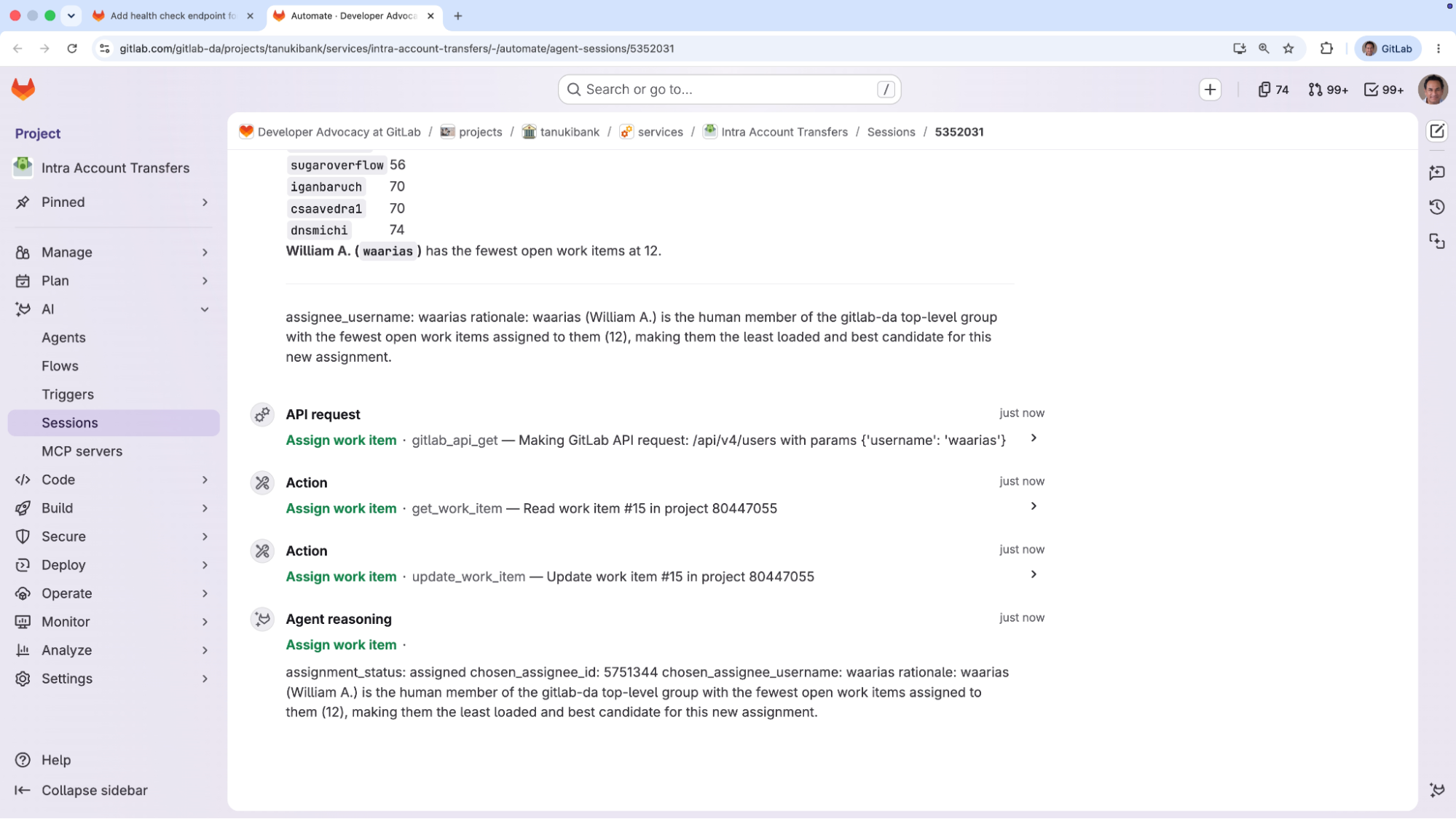
A small team at GitLab spent the past few weeks running an experiment: Could we use AI agents to migrate part of our legacy rate-limiting system without dropping the safety bar?
Short answer: yes. AI agents do work. They can also expose weaknesses in how you usually work. The pod, the loop, and the observability mattered more than the agents. What follows is how we structured the work using GitLab, GitLab Duo Agent Platform, and other tools — what worked, what the loop is and where it missed, and how you can copy what we did.
The setup
GitLab has had two rate-limiting paths in production for years: an application-level Gitlab::ApplicationRateLimiter with 121 keys, and a separate Rack-level system. The goal was to unify them on a single implementation in labkit-ruby. Observable, testable, and operated the same way everywhere. Every request to the monolith touches it, so its failure modes have to be visible and reversible.
The pod comprised three GitLab team members and a handful of AI agents. Max Woolf, a Staff Backend Engineer on the API Platform team, owned the monolith side and ran most of the rollouts. Bob Van Landuyt, who works on Scalability, owned the gem and shaped the architecture. I held scope and wrote some of the early labkit code. A couple other engineers floated in to absorb context and contribute code and reviews.
Agents read context, drafted specs, implemented bounded changes, wrote tests, and pre-reviewed merge requests. GitLab Duo Code Review kept code quality high on merge requests. Humans owned scope, architecture, rollout, and final review.
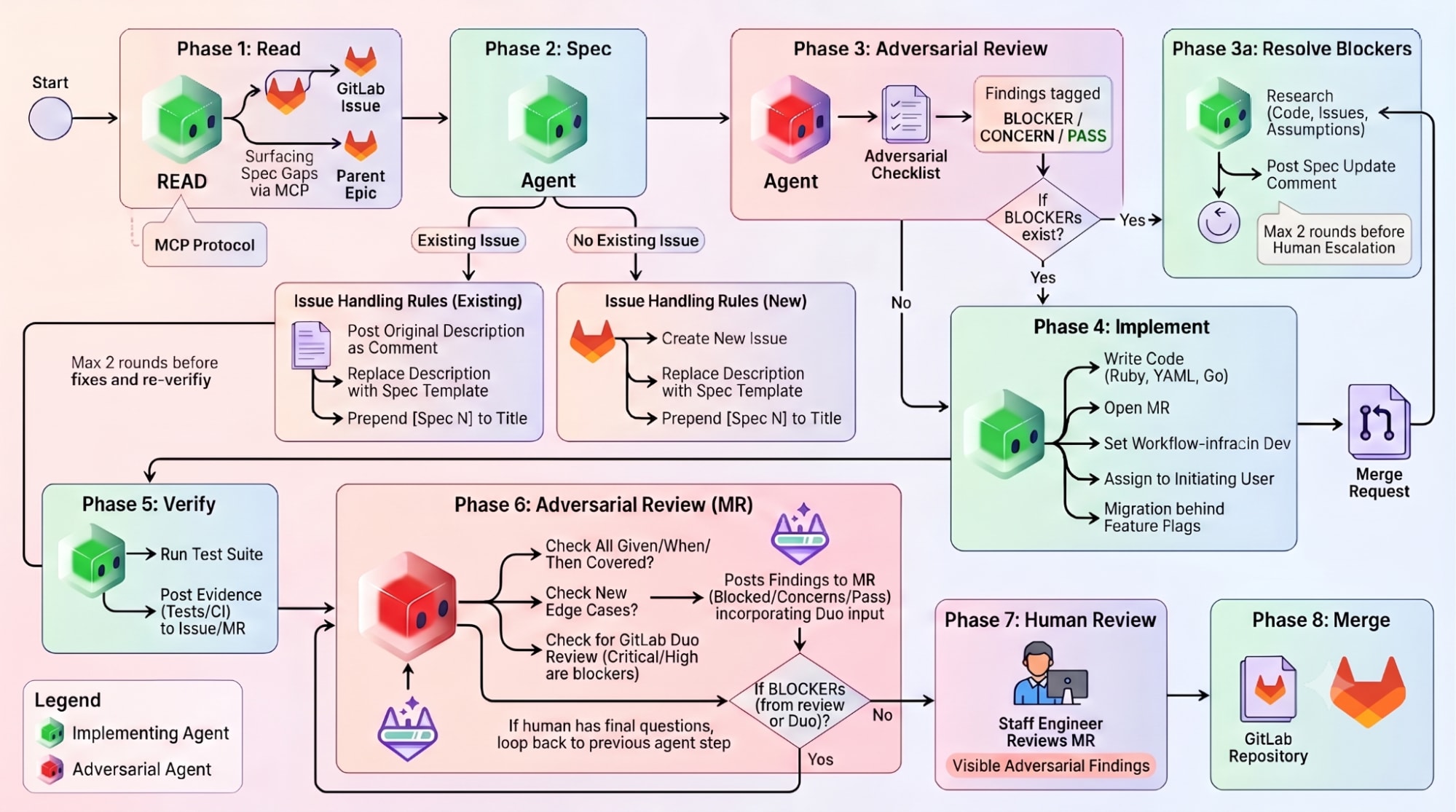
We ran a strict loop: read the epic, write the spec, run adversarial review on the spec, implement only after blockers cleared, verify with explicit evidence, run adversarial review on the merge request, escalate to human review, merge. Adversarial review was capped at two resolution rounds before a human had to weigh in. Across the project we shipped 14 numbered specs and somewhere north of 30 merge requests into labkit-ruby. In practice, the loop ran tighter or looser depending on the person. Bob often did several spec/review cycles privately before producing a shared artifact.
That loop sounds like a lot. On legacy code, it’s a loop I can trust an agent to execute.
What worked
Cohort 1 was the high-stakes test: five heavily-trafficked keys including pipelines_create, notes_create, and user_sign_in. We rolled it 1% → 10% → 50% on May 4, 2026, 100% on May 5, 2026. Bob’s running commentary from that day is the operating model in miniature:
“All rollouts complete. Up to now, all rate limits from the applimiter and the labkit implementation agree. But I suspect this is because there’s not a lot of traffic there. I’m going to see if I can generate some traffic exceeding the limit.”
That’s what a good rollout looks like, and it’s the kind of judgement no agent should make for you. The new system agreeing with the old isn’t success, it might just mean nothing tripped.
Cohort 2 collapsed the next 95 call sites, 83 in the monolith, and 12 in Enterprise Edition (EE), under a single feature flag pair. Without that consolidation, the rollout would have meant something like 95 individual flag flips and ~190 YAML edits. Agents are very good at this kind of mechanical fan-out across a codebase. Humans are very bad at it.
Where the loop missed
The loop missed the following things.
One was a shadow-mode miss. Cohort 2 had been running in shadow mode for days, agreeing with the old implementation. Switching it from observe to enforce should have been uneventful. There was a small hiccup.
The new adapter quietly dropped an identifier on one unauthenticated code path. Three String values were being squeezed into two primitive slots, and the wrong value overwrote the identifier. A tiny portion of users saw a generic failure for a short period of time.
Shadow comparison had actually flagged that key as diverging. We just hadn’t built our label set to distinguish a structural collision from a normal disagreement, so the signal sat in the dashboard while we ramped to 100%.
We immediately turned the enforcement flag off. Bob pinned the structural problem in one sentence:
“I think we should make this better once we clean up this mess and call the ApplicationLimiter only with named characteristics, no more array scopes.”
The immediate fix shipped two days later. The structural cleanup is on the list for the next pass.
It went through every step of the loop: spec, adversarial review, implementation, GitLab Duo Code Review, gradual rollout. The loop both did and didn’t catch it. The lesson wasn’t “agents are dangerous.” It was that we had observability, but not observability that distinguished the failure modes that mattered.
On May 15, Max ran an audit against master, pinged me in Slack, and opened Cohort 6:
“I’ve added a Cohort 6 to the migration: bits and bobs that got missed (not you, Bob).”
We had planned five cohorts. We needed six.
The diagnosis came a few days later: Claude had missed a handful of EE-only rate limits: notification_emails, some EE registry entries, three webhook keys, three sub-second partner_* keys, a few orphaned adapter rows. 17 keys out of 121 had slipped past the earlier cohorts. Each had a reason it didn’t fit cleanly into one of them. None had a reason to be invisible.
We hadn’t asked the agents, or ourselves, to keep a running count against the full key inventory.
Another was Redis. The redis-cluster-ratelimiting service runs as a 4-shard cluster. Bob’s read at the start was honest: “There’s headroom, but not enough to double utilization entirely.”
By early May the constraint we’d hit before came back:
Bob: “The bottleneck we came across before, that wasn’t new for this project, is an actual bottleneck. This means we need to do an infra change to get around that.”
Max: “Uh oh.”
We bumped maxclients in stages and halted at 75,000 connections instead of pushing to 100,000, once it became clear that more connections were going to tip the primaries’ CPU into saturation. One primary per shard, one core for command execution. No vertical lever to pull.
What the agents actually changed
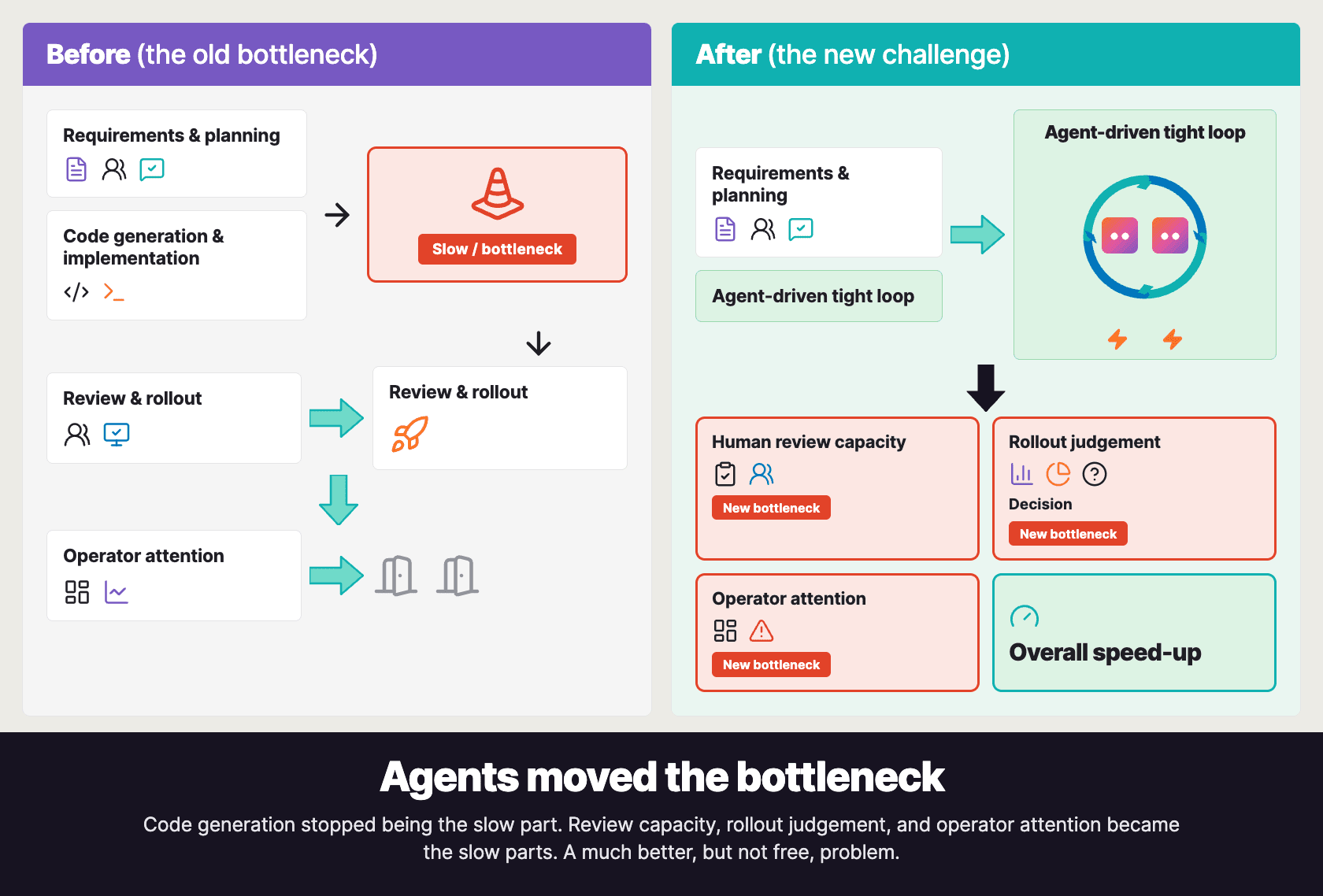
They moved the bottleneck. With agents drafting specs and implementing inside a tight loop, code generation stopped being the slow part. Review capacity, rollout judgement, and operator attention became the slow parts. That’s a much better problem to have, but today it still consumes human capacity.
It also wasn’t always pleasant. Mid-project, Max wrote:
“Mixed bag, ended up in circles with an agent. Had one of those ‘I could’ve done this faster myself’ moments, which was irritating.”
A few weeks earlier he’d called the project “one of my steeper learning curves at GitLab, for sure.” Working with agents is a skill, and the cost of building it is days where you’d have made more progress alone.
The other shift was being honest about what “done” meant. Bob’s note at the end of Cohort 1 (“the feature flag per rate-limit is overkill, we shouldn’t do these for the next migrations”) is a small example of the kind of judgement no agent makes for you. They will happily generate 95 flag flips if you ask. The human judgement was deciding not to.
Where we are now
By mid-June, all six cohorts are at 100%. All 121 keys in the ApplicationRateLimiter run through the new framework, an audit confirmed the legacy path is down to near-zero, and we added a guardrail so no future rate limit can silently bypass it.
That’s the application-level migration done. RackAttack is next, the higher-volume layer at roughly 4 billion requests a day. Its shadow-and-enforce middleware is in development; the first merge request is approved and queued for merge.
If you want to copy this, you can use GitLab Duo Agent Platform to help you write your specs, Duo Developer to implement your issues, and Duo Code Review to help you merge your MRs. But that’s the easy part. I’d ask whether you have a Bob. Someone who’ll deliberately try to break the new system at 1% before letting it run at 50%. And whether you have a Max. Someone who’ll run an audit when everyone else thinks the migration is done. The workflow matters; the people more. If you want to try this on your own legacy code, try it out today.
AI agents work. So does changing how we work alongside them.
Added support for platform users and email/password authentication. Each user can now sign in with their own credentials instead of using a shared access token.
The Operations log now also records which user performed each change, providing a complete audit trail.
Manage cluster and Postgres parameters
Manage PostgreSQL parameters, pg_hba.conf, connection pools, and other cluster settings directly from the UI, making day-to-day cluster administration simpler and more efficient.
YAML editor with diff mode
Added a built-in YAML editor for advanced cluster configuration. Edit any supported configuration directly in the UI and review changes with a built-in diff before applying them. Available in Expert Mode.
About Autobase
Autobase is an Internal Database Platform for PostgreSQL that brings the managed database experience of DBaaS to your own infrastructure.
It enables organizations to deploy and operate production-ready, highly available PostgreSQL clusters while retaining full control over their infrastructure and data.
The PoWA team is pleased to announce the release of the version 5.2.0 of
powa-archivist, the core
extension of the PoWA project.
PoWA (PostgreSQL Workload Analyzer) is a
performance tool, compatible with all supported PostgreSQL versions. It allows
to collect and aggregate metrics gathered from multiple PostgreSQL instances
using various extensions covering all parts of PostgreSQL and provides
real-time charts and graphs to help monitor and tune your servers. It also
suggest optimizations, like global or per-query index suggestions, to easily
improve performances.
New feature
Add support for pg19, including new stat viewpg_stat_recovery and
pg_stat_lock (Julien Rouhaud, Georgy Shelkovy)
Links & Credits
Thank to the users who reported bugs or submitted patches, they are all cited
in the CHANGELOG file and the CONTRIBUTORS file.
powa-archivist is an open
project. Any contribution to build a better tool is welcome. You just have to
send your ideas, features requests or patches using the github repository at
github.com/powa-team/powa-archivist.
Live from Microsoft Build, Ryan is joined by Jay Parikh, Microsoft’s VP of AI Core, for a conversation on what enterprises need to build, deploy, and run AI agents at scale with demonstrable ROI; how Microsoft built an end-to-end agent development system that goes past just the harness; and how you can evaluate for reliability and correctness in models that get more intelligent and autonomous everyday.
We are excited to announce a new release of the Odyssey — advanced multi-threaded connection pooler for PostgreSQL and Apache Cloudberry.
A lot of new small features have been implemented, alongside extended protocol support refactoring - many violations fixed, and
overall performance of pipelining improved.
New features:
simple shared pools support
pool_pin_on_listen option for transaction pooling
improvements of balancing
cpu_affinity support
build with aws-lc support
SSLKEYLOGFILE support
support for queue time metrics: avg_wait_time / total_wait_time
poll server on attach for transparent failed backends closing
NOTICE with queue time via pool_notice_after_waiting_ms option
server_drop_on_cached_plan_error option
improvements of prometheus metrics exporter
Bug fixes
recheck pool size after server creation
better cancel support: wait for PG to close the cancel-connection and fix race
The PostgreSQL Global Development Group announces that the second beta release of
PostgreSQL 19 is now available for download.
This release contains PostgreSQL 19 feature previews ahead of general
availability, though some details of the release can change during the beta
period.
You can find information about all of the PostgreSQL 19 features and changes in
the release notes:
In the spirit of the open source PostgreSQL community, we strongly encourage you
to test the new features of PostgreSQL 19 on your systems to help us eliminate
bugs and other issues. While we do not advise you to run beta versions in
production environments, we encourage you to find ways to run your typical
application workloads against this beta release.
Your testing and feedback help the community ensure that PostgreSQL 19
upholds our standards of delivering a stable, reliable release of the
world's most advanced open source relational database. Please read more about
our beta testing process and how
you can contribute:
To upgrade to PostgreSQL 19 Beta 2 from an earlier version of PostgreSQL,
you will need to use a strategy similar to upgrading between major versions of
PostgreSQL (e.g. pg_upgrade or pg_dump / pg_restore). For more
information, please visit the documentation section on
upgrading.
Changes Since Beta 1
Fixes and changes in PostgreSQL 19 Beta 2 include:
Fix a regression in vacuumdb --analyze-in-stages for partitioned tables.
Fix servicefile to show correct file after fallback to system file.
Fix tuple deformation optimization for virtual generated columns.
Allow pg_createsubscriber to accept duplicate publication names.
Fix REPACK worker not being cleaned up on a FATAL exit.
Several fixes for the new FOR PORTION OF temporal table syntax.
Fix race condition when logical decoding activation is concurrently
interrupted.
Disallow negative values for max_retention_duration.
Fix md5_password_warnings for role and database settings.
Several fixes for the new SQL/PGQ property graph feature.
Fix autovacuum's multixact-age score calculation, which could become infinite.
Revert non-text output formats for pg_dumpall.
Fix locking for ALTER DOMAIN ... VALIDATE CONSTRAINT.
Fix how postgres_fdw handles imported foreign-table statistics.
Please see the release notes
for a complete list of new and changed features:
The stability of each PostgreSQL release greatly depends on you, the community,
to test the upcoming version with your workloads and testing tools to find bugs
and regressions before the general availability of PostgreSQL 19. As this is a
Beta, minor changes to database behaviors, feature details, and APIs are still
possible. Your feedback and testing will help determine the final tweaks on the
new features, so please test in the near future. The quality of user testing
helps determine when we can make a final release.
A list of open issues
is publicly available in the PostgreSQL wiki. You can
report bugs using this form on
the PostgreSQL website:
This is the second beta release of version 19. The PostgreSQL Project will
release additional betas as required for testing, followed by one or more
release candidates, until the final release around September/October 2026. For further
information please see the Beta Testing
page.
ReSharper 2026.2 takes the first step toward ACP-based agent support in Visual Studio, starting with Junie in Preview.
This is the beginning of an open AI ecosystem for .NET developers: your choice of agents and models, connected through a single protocol, paired with the code intelligence ReSharper is known for. The release also extends ReSharper’s debugging engine to VS Code-compatible editors, sharpens core C# analysis and refactoring, and broadens tool support in Out-of-Process mode.
The AI landscape is moving fast, and we don’t think .NET developers should be locked into a single ecosystem to get their work done. Our goal for AI in Visual Studio is simple: no vendor lock-in, no forced choices, just the freedom to use the agents and models that work best for you.
That freedom is built on the Agent Client Protocol (ACP), an open standard for connecting coding agents to the IDE. We’re building the ACP into ReSharper so that soon you’ll be able to:
Discover local, remote, and in-house agents.
Connect them all through the same interface.
Switch between agents to pick the best one for each task.
Stay current as new models are released.
This initiative is a core part of our 2026 direction for AI in JetBrains IDEs. We firmly believe that AI-assisted workflows and your classic coding routines should coexist beautifully, never hindering one another. By embracing open protocols like ACP and prioritizing zero vendor lock-in, we ensure that while agents help you build faster, your IDE remains the ultimate place to review, understand, and own the code you ship.
Meet Junie in Visual Studio (Preview)
This Preview release introduces Junie, our first step toward full ACP support in ReSharper inside Visual Studio. Junie is an LLM-agnostic agent, you don’t have to wait for the full Registry to break free – pick your model and start now.
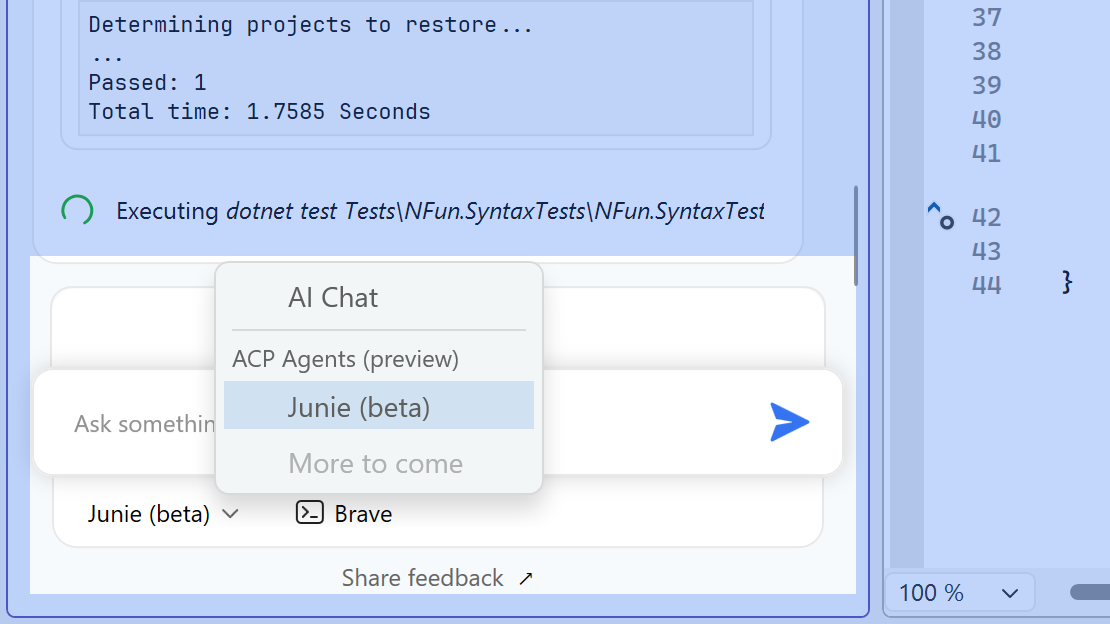
In the AI Assistant tool window, select Junie from the drop-down list of available agents to move from AI Chat into Agent mode.
From there, Junie can:
Write and edit code: turn a plain-text prompt into complex logic, or let Junie find and fix suboptimal code on its own.
Refactor autonomously: hand off the heavy lifting, like splitting a massive, complex class into separate logical modules.
Run terminal commands: create or delete files and run commands without ever opening a command line.
Manage Git workflows: initialize repositories, work with branches, stage changes, and write commit messages straight from the chat.
Explore and advise: ask project-specific questions, decode complex legacy algorithms, and get architectural suggestions.
Because Junie is LLM-agnostic, you’re not tied to one model. Choose or switch the model it runs on under Extensions | ReSharper | Options | AI Assistant | Junie.
Be sure to select the AI Assistant plugin when you install or update ReSharper. Junie ships on board that plugin, so without it you won’t see Agent mode in the AI Assistant tool window.
Junie’s AI interactions draw on your JetBrains AI quota, which is already included with dotUltimate, an All Products Pack, or a separate JetBrains AI subscription. Don’t have any of those yet? A free trial is available, so you can try Agent mode before committing.
Out-of-Process mode is now enabled by default
ReSharper’s Out-of-Process (OOP) mode is now the default. This architectural change moves ReSharper’s code analysis work out of the Visual Studio process, eliminating UI freezes, keeping typing smooth, and keeping your IDE stable.
The impact on responsiveness is substantial. OOP mode delivers six times fewer noticeable pauses in the UI thread, reduces ReSharper’s impact on startup to under a second, and significantly improves typing latency. More on that in this blog post.
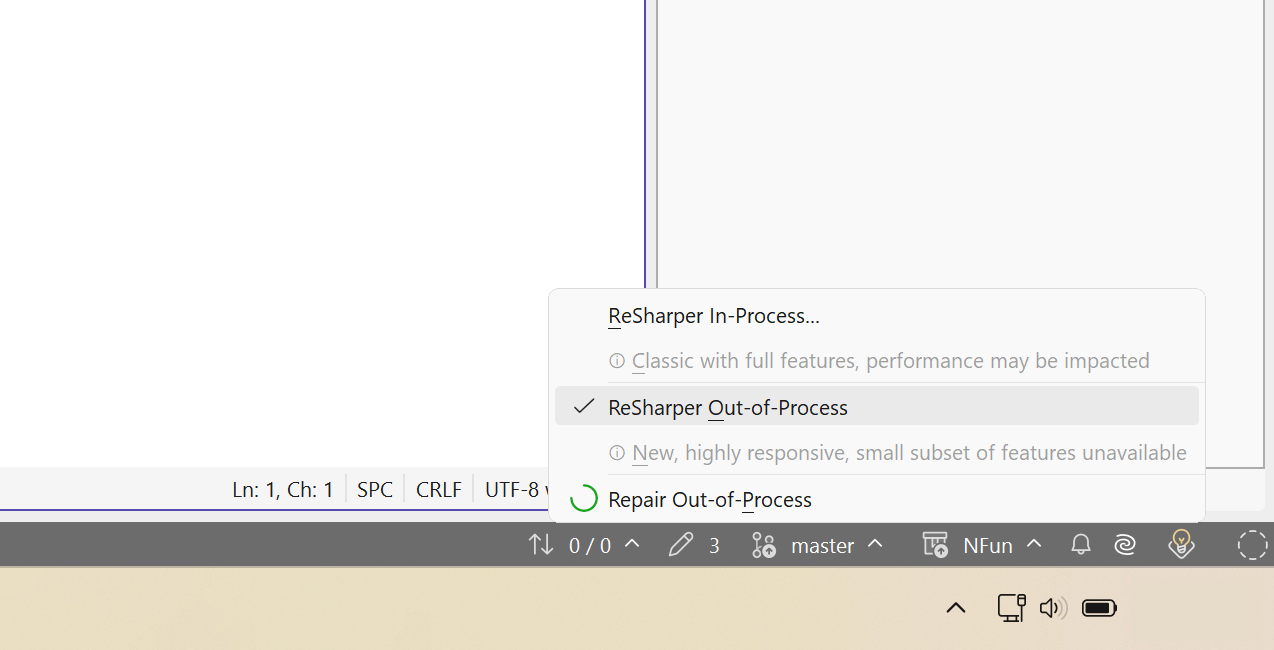
What this means for you: If you haven’t explicitly disabled Out-of-Process mode in the past, ReSharper 2026.2 will now run in OOP. Anyone who has explicitly switched to In-Process keeps their current setting. You can check the current mode and toggle it at any time via the status bar indicator, the ReSharper menu, or the Environment | Products & Features options page.
The most requested ReSharper feature for VS Code is here. This release introduces the first version of debugging for VS Code-compatible editors, including VS Code, Cursor, Google Antigravity IDE, Devin Desktop, and Kiro. Built on the same core engine that powers JetBrains Rider, it brings:
Breakpoint management, including conditional, hit-count, dependent, and tracepoints.
Real-time variable and expression inspection.
Full step navigation.
Launch-and-attach support, directly in your editor.
Together, these make ReSharper the most complete .NET extension available for VS Code-compatible editors. For the full story on this release, see the dedicated blog post.
Sharper C# analysis and refactoring
More collection-expression cases. New inspections suggest collection expressions in additional scenarios, helping you keep code concise and, in some cases, avoid creating intermediate collections. Support for upcoming C# 15 language features is also actively in development, with complete language understanding planned for the next major release.
Enhanced Extract Method.Extract Method now detects exact and parameterized duplicates of the selected code within a file and lets you choose which occurrences to replace, so you can consolidate repeated logic into one well-named method without cleaning up each duplicate by hand.
.editorconfig and Roslyn analyzer integration. Adjust .editorconfig settings for compiler warnings straight from the Alt+Enter menu as warnings appear, and rely on more accurate handling of Roslyn analyzer configuration, including .editorconfig settings and #pragma suppression rules.
Smoother Import missing references popup. The popup has been revamped with better placement, no flickering, and a design that stays out of the way while you type.
C++ updates
ReSharper 2026.2 adds initial support for C++26 reflection, laying the groundwork for next-generation compile-time metaprogramming, along with constexpr evaluation for memory allocations and exceptions, first-class ISPC editor support, significantly faster Unreal Engine indexing for C++ code, and new code inspections.
Integrated profiling and coverage tools. Performance profiling, memory profiling, and code coverage tools are now installed automatically with ReSharper and ready to use inside Visual Studio, with nothing extra to download. Prefer to keep things lean? Disable them anytime under Options | Products and Features, or keep using the standalone dotTrace, dotMemory, and dotCover apps.
Broader Out-of-Process tool support. dotTrace, dotMemory, and the Monitoring tool now work when ReSharper runs in Out-of-Process mode.
Dynamic Program Analysis has been retired. With Monitoring now available in Out-of-Process mode, the transition announced in the previous release is complete: DPA is sunset in 2026.2, and its core capabilities live on in the new Monitoring experience.
Performance. Processing of .cshtml and .razor files is faster and more memory-efficient thanks to cached parsed syntax trees, improving features like Find Usages and refactorings, and reduced memory allocations speed up indexing at startup.
Updated dotUltimate offline installer for Windows. The offline installer now ships as a .ZIP archive instead of a standalone .EXE. Extract the archive and run the included installer, keeping the installer executable and its companion .dat file (which holds the Rider binaries) together. Deployment scripts may need to account for the extra extraction step.
Try ReSharper 2026.2
ReSharper 2026.2 is the start of a more open AI story for .NET in Visual Studio, alongside real gains in debugging, analysis, and tooling. Download the latest version and give Junie’s Agent mode a try.
You can also get your voice heard by filling out this survey to tell us exactly which AI agents you want to see in the Registry. Your input directly shapes how we expand agent support in ReSharper.
You can also reach us in the comments below or on X or Bluesky.
Recorded at Microsoft Build, Ryan welcomes Sarah Bird, Microsoft’s Chief Product Officer for Responsible AI, about how we can build and use AI responsibly with the NIST approach, why most irresponsible AI comes from experimentation without thought of impact, and how Microsoft is researching thoughtful human/AI workflow design to reduce unnecessary escalation.
Rider 2026.2 opens up the IDE’s own intelligence to your AI coding agents, so they work from real project knowledge instead of reconstructing it from files and terminal output.
A new set of agent skills covers testing, profiling, refactoring, and official Microsoft .NET workflows, and GitHub Copilot now joins the lineup as a natively integrated agent. This release also delivers a wave of performance gains that make the IDE feel faster across both .NET and game development.
Rider 2026.2 connects coding agents directly to the IDE’s coverage data, profiler insights, refactoring engine, and framework-specific guidance, so they find context faster and make safer changes with less guesswork and token waste.
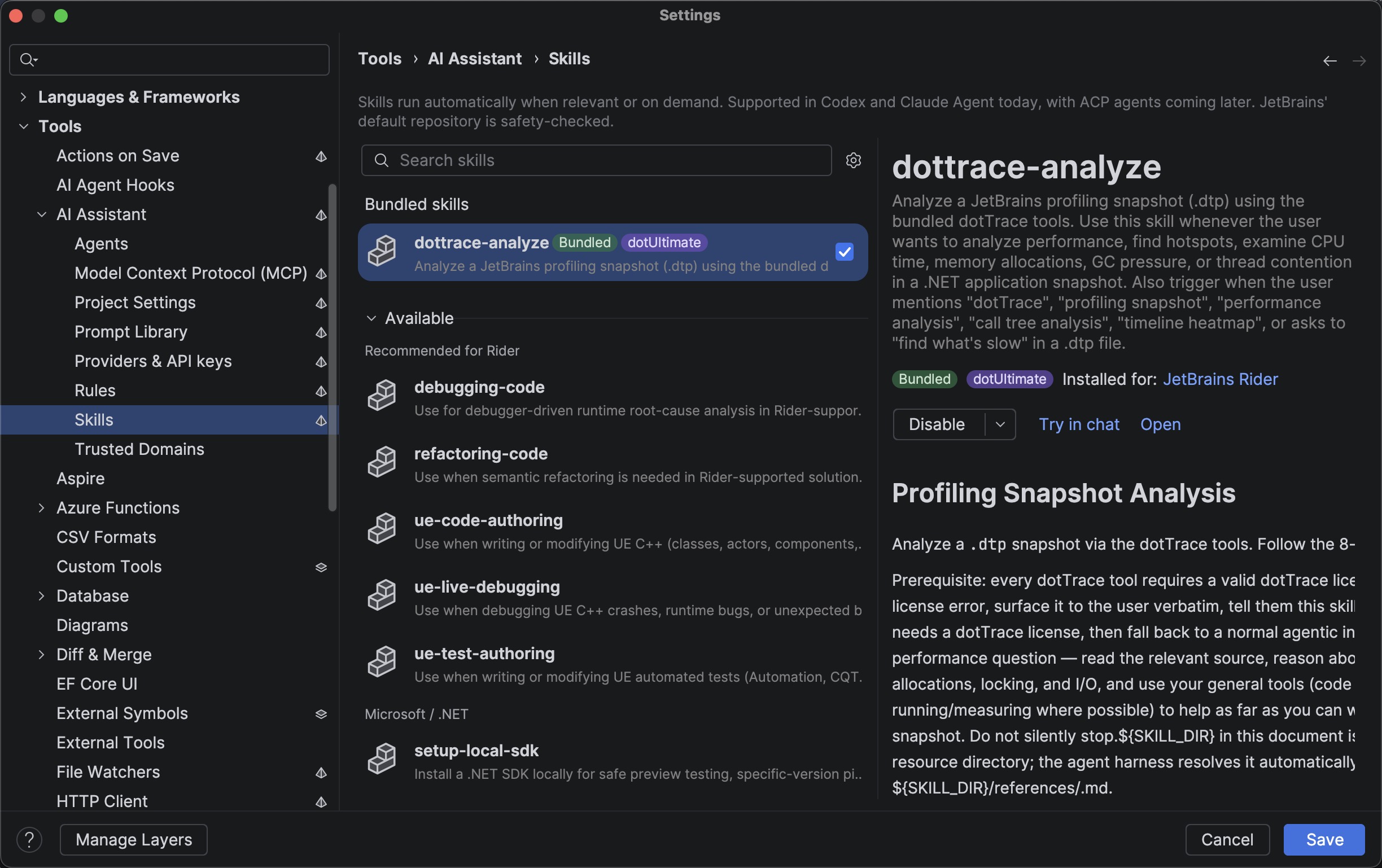
Bundled skills ship with the IDE as built-in workflows, helping agents handle specific tasks without working out every step themselves. Other skills you add through the agent skills manager.
A few of the skills that stand out this release:
dottrace-analyze is a bundled skill that can read a dotTrace .dtp snapshot you hand to it, find where the CPU actually went, and trace the hot path back into your code. Read more on the blog.
Code quality check hooks for Claude Code validate every change an agent makes before it can continue, blocking on errors and returning warnings as feedback. Read more on the blog.
finding-tests uses dotCover data to tell your agent where to put new tests, and how to format them to follow your conventions.
Game-aware Unreal Engine skills for UE C++ authoring, live debugging, and test authoring.
Aside from JetBrains Rider’s proprietary skills, the latest release also comes with support for the official Microsoft .NET, Aspire, and Azure skills, which are easily discoverable and installable straight from the IDE.
You can explore the full list of available agent skills in Rider’s Settings/Preferences | Tools | AI Assistant | Skills. Code quality check hooks can be found and configured under Tools | AI Agent Hooks.
More about the AI agent skills included in this release here.
More AI choice: Copilot built in, plus your own models for code completion
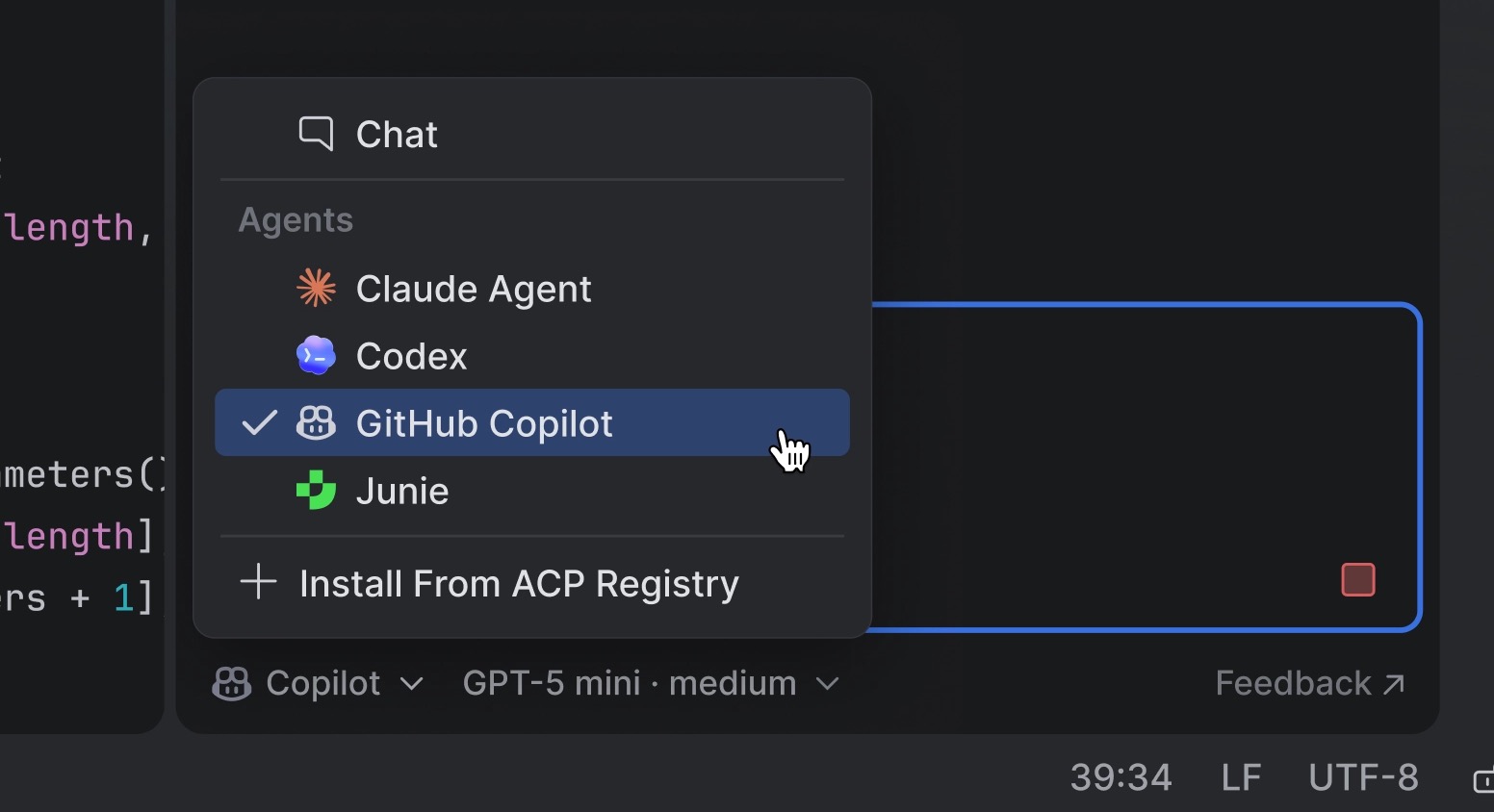
GitHub Copilot is now a natively integrated agent, as the result of a direct partnership between JetBrains and Microsoft. Copilot is available out of the box from the agent picker in AI chat, with OAuth sign-in and no ACP Registry setup required (an active Copilot subscription is needed).
AI completion now supports third-party providers. Alongside the JetBrains-trained models available to all JetBrains AI users out of the box, you can now connect your own completion model, configured independently from your agent provider. Supported options include OpenAI-compatible endpoints like LM Studio or llama.cpp, and Mercury by Inception Labs.
Performance gains for .NET and Unreal Engine
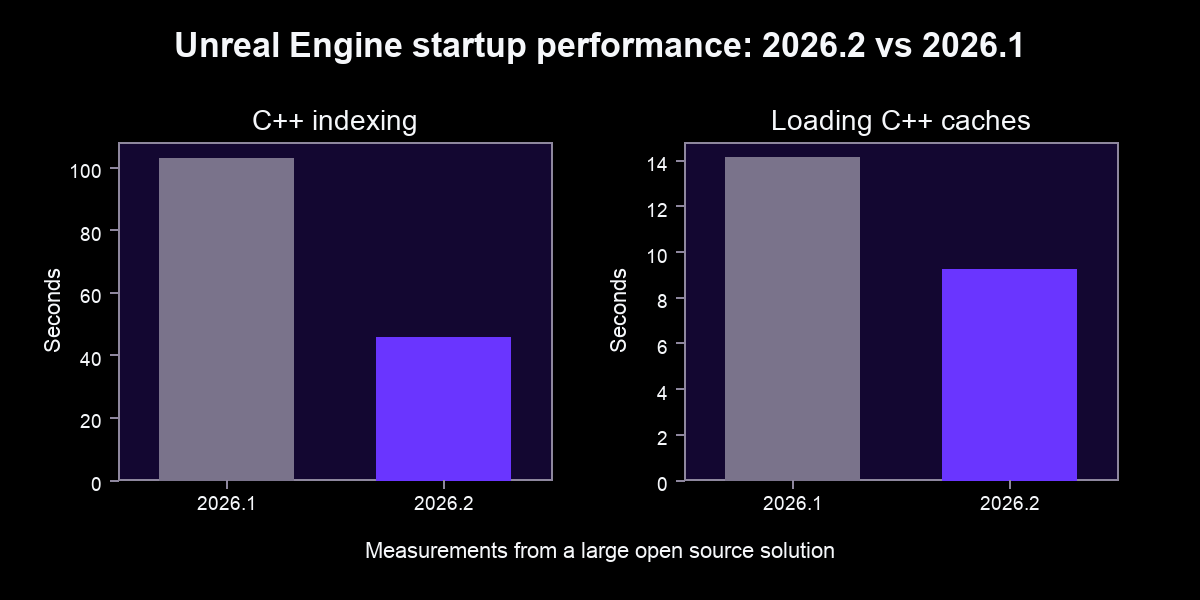
Rider 2026.2 trims the waits that interrupt your flow. On Windows, debugger launch is about 2.8 seconds quicker for .NET apps, branch switching in Roslyn-backed solutions is generally 2–3× faster, and backend processes use around 7–8% less memory. For large Unreal Engine projects opened via the generated .sln, C++ indexing runs roughly twice as fast as in 2026.1.
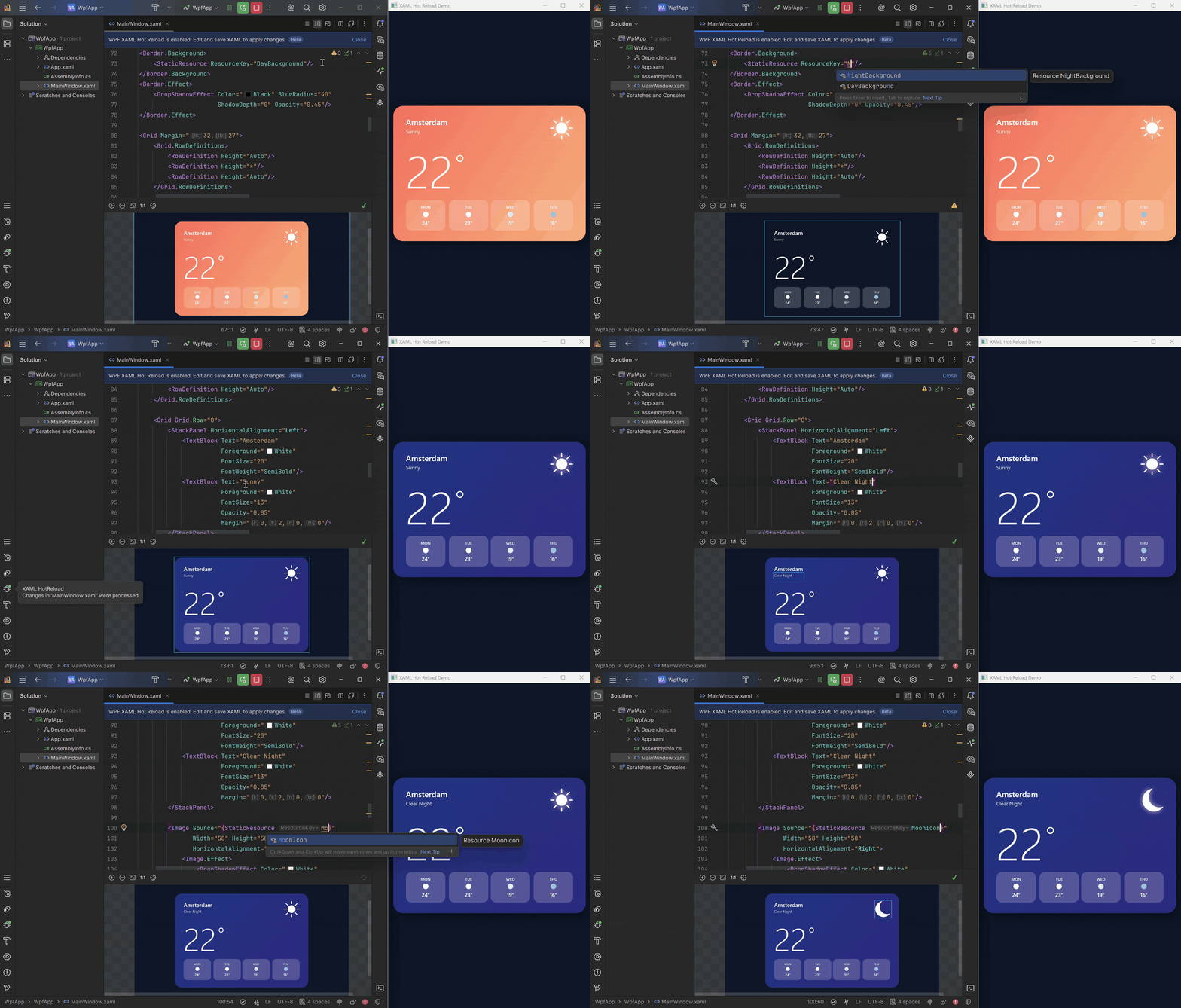
One of the biggest .NET productivity wins this release: WPF Hot Reload lets you edit your XAML while the app runs under the Rider debugger and see saved changes applied in place. Tweak layouts, styles, templates, and resources without rebuilding, restarting, or navigating back to the screen you were on. Paired with Rider’s existing C# Hot Reload, it turns UI iteration into a tight, uninterrupted loop.
In this example we’re using changes to a weather app UI to illustrate the seamless Hot Reload experience for a WPF project in Rider 2026.2
Godot development also feels more complete, with a new configurable GDScript formatter, the ability to drag scene nodes into code as paths or @onready/@export variables, the official JetBrains Rider Integration addon on the Godot Asset Store, and more accurate resolution of Autoloads and uid:// references.
Drag nodes from the Scene Preview tree directly into the editor, and Rider will insert the right node path or variable declaration for you.
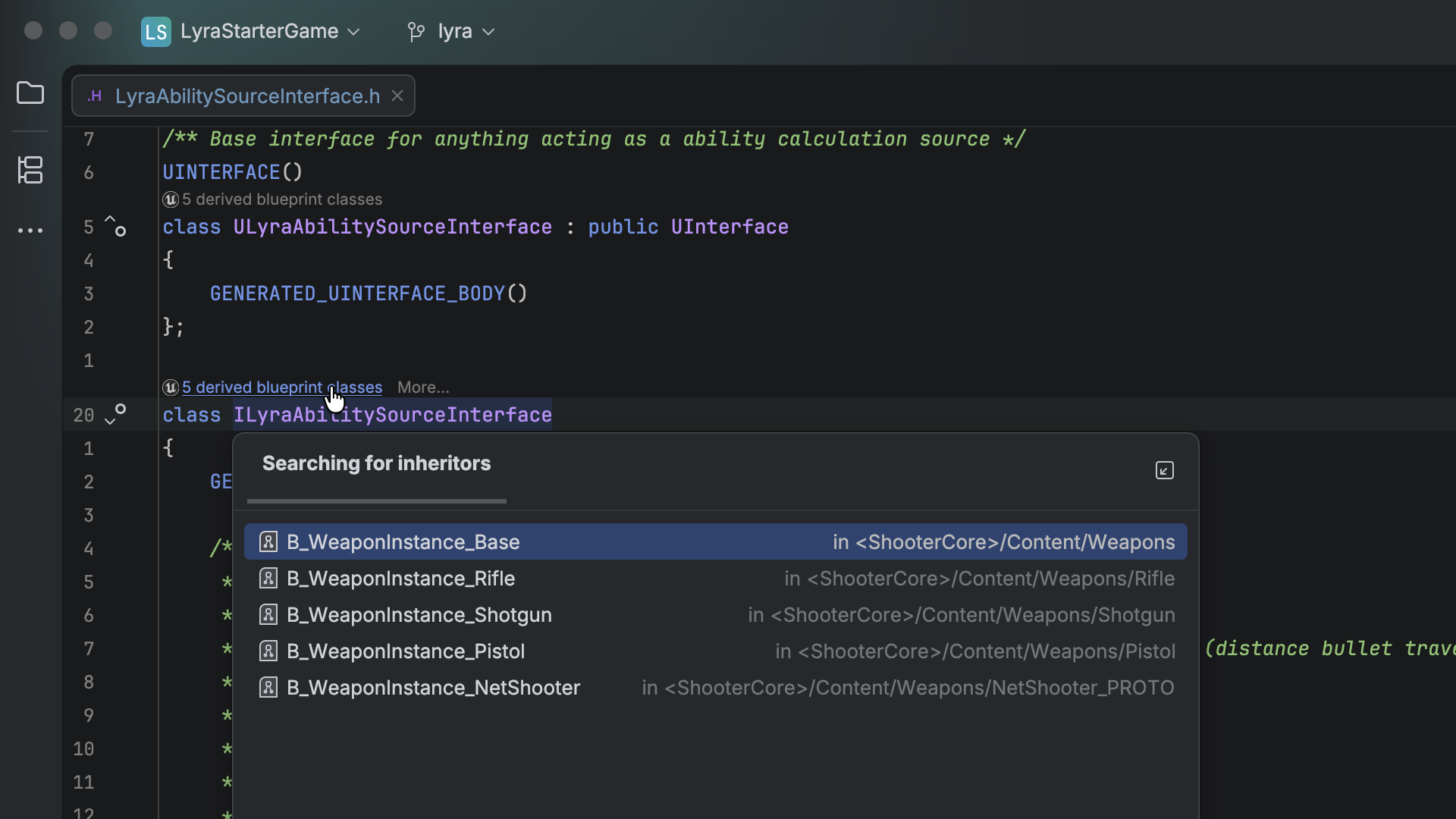
On the Unreal side, UInterface navigation and Gameplay Tag usages now surface across both C++ and Blueprints, and ISPC gets first-class editor support.
C#: Rider ships the latest ReSharper updates for analysis, refactoring, and language support. See What’s New in ReSharper 2026.2.
C++: initial support for C++26 reflection (the ^^ operator, splicing, and consteval blocks), plus a constexpr evaluator that now handles dynamic allocations and exceptions. See What’s New in ReSharper C++ 2026.2.
F#: a new action to disable and restore compiler warnings, more reliable symbol imports from errors, smoother C# 14 interop, and additional debugging fixes.
Other release highlights
File-based C# app templates: create, edit, and run single-file C# scripts, repo utilities, and CI helpers without a full project.
TypeScript 7 support: the Go-based compiler cuts project load time dramatically; in our testing on the Kibana codebase, from ~12 seconds to ~3.
Built-in Azure Functions: create, run, debug, and containerize Functions projects locally without the separate Azure Toolkit plugin.
Azure DevOps pull requests: list, filter, review, vote on, and create PRs from a new tool window, without leaving Rider.
Intention previews: see the diff a quick-fix or context action will produce before you apply it.
Redesigned NuGet tool window: browsing, installed packages, and updates now have separate, more focused paths.
Smarter debugging: more predictable Step Into and cleaner return values for C#/F#, plus more reliable source generator debugging on Linux and macOS.
Try Rider 2026.2
You’ll find the full overview on the What’s New in Rider 2026.2 page. Download the latest version and let us know how it fits into your workflow, in the comments below or on X or Bluesky.
A typical software team runs hundreds of CI/CD jobs a day. Each one runs on compute and burns energy that doesn't show up in your pipeline logs, including its carbon impact.
That invisibility is exactly the problem.
You can't reduce what you don't measure.
Eco CI and Carmen are third-party integrations that add a carbon lens to the pipelines you're already running in GitLab. Both are open source tools you can wire into any pipeline today. Here's why that's worth doing, and how to get started with Green DevOps.
Why it matters
The compute footprint of a modern pipeline is growing. AI-assisted testing, code review, and pipeline automation all add jobs that didn't exist a few years ago, and each one carries an energy cost that never shows up in your pipeline metrics or your architecture diagram. Green DevOps is the practice of changing that. It means measuring emissions per pipeline run, per service, and per pod, and then using that data to make better engineering decisions.
Where carbon shows up in your stack
Two of the most actionable layers for engineering teams are:
Pipeline level
Eco CI measures energy consumption and carbon emissions from your CI/CD jobs. It runs as lightweight bash scripts, with no separate servers or databases. You get per-job emission data, identify your most resource-intensive jobs, track trends over time, and display a carbon badge in your README.
For most teams, it's a good starting point. Your pipeline is already instrumented; Eco CI adds a carbon lens to it.
Infrastructure and application levels
Carmen (Carbon Measurement Engine) goes deeper. Built on the Green Software Foundation Impact Framework, it measures emissions from virtual machines, pods, and individual application workloads running
in Kubernetes. You get a per-component CSV report, broken down by operational carbon (energy use) and embodied carbon (hardware manufacturing and disposal), that you can feed into Grafana, FinOps dashboards, or your own tooling. Output fields include EnergykWh and TotalCarbonGramsCO2eq per component, so the data slots into existing dashboards without transformation.
Carmen is particularly powerful for answering questions like:
Which service in our stack emits the most CO2?
How does our API gateway compare to our data processing layer?
Getting started in your pipeline
Both tools integrate directly into .gitlab-ci.yml. A Carmen job looks like this:
Run it, download the artifact, and you have your first carbon report.
What it looks like in practice
Consider a team running hundreds of pipeline jobs a day. They add Eco CI in an afternoon, with a few lines in .gitlab-ci.yml and a README badge. Their first weekly report surfaces an unexpected finding: Their integration test suite accounts for a disproportionate share of
total pipeline emissions, more than any other job type.
The culprit isn't the tests themselves, but the setup: Every run reinstalls its full dependency set from scratch. Caching the dependency layer can cut both test job runtime and its emission footprint. No new infrastructure, no architectural decisions. A one-line cache config.
Six weeks later, they run Carmen against their staging cluster and find a different kind of problem: A data processing service left over from a deprecated feature is still running, idle, consuming embodied and operational carbon for work that no longer happens. A ticket gets filed. The service is decommissioned.
Neither fix required a sustainability initiative, just visibility. Most carbon waste isn't intentional, it's invisible, and that's what Eco CI and Carmen are built to fix.
Low effort, real payoff
This Green DevOps strategy is low effort because it slots into pipelines you already run. It also has real payoff because the data compounds, whether that shows up as a compliance baseline or a lower CI bill.
Small numbers still build a baseline
At the individual company level, your pipeline's emissions are probably a rounding error against global totals. But measurement isn't primarily about your share of the total. It's about building the data, tooling, and culture you'll need as emissions reporting expectations evolve. Teams measuring now will already have baselines and internal habits in place when that day comes, instead of starting from zero under pressure.
It fits into pipelines you already have
Eco CI is a handful of lines and a bash script. It doesn't spin up additional infrastructure or add meaningful latency. Carmen runs as a separate, non-blocking job. Neither is in your critical path. If your pipeline can run a linting check, it can run a carbon measurement.
The payoff shows up in your FinOps numbers, too
Carbon-efficient code is often also faster and cheaper code. Bloated pipelines burn developer time and cloud budget before they burn carbon. The same cache that reduces emissions can also help reduce your CI bill. Right-sizing runners is a FinOps win as much as a sustainability one, and you
don't have to frame it as an environmental initiative to benefit from it.
The bigger picture
Carbon-aware engineering is becoming a professional expectation, not a nice-to-have. Regulations like the EU's Corporate Sustainability Reporting Directive (CSRD) require large companies to disclose emissions across their value chain, including cloud usage, and enterprise customers increasingly ask vendors about sustainability practices during procurement.
You don't need a mandate to start. You can add Eco CI to a single pipeline, then bring Carmen in for the infrastructure-level view.
ReSharper C++ 2026.2 is out, bringing initial support for C++26 reflection, the most anticipated addition to the C++ language in recent years.
This release also introduces ACP agent support in ReSharper with Junie as the first available agent, adds support for the ISPC language, and significantly speeds up indexing in Unreal Engine projects. Other highlights include updates to the constexpr evaluator, new code inspections, and refactoring enhancements.
If you’d like to explore the full set of updates, take a look at the What’s New in ReSharper C++ 2026.2 page. In this post, we’ll walk through the most important changes and improvements.
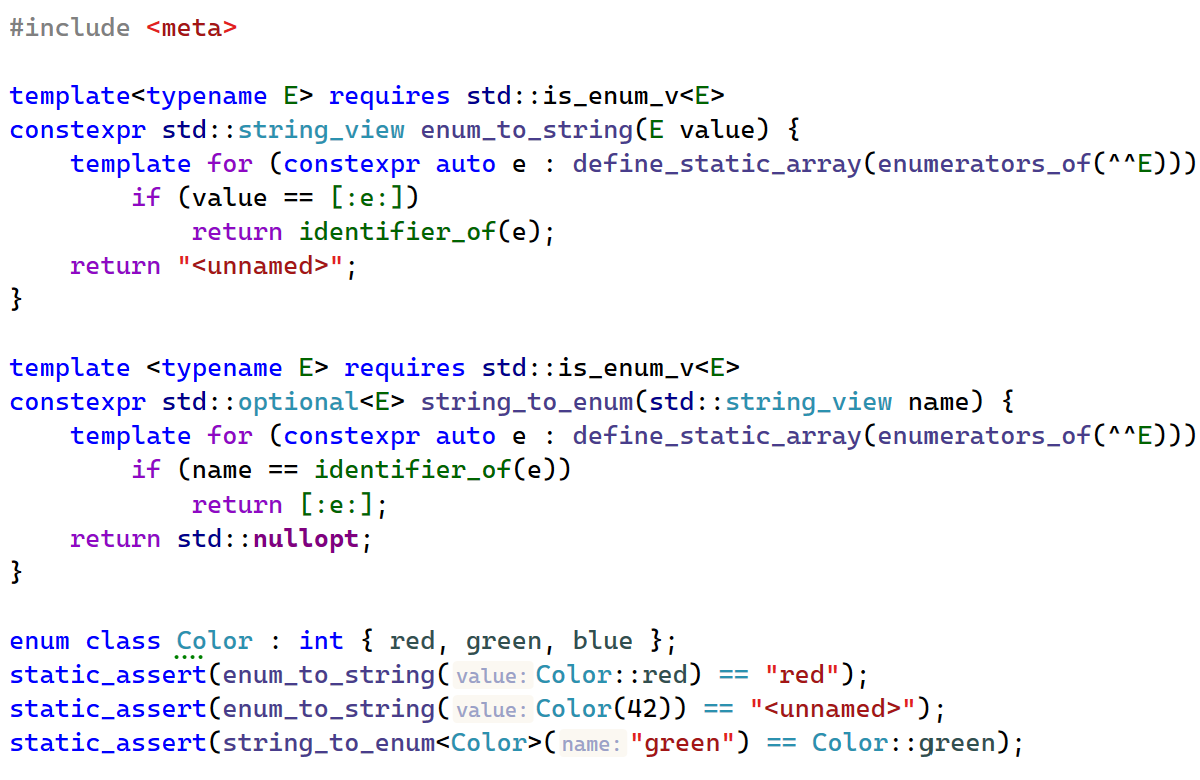
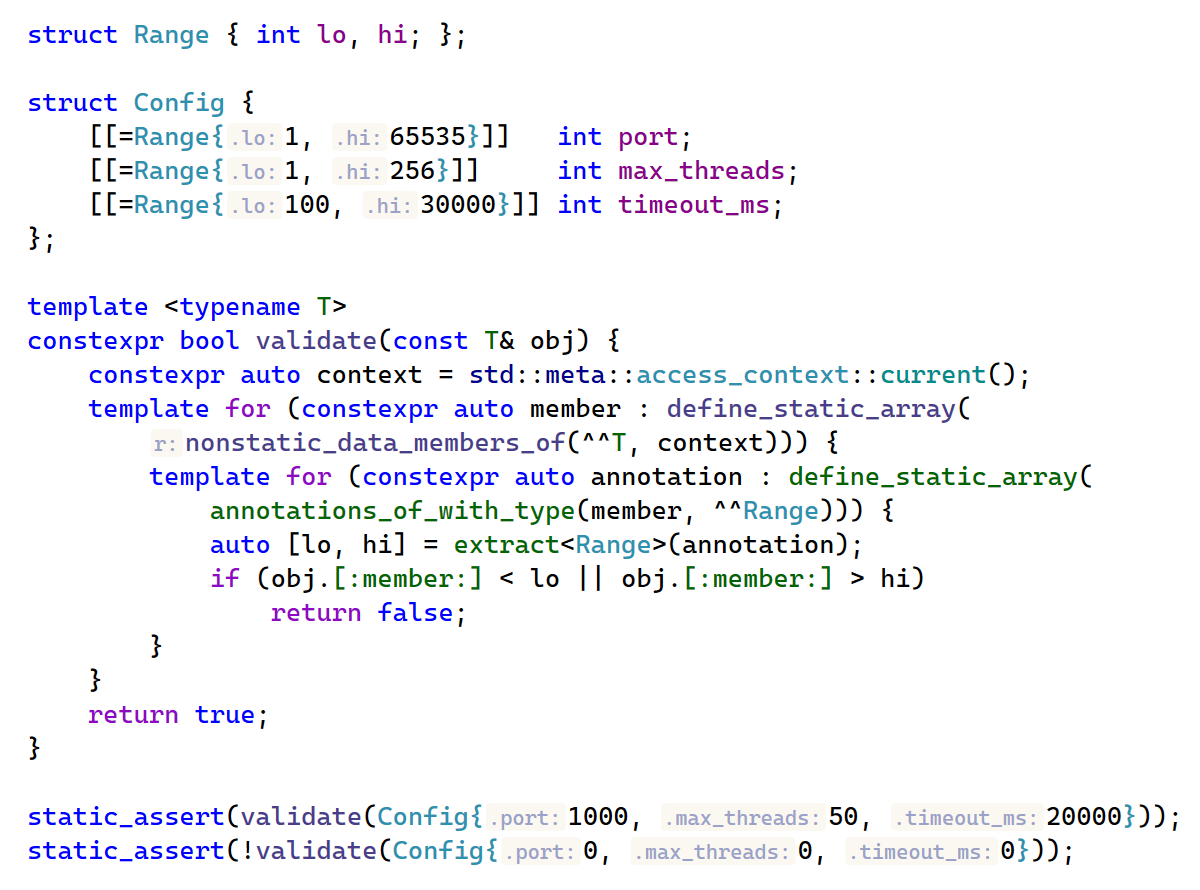
The headline feature of this release is C++26 reflection, a long-awaited addition to the language that enables compile-time introspection and code generation.
With this update, ReSharper C++ recognizes the core reflection primitives:
The ^^ (reflect) operator, which produces a std::meta::info value representing the reflected entity.
The [: ... :] (splice) syntax, which converts a reflection value back into a language construct.
Compile-time queries on reflected types, members, enumerators, and other entities.
Of the major C++ compilers, currently only GCC 16 supports C++26 reflection. One way you can experiment with C++26 reflection in Visual Studio right now is by creating a Linux C++ project and compiling it using WSL on a Linux distribution that includes GCC 16, like Fedora 44.
Related C++26 features
Support for reflection is complemented by two related C++26 language features:
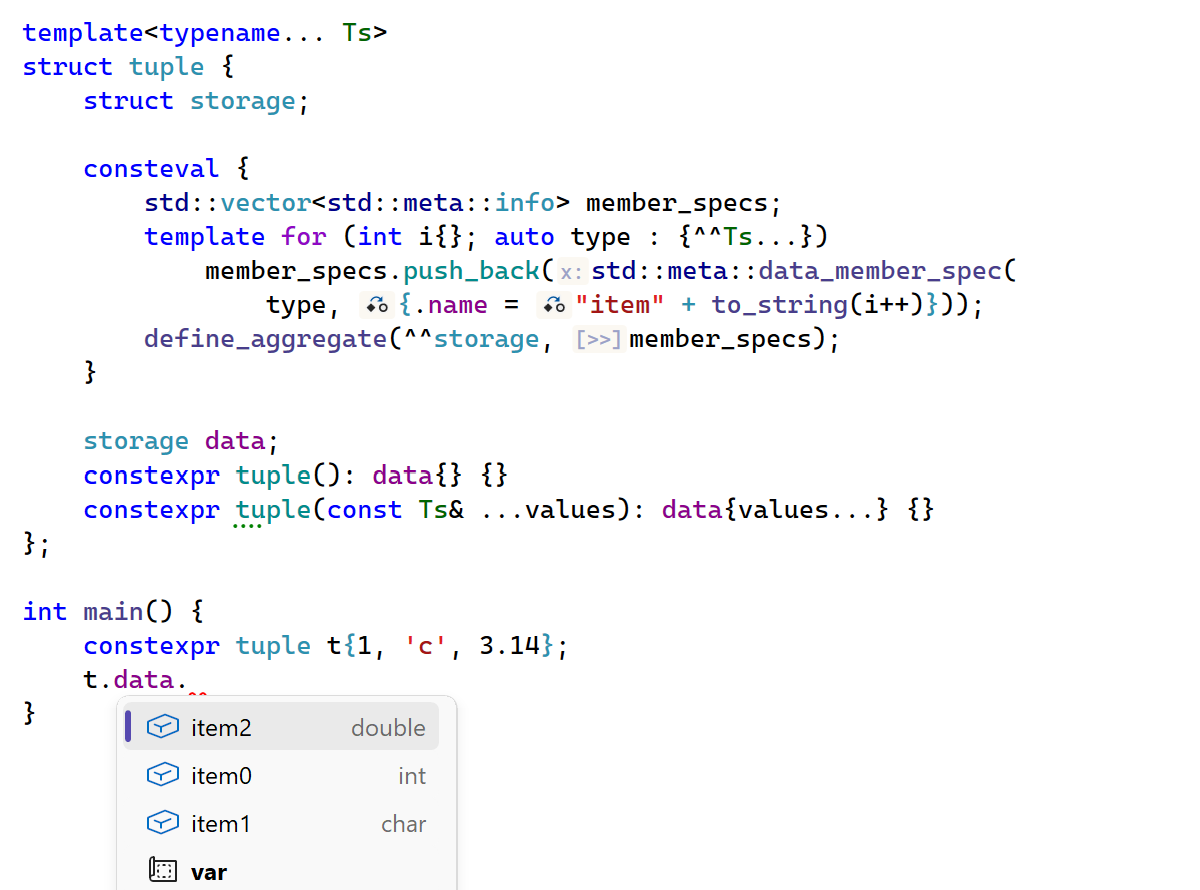
ReSharper C++ now supports consteval { ... } blocks, which are evaluated at compile time and can inject declarations into the enclosing scope. consteval blocks provide a clean way to trigger compile-time side effects, making them particularly useful for practical metaprogramming with reflection.
User-defined annotations can now be attached to declarations and queried through the reflection API, enabling custom metadata-driven code generation.
constexpr evaluation
We’ve also updated the constexpr evaluator with two important capabilities:
The evaluator now supports dynamic memory allocation during constant evaluation – a feature introduced in C++20. This enables correct evaluation of constexpr code that uses new/delete or standard containers like std::vector and std::string.
The evaluator now supports C++26 constexpr exceptions and handles try/catch and throw expressions during constant evaluation.
ISPC language support
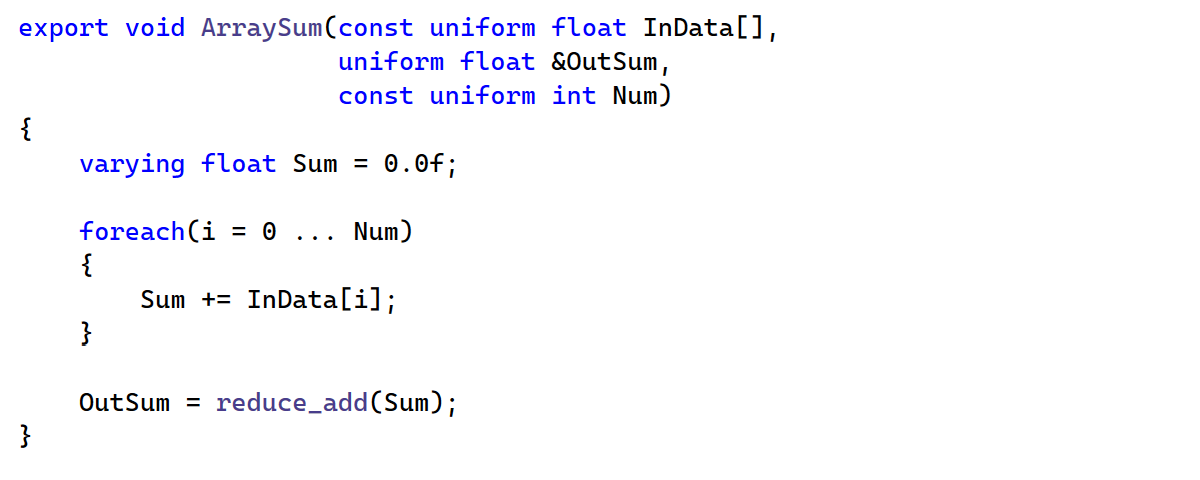
We’ve added support for ISPC (Intel SPMD Program Compiler), a language designed for high-performance parallel programming on CPUs. ISPC is based on the SPMD programming model, where you write code that appears to be a standard serial program, but at runtime, multiple program instances execute in parallel on the target hardware. ISPC is widely used in game engines, rendering systems, and scientific computing, including Unreal Engine projects.
ReSharper C++ now provides syntax highlighting, code analysis, navigation, and coding assistance for ISPC files, bringing the same quality of editor support you expect for C++ to your ISPC code.
Unreal Engine
Performance
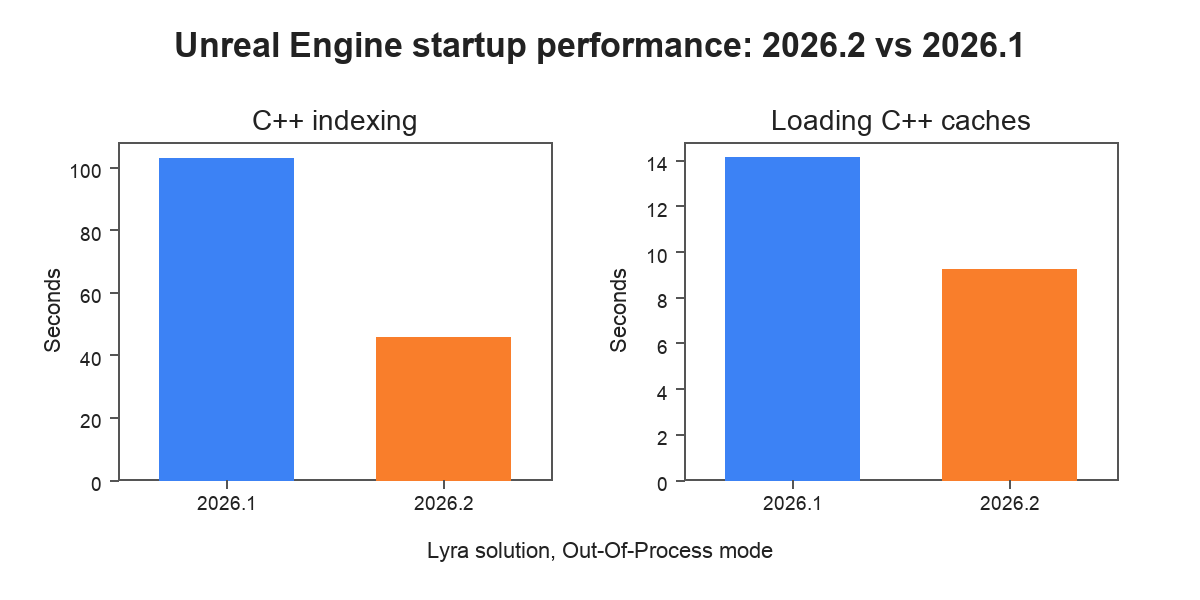
This release brings major performance improvements during startup in Unreal Engine projects. ReSharper C++ now uses the project information from UnrealBuildTool to speed up initial indexing by analyzing only files included in the Unreal Engine project model. Combined with other optimizations, including improvements in multithreaded indexing, this results in a significant speedup.
According to our measurements on the Lyra sample solution:
Initial indexing of C++ code is up to 55% faster.
Loading C++ caches during warm startup is up to 35% faster.
You can disable the new indexing behavior by unchecking the Index only files in Unreal Engine project model option on the Code Editing | C/C++ | Unreal Engine settings page.
Blueprint support
Blueprint support has also undergone a major overhaul, resulting in significantly improved indexing time. On the Lyra sample solution, indexing Blueprints is up to 40% faster, but the exact speedup in your project depends on the structure of your assets.
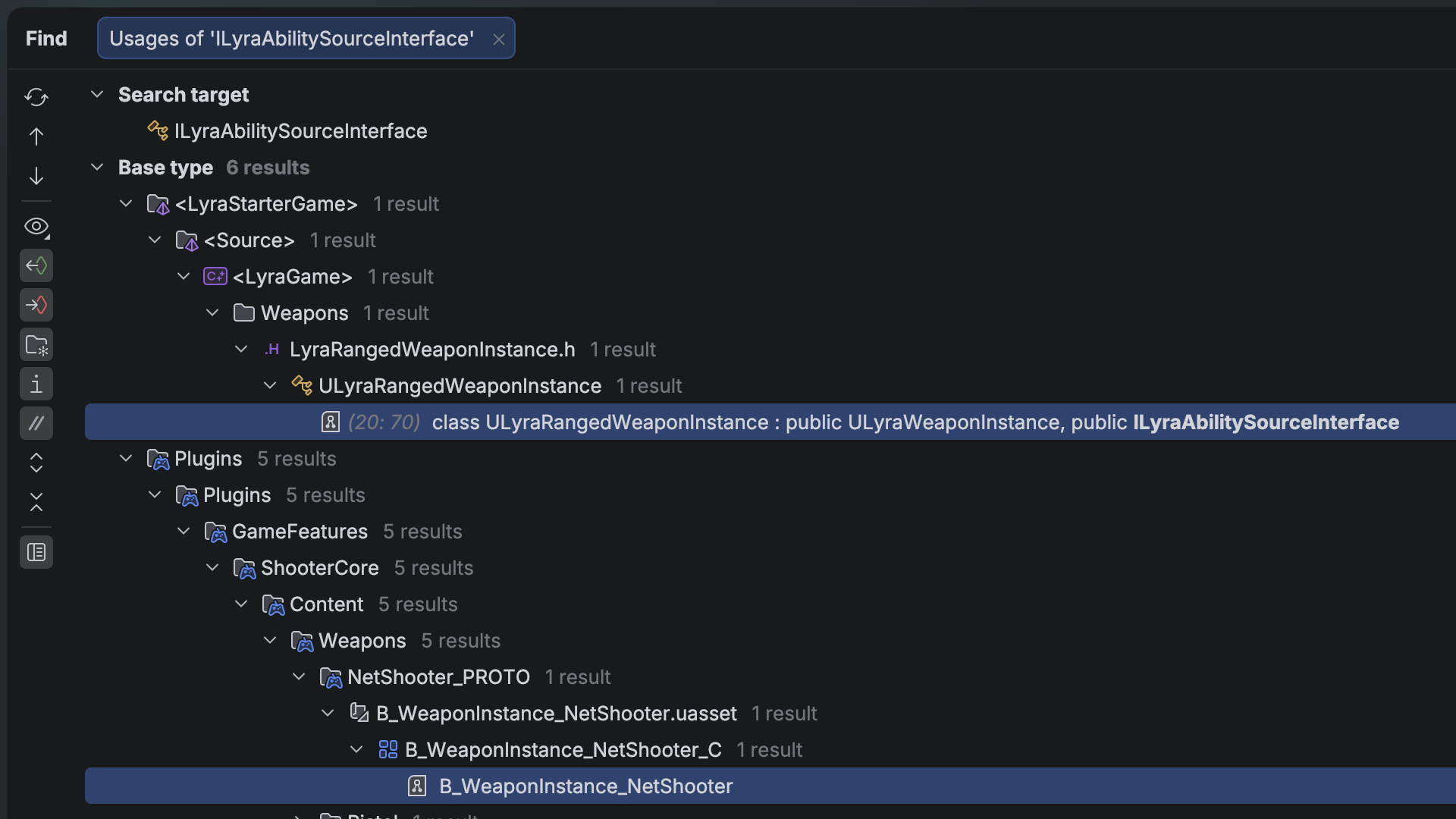
ReSharper C++ now also discovers usages of gameplay tags inside Blueprint assets and shows them in Code Vision and Find usages results, giving you a complete picture of where your gameplay tags are used across the project.
Code analysis
Internal linkage
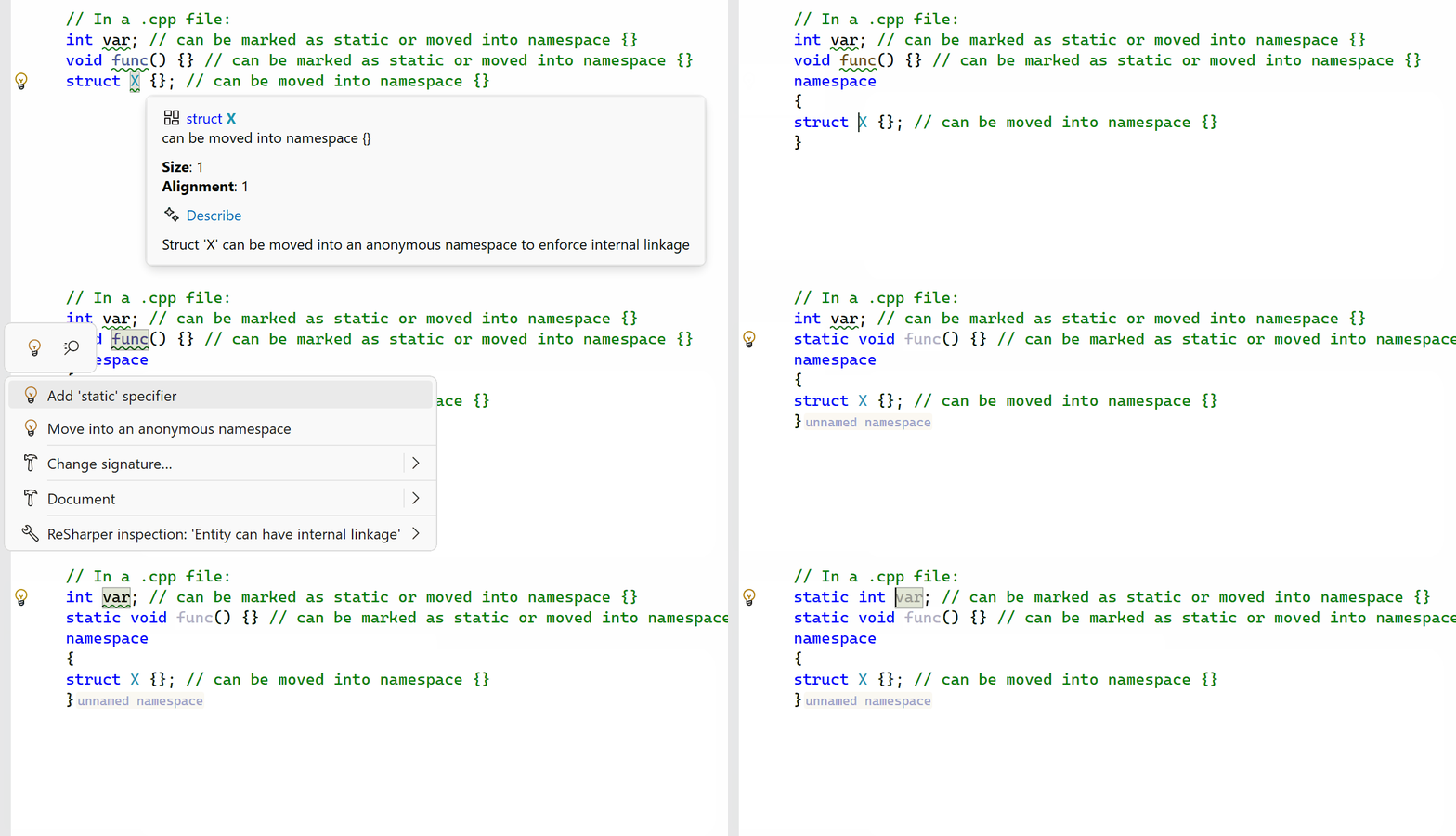
The new Entity can have internal linkage inspection detects functions, variables, and classes that are not used outside their translation unit. You can use the provided fixes to mark such entities static or move them into an anonymous namespace, which helps the compiler optimize and prevents unintended linkage conflicts.
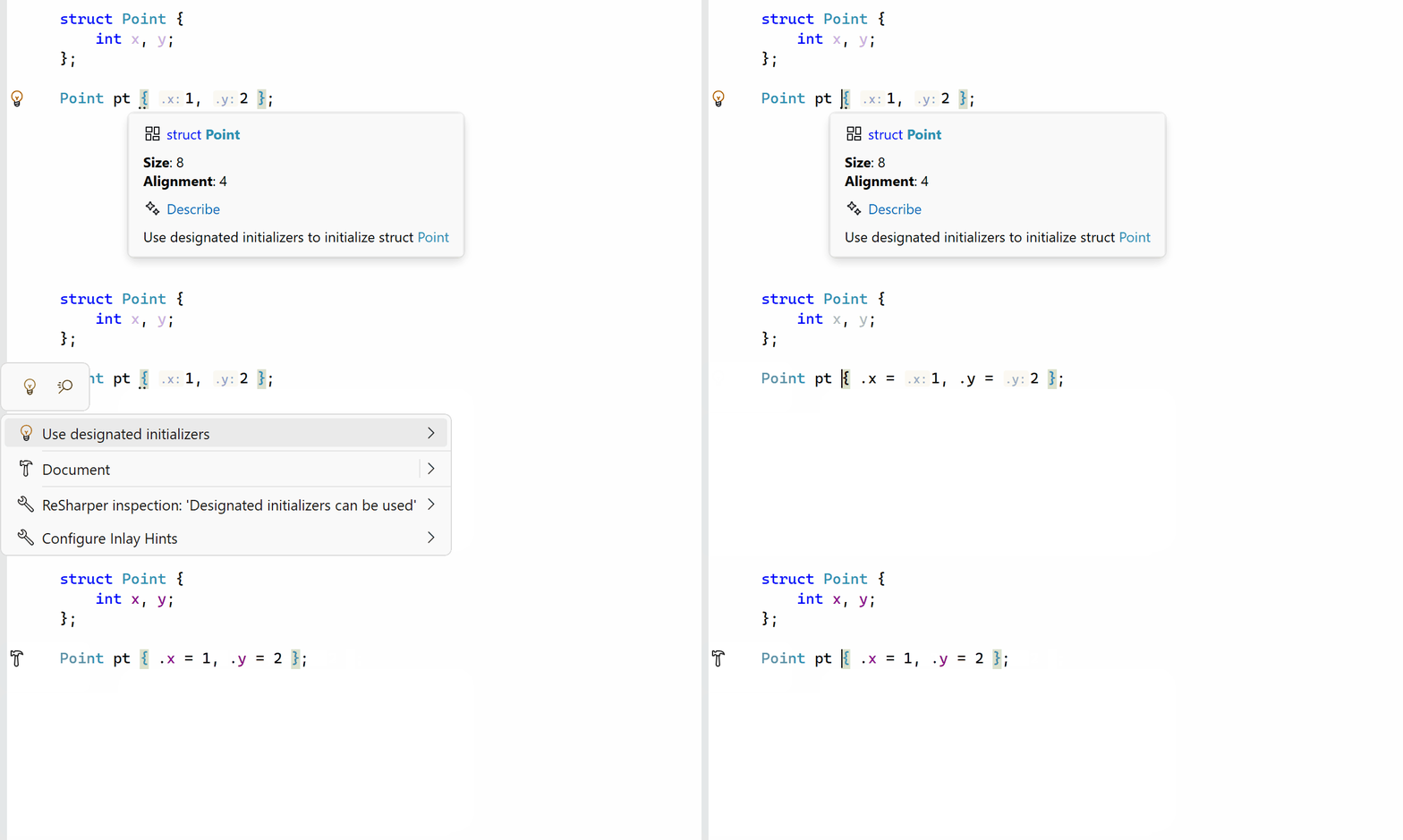
Designated initializers in aggregate initialization
ReSharper C++ now suggests adding designators to braced initializer lists in aggregate initialization. Designated initializers, available since C++20 and C99, make it explicit which member each initializer corresponds to, improving code readability and reducing the chance of errors when members are reordered. A corresponding context action is also available and can be used even when the inspection is disabled.
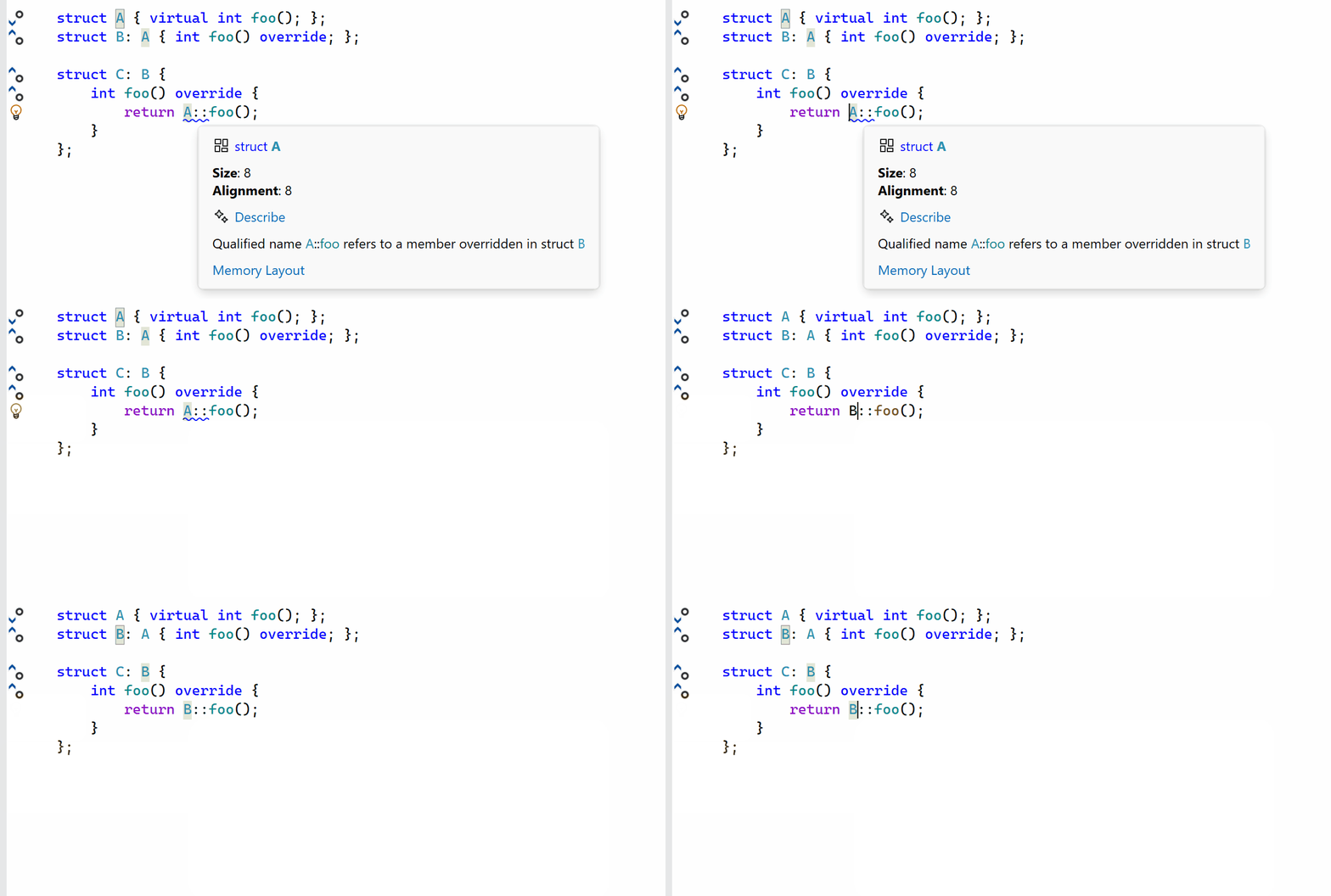
Calls to overridden base functions
Another new inspection detects qualified calls to base virtual functions that are overridden in a derived class. Calling a base-class virtual function directly rather than through virtual dispatch can be a source of subtle bugs, and this inspection helps catch such cases.
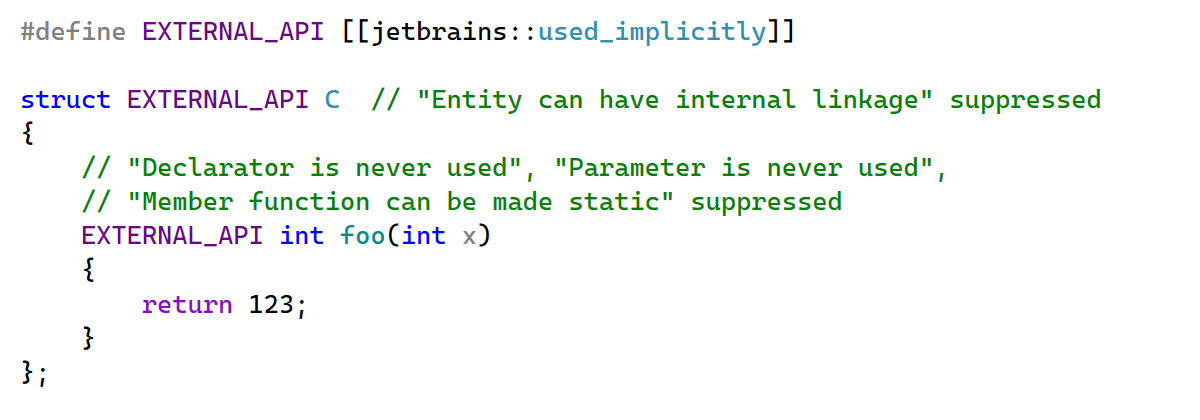
[[jetbrains::used_implicitly]] attribute
ReSharper C++ now recognizes the [[jetbrains::used_implicitly]] attribute, which can be applied to symbols to suppress inspections that would otherwise suggest changing their signature or linkage. This is useful for symbols that are used through reflection, code generation, or other mechanisms not visible to static analysis.
Coding assistance
Refactoring improvements
Two refactoring improvements make restructuring code easier:
Invoking Inline Function on a function declaration now inlines all usages of the function throughout the codebase, not just the usage under the cursor.
The Extract Method refactoring is now available inside lambda bodies, letting you factor out parts of a lambda into a separate function.
Context actions
New context actions help with day-to-day tasks:
A new context action lets you easily toggle the const qualifier on a member function.
You can now quickly insert a #pragma clang diagnostic ignored directive to suppress a specific Clang diagnostic on the current line.
In Unreal Engine projects, you can now copy the include path for the currently opened header file from the Copy Code Reference menu, making it easy to paste the correct #include directive.
Tell us your thoughts
This post covered the highlights, but if you want the full details on these improvements, head on over to the What’s New in ReSharper C++ 2026.2 page.
Download the latest release and let us know how it works for your projects.
At MS Build, Ryan is joined by Cassidy Williams, Senior Director of Developer Advocacy at GitHub and former Stack Overflow Podcast host, to discuss how agentic coding is shifting dev work towards higher-level strategy while increasing decision fatigue; why human taste, community feedback, and mentorship are becoming more essential than ever for developer careers; and the new GitHub Copilot announcements coming out of Microsoft, including the new GitHub Copilot app.
AI is writing more code and pulling in more dependencies, increasing application risk. Most of that exposure isn't from code your team actively chose. A 2025 study of the Maven ecosystem found vulnerabilities reaching roughly 63% of latest releases through transitive dependencies, versus 31% through direct ones.
Dependency Scanning Auto-Remediation, now in beta, closes the loop for security. When dependency scanning finds a vulnerable package, GitLab opens a merge request to update it, uses AI to fix any build-breaking changes, and iterates until your pipeline passes — with every change governed by your existing gates and audit trail.
As a result, security backlogs shrink without diverting developers, high-severity vulnerabilities get fixed within compliance deadlines, and breaking upgrades arrive as merge requests ready for approval.
Why the dependency backlog keeps growing
Vulnerable and outdated components are a longstanding OWASP Top 10 risk and a leading source of remediation backlogs. Clearing findings is slow, manual work that competes with feature delivery, leaving high-severity vulnerabilities unresolved beyond the 30-day deadlines of PCI-DSS and FedRAMP. Meanwhile, even in established libraries, AI-assisted exploit engineering is accelerating disclosure and weaponization.
Roughly one in eight dependency updates introduce a breaking change, and many labeled backward-compatible still break the build. Teams tend to defer complex changes, and the longer those vulnerabilities sit, the more serious they become.
From backlog to fix, without diverting developers
Dependency Scanning Auto-Remediation turns vulnerable dependencies into reviewed, ready-to-merge fixes, so your team clears findings faster and spends less time resolving breaking changes. Teams see benefits in speed, effort, and control:
Shrink the dependency backlog. Vulnerable dependencies get upgraded as they're found, so findings don't pile up and high-severity issues stay within compliance deadlines.
Reclaim time lost to breaking-change rewrites. When a bump breaks the build, GitLab Duo Agent Platform commits a fix, so developers review a working change instead of authoring one from scratch.
Keep every change governed. Auto-remediation drafts the change, but nothing merges until a reviewer signs off, and every MR leaves an audit trail of what changed and who approved it.
Quickly close vulnerabilities, even when they require code changes
Dependency Scanning Auto-Remediation bumps vulnerabilities and fixes breaking changes in two stages:
Automated dependency version bumping runs automatically when scanning detects a vulnerable dependency, opening a merge request to upgrade it to the nearest fixed version. When no eligible fix exists, the finding stays in your vulnerability report until a safe upgrade path becomes available. Every MR is attributed to a dedicated service account, making each change traceable to a distinct identity.
Agentic breaking change resolution handles the tough cases when a version bump introduces breaking changes. When a remediation MR's pipeline fails because the new version breaks your project, GitLab Duo Agent Platform automatically analyzes the pipeline errors, the dependency's changelog, and how your code uses the dependency. Then, within the same MR, it commits fixes to your code so your project works with the updated version. If it can't get the pipeline passing, it stops and posts what it found to the MR so you can take it from there. Supported ecosystems include Bundler, Maven, Gradle, and major Python and JavaScript/TypeScript package managers, with Rust and Go planned in the months ahead.
Auto-remediation never merges on its own. To speed up review, each MR spells out the vulnerability it addresses, the version it moves to, and the code GitLab Duo Agent Platform suggested to keep the build passing, so approvers don't have to reverse-engineer the change.
How Dependency Scanning Auto-Remediation works
Auto-remediation runs automatically when SBOM-based dependency scanning detects a vulnerable dependency with an available fix. Practitioners can also initiate it for an individual finding from the vulnerability report. GitLab then opens a remediation MR that flows through your normal review and merge process; when agentic breaking-change resolution is enabled and the version bump breaks the pipeline, GitLab Duo Agent Platform attempts to fix the resulting code changes in that same merge request.
Built-in safeguards keep remediation automation from becoming noise. Cooldown periods stop busy projects from triggering remediation on every pipeline, and GitLab won’t re-create a closed MR unless a newer fix is available.
Configure remediation to match your risk tolerance. You can target vulnerabilities of any severity from low to critical, cap how far version bumps are allowed to go (patch, minor, or major), and store settings in project- or group-level configuration profiles (via API during beta).
Remediation runs through your organization's own pipeline, so it inherits your existing access controls and approval gates. You also get a complete, auditable record of what changed, who approved it, and why.
See Dependency Scanning Auto-Remediation in action:
Start clearing your dependency backlog today
Dependency Scanning Auto-Remediation is in public beta. It is available on GitLab.com and rolling out to GitLab Self-Managed and GitLab Dedicated.
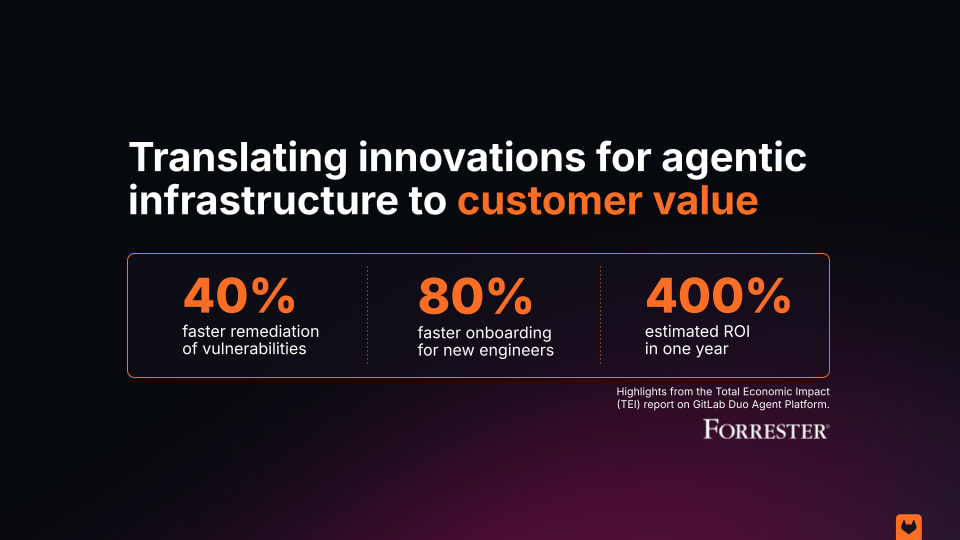
A new Forrester Consulting Total Economic Impact™ study found that organizations using GitLab Duo Agent Platform achieve a 400% return on investment and $7.5 million in net present value over three years — with payback in under six months.
Agentic coding makes developers faster. The harder problem is how enterprises turn speed into return. Faster commits are only part of the equation when it comes to shipping production-grade software. One senior systems engineer in insurance and financial services put it plainly: Code review that used to take hours now takes a fraction of the time, with 80% to 90% of code generation handled by the platform.
To help leaders understand returns achievable by using GitLab, Forrester interviewed four decision-makers across the financial services, software development, entertainment, and insurance industries who use GitLab Duo Agent Platform in production, then combined their experiences into a single composite organization: a global company with $3 billion in annual revenue and 3,000 employees, scaling from 150 to 250 GitLab Duo Agent Platform users over three years.
Weighing cost with ROI
The study is transparent about the investment required: three-year, risk-adjusted costs of $1.3 million in consumption credits and $589,000 in implementation and ongoing management, including internal labor for the pilot program, training, and support. Weighed against $9.4 million in benefits, that's the basis for the 400% ROI and $7.5 million net present value.
Before adopting GitLab Duo Agent Platform, interviewees described familiar bottlenecks: teams that depended on manual processes, senior-engineer expertise, and ad-hoc knowledge sharing to build, review, and secure software. New hires couldn't get unstuck without pulling a senior engineer off their own work. Security fixes sat in a queue until one of a handful of people with the right context had time to look at them. And code review, not writing code, was often the hindrance to shipping. These dependencies are what Forrester's composite organization addressed, resolved, and measured.
After: Faster onboarding, migration, security remediation, and time saved
New developers onboarded 80% faster. Instead of pulling a colleague off their own work, new team members used agentic chat embedded in their IDEs and repositories to get context to work through unfamiliar codebases and conventions on their own — a $582,000 savings.
A migration budgeted for eight months finished in two, a 75% reduction in timeline. The composite organization used GitLab Duo Agent Platform to diagnose pipeline failures and resolve issues in real time during a large-scale migration from an on-prem GitLab environment to GitLab SaaS, saving $157,000 in labor costs.
Security and QA engineers got 40% of their time back. QA and security engineers cut remediation time using GitLab Duo Agent Platform's contextual explanations and suggested fixes, reducing their dependence on senior engineers — a $1.3 million labor savings over three years.
Every developer got 20% more of their week back for feature work. Agentic chat and AI agents took over code review, testing, and troubleshooting that used to eat into build time — a $7.4 million combined gain across all developers as adoption grew over the three-year span.
Forrester also identified benefits it didn't quantify for this study, including savings from consolidating overlapping AI development tools, improved developer satisfaction, and better cross-team knowledge sharing.
"Feature releases that used to take a couple of weeks are now completed in a couple of days. So we're seeing high multipliers of productivity." - Head of automation at a financial services company
Compounded returns for shipping secure software faster
The interviewees didn't just code faster, they shipped features in days instead of weeks, remediated vulnerabilities in minutes, onboarded new hires in a fraction of the time, and compressed an eight-month migration into two months. The pattern this study captures is that while agentic coding accelerates individual output, the return only compounds when that speed runs through infrastructure built for the full software lifecycle.
If you're building the business case for agentic infrastructure for software engineering at your own organization, this study gives you a framework grounded in what four enterprises actually did, so you can turn forecasts into reality.
This study is commissioned by GitLab and delivered by Forrester Consulting. It is not meant to be used as a competitive analysis. Forrester makes no assumptions as to the potential ROI that other organizations will receive; results are representative of the experiences of the interviewed organizations and the composite they inform. GitLab provided customer names for the interviews but did not participate in them, and Forrester maintains editorial control over the study's findings.
Live from Snowflake Summit, Ryan talks with Snowflake’s Head of Developer Experience Umesh Unnikrishnan about the industry-wide shift from “vibe coding” for quick prototypes to agentic engineering for enterprise-ready software, how enterprises can scale governance with guardrails like human-in-the-loop approval and control layers that go beyond the underlying LLM, and why Umesh predicts all developers will become someday become full-stack builders.
Most of the work for software delivery doesn’t happen only in the editor. Pipelines fail. Tests break. Vulnerabilities show up. And a lot of that work starts and ends at the command line.
Agentic AI in the terminal that only understands code can’t help with any of that. A standalone assistant doesn’t know your agents across the entire software lifecycle, your permissions across many projects in your organization, or a specific project context you’ve already set up in GitLab.
That’s what changes in GitLab 19.2. GitLab Duo CLI is generally available, and it brings GitLab Duo Agentic Chat straight into your terminal. Unlike tools bolted on from the outside, it already knows your project, your pipelines, and your agent setup. You can use it interactively when you’re exploring and building, or headless when you want it running in a job or script.
As a result, developers stay in the shell where the failure showed up, and their work continues across the terminal, the UI, and your editor. Platform teams govern rollout like everything else on GitLab, and agentic help finally covers more of the delivery lifecycle than “write this function.”
Why agentic AI in the terminal stopped at code
Agentic tools matured first where demos look best: editing files. The lifecycle after the commit is messier and more operational. When the failure is a pipeline, a dependency, or a CI config, context lives in GitLab — not in a coding agent’s training set or local context.
Teams that tried to bridge that gap with generic CLI assistants paid another cost: no shared admin control, no MCP/setup diagnostics aligned with the platform, and no single identity model with the rest of the agentic software lifecycle. Agentic work in the terminal stayed stuck on coding, instead of helping across the rest of delivery.
What teams get when Duo CLI is generally available
Stay in the terminal for the work that already lives there. Dig into how the codebase fits together, build and refactor, chase down pipeline failures, tidy up CI/CD, and knock out multi-step tasks — without jumping to the browser for every answer.
Pick up where you left off, on any surface. Sessions are shared across the GitLab Duo CLI, the GitLab UI, and editor extensions. Start in the browser. Continue in your shell. Same conversation.
Plan first, then build. Interactive mode works like Agentic Chat: Plan mode looks around without changing anything, build mode makes the changes. Need it unattended? Headless mode drops into CI jobs and scripts.
Turn it on when you’re ready. Duo CLI works on GitLab.com, GitLab Self-Managed, and GitLab Dedicated. On Self-Managed and Dedicated, admins can switch instance access on or off. Anywhere you use it, developers can run /doctor to check their setup and /mcp to see their MCP configuration.
See GitLab Duo CLI in action:
How Duo CLI works
The easiest path is through the GitLab CLI: Run glab duo cli and glab handles authentication for you. You can also install and run duo as a standalone tool with a personal access token. Both setups support the same modes and capabilities.
Interactive mode — chat in the terminal, and approve tools before anything runs. Explore the codebase, plan a fix, then switch to build mode when you’re ready to make changes.
Headless mode — non-interactive execution for runners, scripts, and automation. Use glab duo cli run --goal or duo run --goal.
For instance, when a pipeline fails, ask from the same shell:
$ glab duo cli
> The pipelines in MR 23 are failing. Please help me fix them.
Duo CLI looks at what’s going on, figures out what went wrong, and proposes changes you can review before applying. It follows your custom instructions (chat-rules.md, AGENTS.md, SKILL.md) as you scale, and you can extend its interactive sessions with custom slash commands.
Static scanners excel at catching vulnerabilities that fit a known pattern, like unsanitized query inputs, hardcoded secrets, and unsafe deserialization. They struggle against flaws in your application’s logic, where there is no pattern to match — only valid code doing the wrong thing for your domain. Undetected, these flaws surface late and cost more to fix.
Security Review Flow, now in public beta, scrutinizes code changes the way a security engineer would. It traces intent rather than matching signatures to catch logic flaws before they hit production. It's a major step toward uncovering dangerous flaws that scanners usually miss.
Where pattern-based scanners go blind
The most damaging application vulnerabilities often look correct line by line, but violate context the code doesn't contain, like your authorization model, data sensitivity rules, and intended workflows. Consider three of the most common vulnerability classes:
Access and authorization: Whether a user may read or change a resource is defined by your authorization model, not any language construct. Broken object level authorization (accessing another user's data by changing an ID) has topped the OWASP API Security Top 10 since 2019.
Data exposure: Serializing an object and returning it is ordinary, correct-looking code. Whether it leaks depends on which fields are sensitive and who receives them — facts about your domain, not your syntax.
Control flow and workflow: Business-logic and race-condition flaws occur when valid operations run in the wrong order, repeat unexpectedly, or get manipulated. Examples include checkout reachable without payment, a state re-entered under a race, or a parameter tweaked to change a price.
Catching these flaws has previously required manual security review, which is expensive to scale across every merge request (MR), or penetration testing and bug bounties, which arrive too late. The result is a growing gap between the pace of development and how quickly security expertise can be applied.
Bring security judgment to every MR
Security Review Flow, a foundational flow on GitLab Duo Agent Platform, closes that gap by reasoning about what your code is meant to do. It detects exactly the classes of flaws described above: Broken object level authorization and function level authorization, missing authorization on state-changing operations, information disclosure, mass assignment, business logic errors, and race conditions in stateful workflows.
It complements traditional scanners and human analysis rather than replacing them, and it reviews code at the point of change, when a fix is cheapest. GitLab's own application security team has used Security Review Flow across internal MRs throughout its development.
See Security Review Flow in action:
How it works
When your MR is ready, request a review from Duo Security Review, the same way you would from a person. It analyzes the diff in context: the original files, changed lines, MR discussion, and related code. Its reasoning is optimized for precision, and an independent validation pass examines each finding to filter out likely false positives.
Findings appear as diff threads on the relevant lines, along with a summary in an internal note. On public projects, they’re confined to the internal note, so security details aren’t exposed.
Each finding arrives with the context reviewers need:
Severity determines the reviewer state: A critical or high finding sets it to Request changes, while medium or low findings result in Comment. The flow never approves, even when it finds nothing — a human always owns the final call.
From there, mention your organization’s Duo Security Review service account in a comment thread to ask a question, discuss remediation, or challenge a finding. Resolve each finding by applying the fix as a standard MR suggestion, dismissing it as a false positive, or accepting the risk. After committing your fixes, request a fresh review to check what changed.
Run your first Security Review Flow
Security Review Flow is in public beta for GitLab Ultimate customers. It is available on GitLab.com, GitLab Self-Managed, and GitLab Dedicated.
Cost varies with the complexity of the diff and the model you select, so try it on a few MRs before running it broadly. Pricing may be updated at general availability.
Knowing what to do next in software development is rarely the hard part. Doing it again in the exact same steps — implement an issue, fix a pipeline, review a merge request — is. Chat that only provides answers still leaves every handoff to you. Homegrown scripts don’t inherit changes in access controls, new triggers, or updated review gates. In both cases, the multi-step paths teams rely on continue to stay stuck as runbooks in someone’s head.
GitLab 19.2 closes that gap as Custom Flows reach general availability: AI-powered workflows you define once, trigger from native GitLab events, and run in CI/CD pipeline. A self-healing pipeline pattern like analyze failed test → generate fix → commit → notify team becomes something the platform can run end to end.
In addition, Foundational Flows no longer start only from a button, mention, or assignment. Now, when your request in GitLab Duo Agentic Chat matches specialist work — implement a change, review a merge request, fix a failed pipeline — Duo recommends the flow, you approve the handoff, and you follow it from the conversation.
As a result, agentic software delivery gets past single-turn chat. Teams encode the sequences they already trust, kick them off from events or chat, and keep humans on approval instead of on every intermediate step.
Why multi-step software delivery stays manual
Agentic demos favor single turns. Real delivery work is a chain: gather context, change code, open a merge request, wait on CI, and respond to review. Without flows, every link in that chain is a person clicking, pasting, or remembering tribal steps.
Building those chains used to feel provisional while custom flows within GitLab Duo Agent Platform were still maturing. Teams delayed encoding the paths they already trust, such as self-healing pipelines, “implement this issue,” and event-driven follow-ups, because production readiness and event coverage weren’t there yet.
What agentic flows change for engineering teams
Automate the sequences you already trust. Custom flows run multi-step tasks across projects, triggered by GitLab events you already work with: mentions, assignments, pipelines, merge request lifecycle, work item changes, and more. They run under composite identity, so access stays bounded and actions stay attributable.
Start specialist work from chat. Ask Agentic Chat to use the Developer Flow to implement work, the Code Review Flow to review a merge request, or Fix CI/CD Pipeline Flow to diagnose and repair a failed pipeline. Approve the handoff, then keep working while progress shows inline.
Keep automatic review intentional. In GitLab 19.2, exclusion rules let you skip auto-review for bot-authored or branch-pattern merge requests you don’t want burning credits. Custom review instructions shape what review looks for, so you’re not only choosing which merge requests get reviewed, but how.
See Duo agentic flows in action:
How do they work?
Custom flows. Create one from a project or the AI Catalog, choose visibility, enable it where you need it, and attach a trigger so the right GitLab events start it. You can add human-in-the-loop checkpoints at sensitive steps. In 19.2, custom flows also pick up a "work item status changed" trigger and bulk enablement for public flows across up to 100 projects. Looking ahead, a Flow Creation Agent is on the roadmap so teams can describe a flow in plain language and get a runnable definition, without hand-writing the full schema first.
Foundational Flows in Agentic Chat. When your request matches specialist work, it can be handed to a foundational flow, you approve before anything runs, and you stay in the conversation while it works. That’s the difference from chat that only answers: The multi-step part leaves your hands without leaving GitLab.
Updated Automation for Code Review Flow. Exclusion rules keep bot-driven or out-of-scope merge requests from burning code review cycles you didn’t mean to spend. And, custom review instructions shape what “good” looks like for your team, so that expanding automation doesn’t mean reviewing everything the same way.
Start encoding the paths you already run
Custom Flows are now generally available, and Foundational Flows can now start from Agentic Chat which routes your request to the right specialist flow as you describe what you need — translating the agentic software delivery sequences your team already trusts to predictable automation, beyond tribal knowledge.
Ready to learn more? Start by reviewing our documentation for Custom Flows and Foundational Flows. One thing to plan for: Event-driven flows consume credits based on the work they do. Try them on a few projects before you turn them loose across a large group.
We gave a few thousand developers GitLab Orbit. Then we got out of the way. The community responded with creative solutions to real production problems slowing down their teams. The same problems you hit every week: What does this change break, which tests actually matter, and what will this migration really cost.
GitLab Orbit is a live, queryable graph of your code, merge requests, pipelines, deployments, and ownership, with every relationship between them kept current. Agents write code well but are bad at understanding the system around it. Answering the connecting questions ("what depends on this," "which tests cover it," "who owns the fallout") used to mean an agent crawling files or an engineer digging across four tools. Orbit turns that into one query. Agents reach Orbit through Model Context Protocol (MCP)
), engineers query it directly, and the answer comes back in seconds instead of hours. The Orbit home page has the full story. We wanted to see what people would build once that was theirs.
The hackathon drew 1,576 registered developers, and they shipped 265 eligible Showcase Track projects built on GitLab Orbit: agents, flows, and skills. Separately, 26 contributors merged 61 improvements straight into the Orbit codebase, adding language support, fixing bugs, and sharpening the docs. The community did not just build on Orbit. It made Orbit better.
The problems people reached for
Before scoring anything, one thing jumped out to us: If we sorted the submissions by what they actually do, the distribution would be lopsided.
Seventy teams built a version of the same tool: Tell me what this change could break before I merge it. More than 30 built onboarding and comprehension aids: The help me understand this codebase problem. After that came incident root-cause, architecture drift, flaky-pipeline diagnosis, and tracing a CVE across repositories.
None of that is random. Engineers ask these questions constantly and answer them poorly because the answers used to be scattered across Git, CI, deploy tooling, and a few dashboards nobody trusts. Put it in one graph, and people go straight for it.
That is orchestration with context, not orchestration alone: speed, with control built in. And when dozens of independent teams reach for the same query without being told to, that is the signal a platform owner should read: The context is where the work actually happens. The bar was high in the crowded categories. Projects stood out by beating 68 other teams, or by going somewhere nobody else did.
Technological implementation
Winner: Sankofa. Three agents, each triggered by a different moment in your day, all reading from GitLab Orbit. Open a merge request and Radar hands you the blast radius: downstream callers, affected pipelines, the team that owns the fallout. Get assigned an issue and Guide writes you a brief before you start. A vulnerability surfaces and Shield traces every path to it. The context arrives where you already are, and then gets out of your way.
"When a security vulnerability gets reported, teams spend days manually tracing how far it reaches, because nothing connects the dots automatically."
Lester K, Sankofa
Shield does it in one pass over the graph.
Runner-up:Stayed Shipped. It asks a question your dashboards cannot answer: Of the changes your AI agents merged last month, how many are still in production? It tracks whether a merged change survives or gets quietly fixed forward by a senior engineer, invisible to every standard metric.
Design and usability
Winner: Carver. Carver prices a legacy migration before you commit to it. You say what you want to move; it reads GitLab Orbit's dependency graph and gives you a quote: how many units, how long, in what order, where the risk hides. What wins this category is the output. Carver gives you one line per unit, sized and risk-flagged, and expands the detail only when you ask. Moving AngularJS to Angular comes back as roughly nine weeks of human effort against ten dollars of generation cost, with the untested load-bearing service marked in red so you know where to look first.
"It checks Orbit and, if it doesn't find the service, it asks where the real code is."
Anes Mulalic, Carver
That is why the agent refuses to invent a number it cannot ground.
Runner-up:Marshal. Same territory, opposite approach: full autonomy. Declare one org-wide goal and it finds every affected repo through GitLab Orbit, sequences the work, and lands merge requests wave by wave, making sure no target drops.
Potential impact
Winner: CrossCut. CrossCut runs only the tests a change could actually break. Open a merge request and it pulls the changed symbols, walks GitLab Orbit's call graph to find the true transitive impact, and builds a pipeline that runs those tests and nothing else. No model in the loop, no guessing, just traversal. On a big or cross-repo suite that trims the CI payload by 90% or more, which pays for itself almost immediately.
"You need the call graph of the whole codebase to know which tests a change can reach. That is exactly what GitLab Orbit builds, so instead of guessing, we just ask the graph."
Pritesh Kumar, CrossCut
Runner-up:OrbitWeaver. It does autonomous refactoring using GitLab Orbit's exact blast radius rather than vector similarity. It maps every affected file and edits them in dependency order, the cleanest argument for why a real graph beats fuzzy retrieval when getting it wrong means a red pipeline.
Quality of the idea
Winner: Transcend. Most teams queried GitLab Orbit directly, which is the right move for most questions. Transcend built a second reasoning engine on top of it using the semantic web stack, OWL, SPARQL, and RDF, to reach the questions the native API cannot express in a single call. Transitive closure. Joins that leave your codebase and pull in the world's structured knowledge. Its demo asks which knowledge-graph-embedding methods a codebase implements, and gets back the class names plus the papers that inspired them, the authors, and the years, joined live to the code. Treating Orbit as a foundation to build on rather than an API to call was genuinely new here, and that is precisely what this category rewards.
Runner-up:Universal Agent OS. It builds the governance layer around agents rather than the agent itself: Interview first, plan before coding, keep the evidence, and force validation. As agents write a larger share of code, keeping them accountable is about to become the real problem. It is the same problem GitLab Orbit's context makes visible everywhere else on this list: Agents move fast, someone still has to answer for what they did.
Contribute Track
The Contribute Track ran alongside the Showcase Track, and it was not peripheral work. Twenty-six contributors merged 61 merge requests straight into the GitLab Orbit codebase: language support for C++20 concepts, Go package declarations, Kotlin coroutines, and Ruby lambdas; ontology fixes; a SIGPIPE bug in CI; the first Orbit query tutorial; and documentation cleanups so the next person does not trip over max_depth versus max_hops. Nineteen earned a cash prize. All 26 earned swag credits.
Cash prizes went to the first 40 merged contributions, so this list is as much about speed as quality. These are the contributors who got a working change reviewed and merged before anyone else. Congratulations to this round's cash-prize winners:
You learn something about a tool by watching what people build with it, before anyone tells them what it is for.
Nobody built a chatbot. The strong submissions all made the same move underneath. They took a question that used to mean an afternoon of digging across four tools. They answered it in one query.
What breaks if I merge this?
Which tests actually matter?
What does this migration really cost?
Is last month's change still alive.
We did not ship those as features. The community found them the moment the graph was in reach. That tells us more about GitLab Orbit than any benchmark could.
The full field is in the project gallery if you want to dig around. Plenty of good projects did not fit into eight slots.
What you can build on GitLab Orbit
Every winner above is one answer to the same question: What can an agent do when it reasons from first-party context across your whole system, instead of guessing from fragments? GitLab Orbit continuously maps your code, work items, merge requests, pipelines, deployments, and ownership into one graph, so agents and engineers draw from a single source of truth. You do not need a hackathon to start. Here are the patterns the community proved out, each grounded in a use case Orbit was built for.
Change-aware delivery: See what a change breaks before you push. Ask GitLab Orbit for every downstream caller of a function, the pipelines it feeds, and the team that owns them, in one query. Sankofa's Radar does this on a merge request; CrossCut takes the same call graph and runs only the tests a change can reach, cutting a CI run by 90%. Catch the hidden dependencies early instead of discovering them at the end of CI.
Safer migrations with full system context. Ask which services depend on the one you want to move, in what order, and where the risk sits. Carver turns that into a priced quote; Marshal drives it repo by repo. Both scope the blast radius from the real dependency graph, so a platform team can commit to a migration date instead of discovering hidden dependents three weeks in.
Fast blast-radius analysis for vulnerabilities. From a vulnerable function, follow the graph to every reachable endpoint, the pipelines that build them, and the teams that own them. Sankofa's Shield does in one pass what used to be a project-by-project correlation exercise across days.
The common thread: The answer was never in the code alone. It is in how code connects to pipelines, deployments, vulnerabilities, and ownership, and GitLab Orbit keeps those connections current so you can ask in a single query. Agents on the GitLab Duo Agent Platform query it natively, external agents connect through MCP, and engineers query the same graph directly through the Data Explorer. One graph, one source of truth, for every agent and every person on the team.
Try GitLab Orbit
To everyone who entered, thank you. If you want to build your own, start with GitLab Orbit on the GitLab Duo Agent Platform: The same context these teams used is already live in your software development lifecycle. We will do this again. Sign up at contributors.gitlab.com to hear about it first.
Already have access to the GitLab Duo Agent Platform and GitLab Orbit and want to see how far you can take it? Apply for Co-Create.
A new, event-driven trigger in GitLab Duo Agent Platform lets flows fire the moment a work item is created, turning triage and assignment from a manual, all-day chore into automation that runs in seconds. This comprehensive guide shows you how to use the "Work item created" trigger and follow along with this video demonstration:
See the flow fire, route, and assign in real time — and imagine what continuous, hands-off automation could do for your own projects.
The problem: Assignment doesn't scale by hand
Assigning work manually across projects is harder than it looks. It's not just a single decision; it’s dozens of them, every single day. For every new issue that pops up, someone has to pause, check team capacity, balance current workloads against incoming tasks, and then decide where that item should go. Factor in meetings, breaks, or PTO, and the whole process can lengthen even more. While this works at a small scale, it quickly falls apart as volume grows, leading to delayed triage, uneven work distribution, and team leads burning their time on routing tasks rather than tackling higher-value work.
Until recently, that friction was baked into how flows worked. Every GitLab Duo Flow required a human action in the UI (e.g. a mention, an assignment, or an assign-reviewer event) to get started. Driving flows programmatically or firing them the instant something happened wasn't possible without someone manually pulling the trigger. So even a well-built assignment flow still waited on a person to kick it off.
How the "Work item created" trigger helps
The "Work item created" trigger closes that gap. It fires automatically the moment a new work item is created in a project, with no manual handoff required. Instead of a person noticing the issue, evaluating the team’s workload, and assigning it, a flow springs into action on its own and does the routing for you. With triggers, flows run when the conditions your organization defines are met — continuously, in the background — while your developers stay focused on the work that actually requires judgment.
Value and benefits
The "Work item created" trigger is beneficial in the following ways:
Instant, hands-off triage
Assignment and routing happen the second a work item is created, not whenever someone gets around to it.
Scales to any volume
Whether it's one issue or hundreds, the trigger handles them all in seconds without adding to anyone's workload.
Smarter, balanced assignment
The flow can weigh each team member's current load and availability before assigning; the same judgment a person would apply, applied consistently.
Frees your team from busywork
No more manually sorting through open work items to decide who has capacity; an agent makes the call with the same information you would.
Automatic assignment in action: A step-by-step tutorial
To make this concrete, let’s walk through a real scenario using a project called Intra-account-transfers.
1. The trigger configuration
We've created a flow named "Work item assigner" and enabled it to run whenever a work item is created in that project.
2. How the flow is built
The "Work item assigner" flow uses two agents, each with its own detailed prompt spelling out the process to follow and the tools to use. The first agent uses GitLab Orbit to determine the current workload of each resource across the organization. GitLab Orbit is the lifecycle context graph for software engineering that makes AI agents in Duo Agent Platform faster and more accurate.
The second agent identifies the person who is least loaded with open work items and assigns the new item to them.
Because the assignment logic lives inside the flow, the trigger is all that's needed to set the whole process in motion.
3. Watching the trigger fire
3.1. We create a brand-new work item.
3.2. The moment the issue is created, the trigger fires and the "Work item assigner" flow starts on its own. From the flow activity log, you can follow its progress step by step: The first agent pulls the project information and uses GitLab Orbit tools to count each user's open work items across the top-level group,
The second agent then identifies the least-loaded teammate — in the demo, that's William — and carries out the actual assignment.
4. Verifying issue has been assigned to least loaded individual
A quick trip back to the issue confirms it: The new work item has been assigned to William, automatically.
5. The benefit, seen end to end
The point this scenario drives home is the shift in who does the work. Instead of a person sorting through open work items to figure out who has capacity and then assigning the issue by hand, GitLab Duo Agent Platform's custom flow invoked by the "Work item created" trigger does all of it, in a matter of seconds. It frees the team from a routine decision that an agent can make with the exact same information a human would use, so people can focus their attention where it counts.
6. Extra credit
Potential enhancements to this custom flow could be:
Adding Model Context Protocol (MCP) connectivity to your HR system (or PTO system) so that the agent can be improved to consider resources’ PTO dates when assigning a work item.
Adding MCP connectivity to your resources’ calendars so that the agent can be improved to consider resources’ availability when assigning a work item.
Get started
Assigning incoming work at scale has always been a quiet drain: dozens of small decisions a day, each requiring someone to check workloads and availability before routing an issue — and a process that breaks down as volume grows. The "Work item created" trigger in GitLab Duo Agent Platform removes that bottleneck by firing a flow the instant a work item is created, with no manual handoff. As the step-by-step tutorial above shows, a two-agent flow powered by GitLab Orbit can read the team's real workload and assign each new item to the person best positioned to take it, all in seconds. The result is faster triage, more balanced workloads, and a team that's free to focus on the work that genuinely needs human judgment.
"Modernize Java 8 to Java 21" sounds like one task. It is not. It touches the build, the runtime, dependencies, APIs, concurrency, tests, containers, and production behavior, often all at once. Ask an agent to do all of that in one prompt, and you get one enormous merge request that nobody can safely review.
Cursor, an AI coding agent, is good at the focused part of that problem. Give it one failing test or one bounded issue, and it can inspect the implementation, explain what went wrong, propose a fix, and run the tests without pulling us out of the development flow. What it cannot decide on its own is what "safe" means across a multi-step migration.
That is where GitLab comes in, with Duo Agent Platform orchestrating AI workflows in the rest of the software lifecycle, designed to certify the work of coding agents. The issue hierarchy with epics makes the plan durable and reviewable. The GitLab Model Context Protocol (MCP) server brings that software development lifecycle context into Cursor. CI/CD, security scanning, code review, impact analysis and a cross-service test give us the evidence we need before changing production behavior.
In this tutorial, we will walk through three use cases with Cursor and GitLab:
The progression matters: Start small, add project context, and then modernize one boundary. Cursor moves fast inside that boundary. Code Review Flow, Developer Flow, CI/CD, code owner approvals, and impact analysis are what keep that speed safe. They are not optional checkpoints, but the mechanism that holds every agent-created merge request to the same standard as any other.
We are using the Java HTTP metrics collector from the Tanuki IoT Platform for all three use cases. It checks HTTP endpoints, records metrics such as response status and timing, and sends readings to its Rust metrics backend. That gives us a visible application boundary to modernize and a real backend contract to verify. A while back, we developed the Rust backend in the Codex and GitLab tutorial, and it now fits into the production architecture:
flowchart LR
  subgraph sources["HTTP metric sources"]
    direction TB
    health["Health endpoint"]
    maintenance["Maintenance endpoint"]
  end

  java["Java HTTP metrics collector"]
  rust[("Rust metrics-store backend")]

  java -->|"GET"| health
  java -->|"GET"| maintenance
  java -->|"POST /api/metrics"| rust
  rust -->|"HTTP response"| java

  classDef source fill:#f8fafc,stroke:#64748b,stroke-width:2px,color:#0f172a
  classDef focus fill:#dcfce7,stroke:#16a34a,stroke-width:3px,color:#0f172a
  classDef backend fill:#e0f2fe,stroke:#0284c7,stroke-width:2px,color:#0f172a

  class health,maintenance source
  class java focus
  class rust backend
Prerequisites
Cursor installed and configured. We will use the Cursor IDE in this tutorial.
Clone the project into your local environment and navigate into it.
Open the project in Cursor.
git clone https://gitlab.com/gitlab-da/demo-environments/tanuki-iot-platform/sensors/java-http-metrics-collector.git
cd java-http-metrics-collector

cursor .
The project includes an AGENTS.md file with repository instructions and Maven commands. Cursor can use these local instructions to understand how the project is organized and how changes should be tested.
Fix a failing end-to-end test with Cursor
The collector allows users to configure the HTTP status code they expect from an endpoint. The implementation, however, treats every 2xx response as successful, and 503 errors would always fail even when configured as expected.
The end-to-end test already exposes this mismatch, but the CI/CD job is allowed to fail. That has turned a useful signal into accepted background noise.
Reproduce and fix with Cursor
The problem can be reproduced locally. Open the Cursor IDE with a new chat, and start by describing the observable problem directly in the prompt:
Can you help me fix the end-to-end tests in this project? Please create an analysis first, then fix it, and run the tests again.
Cursor starts by tracing the endpoint configuration into HttpCollector and the failing end-to-end test, and identifies the root cause.
After the focused tests and the full Maven test suite pass, create a branch and merge request. The previously allowed-to-fail end-to-end job can become required when it is deterministic and green.
Can you create a git branch and merge request?
Review and merge
The merge request automatically triggers CI/CD build and tests, and security scanning.
GitLab Duo Code Review then reviews the focused change using the project's Java-specific review instructions.
When the review identifies a concrete problem, we address it through the Developer Flow before merging. That is the point: Code Review Flow ensures every agent-created merge request meets the same bar as any other, regardless of how fast Cursor produced it. The merge request remains the collaboration and decision surface.
The fix gives us a behavioral baseline. We corrected a real bug without mixing it with a runtime migration, and the tests now protect the expected-status contract during the modernization work that follows.
Watch this video to learn how Cursor investigates and fixes the expected end-to-end tests:
Prepare quality gates for Java 21 modernization
The first fix worked with repository context alone. The next request is much larger: Modernize the collector from Java 8 to Java 21.
That work already has planning context in the Java modernization epic: child work items, team discussions, research with merge requests, pipeline history, dependencies, and security findings. Those details do not live in the local checkout. Instead of copying all of them into one enormous prompt, we can bring the GitLab context into Cursor with MCP.
Configure the GitLab MCP server in Cursor
Ensure that the GitLab MCP server is enabled on your instance or top-level group. Cursor uses HTTP transport to connect directly without additional dependencies.
In Cursor, go to Settings > Cursor Settings > Tools & MCP.
Under Installed MCP Servers, select New MCP Server.
Add the following definition to the mcpServers key in the opened mcp.json file. For GitLab.com, replace <gitlab.example.com> with gitlab.com. For GitLab Self-Managed or Dedicated, use your GitLab instance URL.
Save the file and wait for the OAuth authorization page to open in your browser. If it does not open, close and restart Cursor.
Review and approve the authorization request in your browser.
Return to Cursor and inspect the listed tools.
You can now start a new chat and ask a question based on the available GitLab MCP tools.
When Cursor authenticates with GitLab MCP, it acts with your existing GitLab identity. It can only access projects and resources that you can already access. MCP brings approved context into the IDE; it does not bypass GitLab permissions.
Prepare the environment for Java 21 modernization
The Java 8 to 21 modernization epic breaks down the necessary plan into smaller iterations, each artifact and change being testable on its own.
The first step is to ensure that the CI/CD infrastructure tests both Java 8 and 21, in parallel. Increasing the test coverage from the beginning into each modernization task is mandatory, too.
Open the Cursor IDE, and use the following prompt to fetch the planning context:
Please help me modernize this sensor from Java 8 to 21. We want to start with the base line for CI/CD builds in work item 14, and then also look into test coverage from 21. Start the implementation in a new Git branch called `maint-java-21` so we can continue testing different scenarios.
After finishing the work on the CI build visibility issue, Cursor can use the create_workitem_note MCP tool to add a summary comment into the issue, too.
The new merge request triggers CI/CD pipelines, and also the Code Review Flow, which leaves comments about the development style guide requiring documentation.
We can immediately address the feedback in the GitLab UI by mentioning the Developer Flow's service account.
@duo-developer-<group-name> Can you help address the review feedback?
This prompt starts a new background session, and we can focus on other tasks meanwhile. Alternatively, we can change back into the Cursor IDE and prompt its chat to address the review feedback in the merge request.
Cursor implements the changes, and adds comments into the merge request threads using the create_merge_request_note MCP tool.
The change keeps the temporary Java 8 baseline and adds distinct Java 21 build and test validation. This change makes compatibility visible in the pipeline before the source starts using Java 21-only APIs. Once these quality gates exist, every subsequent agent-driven change is reviewed, tested, and traceable. That is the same standard we apply to any other merge request, and it is what makes it safe to let Cursor move fast.
Watch this video to learn how Cursor uses GitLab MCP to prepare quality gates and address code review feedback:
Modernize HTTP connection handling with Java 21
The Java HTTP metrics collector currently uses the legacy HttpURLConnection API from Java 8. Java 21 modernized the HTTP library with java.net.http.HttpClient, but this is not just a mechanical rename. Redirects, restricted headers, timeout scope, response bodies, interruption, and connection reuse can all behave differently. That is why the implementation lives in one bounded work item: Replace HttpURLConnection with java.net.http.HttpClient. Let's put that into practice.
Open the Cursor IDE with a new chat, and ask to implement the changes.
Note: For this use case, we want to use a local Docker compose setup to verify the changes. If you want to reproduce the behavior, install Docker and Docker compose, otherwise remove the second prompt.
We want to continue modernizing the app to Java 21 - use the same maint-java-21 branch, and start implementing issue 16.

Verify the changes locally using the docker compose setup, after making the changes.
The GitLab MCP server provides the issue context, acceptance criteria, dependencies, and related discussions. The first code modernization issue remains deliberately synchronous and limited. It replaces HttpURLConnection with one reusable HttpClient and does not add virtual threads, change the time model, or remediate unrelated dependencies. Those are valuable follow-ups, but combining them would make behavior changes harder to isolate, review, and roll back.
Implement and verify locally
Focused local HTTP server tests cover methods, headers, expected and unexpected status codes, redirects, timeouts, response metadata, connection failures, and interruption.
The Docker Compose functional test then proves that authenticated readings still arrive in the rust-metrics-store backend.
If the CI/CD pipelines are failing after the changes, leverage the GitLab MCP server tools to inspect and fix directly in the Cursor IDE without context switching.
GitLab CI/CD, GitLab Duo Code Review, security scanning, and AI-assisted impact analysis provide the final evidence in the merge request. Human review still matters most at the subtle boundaries: Any intentional behavior difference should be explicit in the merge request, not discovered after deployment.
Watch this video to learn how Cursor and GitLab modernize the collector's HTTP library to Java 21:
Tips for Cursor and GitLab
Here are some tips to use Cursor and GitLab together.
Automate impact analysis for modernization breaking changes
The third use case shows the Developer Flow conducting a breaking change impact analysis. You can turn this workflow into an automated custom flow that gets triggered when a merge request is ready, or the pipeline is OK. Additional context can be retrieved from GitLab Orbit, which provides a context graph across code, work items, merge requests, vulnerabilities, and more.
You can start inspecting the example flow in the AI Catalog: MR Impact analysis (Orbit). Thanks to my teammate Fatima Sarah Kalid for the inspiration. Custom flows are generally available in GitLab 19.2.
Document guidelines and boundaries for agents
AGENTS.md for Java
An AGENTS.md file helps Cursor and other coding agents understand the project architecture, commands, code style, testing expectations, and boundaries. Keep these instructions close to the code and make them concrete enough to verify.
# Java HTTP Metrics Collector - Agent Instructions

## Overview

The Java HTTP Metrics Collector is a REST API metrics collection sensor for the Tanuki IoT Platform. It monitors HTTP endpoints, collects performance metrics (response time, status codes, content length), and exports them in Prometheus text format. The application runs continuously with configurable collection intervals and supports concurrent endpoint monitoring.

## Code Style and Standards

### Java 8 Compatibility

- Do not modernize Java 8 code to Java 11+ features unless there is a GitLab issue or task specifically requesting modernization
- Target Java 8 for source and compilation: `maven.compiler.source=1.8` and `maven.compiler.target=1.8`
- Use Java 8 compatible patterns (e.g., anonymous inner classes instead of lambdas where appropriate)

### Documentation

- All public classes must have Javadoc describing purpose and usage
- All public methods must have Javadoc with `@param` and `@return` tags
- Include code examples in main class Javadoc

### Class Organization

- **Main entry point**: `HttpMetricsCollector` - orchestrates configuration loading, metric collection, and export
- **Collector**: `HttpCollector` - performs HTTP requests and collects metrics
- **Exporter**: `PrometheusExporter` - exports metrics in Prometheus text format
- **Models**: `CollectorConfig`, `EndpointConfig`, `HttpMetric` - data transfer objects

### Dependency Management

- Always use Maven for dependency management
- Use property-based version management for dependencies (e.g., `${jackson.version}`)
- Keep dependencies up-to-date in `pom.xml`

### Error Handling

- Use try-catch blocks with proper resource management (try-with-resources where applicable)
- Log errors using SLF4J Logger
- Gracefully handle configuration loading failures
- Implement proper shutdown hooks for resource cleanup

### Concurrency

- Use `ExecutorService` for concurrent HTTP requests
- Thread pool size is limited to the minimum of endpoint count and 10
- Properly shutdown executor service with timeout handling
- Use `Future` objects to collect results from concurrent tasks
# Custom instructions for GitLab Duo Code Review

instructions:
  # General guidelines

  - name: Code Review
    instructions: |
      1. Focus on correctness and performance
      2. Ensure code comments and documentation are clear and concise
      3. Be respectful and constructive in comments

  - name: CI/CD Configuration
    fileFilters:
      - ".gitlab-ci.yml"
    instructions: |
      1. Do not use YAML anchors
      2. Always use rules in jobs, avoid using `only`

  # Java style guide

  - name: Java Style Guide
    fileFilters:
      - "**/*.java"
    instructions: |
      1. Do not modernize Java 8 code to Java 11+ features, unless there is a GitLab issue or task specifically requesting modernization
      2. All public classes must have Javadoc describing purpose and usage
      3. All public methods must have Javadoc with @param and @return tags
      4. Include code examples in main class Javadoc
      5. All public methods must have at least one test case
      6. Use httpbun.com for test endpoints (status codes, delays, JSON responses)
In the process of modernizing the code, the first guideline with Java 8 enforcement will need to be updated.
Turn a proven workflow into an agentic skill
When a specialized workflow becomes repeatable, capture it in an agentic skill. Skills are loaded on demand, not populating the context window by default.
Start with working CI/CD, tests, and reviewed decisions so the agentic skill reflects proven practice rather than an untested plan. Issue 24 in the modernization epic captures the approach in a focused Java 21+ modernization agentic skill. This adds value beyond the current merge request: Future agent sessions can reuse the same safety boundaries instead of reconstructing them from earlier discussions.
---
name: java21-modernization
description: >-
  Guide incremental Java 8 to Java 21+ modernization for the HTTP metrics
  collector. Use when a GitLab work item asks for Java 21 CI visibility,
  runtime/image upgrades, HttpClient migration, dependency or source API
  modernization, or review of maint-java-21 style merge requests. Do not use
  for routine Java 8 maintenance; prefer java8-maven-maintenance instead.
compatibility: Requires Maven, Docker Compose, and access to the owning GitLab work item.
---

# Java 21 Modernization

## Overview

Modernize in small, reviewable steps. The owning work item is authoritative.
Preserve collector → Rust metrics-store behavior unless the issue says otherwise.

Companion skill: `skills/java8-maven-maintenance/` for the Java 8 default path.

## Before editing

1. Read the owning issue/epic, `AGENTS.md`, `.gitlab-ci.yml`, `pom.xml`,
   `Dockerfile`, and affected tests.
2. Record the current baseline:
   - `maven.compiler.source` / `target`
   - default CI image vs any `*:java-21` jobs
   - container base image
   - observable CLI/Compose behavior
3. Classify the change into **one** lane:
   - CI visibility only
   - runtime / image switch
   - source / API modernization
   - dependency upgrade
   - tests / contract checks

Do not combine lanes in one MR unless the work item explicitly requires it.

## Workflow

Copy and track:

```text
Modernization progress:
- [ ] Baseline recorded
- [ ] Scoped to owning work item
- [ ] Target-JDK CI evidence available before JDK-only APIs
- [ ] Java 8 lane preserved until exit criteria say otherwise
- [ ] Unit / IT / Compose checks run
- [ ] MR documents risks, rollback, human decisions
```

## Guardrails

- Do not remove Java 8 compatibility unless the work item authorizes it.
- Do not introduce Java 21-only APIs before target-JDK CI evidence exists.
- Do not mix runtime upgrades with unrelated refactors.
- Do not claim performance wins without measurements.
- Preserve the Java → Rust API and authentication contract.
- Stop for a human decision when support policy, rollback, data format, or downstream compatibility is unclear.

## Validation

```bash
mvn -Dmaven.repo.local=.m2/repository test
mvn -Dmaven.repo.local=.m2/repository clean package
```

If Compose or container files change:

```bash
docker compose config --quiet
TANUKI_INGESTION_TOKEN=replace-me docker compose up -d --build
# confirm metric_sample logs and authenticated ingest still work
docker compose down -v
```

## Completion report

In the MR description, include:

1. Baseline before the change
2. Lane changed (CI / runtime / source / deps / tests)
3. Evidence run (commands + CI jobs)
4. Remaining risks and rollback
5. Human decisions still open

## Out of scope

- Broad "modernize everything to Java 21" prompts
- HTTP endpoint semantics unrelated to the JDK migration
  (use `skills/http-endpoint-collector-behavior/`)
- Security triage unrelated to the migration slice
  (use `skills/security-triage-java-sensor/`)
Summary
The three use cases in this tutorial build on each other. Cursor fixed an accepted end-to-end test failure using repository context alone. Then the GitLab MCP server brought in the modernization plan, so Cursor could put quality gates in place and close the loop on Duo review feedback directly from the IDE. Finally, Cursor made one bounded Java 21 change, replacing HttpURLConnection with a reusable HttpClient, backed by focused tests, cross-service ingestion runs, pipeline, security scans, software bill of materials, review evidence, and impact analysis.
A legacy Java 8 codebase does not get safer to modernize just because an agent is writing the code. It gets safer because every change is scoped, reviewed, tested against Java 8 and Java 21, and traceable back to a work item with the decisions and evidence behind it. Cursor handles the implementation. GitLab handles the proof. Together, they make the migration something a team can trust.
If you want to try this workflow, start with one test that exposes an accepted failure in a legacy application. Make that test reliable, capture the larger modernization plan in GitLab, and choose one boundary you can change and prove independently. That gives the agent a focused task and gives the team evidence they can review.
If you are not using GitLab Duo Agent Platform today, you can start with a free trial.
If you are already using GitLab in the free tier, you can sign up for GitLab Duo Agent Platform by following a few simple steps.
And if you are an existing subscriber to GitLab Premium or Ultimate, you can get started simply by turning on Duo Agent Platform and start using the GitLab Credits that are included with your subscription.
Whisper Systems was a company focused on the development of mobile security software, which was acquired by
Twitter in late 2011. Twitter very generously made some of the Whisper Systems software available under an
Open Source license (GPLv3), which has since been under open development by the community. The software has
seen a number of new releases based on that open development, and we’ve been calling the project for this
continued work “Open Whisper Systems.” Welcome to the project’s new home.
This Spring will be the first Open Whisper Systems Spring Break Of Code, a week-long, expenses-paid retreat to
Maui for folks who like software development, security, and the beach. We’ve rented a large beachfront house on
the west coast of Maui for everyone to stay in, and will pay for your airfare. While there, you can split your
time between island living and working on an Open Whisper Systems-related project that you propose.
RedPhone is our mobile app for end-to-end encrypted voice calls. When we talk about RedPhone, we tend to
emphasize the cryptography, and how using it can help keep your communications safe. What we don’t talk about
as much is the VoIP application underneath all of that, which it turns out was actually the hard part.
When we were developing RedPhone, we discovered that the cryptographic aspects of it were relatively straightforward.
What we didn’t anticipate was how difficult the mechanics of delivering high-quality, low-latency, and highly available
voice communication would be.
This describes the basic strategy we developed for the network side of low-latency and highly available calls.
In our previous post, we discussed the global infrastructure that allows RedPhone clients
to find low-latency servers when establishing a call. This post discusses the techniques we use to retain call quality
when network conditions are less than ideal.
We were excited about our Spring Break Of Code announcement, but the response
was better than we anticipated: over 100 extremely impressive proposals from folks around the world who are
passionate about pushing the envelope of security and privacy software. After reading all the proposals, we
really wish we’d rented a bigger house.
We think the final lineup of accepted proposals is great:
It’s a busy time here at the Open Whisper Systems factory, and we need all the floor space we can get. We still have some
first-edition T-Shirts that are taking up some space, so we’re offering them to you for the cost of shipping and handling.
There are two designs available in a number of sizes:
One of the first times I met up with Moxie while travelling, we met at a dive bar in
San Francisco’s Mission District, packed with hipsters. I had nineteen years, a modified state ID card, and just
hitchhiked into town. We sat at the bar, and both ordered well gin and tonics.
I had a proposal, the sort of get-rich-quick scheme it seems that only 18th century pirates and lazy hacker-squatters are
capable of contriving: We fly to China. Then, we spend a few grand purchasing a Chinese junk rig, and equip it with a system
of pulleys so that we can man the sails from the cockpit, solo if necessary. Next, we fill the cabin with about as much potable
water as we can carry and enough dried food to stave off starvation, and set a course across the northern arc of the
Pacific – avoiding the treachery of the South Seas – for San Francisco. The choice of vessel was key, the battened sails
and flattened hull of a Chinese junk rig make it arguably one of the safest ships to make a transoceanic voyage alone, not
to mention the financial incentives: being rare in the Americas, a well-kept junk rig would go for anywhere from $50,000
to $250,000 USD – not to mention grant you free slip fees at just about any marina from Anchorage to Punta Arenas. How could
anyone turn down such a preposterous plot which included adventure on the high seas, a high mortality risk, riches and notoriety?
“I am torn on how best to introduce myself out of context like this, the idea of rattling off facts from my resume is my
first instinct, but that seems terribly conventional. With the goal of introducing myself and the entirety of my character,
my second (highly unconventional) instinct is to link you to my online dating profile with the prayer that such an action
would be taken in the desired context. Through my indecision I hope to explain who I am and why I would like to travel
across the country to be involved with the Institute for Disruptive Studies. So here goes…”
I am no stranger to Hawaii. Although I’ve never lived here myself, I’ve visited
the islands perhaps a dozen times. My grandmother and my father were born and
raised here. My mother attended college here. I have aunts, uncles, and cousins
who’ve lived on various islands, moved away, came back, moved away and back
again. I even have Native Hawaiian blood in my veins.
But this trip is different. This time it’s not about family or heritage. This
time, I have a mission: to make secure text messaging and calling easier, more
accessible, and more prevalent.
The main sound on top of the ocean is the click clack of laptop keys,
and the jangle of test calls and SMSes. A neighbor stopped by to
comment that we must be the next Facebook, the next Google; working
instead of surfing made sense in his mind only in the land of money at
the end of the tunnel. He loaned us his stand up paddle boards, surely
expecting a return on investment 10 fold down the line when we exited
into the sunset. A journalist visiting Open Whisper Systems’ Spring
Break of Code commented that she expected more philosophy, politics,
and conversation. After all this group is composed of people who are
not only technologists, but also open source evangelists, activists,
and humanists. Lilia went over
some of the why, but practically anyone
could see we were concentrating on the how, and in the frenzied silence
it was clear that a common philosophy was assumed and what bound us
here was the challenges in the technology to power that philosophy.
I know very well that each and every crisis of modernity is concentrating, concatenating, and seating more deeply into
everyday life. I know the struggles of the world’s unseen and unheard are being subsumed – appropriated – under and
into the framework of a liberal democracy, leaving those at the periphery still under the yoke of capital. The Right further
entrenches itself into political discourse, both in the United States, and (more extremely)
abroad (Finland,
Greece, … et al.). The Left is no less problematic:
reiterating the petty values of social democracy, negotiating the terms of our entrapment within capitalism. Every season,
new horrors fall from the clouds and rise from the seas as industrial civilization demonstrates that terraforming can also
work in reverse. The world’s genetic library – the most prime commons, if ever one existed – is rapidly contracting via
extinction, privatization, and engineering. The colossal failure of ideology in the twentieth century has left the radicals
of today no other choice but to see themselves as “post-ideological”. This is a deeply concerning conundrum, as ideology
survives in post-ideology, different only to the extent that it is less apparent. Yes, it seems like we are living in end
times – an entire era of Apocalypse – made only more insidious by our optimism in its shadow.
Because secure systems aren’t valuable if they’re not used, Whisper Systems has always focused on delivering strong
cryptography alongside a great user experience. That’s the reason call quality has always been a priority in RedPhone’s development.
We know that, for many users, RedPhone has consistently delivered a call quality experience comparable to commercial
mobile VoIP solutions. But we also hear from users who report problems like dropped calls, distracting levels of echo
and latency, or inaudibly low in-call volume. While we investigate these reports and attempt to resolve them, we don’t
have a clear view of what situations cause RedPhone’s call quality to degrade, or how to prioritize our development efforts.
Open Whisper Systems is a project focused on developing Open Source security and privacy apps for the
mobile environment. With all of the recent discussion about PRISM,
Boundless Informant, and
FISA orders,
there has been a surge of new users and inquiries about how to get involved.
At Open Whisper Systems we help develop TextSecure, an
encrypted chat application for Android. TextSecure was designed as a general purpose SMS/MMS client which would also
automatically encrypt conversations when communicating with other TextSecure users. For those encrypted sessions, TextSecure
uses a compact derivative of the well-known OTR protocol.
We’re currently in the process of transitioning TextSecure to use a device’s data channel as a transport for communication
with other TextSecure users whenever possible. This enables communication with the upcoming TextSecure for iOS,
helps users avoid SMS fees, and obscures conversation metadata from telcos.
The transition to a new transport is also a good opportunity for us to evaluate and introduce additional cryptographic
protocol changes. Below is one cryptographic protocol change we’re thinking of making that we’d welcome feedback on.
Traditionally, asynchronous messaging systems such as email have relied on protocols like PGP or S/MIME for
cryptographic security. These protocols work the way most people are familiar with: one who wishes to receive
encrypted email advertises a public key, and those wishing to send encrypted email to that person encrypt their
outgoing message with that public key.