RSS Feeds
England scrap midnight curfew after seven months
Rod Stewart calls off US tour after 'routine' heart procedure
2000 идентификаций в секунду: как выбрать нужную таблицу на документе без нейросетей

Система распознавания документов может найти на одном изображении сразу несколько областей, похожих на таблицы. Среди них может быть нужная нам таблица, другая таблица, блок реквизитов, рамка или просто удачно выровненный текст. И прежде чем запускать распознавание ячеек, нужно понять, какой именно из найденных регионов содержит целевую таблицу.
В Smart Engines мы решили эту задачу необычным способом: превратили каждый табличный регион в строку, которая одновременно описывает его геометрию и текстовое содержимое, а затем стали идентифицировать нужную таблицу с помощью регулярных выражений. Получился быстрый детерминированный алгоритм, способный выполнять около 2000 идентификаций таблиц в секунду даже на обычном мобильном процессоре.
Сегодня в статье мы расскажем, как устроено строковое представление таблицы, почему оно позволяет отказаться от набора хрупких эвристик и как более точная идентификация нужной таблицы влияет на итоговое качество распознавания документа.
Читать далееTrump speaks out on secret Air Force One plane switch after Iran's missile threat
American tourists flock to Europe to experience 2026's only total solar eclipse
Google’s Pixel Watch 5 Can Now Detect Breathing Emergencies
Google’s Quick Share adds a tap-to-share mode
Массированная атака украинских дронов на Новороссийск. Что известно
Трамп издал указ о сокращении количества прививок
Becky G opens up about carrying "resentment," pressure as a child to be family's breadwinner
Too many holes! Why badgers are digging up Britain’s lovingly maintained golf courses
Thanks to the drought, these black-and-white beauties are struggling to catch worms in the rock-hard earth. But there’s still good foraging on well-watered fairways and greens
Name: Badgers.
Age: European badgers live for five to eight years in the wild. They have been in the UK, where this story is set, for half to three-quarters of a million years.
Continue reading...Status Line для Claude Code CLI. Показывает кэш, git, контекст и лимиты в одном месте

Сделал Status Line для тех, кто пользуется Claude Code CLI
Если вы работаете с клодом в терминале, то в одном месте он показывает:
• Модель и Effort;
• Текущую рабочую папку и ветку;
• Незакоммиченные изменения в GIT в этой папке;
• Есть ли что в очереди на push и pull;
• Расхождение основных md файлов;
• Текущий размер контекстного окна;
• Кэш: hit rate & TTL;
• Ну и лимиты, конечно же.
Очень удобно это все видеть в одном месте. Рассказываю про него в статье.
Узнать про Status Line 🥵Inflation eases in July as gasoline and grocery prices fall

Consumer prices in July were up 3.4% from a year ago — a smaller annual increase than in May or June. The news makes it less likely the Fed will feel the need to raise interest rates in September.
(Image credit: Justin Sullivan)

Why some people can't relax while on vacation
Police race to save murder evidence from being turned into scrap metal
Republican candidate Mike Lindell third Trump endorsee to lose in US primaries
Google Pixel 11 Series, Pixel Watch 5, Pixel Tag: Specs, Features, Price, Release Date
4 New Camera Tricks on Google’s Latest Pixel 11 Smartphones
Sneak peek: Murder in the Parking Garage
Google’s new Pixel 11 Pro Fold offers a stronger build and brighter screens
Google takes on AirTag with the new $29 Pixel Tag
Google unveils the Pixel Watch 5 with a smarter Gemini and advanced health monitoring
Google’s Pixel 11 lineup offers fewer hardware changes, but much more Gemini
Luxnet: интеллектуальное решение для контроля и автоматизации процессов

СКАУТ создаёт передовые системы мониторинга, а также под брендом Luxnet мы предлагаем не просто инструменты отслеживания, а комплексные решения для автоматизации предприятий, складов и офисов — от контроля персонала до управления промышленными процессами.
Проект для ВТБ: как работает система Luxnet
В рамках проекта для ВТБ мы внедрили систему Luxnet для эффективного контроля подрядного персонала — в частности, мобильных сотрудников клининговой службы. Решение позволяет:
Читать далееKansas father kills his four children and their mother before shooting himself
Incident marks second familicide in midwest in two weeks, with the children who died ranging in age from three to nine
A father killed his four young children and their mother before turning the gun on himself, said authorities in Wichita, Kansas – marking the second incident of familicide in the midwest in two weeks.
The Kansas bureau of investigation and Winfield police department said a man identified as 53-year-old Ronald Williams Sr called police at 8.50am on Tuesday to say he had killed his entire family and was about to take his own life.
Continue reading...Inter in advanced talks for Spurs full-back Spence
Kansas father kills his four children and their mother before shooting himself
Incident marks second familicide in midwest in two weeks, with the children who died ranging in age from three to nine
A father killed his four young children and their mother before turning the gun on himself, said authorities in Wichita, Kansas – marking the second incident of familicide in the midwest in two weeks.
The Kansas bureau of investigation and Winfield police department said a man identified as 53-year-old Ronald Williams Sr called police at 8.50am on Tuesday to say he had killed his entire family and was about to take his own life.
Continue reading...Trump ally loses, mixed results for progressives: takeaways from primaries in Minnesota, Wisconsin and beyond
Primaries across US included Darline Graham advancing to runoff, while progressive Francesca Hong and MyPillow’s Mike Lindell fell short
A series of primary elections on Tuesday shaped the future of both the Democratic and Republican parties, pitting newcomers against established candidates and testing name recognition.
Wisconsin, Minnesota, Alabama, South Carolina, Vermont and Connecticut held elections, with a gubernatorial race in Wisconsin capturing nationwide attention.
Continue reading...Spotify to add label for AI-generated artists and remove them from recommendations
Messi unsure he will play 'much longer' after father's death
What David Crowley's projected win in Wisconsin primary means for Democrats
Messi unsure he will play 'much longer' after father's death
Federal court blocks another part of Trump mail-in voting executive order
Want to catch a glimpse of the solar eclipse from North America? Here's where and when
Как составить расписание на учебный год и не перегрузить ребёнка

В конце августа большинство родителей ждёт знакомый ежегодный ритуал: открыть сайты кружков, изучить расписания секций и составить расписание для школьника на учебный год. Английский по вторникам, программирование в среду, плавание в пятницу — и вот у ребёнка нет ни одного свободного дня.
А после учебы в школе, обеда и дороги до кружка у него остаётся час-два часа до сна. В сентябре ещё можно пережить это на энтузиазме, но уже к ноябрю у школьника будет перегрузка, и к новому году он откажется ходить на все занятия.
В статье расскажем, как составить график, который не перегрузит ребёнка и будет работать до конца учебного года.
Читать далееInside look at air traffic control upgrades amid aging system
PM warned of Iran war impact on UK growth next year
How GitLab tracks vulnerabilities through refactors and reformatting
Every day, security scans face the same problem: an agent or a developer adds a comment, reformats a file, or moves a function, and a naive vulnerability tracker suddenly reports the same finding twice. Security teams end up re-triaging issues they already dismissed, which causes futile auditing effort and erodes trust in the scan results.
In 2022, we introduced advanced vulnerability tracking to tackle exactly this problem of code volatility. It is based on our Scope+Offset fingerprinting method: instead of identifying a finding by file and line number, we identify it by its narrowest enclosing scope (module, class, function) plus its line offset within that scope. That made tracking robust against code moving around the file and reduced futile re-auditing by about 30% compared to line-based tracking.
But one class of edits still slipped through: non-functional changes. The offset counted every line between the scope boundary and the finding, including comments and blank lines. Add a comment above a vulnerable statement, and the offset shifts. The tracker sees a "new" vulnerability; you see a duplicate.
Our improved method addresses this by simply ignoring non-functional code (comments and blank lines) when computing the fingerprint. Since these lines do not affect the program's behavior, they should not affect the identity of a vulnerability either. With this normalization in place, adding a comment or reformatting a file no longer changes the fingerprint, while the precision of the tracking remains the same as before. The details of the approach are described in our accompanying research paper.
We evaluated the normalized method on a targeted benchmark: 439 source files across C/C++, C#, Go, Java, JavaScript, Python, and Ruby. We generated 2,247 commits, each inserting a single comment or blank line directly before a known vulnerability, and scanned the code as the history was replayed. The benchmark deliberately stresses the worst case: every commit is a non-functional edit right next to a finding.
On this benchmark, the original Scope+Offset method accumulated 1,361 duplicate fingerprints, a 77% growth over the baseline. The normalized method produced zero duplicates and reduced unique fingerprints by 43% overall.
Normalized Scope+Offset ships in GitLab as the scope_offset_compressed tracking algorithm, supporting C#, C/C++, Go, Java, JavaScript, Python, Ruby, and PHP. It reuses the parse tree the scanner already constructs, so scan times are unaffected. The security report format is unchanged, so it composes with any combination of SAST tools in a heterogeneous setup.
The preprint of our study "Vulnerability Tracking using Normalized Scope+Offset" by Julian Thome, Hua Yan, Lucas Charles, Craig Smith, and Jason Leasure will be presented at the ASE 2026 Industry Showcase.
Hua Yan, Lucas Charles, Craig Smith, and Jason Leasure contributed to this article and study.
Заметки о том, как я писал SFU на Rust (2 часть)

Продолжаем изучать, как устроен SFU изнутри: добавляем simulcast, ice restart и мониторинг сети. Дневник разработки на Rust.
Читать далееUnbundling and Deprecating Low-Usage Plugins in PyCharm
As part of ongoing maintenance, we are unbundling and deprecating low-usage plugins starting with PyCharm 2026.2. This includes support for Data Wrangler, Hugging Face, and Google Colab, among others.
A more focused set of bundled plugins means a leaner codebase, enabling us to keep PyCharm fast and responsive and invest our effort where it has the most impact.
You can continue installing compatible versions from the JetBrains Marketplace, but these plugins will no longer be bundled or actively maintained by the PyCharm team. Read this blog post for the full list, deprecation timeline, and next steps.
Why we’re making this change
The tools and workflows developers rely on keep evolving, and several of these plugins never reached the level of adoption we hoped for. After reviewing usage trends, we’ve decided to move a set of low-usage plugins out of active development, so our team can focus on features with broader impact for Python developers.
A smaller set of bundled plugins also means a leaner, more maintainable codebase. As PyCharm continues to grow, we want to invest our engineering effort where it has the most impact and keep the IDE fast and responsive over time.
Unbundling and deprecating a plugin doesn’t necessarily mean deleting it. If a certain plugin’s functionality is still used, we’ll move that plugin’s code to a separate Obsolete Plugins repository. The plugin will remain searchable and installable on JetBrains Marketplace with a fixed compatibility range, but will no longer be rebuilt with every new release or maintained by the PyCharm team.
Which plugins are affected
The following plugins are being deprecated; those currently bundled will be unbundled first:
- Data Wrangler
- Hugging Face
- Google Colab (Jupyter Notebook Colab)
- Spark, including PySpark support
- AI Playground
- AI Agents Debugger
- dbt
- Databricks
Other low-usage plugins may be deprecated in the same way in future releases.
Timeline and what to expect
v2026.2
- The bundled plugins listed above will be unbundled from PyCharm.
- The PyCharm team will no longer develop new features for these plugins or maintain them.
- Compatible versions will remain available for installation from JetBrains Marketplace and stay compatible with v2026.2.
- The plugin source will be published in the Obsolete Plugins repository, where you can continue to build and install it manually.
v2026.3 and beyond
- The PyCharm team will no longer publish compatible versions of these plugins starting from v2026.3.
What this means for you
If you rely on any of these plugins, you can continue to install a compatible version from JetBrains Marketplace for PyCharm 2026.2. Because the source moves to the Obsolete Plugins repository under an open model, the community can keep building and installing the plugins manually. If you’re interested in maintaining one of them, we’d love to hear from you.
Thank you
We’re grateful to everyone who used these plugins, filed issues, and shared feedback over the years. Thank you!
The PyCharm team
We Gave AI Agents a Live Jupyter Kernel in PyCharm
If you’ve handed notebook work to an AI agent, you know how it tends to go: More often than not, it corrupts your .ipynb, loses your trained model the moment the run finishes, or burns budget sitting idle through a long job while you watch.
To solve this, we’re introducing a brand-new Jupyter skill. Built directly into PyCharm, it lets your AI agent work inside a live Jupyter kernel instead of handing the job to a subprocess and losing your progress. This one change means state persists across cells, the .ipynb isn’t corrupted, and long jobs wait until execution is completed instead of constantly checking and wasting precious tokens.
For Opus, the kernel ran cheaper than the shell
We tested the efficiency of the Jupyter skill by comparing the performance of agents when solving twelve different machine learning problems. We compared three different modes: strictly using bash, strictly using the kernel via the Jupyter skill, and a mixture of both.
While the agent was able to solve all twelve tasks in every mode, there was a difference in how much each mode spent. For Claude Opus 5, working through the kernel cost 59.09 USD versus 67.06 USD through the shell – about 12% cheaper.
Here’s the counterintuitive part: The kernel used more tokens, yet cost less. That’s because it keeps the prompt cache warm. 98% of its input was cache reads, versus 82% for the shell – and cache reads incur only 1/12 of the cost of creating a fresh cache.
Why we built this
Notebooks are where coding agents tend to fall apart. Most AI tools treat an .ipynb like a plain text file: They hand-edit the JSON (and corrupt it), and then run code by running a subprocess. The moment an agent starts the subprocess, the kernel state – the trained model, the loaded dataframe, and every import – lives in the child process, and vanishes when that process exits. The agent can’t inspect it, checkpoint it, or reuse it. Output is buffered until the run ends, so progress is invisible, and long training jobs get babysat – blind until the connection times out.
We asked the obvious question: What if the agent operated a live Jupyter kernel through the IDE?
So we built our new Jupyter skill, which exposes PyCharm’s own notebook intelligence – its notebook model and live-kernel control – to the agent. It does this through a single MCP wrapper, execute_tool, which covers the core notebook operations, including creating, editing, and reading notebooks; running cells; waiting on long runs; probing a running kernel; and controlling its lifecycle. The skill tells the agent when and how to use them.
How it works
The agent:
- Runs directly in the kernel. The agent writes real Python into a cell and runs it, so variables, models, and data persist across cells – exactly like a human working in a notebook.
- Waits instead of polling. Rather than polling on a fixed timer and re-billing context on every idle call,
wait_cell_executionis blocked until the cell finishes (or a safe cap), and then hands control back. This helps reduce idle round-trips. - Reads only what’s new. As a long run streams output, the agent reads the delta – just the lines since its last check – instead of re-sending the whole, ever-growing cell output every time.
Methodology
We used twelve tasks from the MLGym machine-learning benchmark – classification, regression, and reinforcement-learning problems, each of which requires the agent to load data, train, evaluate, and save a result. We ran them across Claude Opus 5 and OpenAI’s GPT-5.6 models, Sol and Terra, through Codex. We compared three modes: through the kernel only, through the kernel plus the shell, and through the shell alone. As these benchmark tasks expose test labels to the agent, we treat cost – not accuracy – as the reliable signal.
One caveat, for transparency: An audit found that one of the twelve tasks, Titanic, was contaminated – the agent could peek at the test set, and each agent used this to select the best model to present as the final solution. Titanic is a well-known, easy task for LLMs, and the issue appeared consistently across all three modes, so it doesn’t skew the comparison. The pattern holds even with Titanic removed – the kernel still ran 10% cheaper than the shell for Opus (56.34 USD versus 62.65 USD).
Results
The cost win is model- and task-dependent. It was clearest for Claude Opus on long, stateful jobs, while the shell came out cheaper on short tasks and for the Codex models – which already use the cache efficiently, so there the skill earns its place on workflow, not cost.
Where it still falls short
Two things are worth keeping in mind:
- Tell the agent to save its artifacts. In one run, the agent trained a solid model but never saved the submission file before finishing. This is easy to prevent from your side: Just add a clear instruction in your context file (e.g.
CLAUDE.md) or a skill so the agent saves any model the moment it clears your target metric. - Some tasks are still beyond agents. On a hard task, the agent’s approach simply wasn’t strong enough to clear the bar. That’s genuine ML difficulty, not a tooling gap – some complex problems still need a human in the loop.
The skill removes the mechanical waste, but doesn’t turn a weak approach into a strong one.
Want to try it?
Open the AI chat in PyCharm 2026.2.1 and ask your agent to work in a notebook – create one, load a dataset, or kick off a training run. The agent will operate the kernel directly instead of running commands in the shell.
You can also browse and manage skills directly from the IDE, expand the built-in library with external registries like public GitHub repositories, or let PyCharm import skills you’ve already set up for Claude Code or Codex.
We Stopped AI Agents From Installing Into the Wrong Python: Task Success Rates Jumped to 95%+
AI agents are supposed to save you time. Ask one to install a dependency or run your project, though, and it often does the opposite: It installs into the wrong Python, ignores the uv or virtual environment your project uses, and hands back a broken setup for you to fix yourself.
PyCharm’s new Agent Environment Coordinator skill fixes this, and this blog post shows just how helpful it proves to be.
We tested six AI models using 28 different Python programming tasks. Without access to the project’s real environment, they solved 68% of the tasks on average. After we gave them access, their average success rate shot up to 98% – and they didn’t even modify the system Python.
If you’re currently using AI agents in your Python projects, read on to see how the Agent Environment Coordinator can improve their performance.
When the agent could see the project’s environment, it stopped failing
When using the Agent Environment Coordinator skill, each agent, regardless of the model, was able to complete far more of the 28 tasks. (See the Methodology section below for details on what the tasks entailed.) Here is the share of successfully completed tasks for each model, comparing the baseline to running with the skill in PyCharm:
Every model improved, with the weakest baseline improving the most.
Why we built this
LLMs almost never use a project’s dedicated virtual environment. They fall back to a system interpreter, ignoring the fact that there may be several system interpreters and real projects often have more complex, multi-interpreter setups already configured in PyCharm that the agent has no way to see.
For example, pip install httpx runs against the wrong Python, the package installs globally, the script fails, and the environment is polluted.
PyCharm already knows which interpreter belongs to your project and which tool manages it. The agent just couldn’t ask – so we gave it a way.
How it works
The Agent Environment Coordinator lets the agent ask PyCharm two things. get_python_environment returns the correct interpreter for the file or module in question – the path plus the tool behind it (uv, Poetry, pip + venv, conda). If no environment exists yet, configure_python_interpreter sets one up by reusing PyCharm’s existing configuration mechanism – the same one that offers to create a .venv – so the new interpreter also becomes visible in the IDE.
The important part is what the skill doesn’t do. It returns information; it never intercepts or rewrites the command. The agent asks which Python to use, gets an accurate answer, and decides whether and how to use it to write the command itself. We hand it the missing context using existing mechanisms in PyCharm – we don’t let it take the wheel.
The payoff is practical: The agent works with your project setup out of the box. You don’t need to coach it through prompts about which environment to use, or clean up wrong installs afterward.
Methodology
We built a dataset of 28 tasks covering everyday Python-environment work, like running tests, installing a library, listing dependencies, resolving a version conflict, and so forth.
Each task ultimately required the agent to pick the correct interpreter to execute a command. The eval also reduced the reward when the agent polluted the system environment, so a high score reflects a clean run, not just a passing one.
We ran the full set three times per model, with and without the skill, using Harbor, and averaged the results.
Results
Success rates climbed across the board – Sonnet 5 improved from 73% to 100%, Opus 5 from 94% to 100%, and Codex/GPT-5.6 from 80% to 100%.
Two things stand out in addition to this numerical jump:
- The improved success rates demonstrate that the models lacked context, rather than being incapable of completing the tasks. The models didn’t get better – they just stopped guessing the interpreter, which is why the weakest baseline improved the most.
- Because the eval docks points for polluting the system environment, these higher scores also imply cleaner runs. The agents didn’t just pass more often; they stopped leaving a mess behind.
Want to try it?
Open the AI chat in PyCharm 2026.2.1 and ask your agent to install a package or run something in your project – it’ll reach for the right interpreter on its own.
The Agent Environment Coordinator is one of PyCharm’s bundled skills. You can browse and manage all of them right in the IDE, expand the built-in library with external registries like public GitHub repositories, or import skills you’ve already set up for Claude Code or Codex.
What’s New in PyCharm 2026.2.1
This PyCharm release is a big one for anyone building with AI. Your agents can now roll up their sleeves inside your Jupyter notebooks – working against a live kernel instead of firing off disconnected scripts. And they finally know which Python to use, so packages land in the right environment every time.
We’re also welcoming marimo notebooks into the IDE and introducing changes to bundled plugins to keep PyCharm fast and focused.
Release highlights
Jupyter notebook skill for AI agents
Let AI agents such as Claude Code and Codex create, edit, and run .ipynb notebooks via PyCharm’s notebook model and a live kernel, so variables, models, and data persist across cells instead of disappearing when the agent shells out. For you, this means more reliable notebook and ML work – with fewer tokens used. To start, just open the AI chat and ask the agent to work in your notebook.
Agent environment coordinator
Tired of AI agents installing packages into the wrong Python environment? This new skill gives the agent your project’s configured interpreter and tool – uv, Poetry, pip in a venv, or conda – so commands target the right environment, not a system one. If none exists, it can set one up via PyCharm, and the agent decides how to use the information. To start, ask the agent to run or install something in your project.
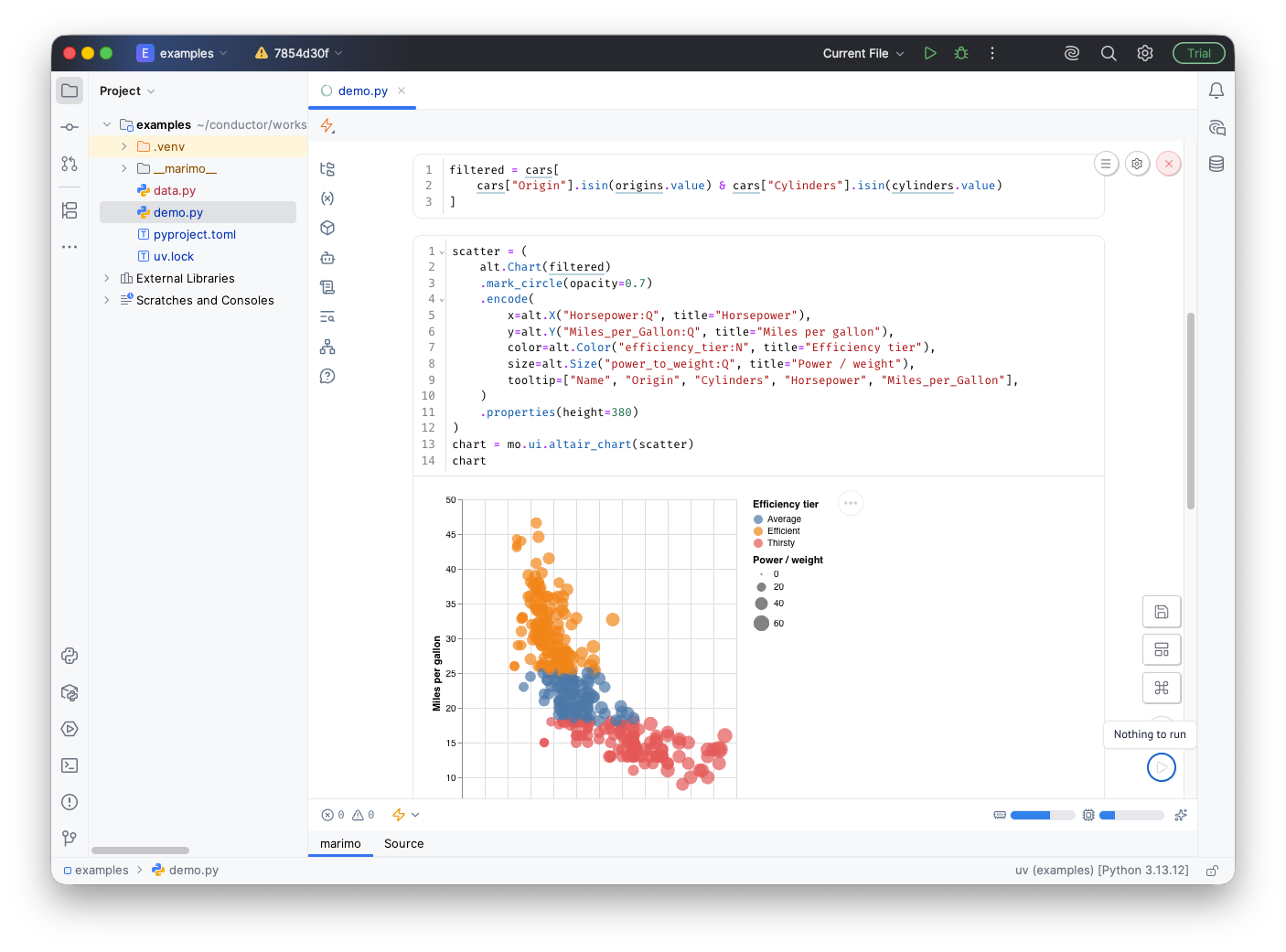
marimo notebooks in PyCharm [third-party plugin]
You can now open, edit, and run marimo notebooks directly in PyCharm with the new plugin developed by the marimo team.
Work with reactive cells and interactive UI elements in a dedicated notebook without leaving your IDE. Because marimo notebooks are stored as Python files, they are Git-friendly, executable as scripts, and easy to integrate into your existing Python projects.
Changes to bundled plugins in 2026.2
As part of ongoing maintenance, we are unbundling and deprecating low-usage plugins, including Data Wrangler, Hugging Face, and Google Colab support. You can continue to install compatible versions from JetBrains Marketplace, but these plugins are no longer bundled or actively maintained by the PyCharm team. A more focused set of bundled plugins means a leaner codebase, helping us keep PyCharm fast and responsive and invest our effort where it has the most impact.
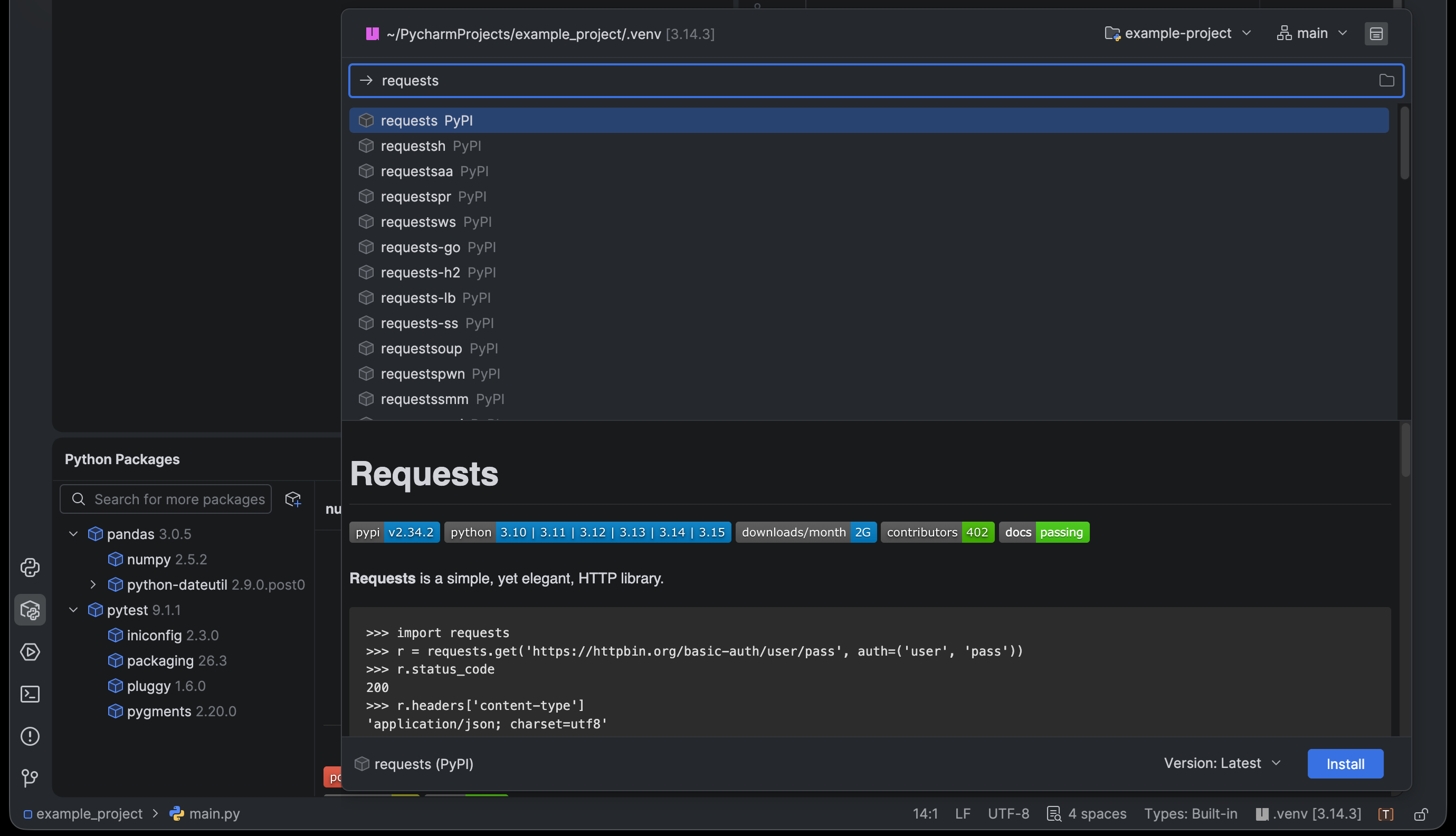
Redesigned Python Packages tool window
- Packages now appear in a collapsible tree alongside their dependencies so you can see what’s installed and why – with new icons, right-aligned versions, and inline Install/Update links.
- A new floating search popup (think “Search Everywhere” but for packages) makes finding and installing fast. It also shows you which environment will be used and lets you pick a module and dependency group.
- You can install a package into specific
uv/Poetry dependency groups like dev or test per workspace member, change versions inline or through the new Change Version dialog, and install from VCS via Custom Installation. - Package repositories can be enabled or disabled, with state remembered across sessions. In addition, unreachable URLs show a clear error, and Remote Development support is substantially improved.
Clearer type checking
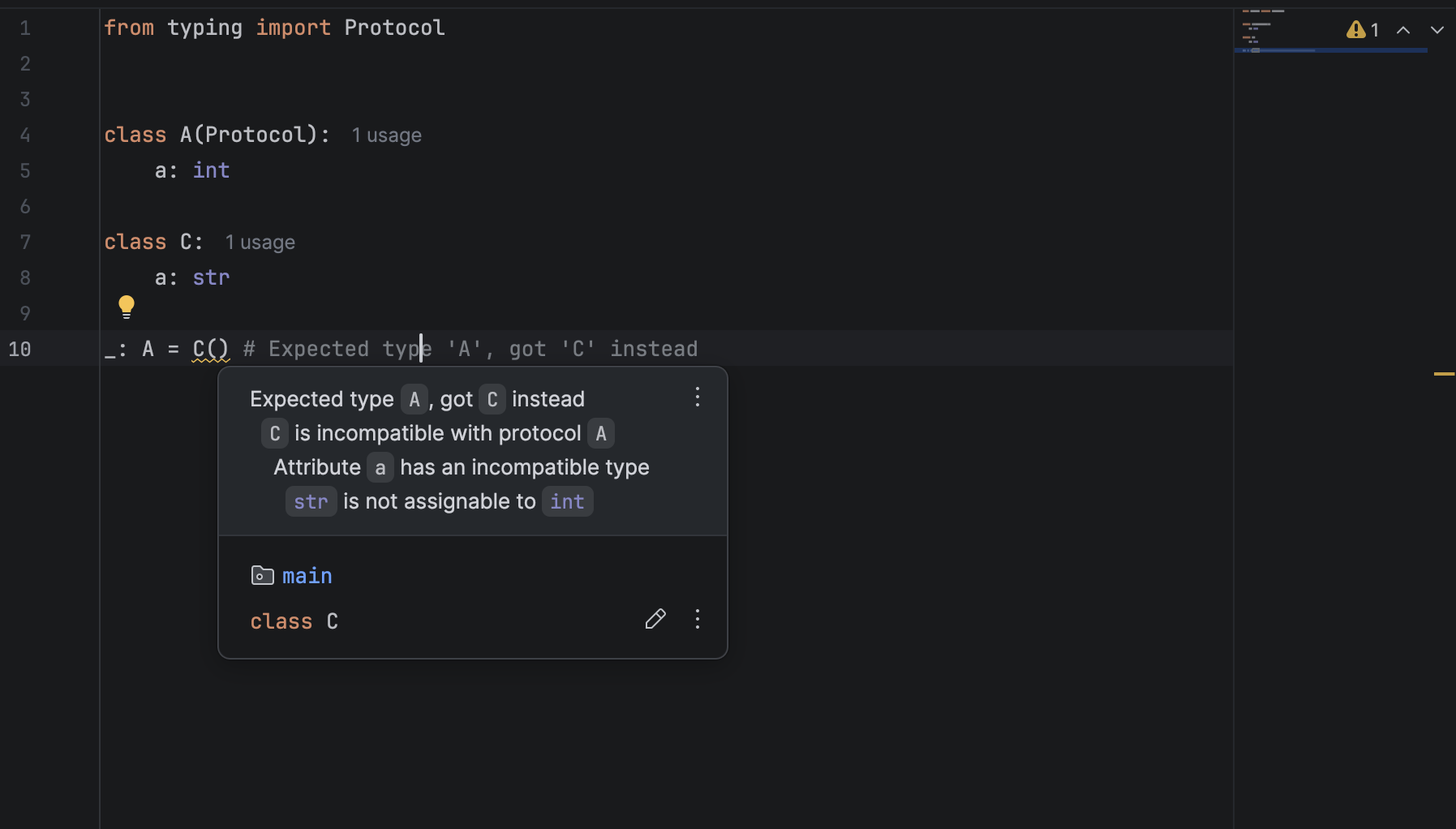
Get clearer, more actionable type messages:
- Richer type-mismatch errors, now with a breakdown of why the types don’t match.
- A type diff for callables and other composite types, so both sides read the same way.
- Fully rendered names and types in inspection tooltips, with clickable links.
Bug fixes
- Virtual environments for end-of-life Python: PyCharm no longer creates venvs for Python 2.7, 3.6, and 3.7. You can still create a new env from a command line and add it to the IDE manually.
- SQLAlchemy 2.0 Session.get() inference:
Session.get(Entity, id)(and SQLModel) is now inferred as a model instance rather than the class.
Download PyCharm
All of these updates are available in PyCharm 2026.2.1. Update right from the IDE or the Toolbox App, or download the latest version to try everything out on your own projects. As always, we’d love to hear your feedback.
Zambia’s election is a test of metal
Europe solar eclipse: millions watch rare spectacle across Spain, UK and Iceland – as it happened
Eclipse witnessed by tens of millions across western Europe as enthusiasts gather along path of totality
in Land’s End, Cornwall
The roads and car parks of west and north Cornwall are clogged as people gather to watch the solar eclipse.
Continue reading...Greetings from a surreal expanse of sand dunes dotted with freshwater lagoons in Brazil

The pristine white sand dunes of the Lençóis Maranhenses National Park are bordered by thick jungle on one side and the Atlantic Ocean on the other. Thousands of lagoons fill up after the rainy season.

Europe solar eclipse live: millions watch rare spectacle across Spain, UK and Iceland
Eclipse witnessed by tens of millions across western Europe as enthusiasts gather along path of totality
in Land’s End, Cornwall
The roads and car parks of west and north Cornwall are clogged as people gather to watch the solar eclipse.
Continue reading...